Notice. New forum software under development. It's going to miss a few functions and look a bit ugly for a while, but I'm working on it full time now as the old forum was too unstable. Couple days, all good. If you notice any issues, please contact me.
PeteCotton Guru Joined: 13/08/2020 Location: CanadaPosts: 653
Posted: 12:09am 31 Mar 2025
Copy link to clipboard
Print this post
I know it's been a while since I've given an update on this project - but that doesn't mean I haven't been busy with it. Quite the opposite, there are some huge changes coming down the pipeline (that I'm quite excited about). But in the meantime, we had a discussion on a separate thread about using a data structure type variable within MMBASIC.
So to reference the Angle of Ship 15 you would use
Ships(15,SHIP_ANGLE)
The realisation that we can use dots ('.') in variable names in MMBasic allows me to use a much neater solution where I define multiple arrays that look very similar to structures in other languages.
DIM FLOAT Ship.Type(100) DIM FLOAT Ship.X(100) DIM FLOAT Ship.Y(100) DIM FLOAT Ship.Angle(100) DIM FLOAT Ship.ShieldN(100) DIM FLOAT Ship.ShieldE(100) DIM FLOAT Ship.ShieldS(100) DIM FLOAT Ship.ShieldW(100) DIM FLOAT Ship.ShieldMax(100) DIM FLOAT Ship.Hull(100) DIM FLOAT Ship.Engines(100) DIM FLOAT Ship.Weapons(100) DIM FLOAT Ship.Sensors(100) DIM FLOAT Ship.Logic(100) DIM FLOAT Ship.Logic2(100) DIM FLOAT Ship.Power(100) DIM FLOAT Ship.DX(100) DIM FLOAT Ship.DY(100)
This makes for much neater code, as shown below:
SHIPS(id%,SHIP_ANGLE) = SHIPS(id%,SHIP_ANGLE) + 5 IF SHIPS(id%,SHIP_ANGLE) >= 360 THEN SHIPS(id%,SHIP_ANGLE) = SHIPS(id%,SHIP_ANGLE) - 360
becomes
Ship.Angle(id%) = Ship.Angle(id%) + 5 IF Ship.Angle(id%) >= 360 THEN Ship.Angle(id%) = Ship.Angle(id%) - 360
So I've now gone through the code and changed it over to this method of variable, and it is a lot more readable.
Mixtel90 Guru Joined: 05/10/2019 Location: United KingdomPosts: 9128
Posted: 08:45am 31 Mar 2025
Copy link to clipboard
Print this post
That certainly looks a lot better. I think you've not been wasting time. :)Mick
PeteCotton Guru Joined: 13/08/2020 Location: CanadaPosts: 653
Posted: 03:51pm 31 Mar 2025
Copy link to clipboard
Print this post
Thanks!
Wrong Pete Non-vegie model of Pete here.
But yes, thank you - that is a very nice efficiency. I will apply it.
Volhout Guru Joined: 05/03/2018 Location: NetherlandsPosts: 6104
Posted: 04:51pm 31 Mar 2025
Copy link to clipboard
Print this post
Oops…. Shame..
Sorry Pete
P.s. Is It really Needed to limit to 360? Maybe any angel can be use, and with 64bit floats you Will not easilly run into numerical limits within a normal game time of 1 million years.. …hours I mean. Edited 2025-04-01 02:57 by VolhoutPicomiteVGA PETSCII ROBOTS
PeteCotton Guru Joined: 13/08/2020 Location: CanadaPosts: 653
Posted: 05:43pm 31 Mar 2025
Copy link to clipboard
Print this post
No need to be - Being mistaken for a user of such high esteem as VegiPete is a compliment!
Good point, however although it might not matter to the computer, limiting it to 360 makes it easier for my feeble brain to debug. There's quite a lot of relative angle work. e.g. your ship might be facing 270 degrees (West) and another ship might be South West of you, but it's facing 180 (South), so their aft and port shields are the ones that will get hit by your shot. That sort of thing. Not overly complex, but enough that I don't want to make things harder for myself
PeteCotton Guru Joined: 13/08/2020 Location: CanadaPosts: 653
Posted: 12:30am 20 Jan 2026
Copy link to clipboard
Print this post
I'm long overdue with an update for this project. But I have been working on it, on and off for the last year.
The first huge change is that it's now real-time. It was turn based before, with ships moving one square at a time. I had to accept that playing the game wasn't as much fun as I hoped. The slow pace didn't build much excitement. The other problem is that it made implementing things like acceleration, inertia, drift and black holes very unintuitive for the player. If they move 5 squares forwards and then they randomly move one square to the right, that's just going to be confusing. So, now, with real-time controls, ships can drift when turning and it feels natural. Different ships have different rates of acceleration - giving the player the option of rerouting power from the shields to engines, to try and outrun an enemy. It also allows me greater control over the turn rate of all ships (player and NPC). This required a significant re-write, but I feel it was worth it. I had to work pretty hard on efficiencies, but the frame rate is now about 30 FPS (occasionally dropping to 20 FPS when there is a lot happening). Although I use the word "work", this challenge was great fun - trimming a few milliseconds off here, a few off there.
The actual gameplay also took quite a lot of tweaking. I didn't want it to be fast paced like 'Asteroids'. So although everything moves in real time it's deliberately slow - like playing asteroids at a tenth of the speed. This helps preserve the feel of big battleships slugging it out - like a naval battle.
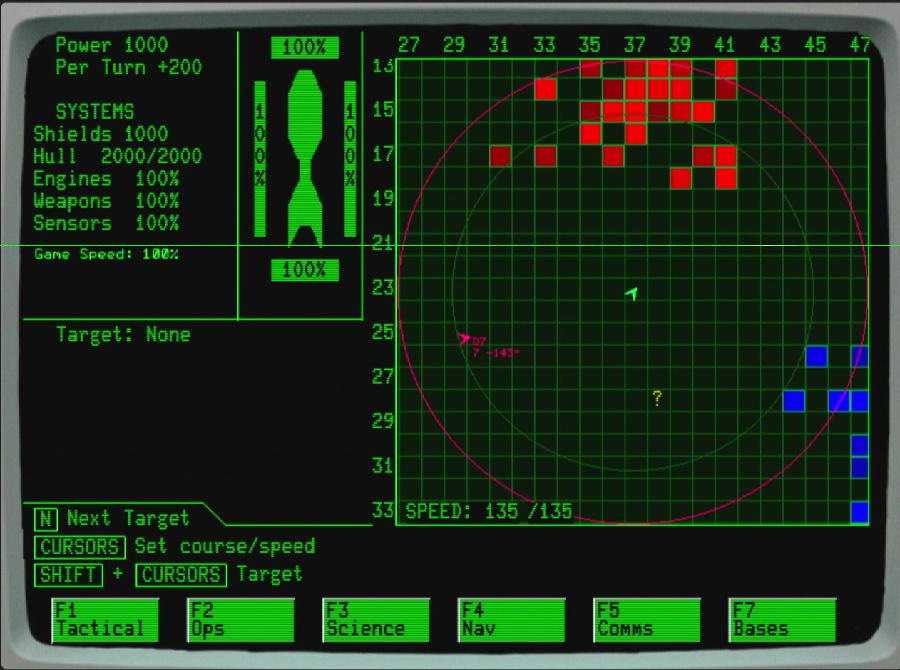
I also implemented "noise" from the ship. Noise is how "loud" your ship appears on NPC ship scanners, the side effect of going fast, or firing weapons or having active radar. In the image above, the red circle denotes how much noise the ship is generating (in this case "a lot") which will be detected by enemy ships. Going slower greatly reduces the size of this noise circle, giving the option for players to sneak past other ships.
The green circle is the optimal range of your scanners. Outside of this, all but the nosiest of ships will be unidentified (there are now friendly, neutral and enemy ships in each quadrant). Only when they fall within the green circle will they be identified (and if they're trying to be quiet - maybe not until they are much closer).
And now for my huge misstep. I spent a couple of months moving the game to a 3D engine. I was thinking I could make it like the old Starfleet Command games that I loved. There was nothing wrong with the CMM2 3D engine - that all worked fine - I had Klingon ships flying past the player and all of that. But it completely broke the old retro feel of the game. I spent too long trying to make it fit in, before I ultimately had to make the difficult acknowledgement that I had taken the wrong turn in the game design. This was very hard to do - but probably the best lesson I have learned from this project so far. I reluctantly bit the bullet - removed all of the 3D logic and instantly knew that I had made the right decision. The nostalgic feel of the original Star Trek games came flooding back once again, and I was no longer struggling with trying to make the game "fit". This was painful - but I have no doubt it was the right move.
Finally, the plot of the game is also evolving. You are now a lone Federation patrol looking for a lost colony ship. This gives you a definite objective, rather than just "kill all of the enemy ships". Clues can be gathered from sub-missions and by building relationships with other races.
The one thing I absolutely do not want to do is "railroad" the player into following my plot though. So, there will be a heavy degree of randomisation to the quest, making every game different. I'm also not gong to artificially stall the player, just to extend the game out. If you find the colony ship 5 minutes into the game - then hurray - you did it.
You have an AI as company - though I really feel the AI is going to be more of a comic side kick than an actual help to you. This AI can be upgraded to give you access to better blueprints etc.
So there you have it. I'm still loving the mental break this game gives me every time I sit down to code it. Even last night I spent the entire evening tweaking the graphic that shows the player ship's speed. I'm still not happy with it - and will probably change it again tonight, but there is zero pressure on me. Edited 2026-01-20 10:34 by PeteCotton
Volhout Guru Joined: 05/03/2018 Location: NetherlandsPosts: 6104
Posted: 07:13am 20 Jan 2026
Copy link to clipboard
Print this post
@Pete,
Looking forward to playing this. Whenever you are ready to let us try it out. There will be a learning curve, so please provide a way to slow down the game while learning, "easy mode" (in the beginning at every step of the journey I will have to consult the manual). That is a problem when the game is "real time".
A possibility would be to create a build in manual/instruction, and whenever you open the manual, the game stalls, until the moment you close the manual.
PeteCotton Guru Joined: 13/08/2020 Location: CanadaPosts: 653
Posted: 04:06pm 20 Jan 2026
Copy link to clipboard
Print this post
Thanks! The slow down is already built in. Using the same format as my beloved Starfleet Command games, you can use the square bracket keys to speed up and slow the game down (from 0% to 100% in steps of 25%). I have logic that tries to run all of the game logic at the same speed regardless of frame rate (so if the frame rate drops, the game itself still runs at the same speed). It was a simple task to just multiply that frame rate calculation by a scaling factor 0.0 to 1.0. (So to be clear the game will still be running at 30 frames per second - just the ship movement, power replenishment, AI logic etc. will all run at a much slower speed. So at 25% speed, instead of moving forward at 1 grid per second, the enemy might only move forward one quarter grid per second).
Furthermore, the game can be paused at any time, and if you leave the "Tactical Screen" (to look at inventory, damage etc.) the game pauses when you are on those screens, and resumes when you return to the Tactical Screen. This was a deliberate choice, I thought it would be unfair to have your ship blow up when you were busy shuffling around inventory.
One of my goals is to build a game that is intuitive enough to pick up (you start the game with quite a basic ship with only a couple of weapons), and then as you progress into the game to let the player explore the deeper complexities at their own pace.
I love this idea! I had always intended on having a manual. My plan is to use it to flesh out the factions/Planets/Characters/Ships in the game and further immerse the player into the world. And I already have logic that will display the manual from the "break" screen (along with all of the other imaginary box contents - such as star map, posters, disks etc.). But I like the idea of linking manual pages to a screen. So if you are on the "Ship Upgrade" screen, you can press a "Help" button and see the manual pages that pertain to that screen! Thank you!
It's funny you say that - because I have another game that I've had ticking over for sometime. Remember "Little Computer People" on the 8-bit formats? I've been working on and off on a game for years, where you have AI people on a spaceship, and you have to try and keep them alive, despite their best efforts to accidently kill themselves (opening airlocks etc.). It would be sort of like a reverse "Lemmings", where doing nothing will get them wiped out in short time. I did briefly toy with the idea of mashing that into this game - but ultimately decided that would destroy the relaxing feel of this game. So it remains a separate project.
That project is called "Artifical Idiots". Edited 2026-01-21 02:12 by PeteCotton

 Notice. New forum software under development. It's going to miss a few functions and look a bit ugly for a while, but I'm working on it full time now as the old forum was too unstable. Couple days, all good. If you notice any issues, please contact me.


 Print this post

 Non-vegie model of Pete here.