| Posted: 06:23am 28 Apr 2026 |
 Copy link to clipboard Copy link to clipboard |
 Print this post |
|
Here is a slightly upgraded version of my analogue keypad.
It still doesn't have as good a current source a Rob's (I don't have an LM334) but it is adequate for 4 x 4 keys.
The main difference is it can drive a piezo speaker to beep with each keypress, without using an extra pin. A couple of extra capacitors are needed to offset the capacitance of the piezo speaker.
It still doesn't have full self calibration but does fine-tune the settings each time the top left and bottom right keys are pressed.
The updated values could be saved with VAR SAVE and restored on starting but if the initial calibration of the current source is good enough that isn't needed.
Adjust the trim-pot for about 3 to 3.2V while the bottom right key is pressed then record that voltage and the voltage when the top left key is pressed. The latter should be less than 100mV. Edit the program setup to set those values.
Eg. VcalL=0.02, VcalH=3.12
The circuit diagram was pinched from Rob's version and adapted. Hope you don't mind Rob.
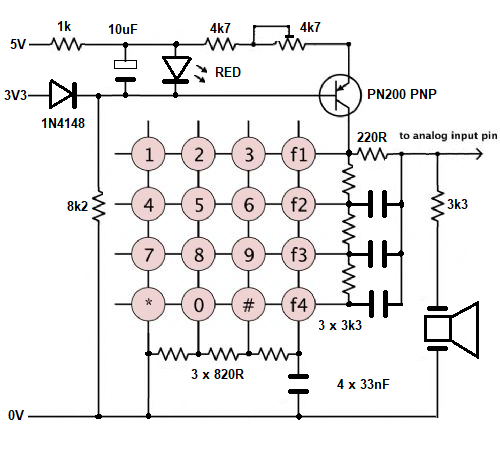
'Interrupt triggered analogue keypad driver with beeper using 1 pin.
Dim Integer Rows=4, Cols=4, Key.pin=MM.Info(pinno GP28)
Dim Float VcalL=0.02, VcalH=3.09 'calibration voltages - read while Lowest then Highest key pressed
Dim map$(15)=("1","2","3","A","4","5","6","B","7","8","9","C","*","0","#","D")
Dim Integer key1=-1, key2=-1, n
SetPin Key.pin, intl, Key.int 'set key interrupt
Print "Calibration values - VcalL =";VcalL; " VcalH ="; VcalH :Print
Sub Key.int 'ISR
SetPin Key.pin, ain
Local key% = (Rows * Cols), KeyV, t
If Pin(Key.pin) < 3.2 Then
Pause 15 'de-bounce and capacitor charging time
If Pin(Key.pin) < 3.2 Then KeyV = Pin(Key.pin)
If KeyV >= 3.2 Or KeyV < 0.001 Then
SetPin Key.pin, intl, Key.int 'restore interrupt
Exit Sub
EndIf
Kcalc = (KeyV-VcalL) * 15 / (VcalH-VcalL)
key1 = Cint(Kcalc)
If Key1 = 0 And KeyV < VcalL+.4 Then VcalL = (VcalL + KeyV)/2
If Key1 = (Rows * Cols)-1 And KeyV > VcalH-0.4 And KeyV < VcalH+.4 Then VcalH = (VcalH + KeyV)/2
Print Format$(Cint(KeyV*1000),"% 5g"); " Key mV ",
'Comment out Print after adjusting pot for highest key voltage (2.9V to 3.1V)
'and setting the values of VcalL when top-left Key is pressed and VcalH when bottom-right Key is pressed
EndIf
t = Timer : Do While Pin(Key.pin) < 3.2 And Timer-t < 500 : Loop 'wait for key release
SetPin Key.pin, Dout
For n=0 To 400 : Key% = Not Key% : Pin(Key.pin) = Key% : Pause 0.2 : Next
Print "Beep ", 'Comment out Print after calibration
SetPin Key.pin, intl, Key.int 'restore interrupt
End Sub
Do 'main loop
If key2 <> key1 And Key1 < Rows * Cols Then
Print " Key no."; key1, "Key code "; map$(key1)
Pause 150 'adjust repeat rate
key1 = -1 : key2 = key1
EndIf
Loop
End > RUN
Calibration values - VcalL = 0.02 VcalH = 3.09
17 Key mV Beep Key no. 0 Key code 1
305 Key mV Beep Key no. 1 Key code 2
434 Key mV Beep Key no. 2 Key code 3
643 Key mV Beep Key no. 3 Key code A
866 Key mV Beep Key no. 4 Key code 4
1150 Key mV Beep Key no. 6 Key code 6
1364 Key mV Beep Key no. 7 Key code B
1483 Key mV Beep Key no. 7 Key code B
1701 Key mV Beep Key no. 8 Key code 7
1907 Key mV Beep Key no. 9 Key code 8
2105 Key mV Beep Key no. 10 Key code 9
2330 Key mV Beep Key no. 11 Key code C
2542 Key mV Beep Key no. 12 Key code *
2762 Key mV Beep Key no. 13 Key code 0
2935 Key mV Beep Key no. 14 Key code #
3157 Key mV Beep Key no. 15 Key code D
>
Edited 2026-04-28 16:45 by phil99
Footnote added 2026-04-28 18:29 by phil99
Edit.
There is a redundant variable in the Sub that can be removed.
Replace Kcalc = (KeyV-VcalL) * 15 / (VcalH-VcalL)
key1 = Cint(Kcalc)
With
key1 = Cint((KeyV-VcalL) * 15 / (VcalH-VcalL)) |

 Notice. New forum software under development. It's going to miss a few functions and look a bit ugly for a while, but I'm working on it full time now as the old forum was too unstable. Couple days, all good. If you notice any issues, please contact me.


