Notice. New forum software under development. It's going to miss a few functions and look a bit ugly for a while, but I'm working on it full time now as the old forum was too unstable. Couple days, all good. If you notice any issues, please contact me.
Grogster Admin Group Joined: 31/12/2012 Location: New ZealandPosts: 10042
Posted: 06:05am 26 Jan 2026
Copy link to clipboard
Print this post
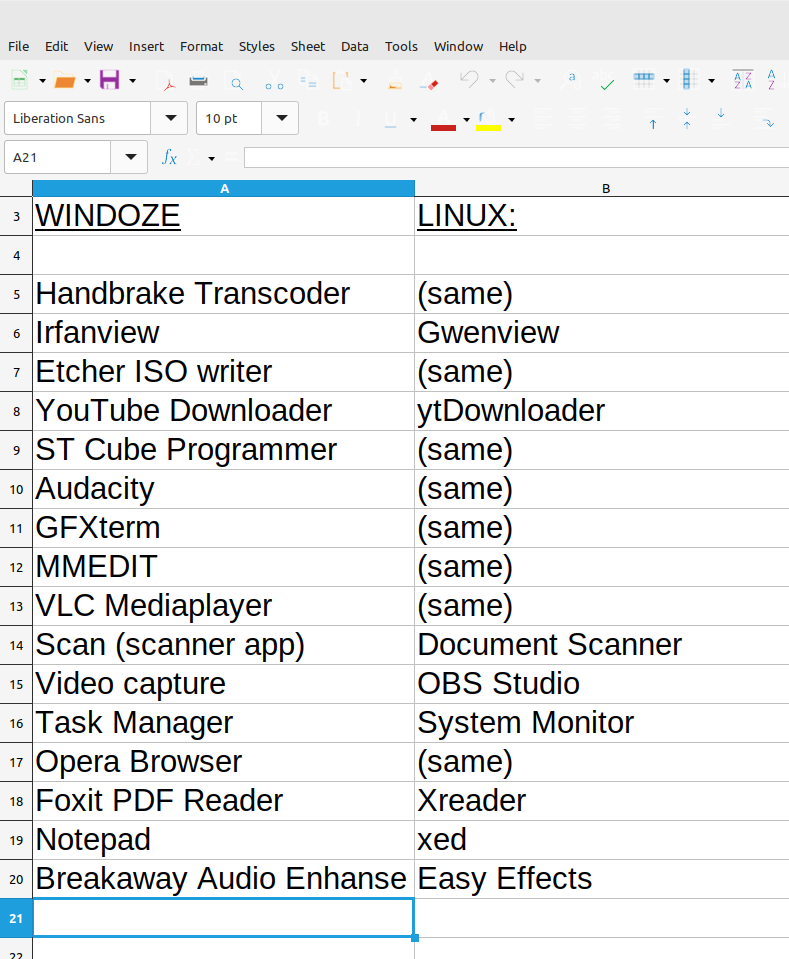
Sure. Here you go:
There is only a handful of applications that I need to remember, and you'll also note that many applications have both Windoze and Linux versions, so on Linux, I simply use the same application as I did with Windoze.
The only one I have not put on there, is iDrive automatic file backup to the cloud, and there is a Linux version of that too.
I can link to a copy of the actual spreadsheet file if you like.Smoke makes things work. When the smoke gets out, it stops!
phil99 Guru Joined: 11/02/2018 Location: AustraliaPosts: 3381
Posted: 06:43am 26 Jan 2026
Copy link to clipboard
Print this post
Using FreeOCR then fixing a few errors:-
WINDOZE LINUX Handbrake Transcoder (same) lrianview Gwenview Etcher ISO writer (same) YouTube Downloader ytDownloader ST Cube Programmer (same) Audacity (same) G FXterm (same) MMEDIT (same) VLC Mediaplayer [same] Scan (scanner app) Document Scanner Video capture OBS Studio Task Manager System Monitor Opera Browser (same) Foxit PDF Reader Xreader Notepad xed Breakaway Audio Enhanse Easy Effects
Edited 2026-01-26 16:49 by phil99
JohnS Guru Joined: 18/11/2011 Location: United KingdomPosts: 4380
Posted: 12:53pm 26 Jan 2026
Copy link to clipboard
Print this post
Maybe try viewnior (yes, odd spelling) as a fast file viewer.
If you like the command line then as well as vlc you might like mplayer
For PDFs, maybe xpdf
John Edited 2026-01-26 22:54 by JohnS
Wolfgang Regular Member Joined: 03/11/2021 Location: GermanyPosts: 88
Posted: 02:39pm 26 Jan 2026
Copy link to clipboard
Print this post
Hallo Grogster,
that is perfect.
I have already installed many of the programs listed, but not others, e.g. Xed
Instead of:
Irfanview I have XnView Multiplatform
Microsoft Office ---> Softmaker-Office (Freeoffice 2024)
Firefox ---> Firefox
furthermore:
Ultrasearch --> Czkawka
Grogster Admin Group Joined: 31/12/2012 Location: New ZealandPosts: 10042
Posted: 11:04pm 26 Jan 2026
Copy link to clipboard
Print this post
Xed comes with Linux Mint - it is the default text editor, so I did not have to install it. From what I remember, Xreader was the same. (comes with Mint as default) So does the Libre Office suite.
Windoze/Linux application substitutes probably should have it's own thread. But I don't care if this thread gets used for it.Smoke makes things work. When the smoke gets out, it stops!
Wolfgang Regular Member Joined: 03/11/2021 Location: GermanyPosts: 88
Posted: 10:18am 27 Jan 2026
Copy link to clipboard
Print this post
OK, it would be better to have a separate thread for Windows replacement programmes for Linux.
Does one already exist? If so, what is it called?
But first, another question: I use the programme "Flow CSV Editor" under Windows, which is capable of immediately displaying huge *.csv files with numerical content in graphical form.
Is there anything similar available under Linux?
lizby Guru Joined: 17/05/2016 Location: United StatesPosts: 3881
Posted: 06:06pm 27 Jan 2026
Copy link to clipboard
Print this post
This sounds interesting to me. Can you explain further and give examples of what specifically you use it for?
Wolfgang Regular Member Joined: 03/11/2021 Location: GermanyPosts: 88
Posted: 06:24pm 27 Jan 2026
Copy link to clipboard
Print this post
@lizby
I have often several columns, each containing sometimes more than 4000 values, which are available as *.txt files (logged on SD-Card). I rename these to *.csv, which the Flow CSV editor (freeware) can load it to directly display the values in various graphic images.
Even more detailed information can be found online at Flow CSV Editor.
Even value series well over 10,000 are displayed without any problems. In the corresponding settings, you can define how the first two lines are to be interpreted, e.g. as a heading, which is then recognised and the display adjusted accordingly.
In the graphical display there, you can zoom in on all axes down to the smallest value.
Wolfgang Regular Member Joined: 03/11/2021 Location: GermanyPosts: 88

 Notice. New forum software under development. It's going to miss a few functions and look a bit ugly for a while, but I'm working on it full time now as the old forum was too unstable. Couple days, all good. If you notice any issues, please contact me.


 Print this post