Home
JAQForum Ver 24.01
Log In or Join  
Active Topics
Local Time 03:09 10 Feb 2026 Privacy Policy
Jump to

Notice. New forum software under development. It's going to miss a few functions and look a bit ugly for a while, but I'm working on it full time now as the old forum was too unstable. Couple days, all good. If you notice any issues, please contact me.

Forum Index : Microcontroller and PC projects : PicoMiteVGA: Framework for ray casting using the DDA method

Author Message
Martin H.

Guru

Joined: 04/06/2022
Location: Germany
Posts: 1346
Posted: 03:55pm 08 Feb 2026
Copy link to clipboard 
Print this post

DDA method (Digital Differential Analyser).Much faster than my previous attempts.
' Raycaster 2 in MMBasic, DDA method (Digital Differential Analyser)
mmb4w=0
CLS
If mmb4w Then
   MODE -7 :CLS RGB(cyan)
PAGE WRITE 1
Else
   MODE 2: CLS RGB(cyan)
   FRAMEBUFFER create:FRAMEBUFFER write f
End If
CLS
mapS=64:mapy=24:mapx=24
' --- Labyrinth Definition ---
Dim mapW = 57
Dim mapH = 51
Dim m(mapW, mapH)
Restore MapData1
For y = 0 To mapH-1 :Read k$:k$=k$+"1"
For x=0 To Len(k$):m(x, y)=Val(Mid$(k$,x+1,1)):Next :Next
'For y = 0 To mapH-1 : For x = 0 To mapW-1 : Read m(x, y) : Next x : Next y
' --- Player Setup ---
px = 26.5 : py = 45.5
dx = 1.0  : dy = 0.5
planeX = 0.0 : planeY = 0.66
moveSpeed = 0.2
rotSpeed = 0.1
buffer = 0.2
' --- Grafic Setup ---
resStep = 2
scrW = MM.HRES*.75
scrH = MM.VRES*.75

' Flag to force the first frame
needsRedraw = 1

Do
 ' Only paint when something has changed
 If needsRedraw = 1 Then
   ' Ceiling and floor
   Box 0, 0, scrW, scrH/2, 0, RGB(0,128,255), RGB(0,128,255)
   Box 0, scrH/2, scrW, scrH/2, 0, RGB(255,128,0), RGB(255,128,0)
   'DDA
   For x = 0 To scrW - 1 Step resStep
     cameraX = 2 * x / scrW - 1
     rayDx = dx + planeX * cameraX
     rayDy = dy + planeY * cameraX
     mx = Int(px) : my = Int(py)

     If rayDx = 0 Then dDx = 1e30 Else dDx = Abs(1 / rayDx)
     If rayDy = 0 Then dDy = 1e30 Else dDy = Abs(1 / rayDy)

     If rayDx < 0 Then
       stepX = -1 : sdX = (px - mx) * dDx
     Else
       stepX = 1 : sdX = (mx + 1.0 - px) * dDx
     End If
     If rayDy < 0 Then
       stepY = -1 : sdY = (py - my) * dDy
     Else
       stepY = 1 : sdY = (my + 1.0 - py) * dDy
     End If
     hit = 0
     Do While hit = 0
       If sdX < sdY Then
         sdX = sdX + dDx : mx = mx + stepX : side = 0
       Else
         sdY = sdY + dDy : my = my + stepY : side = 1
       EndIf
       If m(mx, my) > 0 Then hit = 1
     Loop
     If side = 0 Then pDist = (sdX - dDx) Else pDist = (sdY - dDy)
     If pDist < 0.1 Then pDist = 0.1

     lH = Int(scrH / pDist)
     yS = (scrH / 2) - (lH / 2)
     wallCol = RGB(GREEN)
     If side = 1 Then wallCol = RGB(0, 128, 0)
     Box x, yS, resStep, lH, , wallCol
   Next x
   If mmb4w Then
   PAGE WRITE 0:Blit 0,0,0,0,scrW,scrH,1:PAGE WRITE 1
   Else
   FRAMEBUFFER write n
   Text 290,0,"X="+Str$(Int(px))+" "
   Text 290,12,"Y="+Str$(Int(py))+" "
   FRAMEBUFFER write f
   Blit framebuffer F,N,0,0,0,0,scrW,scrH
   End If
   needsRedraw = 0 ' Reset Redraw Flag
 End If

 ' Wait for button (does not block, but checks efficiently)
 k$ = UCase$(Inkey$)
   If k$ <> "" Then
   ' Enable redraw when a movement key is pressed
   If Instr("WASD", k$) > 0 Then needsRedraw = 1
   Select Case k$
       Case "W"
         If m(Int(px + dx * buffer), Int(py)) = 0 Then px = px + dx * moveSpeed
         If m(Int(px), Int(py + dy * buffer)) = 0 Then py = py + dy * moveSpeed
       Case "S"
         If m(Int(px - dx * buffer), Int(py)) = 0 Then px = px - dx * moveSpeed
         If m(Int(px), Int(py - dy * buffer)) = 0 Then py = py - dy * moveSpeed
       Case "D"
         oldDx = dx : dx = dx * Cos(rotSpeed) - dy * Sin(rotSpeed)
         dy = oldDx * Sin(rotSpeed) + dy * Cos(rotSpeed)
         oldPx = planeX : planeX = planeX * Cos(rotSpeed) - planeY * Sin(rotSpeed)
         planeY = oldPx * Sin(rotSpeed) + planeY * Cos(rotSpeed)
       Case "A"
         oldDx = dx : dx = dx * Cos(-rotSpeed) - dy * Sin(-rotSpeed)
         dy = oldDx * Sin(-rotSpeed) + dy * Cos(-rotSpeed)
         oldPx = planeX : planeX = planeX * Cos(-rotSpeed) - planeY * Sin(-rotSpeed)
         planeY = oldPx * Sin(-rotSpeed) + planeY * Cos(-rotSpeed)
   End Select
 End If
Loop Until k$ = Chr$(27)
If mmb4w Then PAGE WRITE 0
MapData1: '
Data "11111111111111111111111111111111111111111111111111111111"
Data "11111111111111111111111110000000000111111111111111111111"
Data "11111000011111111010111110000000000111111111111111111111"
Data "11111000011111100000000000000000000100111111111111111111"
Data "11111000011111100000000010000000000100111111111111111111"
Data "11111011111111110011111110000000000111111111111111111111"
Data "11111000000000110011111110000000000111111111111111111111"
Data "11111000000001110010111111111001111111111111111111111111"
Data "11111000000000000000111111111001111111111111111111111111"
Data "10000000000001000000111111111001111111111111111111111111"
Data "11111000000001111111111111111001111111111111111111111111"
Data "10000011111101111111111111111001111111111111111111111111"
Data "10011111001111111111111100000000011111111111111111111111"
Data "10111111001111111111111100111001111111111111111111111111"
Data "10011111001111111111111100111001111111111111111111111111"
Data "10000001001111111111111100111001111111111111111111111111"
Data "10000011001111111111111111111001111111111111111111111111"
Data "10010101111011111111111111111001010100111111101111110111"
Data "10011000000001111111111101110000111011111111101000000011"
Data "10010000000001111111111100000000000010010001001000000000"
Data "10011000000001111111111000000000000001111111101000000011"
Data "10001000000000111111111000000000000000000000001000000000"
Data "10001000000001111111111000000000000000000000000000000001"
Data "10001000000001111111111000000000000001000000001000000000"
Data "10011000000001111111111000000000000000111001111000000001"
Data "10011000000001111111111111010000101111110000101000000011"
Data "10011111011011111111111111111101110100110001001011110101"
Data "10001111001111111111111111111000111111111000100110010001"
Data "10011111001111111111111111110000111111110001001000100100"
Data "10010001001111111111111111111000111111111000111111111111"
Data "10000001001111111111111111110001111111110001001000010111"
Data "10011111001111101111111111111001111111111000000000000111"
Data "10001010001111011110101111110001011111110000000000001111"
Data "10000000000000000000011111111000111111111011001010110111"
Data "10000000000000000000000111110000111111111111111111111111"
Data "10000000000000010000011111110001111111111111111111111111"
Data "11101110111101111111111111111000111111111111111111111111"
Data "11111111110010000111111111101101111011111111111111111111"
Data "11111111110000011111111100000000000011111111111111111111"
Data "11111111111011111111111100001001000001111111111111111111"
Data "11111111111001111111111000000000000011111111111111111111"
Data "11111111111001111111111111111001111111111111111111111111"
Data "11111111111111111111111100001001000011111111111111111111"
Data "11111111111111111111111100000000000001111111111111111111"
Data "11111111111111111111111100001001000011111111111111111111"
Data "11111111111111111111111111111001111111111111111111111111"
Data "11111111111111111111111100000000000011111111111111111111"
Data "11111111111111111111111100101010001011111111111111111111"
Data "11111111111111111111111111111111111111111111111111111111"

This is just a basic framework. Feel free to change and expand it.
Cheers
Martin
'no comment
 
LeoNicolas

Guru

Joined: 07/10/2020
Location: Canada
Posts: 560
Posted: 05:10pm 08 Feb 2026
Copy link to clipboard 
Print this post

Nice job Martin

For anyone that wants to know more about DDA and ray casting

https://www.youtube.com/watch?v=NbSee-XM7WA
 
Martin H.

Guru

Joined: 04/06/2022
Location: Germany
Posts: 1346
Posted: 05:25pm 08 Feb 2026
Copy link to clipboard 
Print this post

I forgot to mention,
the keys are ‘AD WS’ and ESC to quit.
'no comment
 
Peter63
Senior Member

Joined: 28/07/2017
Location: Sweden
Posts: 117
Posted: 01:28am 09 Feb 2026
Copy link to clipboard 
Print this post

Hello Martin


I tried it on PicoMiteHDMIUSB V6.02.00RC6 and it works perfectly.

/Peter63
 
Martin H.

Guru

Joined: 04/06/2022
Location: Germany
Posts: 1346
Posted: 06:47am 09 Feb 2026
Copy link to clipboard 
Print this post

  Peter63 said  Hello Martin


I tried it on PicoMiteHDMIUSB V6.02.00RC6 and it works perfectly.

/Peter63

Hi Peter,
Thanks for the feedback. I also tried it on Pico2 with HDMI (Try MODE 3). It should also run on CMM2 and MMBasic for Windows if you set mmb4w=1 at the start of the Programm.

Cheers
Martin
Edited 2026-02-09 16:49 by Martin H.
'no comment
 
Volhout
Guru

Joined: 05/03/2018
Location: Netherlands
Posts: 5665
Posted: 07:51am 09 Feb 2026
Copy link to clipboard 
Print this post

Hi Martin,

Works nice (RP2040 VGA), but requires quite a lot of math. So it is somewhat slow.
Maybe a lot better on 2350.

Now I look at what you are planning to do, could you not make use of the 3D DRAW commands in MMBasic. I am not sure the 3D DRAW routines Peter implemented can handle the whole map, but they certainly could handle the visible part of the map (they also can rotate a multiface football).
If you place your camera inside the football (inside your maze) this could work ?

Regards,

Volhout

EDIT: Martin, I tried to speed things up by changing "resStep" from 2 to 5, but that corrupts the drawing. Change line 78 into adding "wallCol" as fill color.
Edited 2026-02-09 18:42 by Volhout
PicomiteVGA PETSCII ROBOTS
 
Martin H.

Guru

Joined: 04/06/2022
Location: Germany
Posts: 1346
Posted: 08:46am 09 Feb 2026
Copy link to clipboard 
Print this post

  Volhout said  Hi Martin,

Works nice (RP2040 VGA), but requires quite a lot of math. So it is somewhat slow.
Maybe a lot better on 2350.

Now I look at what you are planning to do, could you not make use of the 3D DRAW commands in MMBasic. I am not sure the 3D DRAW routines Peter implemented can handle the whole map, but they certainly could handle the visible part of the map (they also can rotate a multiface football).
If you place your camera inside the football (inside your maze) this could work ?

Regards,

Volhout

Volhout,
You can speed it up by increasing resStep = 2 to resStep = 4 and changing the box command before NEXT X to ‘Box x, yS, resStep, lH, , wallCol, wallCol’.
This halves the number of calculations required, but also the x resolution.

It could be, of course, possible to use the 3D DRAW routines, but this is a completely different approach to ray casting. To do this, the field of view would have to be vectorised and converted into 3D models. This is certainly possible, but I'm not sure if it would be faster in the end.
The initial aim here was to limit the raycast calculations to simple/fast calculations(certainly still room for improvement). I have no experience with the 3D DRAW routines, but I am open to being convinced.
Cheers
Martin
Edited 2026-02-09 19:02 by Martin H.
'no comment
 
thwill

Guru

Joined: 16/09/2019
Location: United Kingdom
Posts: 4337
Posted: 10:48am 09 Feb 2026
Copy link to clipboard 
Print this post

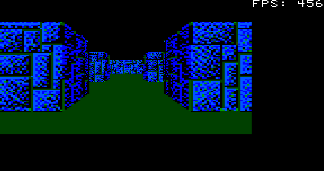
A screenshot for those who are interested, but not enough to crank up the 'Mite:


Generated by MMB4L running under WSL2 on Windows whilst simulating a PicoMite .

Best wishes,

Tom
Edited 2026-02-09 20:49 by thwill
MMBasic for Linux, Game*Mite, CMM2 Welcome Tape, Creaky old text adventures
 
Martin H.

Guru

Joined: 04/06/2022
Location: Germany
Posts: 1346
Posted: 03:53pm 09 Feb 2026
Copy link to clipboard 
Print this post

  thwill said  
Generated by MMB4L running under WSL2 on Windows whilst simulating a PicoMite .

Best wishes,

Tom

Yes, that sounds reasonable.  
'no comment
 
matherp
Guru

Joined: 11/12/2012
Location: United Kingdom
Posts: 10931
Posted: 04:38pm 09 Feb 2026
Copy link to clipboard 
Print this post

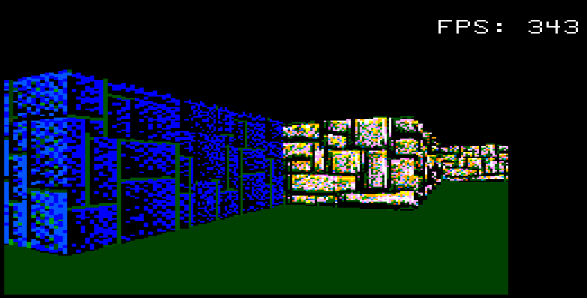
How about this ? - -worth including in the RP2350 firmware?

Manual:

Raycaster_User_Manual.pdf

Example code:

  Quote  ' ============================================================
' Raycaster Demo for PicoMite MMBasic (RP2350)
' Continuous auto-play loop with animated sliding door
' Demonstrates: RAY MOVE, RAY TURN, RAY CELL, RAY CAST,
'               RAY SPRITE, RAY MINIMAP, RAY DOOR
' Press ESC at any time to quit
' ============================================================
Option EXPLICIT
MODE 2
CLS

' ---- Map dimensions ----
Const MAP_W = 57
Const MAP_H = 51
Const FOV = 66

' ---- Start position ----
Const START_X = 25.5
Const START_Y = 23.5
Const START_A = 0

' ---- Variables ----
Dim INTEGER x%, y%, i%, cx%, cy%, door_x%, door_y%, door_wall%
Dim k$
Dim FLOAT moveSpeed, rotSpeed

moveSpeed = 0.2
rotSpeed = 5.625   ' exactly 90 degrees per 16 steps

' ---- Door animation state ----
Dim FLOAT door_offset!, door_target!, door_step!
Dim INTEGER door_animating%
door_step! = 0.1   ' offset change per frame (10 frames to fully open/close)

' ---- Read map data into 1D array ----
Dim INTEGER world%(MAP_W * MAP_H - 1)
Restore MapData1
For y% = 0 To MAP_H - 1
 Read k$
 k$ = k$ + "1"
 For x% = 0 To MAP_W - 1
   world%(y% * MAP_W + x%) = Val(Mid$(k$, x% + 1, 1))
 Next x%
Next y%

' Vary wall types
For y% = 0 To MAP_H - 1
 For x% = 0 To MAP_W - 1
   If world%(y% * MAP_W + x%) > 0 Then
     world%(y% * MAP_W + x%) = ((x% + y%) Mod 1) + 5
   EndIf
 Next x%
Next y%

' ---- Set up framebuffer & raycaster ----
FRAMEBUFFER CREATE
FRAMEBUFFER WRITE F
Ray MAP MAP_W, MAP_H, world%()
Ray COLOUR 12, 3, 8, 1, 1, 3

' ---- Load 4bpp RGB121 sprite images via SPRITE LOADARRAY ----
Const C_BLK = &h000000  ' index 0 - transparent
Const C_RED = &hFF0000  ' index 8
Const C_GRN = &h00FF00  ' index 6
Const C_BLU = &h0000FF  ' index 1
Const C_YEL = &hFFFF00  ' index 14
Const C_CYN = &h00FFFF  ' index 7
Const C_MAG = &hFF00FF  ' index 9
Const C_WHT = &hFFFFFF  ' index 15

Sprite SET TRANSPARENT 0  ' index 0 (black) is transparent
Dim INTEGER spr%(63)   ' reusable 8x8 pixel array

Sprite loadpng 1,"char.png",-2,1
Sprite LOADpng 2, "char2.png",-2,1
Sprite LOADpng 3, "char3.png",-2,1
Sprite LOADpng 4, "char4.png",-2,1

' Sprite 5: White ring on black background
For i% = 0 To 63: spr%(i%) = C_BLK: Next i%
For i% = 2 To 5: spr%(0 * 8 + i%) = C_WHT: spr%(7 * 8 + i%) = C_WHT: Next i%
For i% = 2 To 5: spr%(i% * 8 + 0) = C_WHT: spr%(i% * 8 + 7) = C_WHT: Next i%
spr%(1 * 8 + 1) = C_WHT: spr%(1 * 8 + 6) = C_WHT
spr%(6 * 8 + 1) = C_WHT: spr%(6 * 8 + 6) = C_WHT
Sprite LOADARRAY 5, 8, 8, spr%()

' ---- Place billboard sprites in the open area ----
' RAY SPRITE id, spritenum, x!, y!
Ray SPRITE 0, 1, 32.5, 23.5   ' Red cross, ahead east
Ray SPRITE 1, 2, 32.5, 24.5   ' Yellow diamond, southeast
Ray SPRITE 2, 3, 26.5, 24.5   ' Green stripes, southwest
Ray SPRITE 3, 4, 26.5, 23.5   ' Checkerboard, behind west
Ray SPRITE 4, 5, 29.5, 22.5   ' White ring, just north

' ---- Pre-programmed input sequence (round trip) ----
Dim seq$
seq$ = "P5W22P3O1P10W15P5D16W5P5W5D16W30D16W5P5W5P5D16W15P3C1P10A16W5P5D32W5D16W22D16D16P5"

Dim INTEGER curpos%, reps%, r%
Dim cmd$

' ============================================================
' MAIN LOOP - runs continuously until ESC
' ============================================================
Do
 ' ---- Reset camera to start position ----
 Ray CAMERA START_X, START_Y, START_A, FOV

 ' ---- Rebuild door wall (north-south at x=30, y=19..24) ----
 Ray CELL 30, 19, 3
 Ray CELL 30, 20, 3
 Ray CELL 30, 21, 3
 Ray CELL 30, 22, 3
 Ray CELL 30, 23, 31   ' door (wall type >= 16 = brown/yellow)
 Ray CELL 30, 24, 3

 ' ---- Reset door animation state ----
 door_offset! = 0.0
 door_target! = 0.0
 door_animating% = 0
 door_x% = 30: door_y% = 23: door_wall% = 31
 Ray DOOR CLEAR

 ' ---- Execute the sequence ----
 curpos% = 1
 Do While curpos% <= Len(seq$)
   cmd$ = Mid$(seq$, curpos%, 1)
   curpos% = curpos% + 1

   ' Read repeat count
   reps% = 0
   Do While curpos% <= Len(seq$)
     k$ = Mid$(seq$, curpos%, 1)
     If k$ >= "0" And k$ <= "9" Then
       reps% = reps% * 10 + Val(k$)
       curpos% = curpos% + 1
     Else
       Exit Do
     EndIf
   Loop
   If reps% = 0 Then reps% = 1

   ' Execute reps% times
   For r% = 1 To reps%
     k$ = Inkey$
     If k$ = Chr$(27) Then GoTo Done

     Select Case cmd$
       Case "W": Ray MOVE moveSpeed
       Case "S": Ray MOVE -moveSpeed
       Case "A": Ray TURN -rotSpeed
       Case "D": Ray TURN rotSpeed
       Case "O"
         ' Start door open animation
         door_target! = 1.0
         door_animating% = 1
         Ray DOOR door_x%, door_y%, door_offset!
       Case "C"
         ' Start door close animation
         door_target! = 0.0
         door_animating% = 1
       Case "P"
         ' Pause = render only, no movement
     End Select

     ' ---- Update door animation every frame ----
     If door_animating% Then
       Pause 50
       If door_target! > door_offset! Then
         door_offset! = door_offset! + door_step!
         If door_offset! >= door_target! Then
           door_offset! = door_target!
           door_animating% = 0
         EndIf
       ElseIf door_target! < door_offset! Then
         door_offset! = door_offset! - door_step!
         If door_offset! <= door_target! Then
           door_offset! = door_target!
           door_animating% = 0
           If door_offset! <= 0.0 Then
             Ray DOOR CLOSE door_x%, door_y%
           EndIf
         EndIf
       Else
         door_animating% = 0
       EndIf
       If door_offset! > 0.0 Then
         Ray DOOR door_x%, door_y%, door_offset!
       EndIf
     EndIf

     ' ---- Render frame ----
     Ray RENDER
     Ray MINIMAP 2, 2, 48
     Line MM.HRES\2 - 4, MM.VRES\2, MM.HRES\2 + 4, MM.VRES\2,, RGB(WHITE)
     Line MM.HRES\2, MM.VRES\2 - 4, MM.HRES\2, MM.VRES\2 + 4,, RGB(WHITE)
     FRAMEBUFFER COPY F, N
     Pause 30
   Next r%
 Loop

 ' Brief pause before restarting the loop
 Pause 500
Loop

Done:
Ray CLOSE
FRAMEBUFFER CLOSE
CLS
Print "Raycaster demo ended."
End

MapData1:
Data "11111111111111111111111111111111111111111111111111111111"
Data "11111111111111111111111110000000000111111111111111111111"
Data "11111000011111111010111110000000000111111111111111111111"
Data "11111000011111100000000000000000000100111111111111111111"
Data "11111000011111100000000010000000000100111111111111111111"
Data "11111011111111110011111110000000000111111111111111111111"
Data "11111000000000110011111110000000000111111111111111111111"
Data "11111000000001110010111111111001111111111111111111111111"
Data "11111000000000000000111111111001111111111111111111111111"
Data "10000000000001000000111111111001111111111111111111111111"
Data "11111000000001111111111111111001111111111111111111111111"
Data "10000011111101111111111111111001111111111111111111111111"
Data "10011111001111111111111100000000011111111111111111111111"
Data "10111111001111111111111100111001111111111111111111111111"
Data "10011111001111111111111100111001111111111111111111111111"
Data "10000001001111111111111100111001111111111111111111111111"
Data "10000011001111111111111111111001111111111111111111111111"
Data "10010101111011111111111111111001010100111111101111110111"
Data "10011000000001111111111101110000111011111111101000000011"
Data "10010000000001111111111100000000000010010001001000000000"
Data "10011000000001111111111000000000000001111111101000000011"
Data "10001000000000111111111000000000000000000000001000000000"
Data "10001000000001111111111000000000000000000000000000000001"
Data "10001000000001111111111000000000000001000000001000000000"
Data "10011000000001111111111000000000000000111001111000000001"
Data "10011000000001111111111111010000101111110000101000000011"
Data "10011111011011111111111111111101110100110001001011110101"
Data "10001111001111111111111111111000111111111000100110010001"
Data "10011111001111111111111111110000111111110001001000100100"
Data "10010001001111111111111111111000111111111000111111111111"
Data "10000001001111111111111111110001111111110001001000010111"
Data "10011111001111101111111111111001111111111000000000000111"
Data "10001010001111011110101111110001011111110000000000001111"
Data "10000000000000000000011111111000111111111011001010110111"
Data "10000000000000000000000111110000111111111111111111111111"
Data "10000000000000010000011111110001111111111111111111111111"
Data "11101110111101111111111111111000111111111111111111111111"
Data "11111111110010000111111111101101111011111111111111111111"
Data "11111111110000011111111100000000000011111111111111111111"
Data "11111111111011111111111100001001000001111111111111111111"
Data "11111111111001111111111000000000000011111111111111111111"
Data "11111111111001111111111111111001111111111111111111111111"
Data "11111111111111111111111100001001000011111111111111111111"
Data "11111111111111111111111100000000000001111111111111111111"
Data "11111111111111111111111100001001000011111111111111111111"
Data "11111111111111111111111111111001111111111111111111111111"
Data "11111111111111111111111100000000000011111111111111111111"
Data "11111111111111111111111100101010001011111111111111111111"
Data "11111111111111111111111111111111111111111111111111111111"
 
Print this page


To reply to this topic, you need to log in.

The Back Shed's forum code is written, and hosted, in Australia.
© JAQ Software 2026