Home
JAQForum Ver 24.01
Log In or Join  
Active Topics
Local Time 05:55 01 Mar 2026 Privacy Policy
Jump to

Notice. New forum software under development. It's going to miss a few functions and look a bit ugly for a while, but I'm working on it full time now as the old forum was too unstable. Couple days, all good. If you notice any issues, please contact me.

Forum Index : Microcontroller and PC projects : how do setup picomite hdmiusb ??

     Page 2 of 2    
Author Message
JohnS
Guru

Joined: 18/11/2011
Location: United Kingdom
Posts: 4269
Posted: 08:32pm 27 Feb 2026
Copy link to clipboard 
Print this post

The highlighted firmware above isn't the same as the one Mick said (it's missing USB in the name).

John
 
Mixtel90

Guru

Joined: 05/10/2019
Location: United Kingdom
Posts: 8617
Posted: 08:33pm 27 Feb 2026
Copy link to clipboard 
Print this post

SDcard CS is GP22
Mick

Zilog Inside! nascom.info for Nascom & Gemini
Preliminary MMBasic docs & my PCB designs
 
dddns
Guru

Joined: 20/09/2024
Location: Germany
Posts: 772
Posted: 08:34pm 27 Feb 2026
Copy link to clipboard 
Print this post

I think this issue here can only be solved with the help of AI
 
tenij000
Regular Member

Joined: 30/05/2025
Location: Netherlands
Posts: 94
Posted: 08:36pm 27 Feb 2026
Copy link to clipboard 
Print this post

cant do nothing whit the usb c port so stuck whit pico usb port from the pcb that working so  if connect whit the usb port whit tera type see nothing on the monitor
 
Mixtel90

Guru

Joined: 05/10/2019
Location: United Kingdom
Posts: 8617
Posted: 08:37pm 27 Feb 2026
Copy link to clipboard 
Print this post

LOL - it needs something....  :)

Did you solder the TP pads under the Pico? I can't remember if there are holes there so that you can get flux in later.
Mick

Zilog Inside! nascom.info for Nascom & Gemini
Preliminary MMBasic docs & my PCB designs
 
tenij000
Regular Member

Joined: 30/05/2025
Location: Netherlands
Posts: 94
Posted: 08:42pm 27 Feb 2026
Copy link to clipboard 
Print this post

yes i did
 
Mixtel90

Guru

Joined: 05/10/2019
Location: United Kingdom
Posts: 8617
Posted: 08:46pm 27 Feb 2026
Copy link to clipboard 
Print this post

Without the USB working you can only access the Pico using Tera Term and your PC's keyboard. To do that you need to load the ordinary HDMI non-USB firmware and keep the PC plugged into the Pico's USP port, not USB2.

You can probably get the SD card working with
OPTION SDCARD GP22, GP26, GP28, GP27
Mick

Zilog Inside! nascom.info for Nascom & Gemini
Preliminary MMBasic docs & my PCB designs
 
Mixtel90

Guru

Joined: 05/10/2019
Location: United Kingdom
Posts: 8617
Posted: 08:49pm 27 Feb 2026
Copy link to clipboard 
Print this post

The USB connections from the Pico go to CN4 then the other side of CN4 goes to the USB hub chip. That's why you have to take the links off CN4 while installing MMBasic - the hub chip collides with the pico. Afterwards you need toreplace the CN4 links to get the hub to work.
Mick

Zilog Inside! nascom.info for Nascom & Gemini
Preliminary MMBasic docs & my PCB designs
 
Mixtel90

Guru

Joined: 05/10/2019
Location: United Kingdom
Posts: 8617
Posted: 08:50pm 27 Feb 2026
Copy link to clipboard 
Print this post

Are there holes through the TP pads?
Mick

Zilog Inside! nascom.info for Nascom & Gemini
Preliminary MMBasic docs & my PCB designs
 
Bleep
Guru

Joined: 09/01/2022
Location: United Kingdom
Posts: 749
Posted: 08:55pm 27 Feb 2026
Copy link to clipboard 
Print this post

As Mick has already said.
Follow these instructions EXACTLY.
Remove all jumpers off the board and insert a micro-USB into the PROG connector, connected to a PC.
• Load up the 'HDMIUSB' firmware (V6.00.00b10 or greater) then remove the microUSB connector.
• Install jumpers to enable the USB hub circuit (1 to 2 and 3 to 4)
• Install jumpers to enable the SDcard (default is GP26, GP27, and GP28)
• Install a CR2032 battery
• Connect a USB-C cable to a PC, and an HDMI cable and press the on/off switch.
• You should then get the Copyright logo on the screen
• From the PC, using a terminal program, Type "OPTION RESET HDMIUSB" to fully configure the board and you are good to go.
The onboard USB hub allows you to connect up to 4 USB devices, keyboards mice, gamepads. A green
LED adjacent to the USB connector will light up to indicate they are operational. See the PicoMite User
Manual for more details

Edited 2026-02-28 06:56 by Bleep
 
tenij000
Regular Member

Joined: 30/05/2025
Location: Netherlands
Posts: 94
Posted: 09:01pm 27 Feb 2026
Copy link to clipboard 
Print this post

thx for the help think i broke it did the hand soldering wrong


but still have 4 boards left dint plugin dind hand solder the last step fill in the 4 holes if any wants those board say it
 
disco4now

Guru

Joined: 18/12/2014
Location: Australia
Posts: 1102
Posted: 09:12pm 27 Feb 2026
Copy link to clipboard 
Print this post

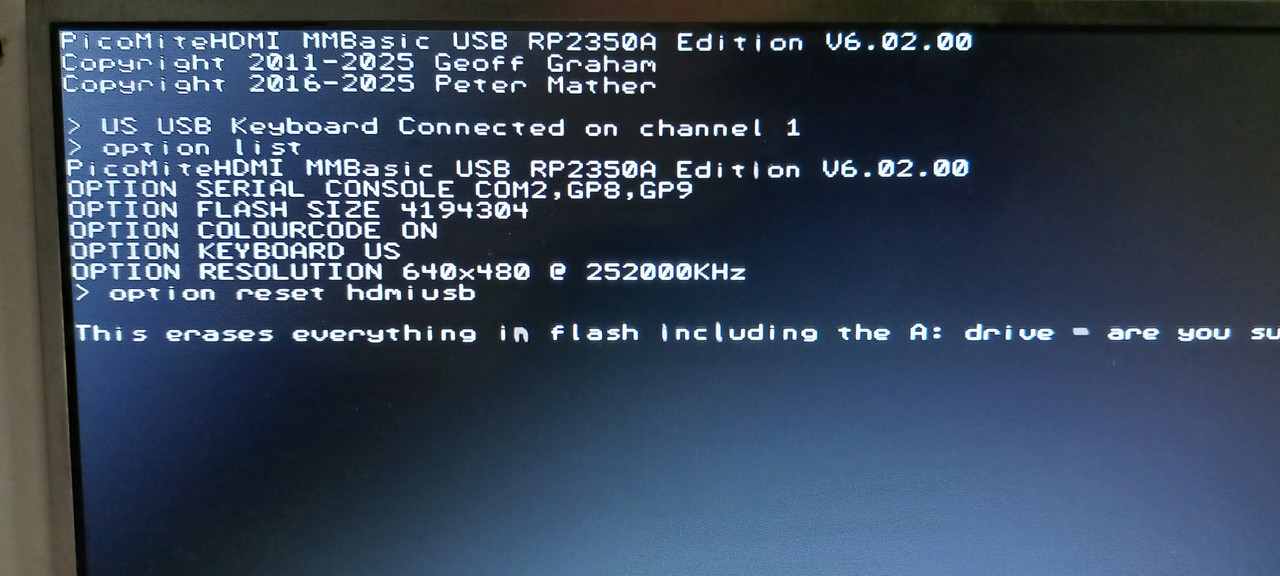
  tenij000 said  OPTION RESET HDMIUSB then get error


If you get this you have correct firmware.
> option reset list
HDMIUSB
OLIMEX USB
PICO COMPUTER
HDMIUSBI2S

If when you try  
OPTION RESET HDMIUSB
it does not wait for your response and you don't get a chance to enter Y/N
THEN adjust your TeraTerm setting.


> option reset hdmiusb

This erases everything in flash including the A: drive - are you sure (Y/N) ?

In TeraTerm:
Setup-->Terminal-->Transmit  Change to LF  NOT CR+LF
AFTER TeraTerm is set for LF on transmit  it should show this.
>

> option reset hdmiusb

PicoMiteHDMI MMBasic USB RP2350A Edition V6.02.01b2ive - are you sure (Y/N) ? Y
OPTION SERIAL CONSOLE COM2,GP8,GP9
OPTION SYSTEM I2C GP20,GP21
OPTION FLASH SIZE 4194304
OPTION COLOURCODE ON
OPTION KEYBOARD US
OPTION RESOLUTION 640x480 @ 315000KHz
OPTION DISPLAY 24, 80
OPTION SDCARD GP22, GP26, GP27, GP28
OPTION AUDIO GP10,GP11', ON PWM CHANNEL 5
OPTION RTC AUTO ENABLE
OPTION MODBUFF ENABLE  192
OPTION PLATFORM HDMIUSB
Formatting the A: drive


F4 H7FotSF4xGT
 
tenij000
Regular Member

Joined: 30/05/2025
Location: Netherlands
Posts: 94
Posted: 09:57pm 27 Feb 2026
Copy link to clipboard 
Print this post

> option list
PicoMiteHDMI MMBasic RP2350A Edition V6.02.00
OPTION SYSTEM I2C GP20,GP21
OPTION FLASH SIZE 4194304
OPTION COLOURCODE ON
OPTION KEYBOARD US
OPTION RESOLUTION 640x480 @ 252000KHz
OPTION SDCARD GP22, GP26, GP27, GP28
OPTION AUDIO GP10,GP11', ON PWM CHANNEL 5
OPTION RTC AUTO ENABLE
OPTION MODBUFF ENABLE  192


now got sound and the sdcard working    think did somthing wrong whit the usb hub part whit the hand soldering besouse of the canot connect to usb c
 
Mixtel90

Guru

Joined: 05/10/2019
Location: United Kingdom
Posts: 8617
Posted: 10:15pm 27 Feb 2026
Copy link to clipboard 
Print this post

Using that firmware you have no USB- You need the HDMIUSB version to put the Pico's USB port into Host mode.
You also need the CN4 links in place to connect the hub to the Pico.

While USB is running, if you want the console you have to use Tera Term at 115200 baud connected to USB2.
Mick

Zilog Inside! nascom.info for Nascom & Gemini
Preliminary MMBasic docs & my PCB designs
 
disco4now

Guru

Joined: 18/12/2014
Location: Australia
Posts: 1102
Posted: 10:29pm 27 Feb 2026
Copy link to clipboard 
Print this post

Did you get this via
OPTION RESET HDMIUSB
or did you manually enter the options.

What about
OPTION SERIAL CONSOLE COM2,GP8,GP9
Edited 2026-02-28 08:29 by disco4now
F4 H7FotSF4xGT
 
tenij000
Regular Member

Joined: 30/05/2025
Location: Netherlands
Posts: 94
Posted: 10:53pm 27 Feb 2026
Copy link to clipboard 
Print this post

> OPTION SERIAL CONSOLE COM2,GP8,GP9
Error : Pin 11/GP8 is in use

did manual
 
disco4now

Guru

Joined: 18/12/2014
Location: Australia
Posts: 1102
Posted: 11:02pm 27 Feb 2026
Copy link to clipboard 
Print this post

What does OPTION RESET LIST give.
> option reset list
HDMIUSB
OLIMEX USB
PICO COMPUTER
HDMIUSBI2S

If its not this you have the wrong firmware loaded.

See the table here It is from the manual.
Edited 2026-02-28 09:06 by disco4now
F4 H7FotSF4xGT
 
tenij000
Regular Member

Joined: 30/05/2025
Location: Netherlands
Posts: 94
Posted: 07:19pm 28 Feb 2026
Copy link to clipboard 
Print this post

got wrong firmware becouse if do correct firmware no way to enter commands to picomite (bad soldering prob)

but if connect to picomite whit the usb port whit windows


there seems to be a com12 port i can connect to it whit teraterm  use LF
still see nothing like text etc on screen if type on windows pc

do need first to setup something else

there is OPTION KEYBOARD US does mean can connect a ps2 keyboard to gpio pins try that way
 
     Page 2 of 2    
Print this page


To reply to this topic, you need to log in.

The Back Shed's forum code is written, and hosted, in Australia.
© JAQ Software 2026