Notice. New forum software under development. It's going to miss a few functions and look a bit ugly for a while, but I'm working on it full time now as the old forum was too unstable. Couple days, all good. If you notice any issues, please contact me.
matherp Guru Joined: 11/12/2012 Location: United KingdomPosts: 12034
Posted: 04:21pm 20 Apr 2026
Copy link to clipboard
Print this post
Jan Sounds like a system stack issue, I'll reduce the heap to 316 from 320 in the next beta.
Frank N. Furter Guru Joined: 28/05/2012 Location: GermanyPosts: 1155
Posted: 04:52pm 20 Apr 2026
Copy link to clipboard
Print this post
@matherp:
Thank you very much for fixing the bug and enhancing the text viewer!!!
Frank
terekgabor Senior Member Joined: 02/01/2026 Location: HungaryPosts: 153
Posted: 05:21pm 20 Apr 2026
Copy link to clipboard
Print this post
Peter!
Thank you for all bugs repair, I will try the new beta in the evening.
Many thanks for your work again!
G@bor
terekgabor Senior Member Joined: 02/01/2026 Location: HungaryPosts: 153
Posted: 06:58pm 20 Apr 2026
Copy link to clipboard
Print this post
Peter!
I tested long lines, mark mode behavior. Working good, only one thing I found. I really can’t remember how was it in previous versions. If I mark line(s) or char(s) then unmark them (move the cusror opposite direction) chars or lines looses its color in editor and became black and white. Then if I exit from mark mode with ESC or F4 or F5 colors are coming back.
All other are working good including profiling pages!
G@bor
mozzie Guru Joined: 15/06/2020 Location: AustraliaPosts: 468
Posted: 02:22pm 21 Apr 2026
Copy link to clipboard
Print this post
G'day Peter, Using V6.02.02B8, if PEEK(STEPPER ACTIVE) is used before the stepper system is initialised, or after STEPPER CLOSE, this causes the PicoMite to lock up, only hard RESET will fix.
> option list PicoMiteHDMI MMBasic USB RP2350A Edition V6.02.02B8 OPTION SERIAL CONSOLE COM2,GP8,GP9 OPTION FLASH SIZE 4194304 OPTION COLOURCODE ON OPTION KEYBOARD US OPTION RESOLUTION 800x480 @ 333000KHz OPTION DISPLAY 40, 100 OPTION SDCARD GP22, GP2, GP3, GP4 > ? peek(stepper active) (no response)
Just experimenting on a PicoMiteHDMIUSB at the moment, usually use base PicoMiteRP2350
Further to my previous post, it is probably best to leave the enable signal as is, I will post a circuit on the Stepper Thread that should work.
Regards, Lyle.
twofingers Guru Joined: 02/06/2014 Location: GermanyPosts: 1782
Posted: 05:05pm 21 Apr 2026
Copy link to clipboard
Print this post
Hi Peter, Congratulations on the latest (beta) release! Is there already an equivalent to the MM.INFO$(SDCARD) function for the new C-Drive (USB stick)? Regards Michael
terekgabor Senior Member Joined: 02/01/2026 Location: HungaryPosts: 153
Posted: 05:47pm 21 Apr 2026
Copy link to clipboard
Print this post
@matherp
Good evening Peter!
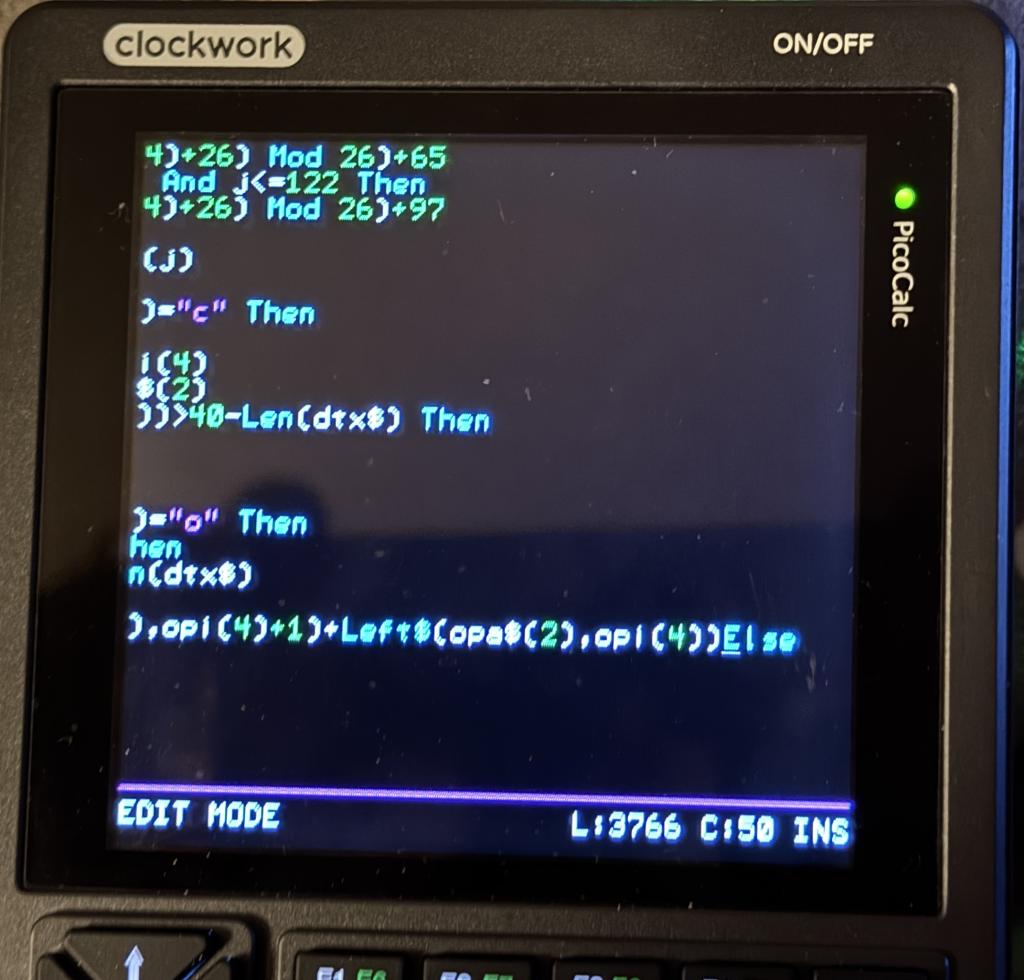
I continued testing long lines on Picocalc. When I press backspace in the beginning of a line after a long line I got the same problem. Check picture. The other lines I will never see (expect the long on where I can navigate) until I escape editor and come back.
G@bor
Frank N. Furter Guru Joined: 28/05/2012 Location: GermanyPosts: 1155
Posted: 05:48pm 21 Apr 2026
Copy link to clipboard
Print this post
I have two files here in a ZIP archive that are causing problems in FM under PicoCalc: README.md and rgb.bas
When I run rgb.bas, the font size in FM becomes smaller, and in the text viewer, the text is not only smaller but also black on white (After the program has closed again).
When I open README.md in the text viewer, the viewer closes while the last page is still being displayed, and the text in FM is displayed in a larger font. When I open the file with F2, I can no longer close the editor with ESC: LINE TO LONG problem.zip
Frank
(P.S.: Maybe it wouldn't be such a bad idea if you could adjust the font size in the file manager and text viewer???)
JanVolk Guru Joined: 28/01/2023 Location: NetherlandsPosts: 420
Posted: 08:17pm 21 Apr 2026
Copy link to clipboard
Print this post
Peter,
Could it be that the PicoMite occasionally freezes on values that appear in, for example, I2CLCD 1.13, Chr$(status_meteo) in a program with an LCD 2004 display?
I thought it no longer occurred in V6.02.02B5, but it does after a certain time; see the printout below with the error message and a snippet of the program from the message. The display works normally until the error message, then the status R, the outside temperature, and the degree sign (which is Chr$(0)) disappear, leading to my suspicion regarding chr$().
The program is far from finished, and I am trying to convert it from BascomAVR to MMBasic.
matherp Guru Joined: 11/12/2012 Location: United KingdomPosts: 12034
Posted: 09:58pm 21 Apr 2026
Copy link to clipboard
Print this post
Jan, it is nothing to do with chr$ which cannot give that erro. Almost certainly stack overflow. I;ve already said I will reduce MMBasic heap and increase stanck in the next beta.
JanVolk Guru Joined: 28/01/2023 Location: NetherlandsPosts: 420
Posted: 10:34pm 21 Apr 2026
Copy link to clipboard
Print this post
Peter,
Thank you for your response to my question.
I appreciate all the great commands and functions available in PicoMiteBasic.
Jan.
matherp Guru Joined: 11/12/2012 Location: United KingdomPosts: 12034
Posted: 07:22am 22 Apr 2026
Copy link to clipboard
Print this post
This is correct. The editor can't handle lines > 240 characters (255 with a tolerance). You will have to split the line. The response of the LIST command is caused by the same problem. I can probably solve that but the editor issue is fundamental to the way MMBasic works
Frank N. Furter Guru Joined: 28/05/2012 Location: GermanyPosts: 1155
Posted: 08:18am 22 Apr 2026
Copy link to clipboard
Print this post
Okay, THANKS! ...I just wanted to point that out to you...
Frank
matherp Guru Joined: 11/12/2012 Location: United KingdomPosts: 12034
Posted: 08:47am 22 Apr 2026
Copy link to clipboard
Print this post
I'll try and change it so non-basic files can have longer lines but for basic files it is a definite no.
Frank N. Furter Guru Joined: 28/05/2012 Location: GermanyPosts: 1155
Posted: 09:40am 22 Apr 2026
Copy link to clipboard
Print this post
That would be fine! It goes without saying that lines in BASIC can't be any longer...

 Notice. New forum software under development. It's going to miss a few functions and look a bit ugly for a while, but I'm working on it full time now as the old forum was too unstable. Couple days, all good. If you notice any issues, please contact me.


 Print this post