Notice. New forum software under development. It's going to miss a few functions and look a bit ugly for a while, but I'm working on it full time now as the old forum was too unstable. Couple days, all good. If you notice any issues, please contact me.
kermess Regular Member Joined: 04/04/2013 Location: SpainPosts: 50
Posted: 03:07pm 26 Aug 2026
Copy link to clipboard
Print this post
Good afternoon.
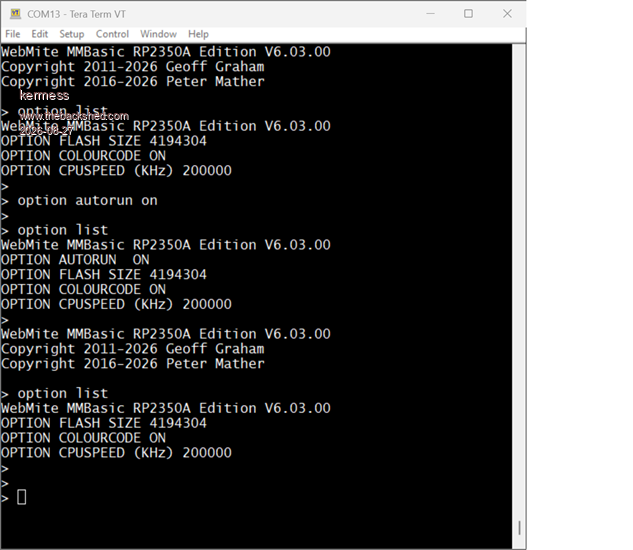
I am trying to understand a behaviour of OPTION AUTORUN ON that I find rather puzzling. I used this feature some time ago and do not remember having this problem. To check it as simply as possible, I decided to carry out the test using a new Pico 2W running WebMite MMBasic RP2350A V6.03.00, with no program, no Library and no WiFi or other peripherals configured. The test is performed from the Tera Term console. The attached screenshot shows the complete sequence up to the point where the board is powered off. The console first executes OPTION LIST, then OPTION AUTORUN ON, followed by another OPTION LIST, confirming that AUTORUN ON is correctly shown.
At this point I completely power off the Pico 2W, wait a few seconds, and then power it on again. The screenshot continues after the restart. The first thing that appears is the normal WebMite identification: WebMite MMBasic RP2350A Edition V6.03.00 followed by the copyright information and the Tera Term prompt. Without performing any other operation, I then execute OPTION LIST. In this second OPTION LIST, OPTION AUTORUN ON is no longer shown. The board has started normally and no error message is displayed.
Should OPTION AUTORUN ON remain set after powering the board off and then back on? Is this the intended behaviour? Or am I missing some condition or step in the procedure?
Thank you for any clarification.
David
homa Guru Joined: 05/11/2021 Location: GermanyPosts: 745
Posted: 03:36pm 26 Aug 2026
Copy link to clipboard
Print this post
I mean, that’s exactly the problem – ‘no programme’!
However, the manual doesn’t say anything about this either, or?*:
Instructs MMBasic to automatically run a program on power up or restart. ON will cause the current program in program memory to be run. Specifying ‘n’ will cause that location in flash memory to be run. ‘n’ must be in the range 1 to 3. Specifying the optional parameter “NORESET” will maintain AUTORUN even if the program causes a system error (by default this will cause the firmware to cancel any OPTION AUTORUN setting). OFF will disable the autorun option and is the default for a new program. *<-- ? Entering the break key (default CTRL-C) at the console will interrupt the running program and return to the command prompt.
PhenixRising Guru Joined: 07/11/2023 Location: United KingdomPosts: 2137
Posted: 07:35pm 26 Aug 2026
Copy link to clipboard
Print this post
Isn't Autorun different in that it needs to be in the code?
phil99 Guru Joined: 11/02/2018 Location: AustraliaPosts: 3422
Posted: 10:06pm 26 Aug 2026
Copy link to clipboard
Print this post
An alternative to Autorun that can't be cancelled is MM.STARTUP at the start of the program.
Sub MM.STARTUP Pause 99 'Ensures Ctrl-C can be used if stuck in a reboot loop. RUN End Sub
Grogster Admin Group Joined: 31/12/2012 Location: New ZealandPosts: 10085
Posted: 12:11am 27 Aug 2026
Copy link to clipboard
Print this post
I've always just issued it at the command prompt, and it has always worked - and been saved with all the other options.
SOME options DO need to be in the code, such as OPTION EXPLICIT or OPTION DEFAULT, but as for autorun, I've never included it in any code, and always just set it as once of my last steps.
Mind you, I have ALWAYS had a code there to run. This example might be causing the interpreter to stumble, as there is no code to run. Perhaps the interpreter even KNOWS there is no code to run, so disables the autorun automatically or something - might POSSIBLY be by design.
Peter or Geoff would know, and they might chime in here.Smoke makes things work. When the smoke gets out, it stops!
Volhout Guru Joined: 05/03/2018 Location: NetherlandsPosts: 6231
Posted: 06:33am 27 Aug 2026
Copy link to clipboard
Print this post
Option Autorun is smart.
When you turn autorun on, it executes the code in flash. When an error occurs, it sees the program in flash as corrupt, and will not start it again. The option is reset. It will not show anymore when you do an OPTION LIST.
Since some errors (i.e. in a Webmite, when you do not get an IP address) could lead to reboots this avoids endless reboots.
If you have a program that could error, but you insist in starting it up after a reboot (you don't mind endless reboots) then use
OPTION AUTORUN ON, NORESET
This is used in Game*Mite, where the menu must always show, even if a game crashes.
Grogster Admin Group Joined: 31/12/2012 Location: New ZealandPosts: 10085
Posted: 11:27pm 27 Aug 2026
Copy link to clipboard
Print this post
Well, there you go then!
You need a code of some sort. Or OPTION AUTORUN ON, NORESET Even just a "Hello World" would do for testing, to allow AUTORUN to actually run. Edited 2026-08-28 09:29 by GrogsterSmoke makes things work. When the smoke gets out, it stops!
Geoffg Guru Joined: 06/06/2011 Location: AustraliaPosts: 3370
Posted: 04:41am 28 Aug 2026
Copy link to clipboard
Print this post
There is a bit of confusion here and I'm not sure quite what is going on, but the following might help.
If the Picomite is powered up normally, or rebooted by the watchdog timer, or by the CPU RESTART command, the AUTORUN ON option will cause the program in flash to be automatically run... we all know that.
BUT if the reboot was caused by a CPU exception the Picomite firmware will ignore the AUTORUN setting, it will NOT run the program and it will clear the AUTORUN setting. A CPU exception is normally something within the firmware, like trying to access non existent memory or hardware.
This is different from the Micromite which always honoured the AUTORUN option, regardless of what caused the reboot. The problem with the Picomite behavior is that in an embedded controller it could fall over and the only way to fix it would be to pull it out of service, connect to the console and reinstate the AUTORUN ON option. Cycling the power will not help.
I discovered this on the early WebMite versions which had trouble in its TCP/IP stack and was always generating CPU exceptions. Peter's solution was to add the ,NORESET option to act like the Micromite.
I don't see any mention of unexpected reboots in this thread so this explanation might not be relevant. But it does explain why the ,NORESET option is there and what it is intended to fix.
Also, you can put the AUTORUN ON option in the program. It does no harm and it is one less option that you have to remember to set.
Geoff Edited 2026-08-28 14:52 by GeoffgGeoff Graham - http://geoffg.net
kermess Regular Member Joined: 04/04/2013 Location: SpainPosts: 50
Posted: 07:41pm 28 Aug 2026
Copy link to clipboard
Print this post
Thank you all for your replies and explanations.
I think I now have a better understanding of how OPTION AUTORUN ON works and its relationship with having a program available to run at startup.
I will repeat the tests with a program present and continue from there.
Thanks again to everyone who took the time to explain this and help me understand what was happening.

 Notice. New forum software under development. It's going to miss a few functions and look a bit ugly for a while, but I'm working on it full time now as the old forum was too unstable. Couple days, all good. If you notice any issues, please contact me.

 Print this post