Notice. New forum software under development. It's going to miss a few functions and look a bit ugly for a while, but I'm working on it full time now as the old forum was too unstable. Couple days, all good. If you notice any issues, please contact me.
Frank N. Furter Guru Joined: 28/05/2012 Location: GermanyPosts: 1185
Posted: 07:15pm 09 Nov 2026
Copy link to clipboard
Print this post
Hi,
for almost two weeks now, I've been desperately trying to connect an HX-20 to an Olimex RP2040 PC via a MAX3232.
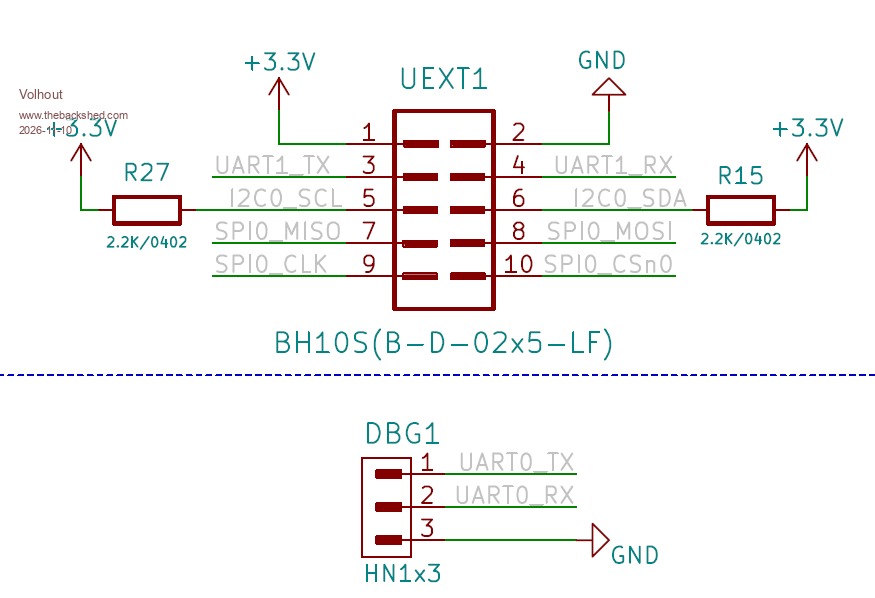
On the Olimex, COM2 is routed through the UEXT interface. I'm trying to connect an HX-20 with an MAX3232 as a level converter to COM2.
I was able to track the signals using the oscilloscope. The connections between the HX-20 and the MAX3232 are correct, but the signals aren't reaching the PicoMite! The moment I connect the Rx and Tx lines to the Pico, the MAX3232’s output signals (toward the Pico) are apparently pulled either toward GND or VCC. Without a connection to the PicoMite, I can see the data transmission by the flickering of the Rx LED.
I also notice that when I reboot the Pico, the LED for one of the lines suddenly lights up (meaning the LED is pulled to GND) and goes out when I open the file manager. At this point, COM2 hasn’t even been initialized yet.
When I start my program and send characters from the HX-20, I don’t see any activity on the LEDs. Unfortunately, swapping the Rx and Tx lines doesn’t help either.
Has anyone ever successfully gotten the COM2 interface on this board to work? I’m using firmware version PicoMiteHDMIUSBV7.00.00RC7.
Frank
phil99 Guru Joined: 11/02/2018 Location: AustraliaPosts: 3428
Posted: 09:19pm 09 Nov 2026
Copy link to clipboard
Print this post
The key there is "True RS-232" so the data is inverted compared to TTL-Serial, not just level shifted. If all you need is level shifting add a 1.8kΩ - 3.3kΩ voltage divider between the 5V Tx pin and the 3V3 Rx pin. Going from 3V3 Tx to 5V Rx usually just a 1kΩ series resistor works.
Frank N. Furter Guru Joined: 28/05/2012 Location: GermanyPosts: 1185
Posted: 07:29am 10 Nov 2026
Copy link to clipboard
Print this post
Even so, the receive LED should flicker when I transmit something with the HX-20. But it doesn't when the MAX is connected to the Pico.
I think it would be best if I built a loopback adapter and tested it using a Basic program.
Does a test program like that already exist somewhere?
Frank
Mixtel90 Guru Joined: 05/10/2019 Location: United KingdomPosts: 9327
Posted: 08:51am 10 Nov 2026
Copy link to clipboard
Print this post
Don't forget that under MMBasic on the PicoMite the default PS2 keyboard or console is on COM2. By default only COM1 is available to the user unless you disable the keyboard and don't use USB.Mick
Frank N. Furter Guru Joined: 28/05/2012 Location: GermanyPosts: 1185
Posted: 10:00am 10 Nov 2026
Copy link to clipboard
Print this post
I can open COM2 without any errors, and I'm using the HDMI-USB version. I'm already having these problems even when my program isn't running. However, the pins on COM2 are free and not assigned to anything else...
Frank
Volhout Guru Joined: 05/03/2018 Location: NetherlandsPosts: 6248
Posted: 10:27am 10 Nov 2026
Copy link to clipboard
Print this post
Hi Frank,
On what pins do you connect COM2 ? The issue is that when you use a uf2 file that has "USB" in it's name, the USB port on the pico is reserved for USB communication (keyboard/mice/hub) and control of the pico (console) is through pins GP8 and GP9.
On the RP2350A and RP2040 pins GP8 and GP9 are COM2 (so is PC3). So COM2 is reserved for console, and cannot be used for anything else. You should NOT be able to open COM2 from MMBasic.
You can open COM1 from MMBasic (example : on GP0 and GP1). It is available on the DBG1 connector.
Regards,
Volhout
P.S. Maybe this is one for Peter : you should get an error message when trying to open COM2. Edited 2026-11-10 20:38 by VolhoutPicomiteVGA PETSCII ROBOTS
Frank N. Furter Guru Joined: 28/05/2012 Location: GermanyPosts: 1185
Posted: 10:52am 10 Nov 2026
Copy link to clipboard
Print this post
UEXT is connected to pin 26/27 (GP20/21). I get no error with open COM2. I'm using an original Pico 2 with an RP2350. Is COM2 really blocked? That would explain a lot!!!
Frank Edited 2026-11-10 20:52 by Frank N. Furter
matherp Guru Joined: 11/12/2012 Location: United KingdomPosts: 12166
Posted: 11:15am 10 Nov 2026
Copy link to clipboard
Print this post
Are you doing a setpin on the pins to set them as com pins?
Listing your code would help us diagnose Edited 2026-11-10 21:16 by matherp
Frank N. Furter Guru Joined: 28/05/2012 Location: GermanyPosts: 1185
Posted: 11:31am 10 Nov 2026
Copy link to clipboard
Print this post
I didn't write the code. A friend of mine generated it using AI. I think these are the relevant passages:
' Teilt dem Port die Pins zu und oeffnet ihn. Liefert "" oder den Grund, warum es nicht geht. FUNCTION ComOeffnen$(port$) LOCAL INTEGER rx, tx ON ERROR SKIP rx = MM.INFO(PINNO SER_RX$) IF MM.ERRNO = 0 THEN ON ERROR SKIP tx = MM.INFO(PINNO SER_TX$) ENDIF IF MM.ERRNO THEN ComOeffnen$ = "Unbekannter Pin " + SER_TX$ + " oder " + SER_RX$ + ": " + Fehlertext$() ELSE ' SETPIN braucht COM1 oder COM2 als festes Wort, eine Variable geht dort nicht IF port$ = "COM2" THEN ON ERROR SKIP SETPIN rx, tx, COM2 ELSE ON ERROR SKIP SETPIN rx, tx, COM1 ENDIF IF MM.ERRNO THEN ComOeffnen$ = "Pins passen nicht zu " + port$ + ": " + Fehlertext$() + "|Moeglich: " IF port$ = "COM2" THEN ComOeffnen$ = ComOeffnen$ + "TX GP4/8/20, RX GP5/9/21" ELSE ComOeffnen$ = ComOeffnen$ + "TX GP0/12/16/28, RX GP1/13/17" ENDIF ELSE ON ERROR SKIP OPEN port$ + ":" + STR$(SER_BAUD) + "," + STR$(SER_PUFFER) AS #5 IF MM.ERRNO THEN ComOeffnen$ = "Kann " + port$ + " nicht oeffnen: " + Fehlertext$() ENDIF ENDIF ON ERROR CLEAR END FUNCTION
Frank
matherp Guru Joined: 11/12/2012 Location: United KingdomPosts: 12166
Posted: 11:41am 10 Nov 2026
Copy link to clipboard
Print this post
You have "on error skip" around critical statements which would give you the errors you need to see. Remove those and you will get the full picture
Frank N. Furter Guru Joined: 28/05/2012 Location: GermanyPosts: 1185
Posted: 12:00pm 10 Nov 2026
Copy link to clipboard
Print this post
Shouldn't it still display a message saying that the COM port could not be opened?
IF MM.ERRNO THEN ComOeffnen$ = "Kann " + port$ + " nicht oeffnen: " + Fehlertext$()
"Can " port$ + " not open: "
Frank
matherp Guru Joined: 11/12/2012 Location: United KingdomPosts: 12166
Posted: 12:11pm 10 Nov 2026
Copy link to clipboard
Print this post
mm.errno has probably already been cleared by the endif
Frank N. Furter Guru Joined: 28/05/2012 Location: GermanyPosts: 1185
Posted: 12:37pm 10 Nov 2026
Copy link to clipboard
Print this post
Okay, so I'd have to use the “standard” HDMI version to be able to use COM2? Then I should be able to use the console with another PC and could use COM2 via UEXT, right?
Frank
matherp Guru Joined: 11/12/2012 Location: United KingdomPosts: 12166
Posted: 01:13pm 10 Nov 2026
Copy link to clipboard
Print this post
I have tested your program and in every case I get the error printed so something else must be going on. In any case, as I always advise, avoid ON ERROR at all costs it is inefficient and in the case of OPTION COMPILE ON slows the code dramatically. The standard HDMI won;t lock up any serial ports and will give you the console on the micro-USB
Mixtel90 Guru Joined: 05/10/2019 Location: United KingdomPosts: 9327
mozzie Guru Joined: 15/06/2020 Location: AustraliaPosts: 505
Posted: 02:13pm 10 Nov 2026
Copy link to clipboard
Print this post
G'day Frank, To avoid further confusion, could you please post your option list.
Am I right in thinking you have the OLIMEX RP2350PC?
I think the issue is the standard HDMIUSB console connection is GP8,GP9 on COM2 (UART1), if you have set OPTION RESET OLIMEX USB to suit your board then AFAIK the console connection is GP0/GP1 on COM1 (UART0), leaving COM2 free for your project.
So if this is correct we need to figure out why it still wont work.
If the above is correct you could try looping TX to RX and:
'Prog to test COM2 UART loopback
Setpin gp20,gp21,com2 Pause 10 Open "com2:38400" as #1 Pause 10 Print #1,"This is COM2 @ 38400 Baud" Pause 10 Print "Received ",Input$(100,#1) End
This works on a standard Pico on the bench here
Regards, Lyle. Edited 2026-11-11 00:46 by mozzie
Mixtel90 Guru Joined: 05/10/2019 Location: United KingdomPosts: 9327
Posted: 02:50pm 10 Nov 2026
Copy link to clipboard
Print this post
Frank seems to be using the RP2040 Olimex, unless he's plugged a RP2450 into it. I'm guessing at This as it's noted for having confusing connections and it has a UEXT socket. . Edited 2026-11-11 00:52 by Mixtel90Mick
Frank N. Furter Guru Joined: 28/05/2012 Location: GermanyPosts: 1185
Posted: 05:01pm 10 Nov 2026
Copy link to clipboard
Print this post
That's strange! As I said, the program was generated by AI, it's pretty long, and I'm not sure yet if I'm allowed to share it...
THANK YOU! I'll give that a try next.
Yes, the board is called RP2040-PICO-PC, but it's equipped with a Pico 2 (RP2350). Otherwise, MMBASIC wouldn't be possible with HDMI (OPTION RESET OLIMEXUSB).

 Notice. New forum software under development. It's going to miss a few functions and look a bit ugly for a while, but I'm working on it full time now as the old forum was too unstable. Couple days, all good. If you notice any issues, please contact me.


 Print this post