Frank N. Furter
Guru

Joined: 28/05/2012
Location: GermanyPosts: 1203 |
| Posted: 12:08pm 25 Nov 2026 |
 Copy link to clipboard |
 Print this post |
|
Hi to all!
I have a PNG file with many individual frames. I want only a few of these frames to be displayed at a time. If I understand the LOAD PNG command correctly (and based on what I’ve tried so far), I can select the starting point from my PNG, but not the ending point. As a result, more is displayed than I want. I want to display the individual frames on a PicoCalc.
Or do I need to use BLIT LOAD here? Does anyone have an example for me? It wouldn’t be a problem to convert the image to a BMP first.
What’s the best way to do this? This is the image in question:
.png)
Frank |
matherp
Guru
Joined: 11/12/2012
Location: United KingdomPosts: 12288 |
| Posted: 12:40pm 25 Nov 2026 |
Copy link to clipboard |
Print this post |
|
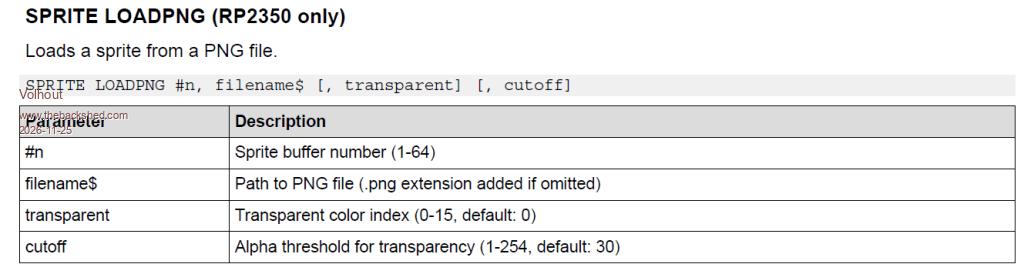
Use sprite loadpng and then write it to the screen wherever you want. If not needed further free the sprite with sprite close #n
SPRITE LOADPNG [#]n ,fname$ [,t] [,cutoff] [,x] [,y] [,w] [,h]
Loads the PNG image ‘fname$’ as sprite number ‘n’, which must not be in use.
If an extension is not specified “.PNG” will be added to the file name. The file
can be of any of the types that LOAD PNG reads, and it is decoded a line at a
time.
A pixel whose alpha value (its opacity) is above ‘cutoff’ (1 to 254, default 30)
is solid. The others take the colour ‘t’, one of the PicoMite's 16 colours (0 to
15, default 0, black: the transparent colour, so that they are not drawn), as on
the PicoMite. The colours are numbered from 0:
Black, Blue, Myrtle, Cobalt, Midgreen, Cerulean, Green, Cyan, Red, Magenta,
Rust, Fuchsia, Brown, Lilac, Yellow and White
A negative ‘t’ (-1 to -15) instead gives the colour -‘t’ to the solid pixels that the
colour depth shows as black, which would be transparent, so that the image's
black can be drawn; the others are then transparent. |

 Notice. New forum software under development. It's going to miss a few functions and look a bit ugly for a while, but I'm working on it full time now as the old forum was too unstable. Couple days, all good. If you notice any issues, please contact me.