Notice. New forum software under development. It's going to miss a few functions and look a bit ugly for a while, but I'm working on it full time now as the old forum was too unstable. Couple days, all good. If you notice any issues, please contact me.
panky Guru Joined: 02/10/2012 Location: AustraliaPosts: 1147
Posted: 09:13pm 28 Nov 2026
Copy link to clipboard
Print this post
Tom, I think GP12 is used by HDMI - see the manual on Video Output around page 46. Regards, Doug.... almost all of the Maximites, the MicromMites, the MM Extremes, the ArmMites, the PicoMite and loving it!
panky Guru Joined: 02/10/2012 Location: AustraliaPosts: 1147
Posted: 09:19pm 28 Nov 2026
Copy link to clipboard
Print this post
Tom, You could try setting up the SD Card using system spi as per the manual on page 55
System SPI Port This is a port that will be used for system use (SD card, LCD display and the touch controller on an LCD panel). There are a number of ports and pins that can be used (see the chapter PicoMite Hardware) but this example uses SPI on pins GP18, GP19 and GP16 for Clock, MOSI and MISO respectively. OPTION SYSTEM SPI GP18, GP19, GP16 Then MMBasic must be told that there is an SD card attached and what pin is used for the Chip Select (CS) signal: OPTION SDCARD GP22
... almost all of the Maximites, the MicromMites, the MM Extremes, the ArmMites, the PicoMite and loving it!
thwill Guru Joined: 16/09/2019 Location: United KingdomPosts: 4421
phil99 Guru Joined: 11/02/2018 Location: AustraliaPosts: 3470
Posted: 09:40pm 28 Nov 2026
Copy link to clipboard
Print this post
Some SD cards are fussy about the power supply so a 47µF or larger cap. across the socket power pins may help.
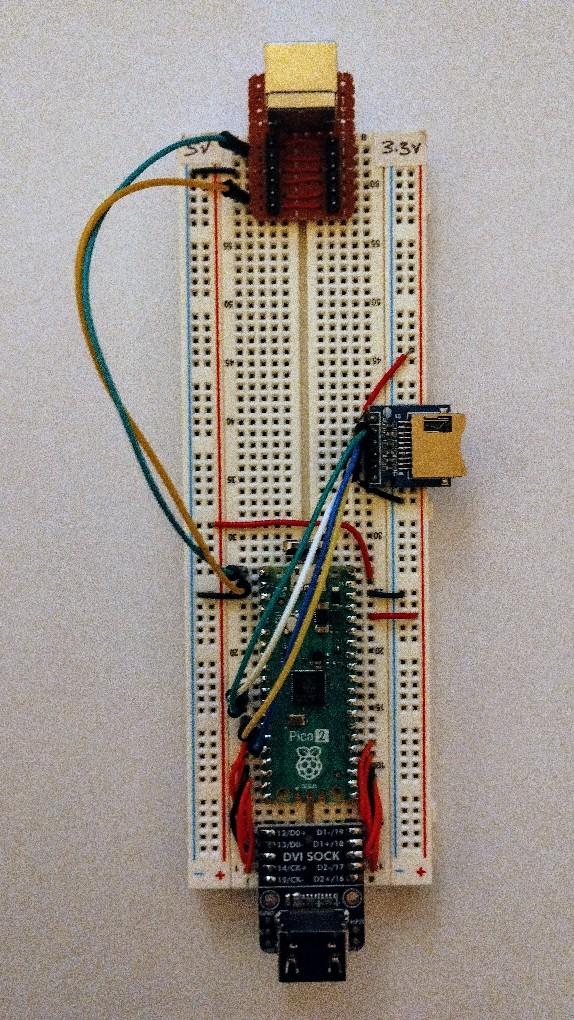
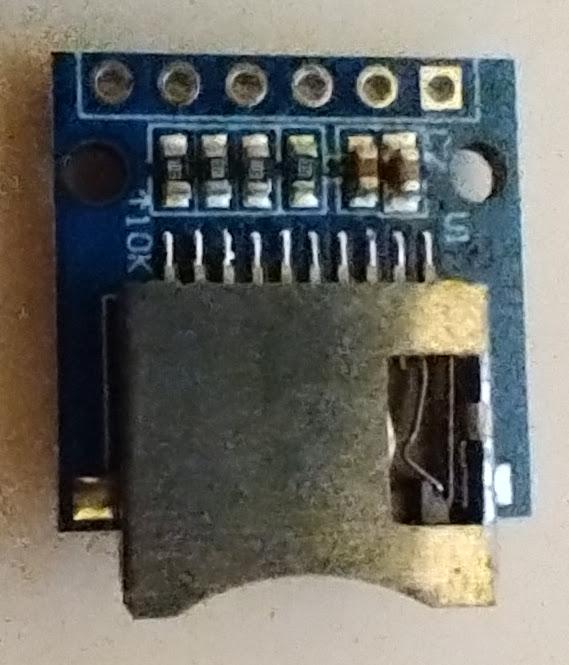
One card I have gives "Error : SD Card not found" on the first attempt but after reselecting B: works ok. That was cured with 10kΩ pullups on MOSI and MISO. It is hard to see in the photo but perhaps your adapter board already has them, and maybe a small cap. on the power pins?
If the issue is dirty contacts pushing the card in and out a few times is worth a try.
Another possibility is the breadboard contacts. Check continuity from the top of the Pico pins to the top of the socket pins.
Edit. Do you have continuity between the two blue ground rails? Edited 2026-11-29 07:44 by phil99
thwill Guru Joined: 16/09/2019 Location: United KingdomPosts: 4421
v.lenzer Senior Member Joined: 04/05/2024 Location: GermanyPosts: 160
Posted: 10:14pm 28 Nov 2026
Copy link to clipboard
Print this post
I'm using the same sd-card-module. My options: OPTION SYSTEM SPI GP6,GP3,GP4 OPTION SDCARD GP9 But at first I have had the same problems like You. Always "sd card not found". Then I found out, the card was damaged. So You should also try it with another card, just to be sure, the card is working.Best wishes! Joachim
Mixtel90 Guru Joined: 05/10/2019 Location: United KingdomPosts: 9414
Posted: 10:32pm 28 Nov 2026
Copy link to clipboard
Print this post
If you are using SPI for a LCD display as SYSTEM SPI then you only need OPTION SDCARD cs Otherwise, without SYSTEM SPI, you need OPTION SDCARD cs, sclk, mosi, miso
The card will run better (I think) if the pins are for a hardware SPI port, but they don't have to be - you can get away with any unallocated pins. If they aren't then the card is accessed in bitbang mode.Mick
thwill Guru Joined: 16/09/2019 Location: United KingdomPosts: 4421
Posted: 10:16am 29 Nov 2026
Copy link to clipboard
Print this post
Good morning (UK) folks,
I'm at a loss on this, I've tried a different SD card socket (same design), different SD card (though the original reads fine on a PicoMiteVGA), a different set of pins and a 47uF cap over the socket. Continuity looks good, though it is solderless breadboard and I know that can be iffy.
phil99 Guru Joined: 11/02/2018 Location: AustraliaPosts: 3470
Posted: 11:18am 29 Nov 2026
Copy link to clipboard
Print this post
Yes, I didn't look at the diagram closely enough.
That you got one brief successful read indicates something with the hardware is marginal.
Voltage at the socket power pins? To see if it sags under load put a 68Ω resistor across the socket power pins while measuring the voltage.
Resistance of the connections between the Pico and the socket? Some LCD panels have 1kΩ in series with the SD SPI lines that can cause problems, and need to be bypassed. (I think the series resistors may be there to protect the SD card if connected to a 5V chip, but may be too high).
In your last pic the socket has 10k resistors (marked 103) which I assume are harmless pullups. Edited 2026-11-29 21:21 by phil99

 Notice. New forum software under development. It's going to miss a few functions and look a bit ugly for a while, but I'm working on it full time now as the old forum was too unstable. Couple days, all good. If you notice any issues, please contact me.


 Print this post