Notice. New forum software under development. It's going to miss a few functions and look a bit ugly for a while, but I'm working on it full time now as the old forum was too unstable. Couple days, all good. If you notice any issues, please contact me.
v.lenzer Senior Member Joined: 04/05/2024 Location: GermanyPosts: 155
Posted: 10:29pm 04 Dec 2025
Copy link to clipboard
Print this post
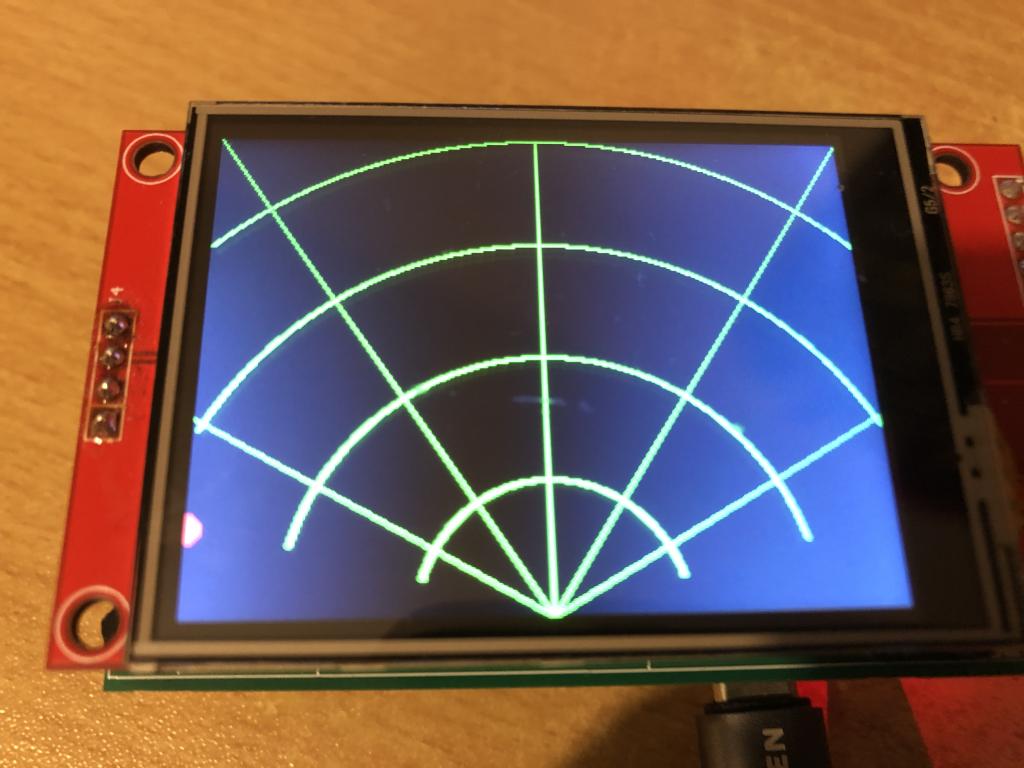
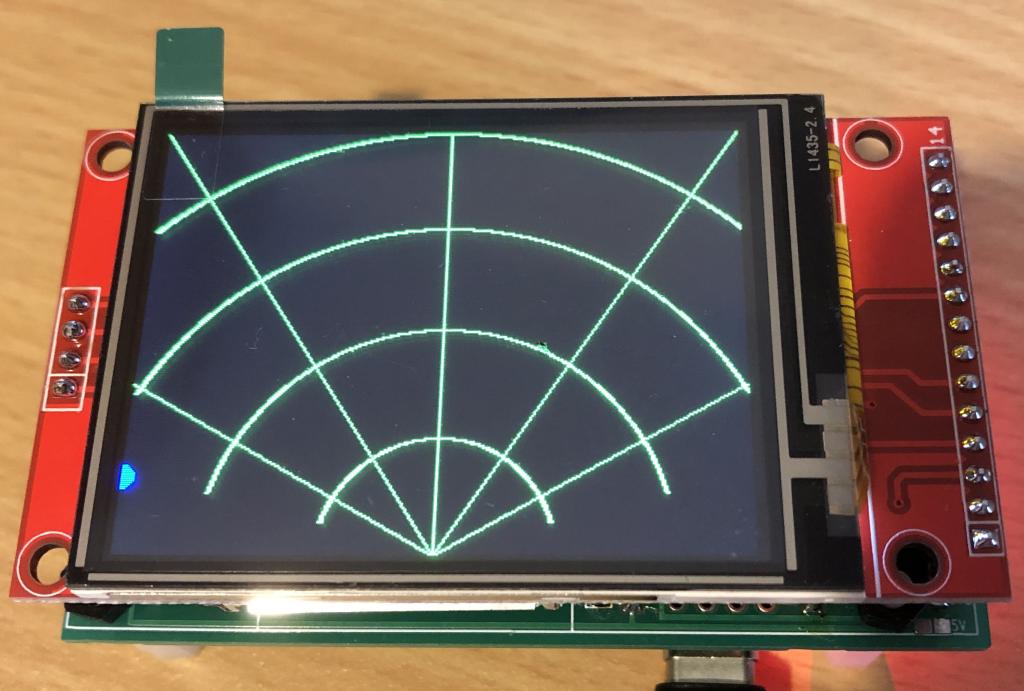
My new project, "Human Radar" (https://www.thebackshed.com/forum/ViewTopic.php?FID=16&TID=18438), uses a 320x240 ILI9341 display.
With these options:
PicoMite MMBasic RP2040 Edition V6.00.03
OPTION SYSTEM SPI GP6, GP3, GP4
OPTION AUTORUN ON
OPTION COLOURCODE ON
OPTION CPUSPEED (KHz) 200000
OPTION LCDPANEL ILI9341, LANDSCAPE, GP7, GP2, GP5 everything works perfectly.
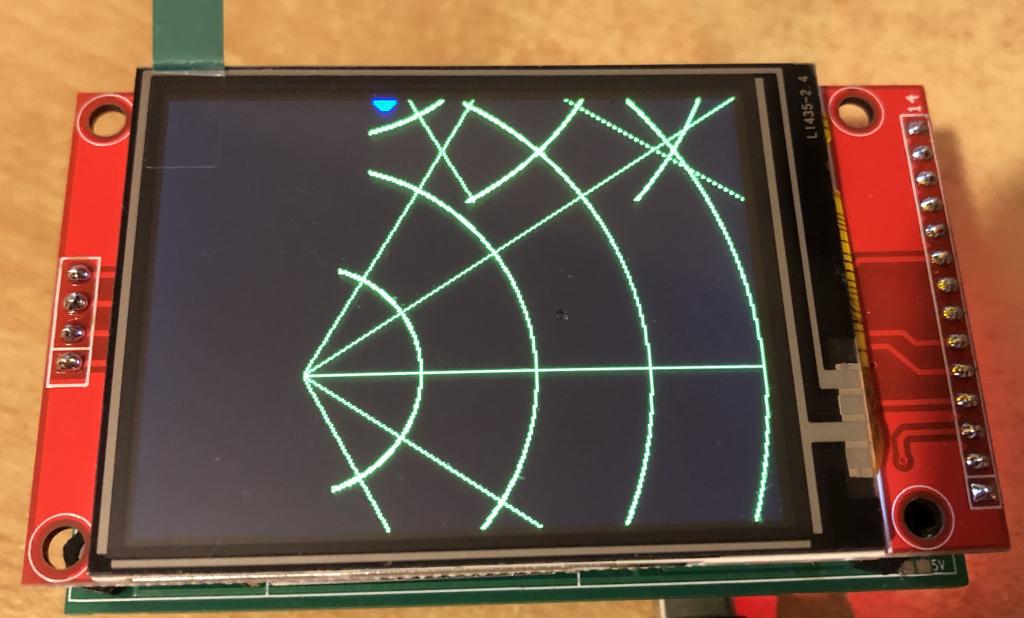
Now I've bought four more displays from AliExpress, which also use the ILI9341 display driver. They look like the display I'm currently using. However, it appears they're using portrait mode, even though landscape is selected. The small red dot on the left side of the display in the radar grid isn't red, as it should be, but blue.
I've tried all the available settings for the ILI9341 (L, P, RL, RP). The display rotates, but it's not using the full 320 x 240 pixels. It looks like it's using 0-240 for X and 0-320 for Y.
Does anyone have any suggestions on how I can use this display with a different setting?Best wishes! Joachim
v.lenzer Senior Member Joined: 04/05/2024 Location: GermanyPosts: 155
Posted: 10:37pm 04 Dec 2025
Copy link to clipboard
Print this post
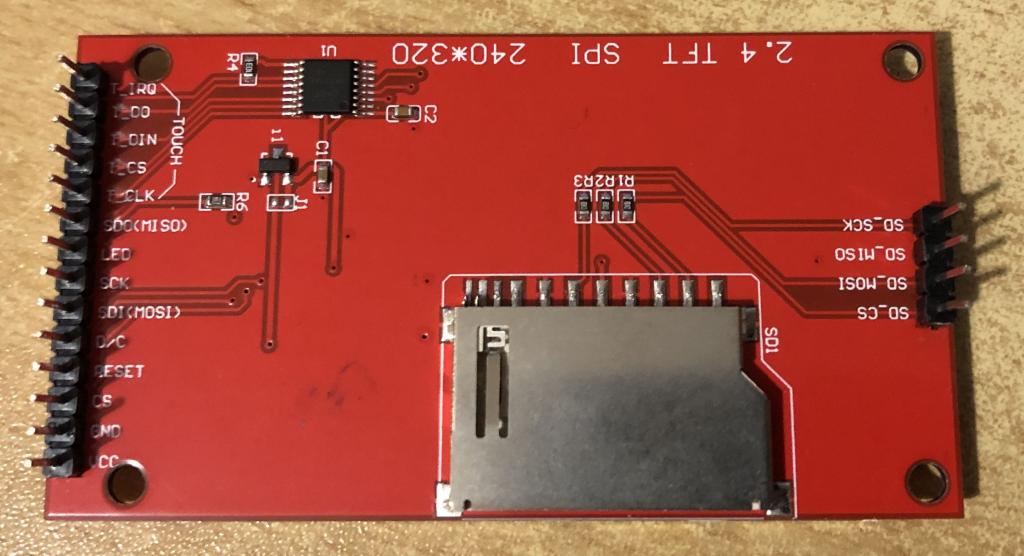
Backside of the "good" ones.
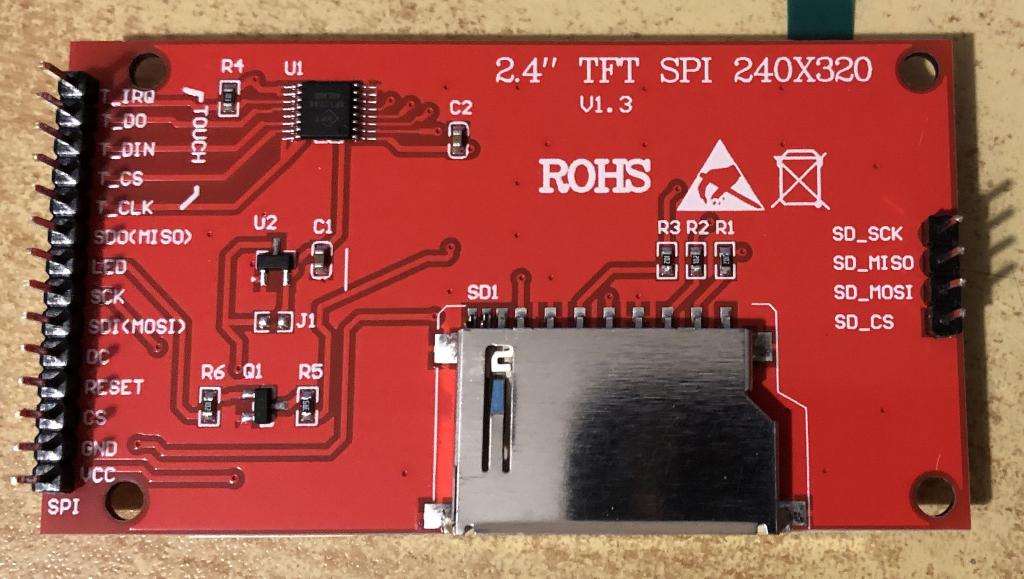
Backside of the "bad" ones.
Edited 2025-12-05 08:41 by v.lenzerBest wishes! Joachim
disco4now Guru Joined: 18/12/2014 Location: AustraliaPosts: 1151
Posted: 11:01pm 04 Dec 2025
Copy link to clipboard
Print this post
The Red/Blue reversal should be fixed by using the INVERT parameter when the display is setup. OPTION LCDPANEL .................,INVERT
You can adjust the driver setting after it initiates using POKE DISPLAY command [,data1] command &H36 is the likely area you need to adjust. e.g. POKE DISPLAY &H36,xx
This from the source might help help working out how to swap Landscape/Portrait after it is loaded.
v.lenzer Senior Member Joined: 04/05/2024 Location: GermanyPosts: 155
Posted: 12:47pm 05 Dec 2025
Copy link to clipboard
Print this post
Thank you for the information. I managed to make the display now look the same as the other displays. When setting the option for the LCD, I entered "RP" as the orientation and in the program poke display hres 320 poke display vres 240 When I want to append "INVERT" to the LCD OPTION, I get an error (PIN 0/NULL). It worked with a fantasy GPIO, but all colors were inverted. The blue dot became yellow and the actually correct green lines were also inverted. But you can set that with LINE and CIRCLE. That's not a problem.
PicoMite MMBasic RP2040 Edition V6.00.03 OPTION SYSTEM SPI GP6,GP3,GP4 OPTION COLOURCODE ON OPTION CPUSPEED (KHz) 200000 OPTION LCDPANEL ILI9341, RPORTRAIT,GP7,GP2,GP5 Edited 2025-12-05 22:53 by v.lenzerBest wishes! Joachim
matherp Guru Joined: 11/12/2012 Location: United KingdomPosts: 11879
Posted: 02:16pm 05 Dec 2025
Copy link to clipboard
Print this post
The first optional parameter is a pin for the backlight. The second is the invert option. Just use ,,INVERT
HOWEVER invert won't do what you want as it makes black white.
Try using bit 3 in register &H36 #define ILI9341_MADCTL_BGR 0x08
ville56 Guru Joined: 08/06/2022 Location: AustriaPosts: 612
Posted: 04:10pm 05 Dec 2025
Copy link to clipboard
Print this post
I found this type of color errors typically on IPS displays and the INVERT parameter cured it. Had this also when I retrofitted a TFT display with an IPS panel.
Gerald 73 de OE1HGA, Gerald
matherp Guru Joined: 11/12/2012 Location: United KingdomPosts: 11879
Posted: 04:24pm 05 Dec 2025
Copy link to clipboard
Print this post
As in my reply above, invert is different to a simple B/R swap.IPS displays without invert set see a value of 0 as full on and 255 is off for each of R G and B. The OP is not seeing an inverted display just a R B swap. The control for this in a ILI9341 is bit 3 of register &H36
v.lenzer Senior Member Joined: 04/05/2024 Location: GermanyPosts: 155
Posted: 09:42pm 05 Dec 2025
Copy link to clipboard
Print this post
I must confess that I don't quite understand what I'm supposed to try. I can't make heads or tails of `#define`. I'm more of an assembly language person. I'm programming the RP2040 using MMEdit and I am trying to understand MMBasic in this way. If you could tell me what to enter, either on the console or in MMEdit, that would be a huge help. I'm sure we can get somewhere that way. It would be good for the future, since there are obviously other ILI9341 displays out there that are different.
And indeed, INVERT inverts all colors. In my case, the black background becomes white, the green mesh is somehow pink, and the dot is yellow. I was able to enter the inverted LCD option with two commas. I hadn't thought of that. Edited 2025-12-06 07:43 by v.lenzerBest wishes! Joachim
disco4now Guru Joined: 18/12/2014 Location: AustraliaPosts: 1151
Posted: 10:16pm 05 Dec 2025
Copy link to clipboard
Print this post
So "RP" is now setting &H36 as 0x88 , if we don't want Bit3 then try
POKE DISPLAY &H36,0x80 or POKE DISPLAY &H36,0x88 if we have it the wrong way. and then your poke display hres 320 poke display vres 240F4H7FotSF4xGT
v.lenzer Senior Member Joined: 04/05/2024 Location: GermanyPosts: 155
Posted: 10:18pm 05 Dec 2025
Copy link to clipboard
Print this post
Following a tip I found online that AliExpress was selling displays with the wrong driver (for example here https://lecity.edu.au/?p=2761), I entered this option: `OPTION LCDPANEL ST7789, LANDSCAPE,GP7,GP2,GP5,,INVERT`. Now all the colors are correct!
Together with `poke display hres 320` and `poke display vres 240`, the orientation is also correct. Edited 2025-12-06 08:31 by v.lenzerBest wishes! Joachim
phil99 Guru Joined: 11/02/2018 Location: AustraliaPosts: 3381
Posted: 10:20pm 05 Dec 2025
Copy link to clipboard
Print this post
A bit of trial and error using the information from Peter and disco4now was able to swap red and blue on a normal ILI9341. However this also created the same problem you had with vertical and horizontal. Using your cure for that restored things.
This solved the color problem. BUT: now X0/Y0 is no longer in the upper left corner, but in the upper right corner. I don't understand it, but that's how it is.
This is the entire program. Please note that this was only intended to help understanding the graphics commands. It has nothing to do with the radar program. I think there's a simpler way to convert from polar coordinates to Cartesian coordinates. ... 'Hires tests 'Display of the display and font parameters 'print "Vertical resolution :";mm.vres 'print "Horizontal resolution :";mm.hres 'print "Font height :";mm.info(fontheight) 'print "Font width ;";mm.info(fontwidth) ' 'Drawing commands:
for i=0 to 90 radar_net r=200 w=i w=(w*pi)/180 x2=r*cos(w) y2=r*sin(w) 'print "X2:"x2;" Y2:";y2;" W:";w
circle x2,y2,6,,1,rgb(red),rgb(red) break 100
next i
end
sub radar_net
cls
arc 160,240,60,,285,75,rgb(green)
arc 160,240,120,,285,75,rgb(green)
arc 160,240,180,,298,62,rgb(green)
arc 160,240,240,,318,42,rgb(green)
line 0,0,160,240,,rgb(green)
line 160,0,160,240,,rgb(green)
line 320,0,160,240,,rgb(green)
line 0,150,160,240,,rgb(green)
line 320,150,160,240,,rgb(green)
end sub
It is now after midnight in Germany. All I can see before my burning eyes is "OPTION LCDPANEL DISABLE". I'll continue tomorrow :) Edited 2025-12-06 09:25 by v.lenzerBest wishes! Joachim
TassyJim Guru Joined: 07/08/2011 Location: AustraliaPosts: 6606
Posted: 12:08am 06 Dec 2025
Copy link to clipboard
Print this post
I think that you need POKE DISPLAY &H36,0x80
It is bit 3 (decimal 8) not decimal 3 and you need bit 3 set to 0 leaving the other bits set as required for display orientation.
phil99 Guru Joined: 11/02/2018 Location: AustraliaPosts: 3381
Posted: 12:53am 06 Dec 2025
Copy link to clipboard
Print this post
More testing.
OPTION LCDPANEL ILI9341, RLANDSCAPE,.......
and
POKE DISPLAY &H36, &H20
Swapped red and blue with pixel (0,0) at top left and (320,240) at bottom right so Hres and Vres are correct. SD card is at the bottom.
POKE DISPLAY &H36, &H60
Swapped red and blue with pixel (0,0) at bottom left and (320,240) at top right so Hres and Vres are correct. SD card is at the bottom.
POKE DISPLAY &H36, &HA0
Swapped red and blue with pixel (0,0) at top right and (320,240) at bottom left so Hres and Vres are correct. SD card is at the bottom.
POKE DISPLAY &H36, &HE0
Swapped red and blue with pixel (0,0) at bottom right and (320,240) at top left so Hres and Vres are correct. SD card is at the bottom.
If using OPTION LCDPANEL ILI9341, LANDSCAPE,....... they would all be reversed.
v.lenzer Senior Member Joined: 04/05/2024 Location: GermanyPosts: 155
Posted: 09:38am 06 Dec 2025
Copy link to clipboard
Print this post
I think the mystery is solved: I got displays with the ST7789 from Aliexpress. If you look at the pictures of this Offer or here in this post , then you can see what the ST7789 displays look like on the back. And I have one exactly like that.
I'll continue to try out your suggestions later today. Maybe a good solution will be found so that I or a future colleague can still use this display.Best wishes! Joachim
matherp Guru Joined: 11/12/2012 Location: United KingdomPosts: 11879
Posted: 10:06am 06 Dec 2025
Copy link to clipboard
Print this post
If it is a st7789 then use OPTION LCDPANEL ST7789_320,L,... This properly configures a st7789 in 320x240. Then, if necessary you can tweak from there
v.lenzer Senior Member Joined: 04/05/2024 Location: GermanyPosts: 155
Posted: 10:29am 06 Dec 2025
Copy link to clipboard
Print this post
The next problem:
The display cannot be calibrated as an ILI9341. The calibration crosses on the portrait screen are not at all four corners, but rather twice at the top left and top right. Let's see what the setting changes bring. This was the error message:
Warning: Inaccurate calibration Deviation X = 0, Y = 342 (pixels) As ST7789 in connection with poke display hres 320 and poke display vres 240 calibration was possible.
This means that nothing needs to be changed or added to the program. This means that the orientation, resolution and colors are correct. Touch function also.
Thank you very much to all of you for your valuable tips. I learned a lot again. not just when programming but also when purchasing on aliexpress.
Once again proof of how great this forum works. What impressed me most was that no one made a derogatory comment when I didn't know what to do and was simply trying to help.
Nevertheless, I will still try your suggestions. This allows me to learn how to influence the driver. Edited 2025-12-06 21:12 by v.lenzerBest wishes! Joachim
v.lenzer Senior Member Joined: 04/05/2024 Location: GermanyPosts: 155

 Notice. New forum software under development. It's going to miss a few functions and look a bit ugly for a while, but I'm working on it full time now as the old forum was too unstable. Couple days, all good. If you notice any issues, please contact me.


 Print this post