Notice. New forum software under development. It's going to miss a few functions and look a bit ugly for a while, but I'm working on it full time now as the old forum was too unstable. Couple days, all good. If you notice any issues, please contact me.
hhtg1968 Senior Member Joined: 25/05/2023 Location: GermanyPosts: 247
Posted: 08:28pm 12 Dec 2025
Copy link to clipboard
Print this post
I try to code a simple paint-like program on my cmm2g2 (thanx to ManiB i got one). i found in the manual the command "box xor_pixels". i do not find a similar command "line xor_pixels". is there a possibility to use line in XOR-mode?
disco4now Guru Joined: 18/12/2014 Location: AustraliaPosts: 1157
Posted: 02:32am 13 Dec 2025
Copy link to clipboard
Print this post
I can confirm its not there. There are currently no plans to add it. How are you using the BOX XOR_PIXELS command? Edited 2025-12-13 12:32 by disco4nowF4H7FotSF4xGT
phil99 Guru Joined: 11/02/2018 Location: AustraliaPosts: 3412
Posted: 07:19am 13 Dec 2025
Copy link to clipboard
Print this post
If you only want horizontal or vertical lines with a width of at least 2 pixels a work-around might be:-
> box 33,44,2,200 > box 33,44,200,2
hhtg1968 Senior Member Joined: 25/05/2023 Location: GermanyPosts: 247
Posted: 02:55pm 13 Dec 2025
Copy link to clipboard
Print this post
In a kind of paint programm i usually program that you can click the firstpoint of a line and then you can hold the button to go to the end point during the line is drawed continously. the backgroung should not be destroyed so i use xor to show the recent line and xor again to show the original backgroung (my english is not so good).
I want to draw a graphic line (or a box or a circle...) with live display, without permanently painting over or damaging the background.
otherwise i had to cache the background.
hhtg1968 Senior Member Joined: 25/05/2023 Location: GermanyPosts: 247
Posted: 03:23pm 13 Dec 2025
Copy link to clipboard
Print this post
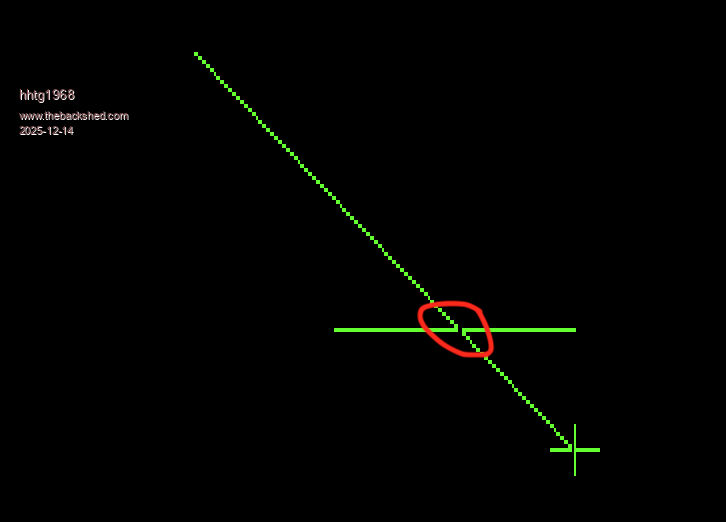
In the example image, I've circled it in red. The line with the cross isn't final yet. You can see the inversion at the intersection...
because of the inversion by XOR the background is not destroyey if i draw with XOR again...
this example is on my z80 computer.
vegipete Guru Joined: 29/01/2013 Location: CanadaPosts: 1185
Posted: 01:15am 14 Dec 2025
Copy link to clipboard
Print this post
For a different solution, play with the following quick test: Use the arrow keys to move one end of the line around. Hold [SHIFT] to move faster. Press [RETURN] to draw line, [ESC] to quit.
The program uses 12 bit mode to get a second visible page. The main image is drawn on page 0, the lower page, and animated line is drawn on page 1.
Not quite the same effect as XOR but the underlying image is unaffected. You could blink or otherwise animate the object as it is being drawn for better visibility.
mode 1,12 pause 1000 ' wait for mode change cls page write 0 ' draw some random stuff for i = 1 to 10 circle 100+600*rnd,100+400*rnd,25+150*rnd,2,,rgb(green) next i t$ = chr$(149)+chr$(146)+chr$(147)+chr$(148) text 400,285,t$+" to move, [SHIFT] for bigger step",CM,,,rgb(white) text 400,300,"Press [ENTER] to draw line",CM,,,rgb(white) text 400,315,"Press [ESC] to quit",CM,,,rgb(white)
x1 = 750 : y1 = 75 x2 = 100 : y2 = 200
page write 1 redraw do k = asc(inkey$) s = 1 if (keydown(7) and 136) <> 0 then s = 10 ' move faster if SHIFT pressed
' on my keyboard, SHIFT-DOWN ARROW gives ASCII 161 and ' SHIFT-RIGHT ARROW gives ASCII 163 so make correction if k = 163 then k = 131 if k = 161 then k = 129 end if select case k case 13 : paintline case 27 : exit do ' escape to quit case 128 : y2 = y2 - s * (y2 > 10) : redraw ' cursor up case 129 : y2 = y2 + s * (y2 < 590) : redraw ' cursor down case 130 : x2 = x2 - s * (x2 > 10) : redraw ' cursor left case 131 : x2 = x2 + s * (x2 < 790) : redraw ' cursor right end select loop
end
sub redraw cls line x1,y1,x2,y2,,rgb(yellow) end sub
sub paintline page write 0 line x1,y1,x2,y2,,rgb(blue) page write 1 end sub
My keyboard returns unexpected ascii codes for SHIFTed right and down arrows so there is some extra code starting on line 25 to handle the weirdness.Visit Vegipete's *Mite Library for cool programs.
hhtg1968 Senior Member Joined: 25/05/2023 Location: GermanyPosts: 247
Posted: 09:06am 15 Dec 2025
Copy link to clipboard
Print this post
@vegipede:
cool idea. i will try it. thanx a lot.
p.s.:
is there a special sense that the commando "box" has a xor mode and line not?
hhtg1968 Senior Member Joined: 25/05/2023 Location: GermanyPosts: 247
Posted: 02:07pm 15 Dec 2025
Copy link to clipboard
Print this post
@vegipede:
runs cool. i think i will try to change my programm to 12bit mode...
hhtg1968 Senior Member Joined: 25/05/2023 Location: GermanyPosts: 247
Posted: 08:46am 16 Dec 2025
Copy link to clipboard
Print this post
i have a perhaps silly question for gui programming. i code:
rem Menu Test1 rem option explicit mode 8,12 ' dim integer r 'menu defs const mframe=1 ' gui cursor on 0,mm.hres/2,mm.vres/2 'menu display gui frame mframe,"mTest",16,16,608,448,rgb(white) ' do loop until inkey$<>"" or mouse(l,0)=1 r=msgbox("good bye!","ok") end
... i can click the left button to end the loop. mouse cursor appears but i cannot move the mouse, so i cannot click ok in the message box. is it necessary to code a interrupt routine to change x and y coordinates?
matherp Guru Joined: 11/12/2012 Location: United KingdomPosts: 12034
Posted: 09:56am 16 Dec 2025
Copy link to clipboard
Print this post
Assuming a PS2 mouse then somewhere on a regular basis you need to call GUI CURSOR MOUSE(X,0),MOUSE(Y,0) a settick interrupt is a good way of doing this Edited 2025-12-16 19:58 by matherp
hhtg1968 Senior Member Joined: 25/05/2023 Location: GermanyPosts: 247
Posted: 01:37pm 16 Dec 2025
Copy link to clipboard
Print this post
thank you. i will try it soon.
Volhout Guru Joined: 05/03/2018 Location: NetherlandsPosts: 6184
Posted: 07:01pm 16 Dec 2025
Copy link to clipboard
Print this post
On PicoMite (VGA/HDMI) in mode 2
Attached will allow you to test your mouse in a program. Assuming you have used OPTION MOUSE to enable the mouse. It reads the coordinates from the mouse, and creates the cursor (rectangle) in MMBasic.
Use the mouse to navigate to a lemming, then click left mouse to change the walking direction of that lemming. It is not flawless (yet) but helps you to test the mouse.
hhtg1968 Senior Member Joined: 25/05/2023 Location: GermanyPosts: 247
Posted: 03:54pm 20 Dec 2025
Copy link to clipboard
Print this post
hello,
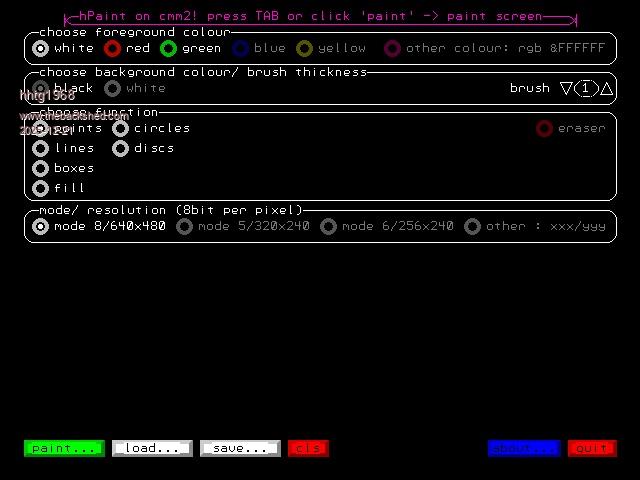
because of the help from vegipede I continued to code my simple painting program. there is no real sense because there are thousends of such programms for "normal" computers and you can transform pictures via sd card to the cmm2. but i wrote for every system a paint program for fun.
menu page (gui commands from geoffg):
paint page:
At the beginning i do not code with events for mouse etc. so the main loop runs fast and the commands "gui cursor on" and "cursor off" was called very often. i have changed this and all is well.
but i think that a memory error will accure if you call this commands very often (not recursive). I tested it with a little program:
dim integer n=0 cls do inc n gui cursor on print @(0,0)n gui cursor off loop
and after 879 loops the system says kind of "not enough internal memory". i use a cmm2 g2 v2.
is this a bug/ correct? or have I a mistaken thinking?
matherp Guru Joined: 11/12/2012 Location: United KingdomPosts: 12034
Posted: 04:14pm 20 Dec 2025
Copy link to clipboard
Print this post
If your little program triggers it then it certainly looks like a bug. Are you using the latest CMM2 beta? If yes post on the beta thread and I'm sure disco4now will find and fix it. If not try the latest beta.
JohnS Guru Joined: 18/11/2011 Location: United KingdomPosts: 4389
Posted: 04:15pm 20 Dec 2025
Copy link to clipboard
Print this post
Looks like a bug.
John
hhtg1968 Senior Member Joined: 25/05/2023 Location: GermanyPosts: 247
Posted: 05:17pm 20 Dec 2025
Copy link to clipboard
Print this post
I use v6.00.00b8. I do not know wether this is the most recent version.
hhtg1968 Senior Member Joined: 25/05/2023 Location: GermanyPosts: 247
Posted: 05:21pm 20 Dec 2025
Copy link to clipboard
Print this post
i hope that i will find the beta thread...
JohnS Guru Joined: 18/11/2011 Location: United KingdomPosts: 4389
hhtg1968 Senior Member Joined: 25/05/2023 Location: GermanyPosts: 247
Posted: 05:30pm 20 Dec 2025
Copy link to clipboard
Print this post
I guess i found it. i posted it there...
hhtg1968 Senior Member Joined: 25/05/2023 Location: GermanyPosts: 247
Posted: 11:09am 22 Dec 2025
Copy link to clipboard
Print this post
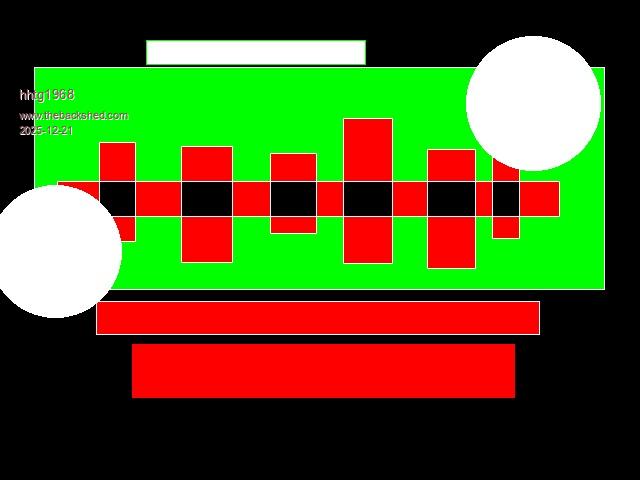
During the programming of the painting program, another effect occurs which I cannot explain.
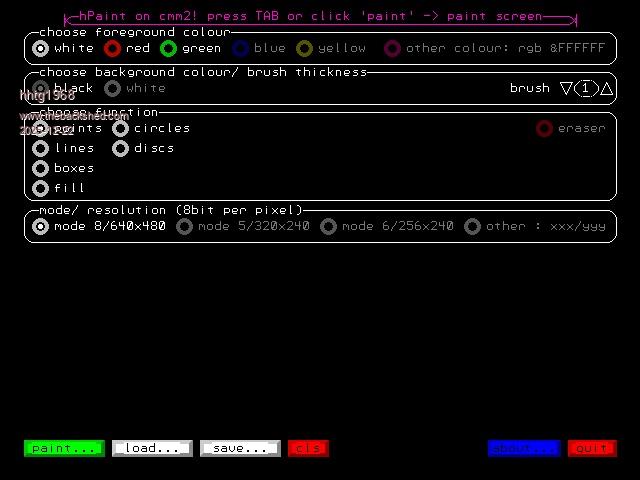
I'm working in 12-bit mode. The painting is done on page 0, the preliminary graphics are on page 1. The menu is on page 2.
Menu page
Paint page
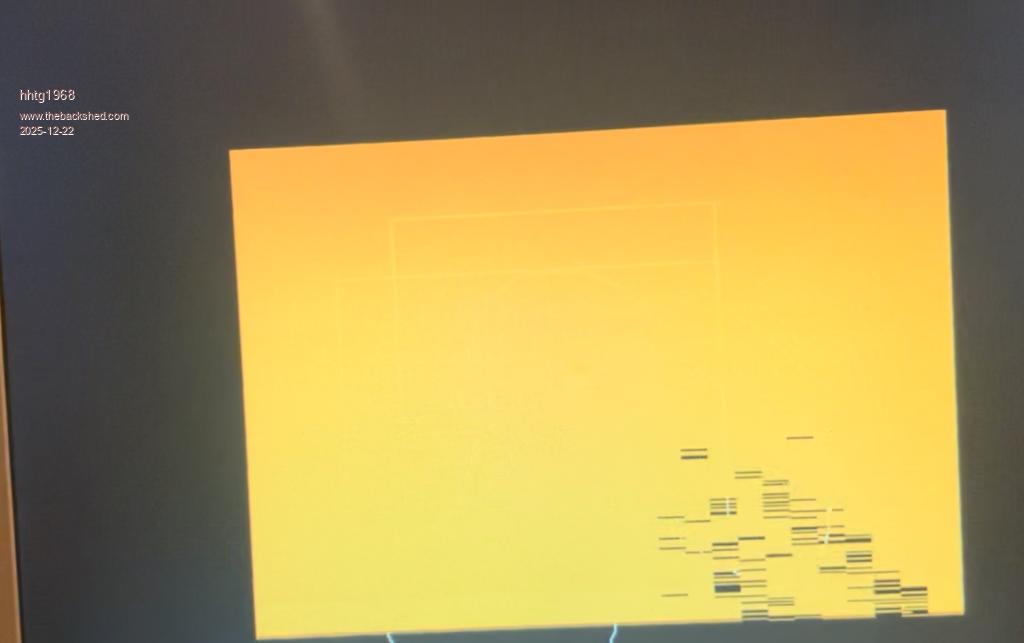
screen mistakes
In principle, everything works. However, in the lower third of the drawing area, the mouse cursor becomes patchy or disappears completely at times. With large graphics, errors appear on the screen (screen memory).
These screen errors cannot be cleared with cls, at least not at runtime. When I finish the program, the screen becomes correct again.
movies.zip 3 Movies (here you can see the mistakes at screen)
I only use predefined basic routines for the graphics, e.g., line, circle, box, etc. I don't write to the screen memory directly, as would be possible with "poke," for example.
Sometimes the screen errors persist even when I switch to the menu screen (page 2).
I didn't have this problem with an earlier version that wasn't 12-bit.
Perhaps someone has an idea.
Page 1 of 2
Print this page
The Back Shed's forum code is written, and hosted, in Australia.

 Notice. New forum software under development. It's going to miss a few functions and look a bit ugly for a while, but I'm working on it full time now as the old forum was too unstable. Couple days, all good. If you notice any issues, please contact me.


 Print this post