Notice. New forum software under development. It's going to miss a few functions and look a bit ugly for a while, but I'm working on it full time now as the old forum was too unstable. Couple days, all good. If you notice any issues, please contact me.
Grogster Admin Group Joined: 31/12/2012 Location: New ZealandPosts: 10064
Posted: 06:51am 13 Jan 2026
Copy link to clipboard
Print this post
Hello all.
Quite enjoying my Linux journey so far, now that I have dropped Windoze totally.
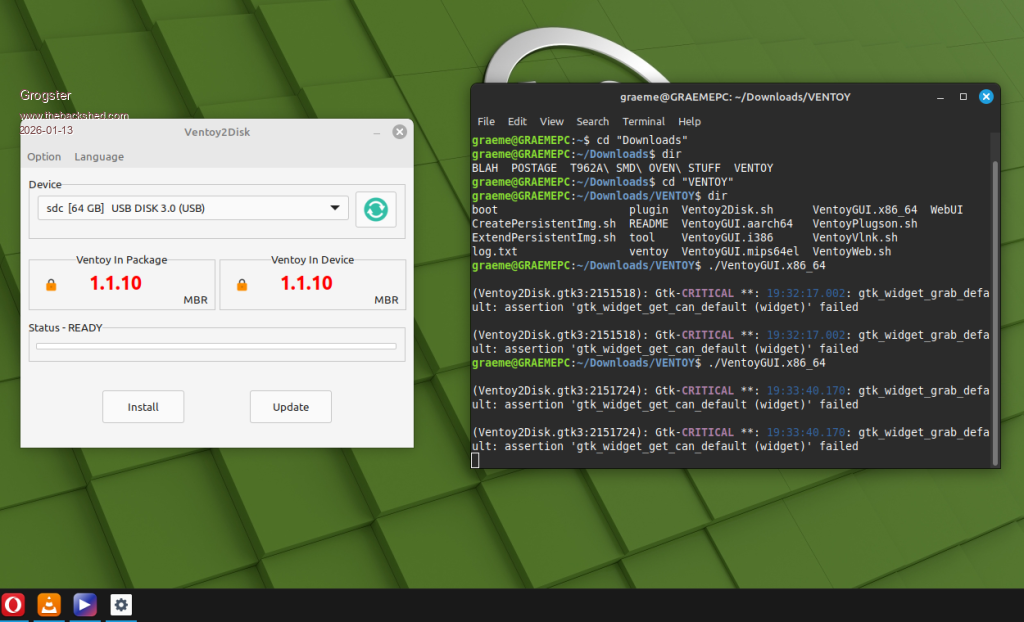
Setting up Ventoy tonight, I ran into some problems. The application(once unzipped), would simply not run.
Borrowing from recent knowledge of the power of the Linux terminal, I opened the terminal, and navigated to the download folder, and used my new Linux-Love: "./"
THIS WORKED, and the GUI then popped up, but the terminal was reporting some "CRITICAL" errors, but despite reading the messages several times, I am still lost as to what Linux is trying to tell me.
Can someone look at this screenshot, and tell me what Linux is upset about?
Despite Linux moaning about this, the application ran and completed fine, and I will now have a bit of a tinker about with it.
My God..... A few years ago, I was so terrified of the Linux terminal, I would NOT run Linux.......just because of the fact the terminal existed at all.
But the Linux terminal, is pretty much the Windoze Command-prompt on steroids. You DO have to be careful about what you do in the Linux terminal(as it is so powerful), but for general purpose "Hey Linux, I need to do this thing...." - I am falling more and more in love with it.
Just so long as I don't do anything silly with a SUDO command in the terminal, I SHOULD be OK. Smoke makes things work. When the smoke gets out, it stops!
JohnS Guru Joined: 18/11/2011 Location: United KingdomPosts: 4386
Posted: 08:14am 13 Jan 2026
Copy link to clipboard
Print this post
I web searched for gtk_widget_grab_default gtk_widget_get_can_default failed
and it looks probably harmless plus may be due to running from the terminal.
You could set up a desktop item so it runs with a click or two.
Be careful of typing wildcards (the * character) with rm!! Unless you have rm -i it's risky if you're also a bit hamfisted with the space bar.
E.g. rm test.* or rm *.old are fine but a stray space would be a disaster.
John
KeepIS Guru Joined: 13/10/2014 Location: AustraliaPosts: 2282
Posted: 12:00am 14 Jan 2026
Copy link to clipboard
Print this post
Pretty standard terminal error/info output when run from terminal, some are permission errors or missing info depending on the Linux system.
I have dropped a few Linux ISO's on the disk, such a quick way to have a look/play with another Linux for fun, each ISO was automatically added to the Boot menu and all run correctly, a really neat program, no longer needing a separate boot USB drive for each ISO is so nice and quick.NANO:Inverter V 8.4ks - Linux AvrDude GUI script V4.1
Grogster Admin Group Joined: 31/12/2012 Location: New ZealandPosts: 10064
Posted: 12:22am 14 Jan 2026
Copy link to clipboard
Print this post
Yes, I think this will be my new universal boot USB! I put all the versions of Linux I like to play with(Including Puppy) on this, and also diagnostic tools and clonezilla etc, along with several versions of Windoze up to W10 - but not W11.
Now I'm on Linux full-time, I am unlikely to need the Windoze ISO's, but they can still come in handy, for those that want their older machine clean-installed, and I can't convince them to move to Linux.
Point being that one 64GB USB flash-drive, can contain ISO's of anything I am likely to want to boot. It's a really interesting utility! Smoke makes things work. When the smoke gets out, it stops!
KeepIS Guru Joined: 13/10/2014 Location: AustraliaPosts: 2282
Posted: 01:16am 14 Jan 2026
Copy link to clipboard
Print this post
From memory there is one thing that may be incompatible, and that is the ability to save any changes to a booted live session ISO when shutting down the ISO, assuming that the Linux OS ISO supports that in the first place.
I've seen a workaround but it's not worth the effort, I believe they are looking into this option.
It's easier for me to simply save a bootable current system snapshot straight to the VENTOY boot USB.
I've also converted to 99.999% Linux now, 0.001% Win VM usage - and I can disconnect the Network in the Win-VM as I don't need Net access anymore. So in reality a completer disconnect from MS, using a VPN, and I will never login to YouTube on this PC, also currently moving/changing my email address to a secure encrypted Client, and No cloud storage.
Downloading a a huge amount of Linux and Programming PDF's and how to manuals for when the Net dies, I will have plenty of reading and info to keep me busy and enough info to fix almost anything. Still have book shelves full of my old manuals and tech info.
Grogster Admin Group Joined: 31/12/2012 Location: New ZealandPosts: 10064
Posted: 07:30am 14 Jan 2026
Copy link to clipboard
Print this post
Yeah, I remember looking into that(the persistance ting), but did not care, as all I wanted to do - and still do - is just boot the OS. Not interested in trying to save anything from inside a live boot. If you like the OS enough, then clean-install it, THEN save stuff! Smoke makes things work. When the smoke gets out, it stops!
JohnS Guru Joined: 18/11/2011 Location: United KingdomPosts: 4386
Posted: 09:32am 14 Jan 2026
Copy link to clipboard
Print this post
I see you navigated to Downloads and then use ./program
Just in case you don't know, from your home you could have done ./Downloads/program
or from anywhere ~/Downloads/program
(that's a tilde instead of the dot)
If you have suitable permissions you can also do ~anyuser/path/program
because ~anyuser is converted to that user's home directory (or your home if anyuser is absent).
The shell does this, so you can do such as ls -l ~
(If you actually want a tilde, put a backslash in front or quotes round it.)
John Edited 2026-01-14 19:35 by JohnS
Grogster Admin Group Joined: 31/12/2012 Location: New ZealandPosts: 10064
Posted: 11:40pm 14 Jan 2026
Copy link to clipboard
Print this post
Excellent, thanks. I have a feeling I have a LONG way to go, till I have learned all the commands available in the terminal!
However, just taking it gently for now, and staying away from the SUDO command - for now, anyway!
I note that Linux terminal is touchy when it comes to paths with SPACES. The file-system does not seem to care if you have spaces in folder names, but the terminal DOES. It's also case-sensitive, so /HEX is not the same as /hex.....but I'm still learning, and once I get the hang of it, shorter folder names are actually preferable - they don't take so long to type! (not that that is really an issue, cos there is always copy/paste...)Smoke makes things work. When the smoke gets out, it stops!
pwillard Guru Joined: 07/06/2022 Location: United StatesPosts: 347
Posted: 01:32am 15 Jan 2026
Copy link to clipboard
Print this post
Using "short names for things" was sort of an early mantra for the original Unix developers.
JohnS Guru Joined: 18/11/2011 Location: United KingdomPosts: 4386
Posted: 08:18am 15 Jan 2026
Copy link to clipboard
Print this post
For long names just surround with quotes or use a backslash in front of each space.
You can also hit TAB part way through a name (or command) and not only will the shell try to complete the name it will add backslashes as needed.
But yes short names are easier.
John
Mixtel90 Guru Joined: 05/10/2019 Location: United KingdomPosts: 9213
Posted: 08:34am 15 Jan 2026
Copy link to clipboard
Print this post
Unix and Linux have always been case-sensitive. That's why you tend to find that almost everything is done in lower case. :)
Remember, Unix programmers were lazy. Why use commands like DIRECTORY or CATALOG when ls will do nicely?
The mantra for Unix was "do one thing and do it well". So you usually get quite a lot of simple commands, each one being reliable, rather than single, complex commands. The simple commands can be scripted or piped into another if you want complex operations.Mick

 Notice. New forum software under development. It's going to miss a few functions and look a bit ugly for a while, but I'm working on it full time now as the old forum was too unstable. Couple days, all good. If you notice any issues, please contact me.


 Print this post


 (not that that is really an issue, cos there is always copy/paste...)
