Notice. New forum software under development. It's going to miss a few functions and look a bit ugly for a while, but I'm working on it full time now as the old forum was too unstable. Couple days, all good. If you notice any issues, please contact me.
Grogster Admin Group Joined: 31/12/2012 Location: New ZealandPosts: 10064
Posted: 07:42am 16 Jan 2026
Copy link to clipboard
Print this post
Hello everyone.
I am testing Timeshift restore, on another PC with Linux Mint xfce edition on it, but I am having issues getting it to boot. I think it is a GRUB problem, or, specifically, the lack of. I am just playing with another clean-install system, so I can teach myself how to use Timeshift restore, if that becomes a requirement.
Steps I took:
- Timeshift made a restore fine on an external USB drive. - I booted from a Live USB, and deleted the partitions on the SSD. - I created a new partition(all of the SSD) and formatted it to ext4. - I then ran Timeshift. - I selected the restore USB, and set it in motion. - This completed fine, including ticks in the reset/setup GRUB in advanced restore options.
Now, when I reboot when prompted, the "Restored" system fails to boot, and I am dropped into the EUFI. I can put the Live USB back in, and the system will boot from that, and once up and running, the SSD HAS BEEN RESET - all the files are there, all the directories are there.
My feeling is that GRUB has not been installed, despite the restore theoretically doing this for me as part of the process.
So, I think I need to manually install a copy of GRUB, and configure it, but this has to happen WITHOUT destroying the restore that has actually completed.
I seem to recall, there used to be a Live-USB boot thing for GRUB, that would then allow you to install GRUB on any chosen drive - this is what I think I need to do, but a bit confused as to why this DIDN'T happen as part of the restore process.
My guess is that I am missing something Linux-specific, as I am still learning a lot with respect to how Linux does things.
If anyone can help, that would be great.
I think I am 99% there with this test - the system DOES seem to be restored to the SSD, I just can't boot from it. Smoke makes things work. When the smoke gets out, it stops!
phil99 Guru Joined: 11/02/2018 Location: AustraliaPosts: 3412
Posted: 07:55am 16 Jan 2026
Copy link to clipboard
Print this post
As best I can recall:- Use gparted (GUI) or fdisk (command line) to set the partition as Primary and Active. Then Grub can be loaded to the boot sector.
tgerbic Senior Member Joined: 25/07/2019 Location: United StatesPosts: 123
Posted: 10:10am 16 Jan 2026
Copy link to clipboard
Print this post
I would not blank the SSD. I would just write the Timeshift backup over the existing SSD and reboot. It should just come up.
When you create a linux boot drive there is usually four partitions, or at least three with Fedora.
Look at an installed drive with gparted, disks or whatever drive manager you have installed. You should see a small first boot partition, then a partition for /boot (grub is there), an optional swap partition (newer linux may not need one as they may use a RAM swap) and then a /home partition. If you make just one partition on the drive, you may be missing the first two mandatory partitions. I have not seen a single partition made and then Timeshift written to the drive, but I don't see how it would work. Edited 2026-01-16 20:12 by tgerbic
JohnS Guru Joined: 18/11/2011 Location: United KingdomPosts: 4386
Posted: 02:14pm 16 Jan 2026
Copy link to clipboard
Print this post
From the Timeshift manual it backsup user files so you'd need to make any drive they're restored to bootable yourself (before or after the restore - normally before I suppose so you can check it boots and if not then sort that out followed by restore).
John
pwillard Guru Joined: 07/06/2022 Location: United StatesPosts: 347
Posted: 04:48pm 16 Jan 2026
Copy link to clipboard
Print this post
I didn't get the impression that TIMESHIFT is a partition backup tool. I'm pretty sure it was designed to restore your PERSONAL environment, not the whole drive at a partition level.
I mean, the way I would use it is, I would *build* a BASE install and boot it, and then restore Timeshift to that. I don't think anything like Macrium Reflect or Acronis Trueimage exists for Linux. (willing to be wrong)
dddns Guru Joined: 20/09/2024 Location: GermanyPosts: 924
Posted: 06:44pm 16 Jan 2026
Copy link to clipboard
Print this post
If your BIOS is set to UEFI only, it won't boot without UEFI partion. In your case, the preparation for the disk needs to be like this Watch the slides from 5 ongoing
KeepIS Guru Joined: 13/10/2014 Location: AustraliaPosts: 2282
Posted: 10:06pm 16 Jan 2026
Copy link to clipboard
Print this post
I though that also until I used snapshot. I've used Macrium Reflect and Acronis Trueimage for years on Win.
Snapshot creates a full current state Linux OS re-install ISO, all apps, data and everything else as of the date the restore ISO was created, it takes only a few minutes to make the backup ISO on my system, which I now do on a weekly basis, with automated Lucky Backup for quick HOME data backups as extra insurance . Edited 2026-01-17 08:07 by KeepISNANO:Inverter V 8.4ks - Linux AvrDude GUI script V4.1
pwillard Guru Joined: 07/06/2022 Location: United StatesPosts: 347
Posted: 12:44am 17 Jan 2026
Copy link to clipboard
Print this post
Thanks, I've looked for a tool like that before and just never found one.
Grogster Admin Group Joined: 31/12/2012 Location: New ZealandPosts: 10064
Posted: 03:11am 17 Jan 2026
Copy link to clipboard
Print this post
I tried that, but Timeshift refused to do ANYTHING with the SSD, unless it was formatted AND formatted as ext4. If the SSD is not formatted, the drive is greyed out - I cannot select it.
When trying, I had already used Gparted as an intermediate step, to DELETE all partitions on the drive, thinking that Timeshift would recreate all that was needed when run.
Apparently not, but this is good - I'm learning. This is EXACTLY why I built the 2nd system to play with - so I can learn how to do a timeshift restore if I need to later. Smoke makes things work. When the smoke gets out, it stops!
Grogster Admin Group Joined: 31/12/2012 Location: New ZealandPosts: 10064
Posted: 03:15am 17 Jan 2026
Copy link to clipboard
Print this post
Ahhhhhhhh!!!!!!! Now THAT is a good point!!!
I never considered that, and I think that is exactly where I have gone wrong, people! Lightbulb moment!!!
I'm perhaps trying to use Timeshift restore, as if it were "Clonezilla" for example.
I will wipe the test machine, install base Mint on the SSD first, THEN try to timeshift restore and see if it comes back how I created the original timeshift backup.
Will keep the forums updated.Smoke makes things work. When the smoke gets out, it stops!
Grogster Admin Group Joined: 31/12/2012 Location: New ZealandPosts: 10064
Posted: 07:06am 17 Jan 2026
Copy link to clipboard
Print this post
THIS process worked MUCH better, but still fails to "Proceed" into the system. IT DOES BOOT after the restore, but refused to load the desktop GUI. I get the standard "LM" boot-up logo/image, but the system then falls over to text-only terminal mode. This takes about two minutes of "Logo show", before all I get is text-mode terminal.
Basically, this is a CRASH at this point.
Asks for my username and PW to continue(at terminal mode), and I supply that, and THAT IS ACCEPTED, then the system never recovers to the GUI. Edited 2026-01-17 17:16 by GrogsterSmoke makes things work. When the smoke gets out, it stops!
Grogster Admin Group Joined: 31/12/2012 Location: New ZealandPosts: 10064
Posted: 07:18am 17 Jan 2026
Copy link to clipboard
Print this post
....this is facinating. I am learning so much new Linux stuff at this point. Smoke makes things work. When the smoke gets out, it stops!
Mixtel90 Guru Joined: 05/10/2019 Location: United KingdomPosts: 9213
Posted: 08:29am 17 Jan 2026
Copy link to clipboard
Print this post
"Fascinating" or downright infuriating - like me trying to learn how to fly a drone in acro mode? :(Mick
dddns Guru Joined: 20/09/2024 Location: GermanyPosts: 924
Posted: 10:41am 17 Jan 2026
Copy link to clipboard
Print this post
I think that the UUID has changed because you wiped everything and it can't find the partion(s) that should be mounted according to /etc/fstab of your backup.
I guess, because of the new attempt to install Mint the partions "BIOS boot" and "EFI-SYSTEM" are recreated.
Gerät Anfang Ende Sektoren Größe Typ /dev/sdb1 2048 390625279 390623232 186,3G Linux-Dateisystem
I use /dev/sda only for system and /dev/sdb only for data. /dev/sdb3 is my running Linux with all I need and 22GB free space /dev/sdb4 is my Timeshift partition /dev/sdb1 is mounted to /home
Timeshift is good as a system snapshot tool. If I install something which I compiled from source, so I worked around the package manager, it's sometime hard to deinstall. Timeshift is perfect to remove really everything and gives me exactly on a file base what I had.
JohnS Guru Joined: 18/11/2011 Location: United KingdomPosts: 4386
Posted: 10:52am 17 Jan 2026
Copy link to clipboard
Print this post
I like to have a "hot" backup - a complete system which is copied to "often" (you choose).
The backup computer doesn't have to be identical, though the drives may as well be the same capacity.
The backup computer doesn't have to be the same CPU, RAM, etc (and for me won't be as I just buy someone's cast-off i.e. used Windows system).
I use rsync etc but Timeshift looks to be the equivalent.
For better resilience in case of fire, burglary, etc, put the backup system in a different place (family member, friend, ...). You can backup across the net.
I also do periodic complete copies and archive them but may reuse old copies (the grandfather, father, son etc stuff).
John Edited 2026-01-17 20:57 by JohnS
dddns Guru Joined: 20/09/2024 Location: GermanyPosts: 924
Posted: 11:10am 17 Jan 2026
Copy link to clipboard
Print this post
@Grogster
I use a 128GB 12€ SSD as system which has about 450Mb/s rate. I bought this twice and after I finished my main system, I used dd to copy it 1:1 to the second. I never touched it since.. Another method is to use dd and copy it into a file which can be effectively compressed with e.g. gzip and store it where ever
Grogster Admin Group Joined: 31/12/2012 Location: New ZealandPosts: 10064
Posted: 11:01pm 17 Jan 2026
Copy link to clipboard
Print this post
Both. Infuriating to some extent, yes, but not in a HUGE way, as I expected there to be hiccups, and as this is my test machine, it does not affect my main machine, so if I get stuck, I just turn the monitor off on the test machine and go back to this one till I can find something else to try later - saves stress!
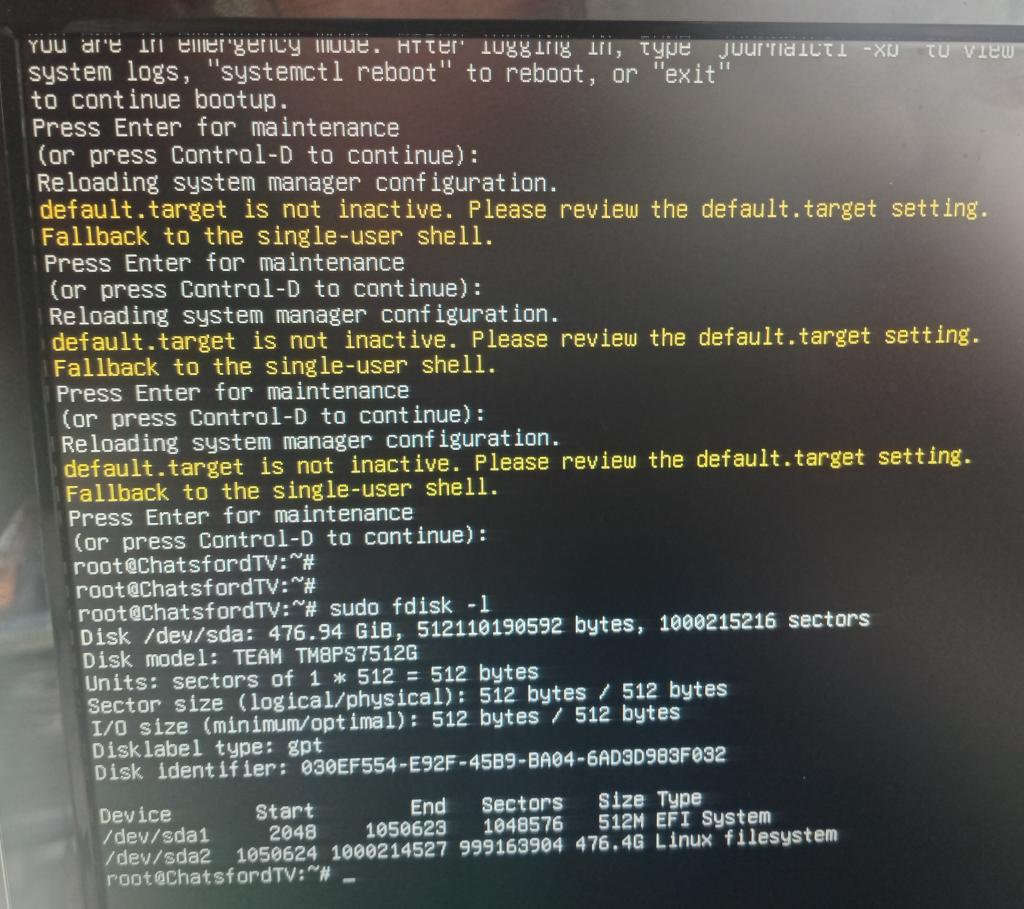
This is what I am seeing when I boot up:
It's upset, cos it says it is in "Emergency mode"
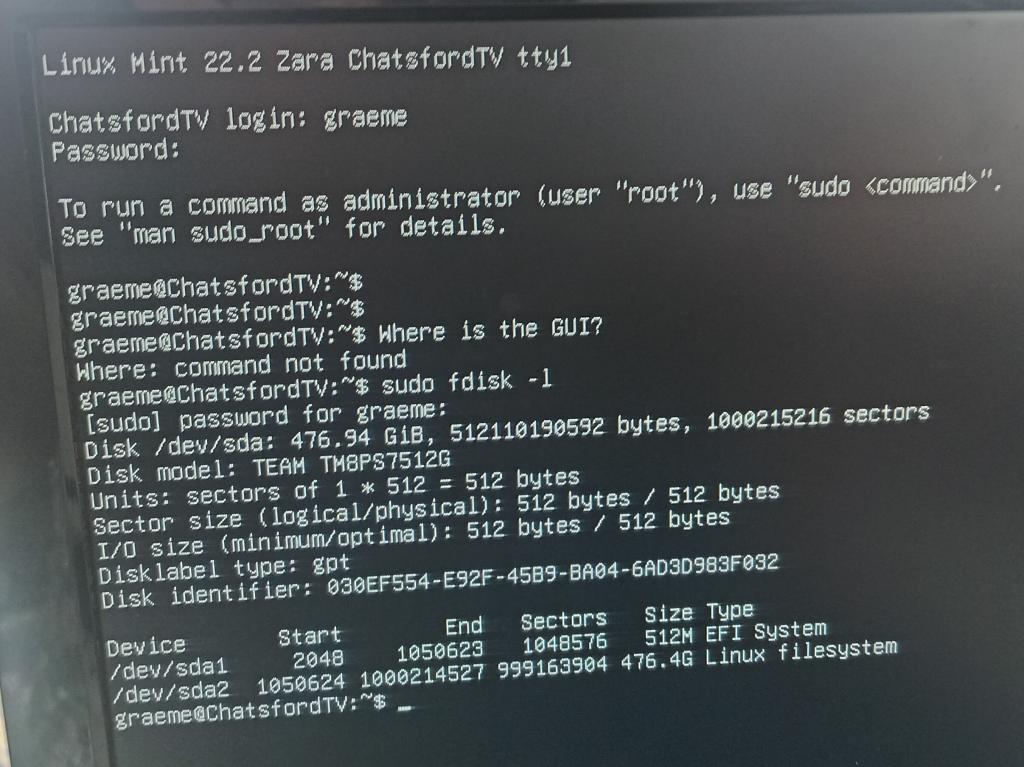
I type "login", and log into the account I created for this machine. At that point, I am stuck.
Anyone got any pointers as to perhaps a command I need to type or a config file I need to edit to get things booting again? Smoke makes things work. When the smoke gets out, it stops!
dddns Guru Joined: 20/09/2024 Location: GermanyPosts: 924
Posted: 11:30pm 17 Jan 2026
Copy link to clipboard
Print this post
Your root partition could not be mounted. Boot with a live stick and this will show you all UUID's:
blkid
Then click on /dev/sda2/ with the filemanager and navigate to /etc. Open it as administrator and edit /etc/fstab
Look in the first line with "/" and enter the UUDI you saw with blkid above for /dev/sda2
save it and reboot
Hope that helps :) Edited 2026-01-18 09:31 by dddns
dddns Guru Joined: 20/09/2024 Location: GermanyPosts: 924
Posted: 11:53pm 17 Jan 2026
Copy link to clipboard
Print this post
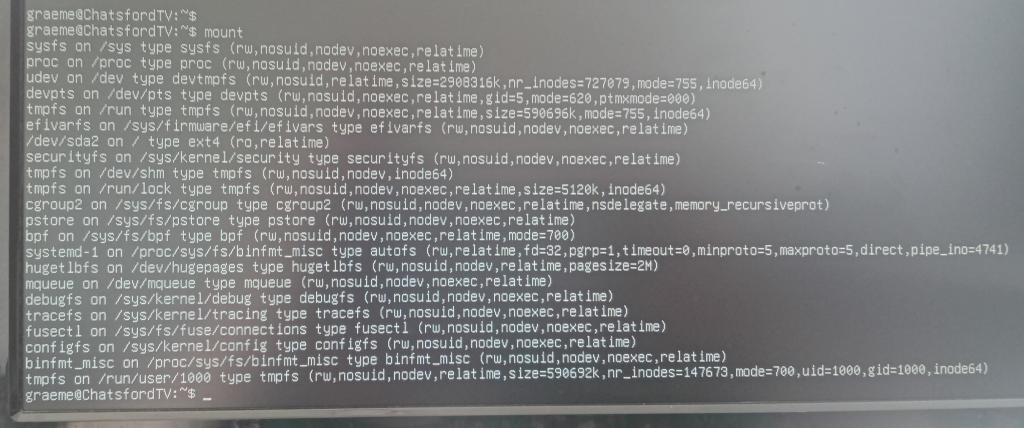
The second pic is confusing, what is the output of
mount
Grogster Admin Group Joined: 31/12/2012 Location: New ZealandPosts: 10064
Posted: 03:26am 18 Jan 2026
Copy link to clipboard
Print this post
Thanks, I will try the UUID thing now.
Results of 'mount':
Smoke makes things work. When the smoke gets out, it stops!
Page 1 of 2
Print this page
The Back Shed's forum code is written, and hosted, in Australia.

 Notice. New forum software under development. It's going to miss a few functions and look a bit ugly for a while, but I'm working on it full time now as the old forum was too unstable. Couple days, all good. If you notice any issues, please contact me.


 Print this post