Home
JAQForum Ver 24.01
Log In or Join  
Active Topics
Local Time 18:38 12 Feb 2026 Privacy Policy
Jump to

Notice. New forum software under development. It's going to miss a few functions and look a bit ugly for a while, but I'm working on it full time now as the old forum was too unstable. Couple days, all good. If you notice any issues, please contact me.

Forum Index : Microcontroller and PC projects : Flash Peters nice Picomite VGA V 1.0 Board

Author Message
atmega8

Guru

Joined: 19/11/2013
Location: Germany
Posts: 738
Posted: 04:16pm 05 Feb 2026
Copy link to clipboard 
Print this post

Hallo,

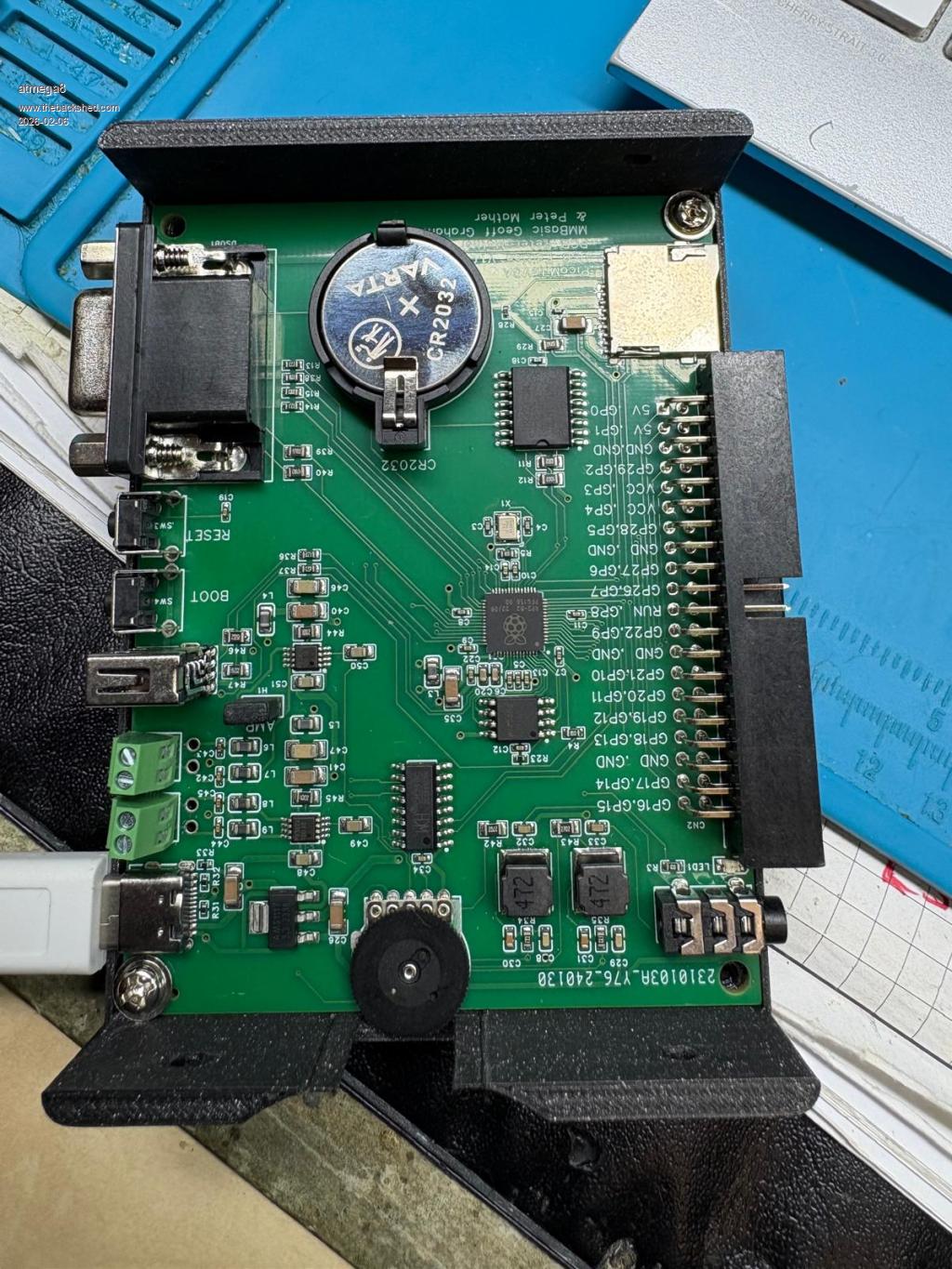
which USB Port should i connect to power it on, USB C or USB A?

Which Button to Press when Flash?

Boot or Reset?

The Device doesn't show up in my Explorer to copy the Binary on it.
RED on board LED is blinking.

THX  
 
matherp
Guru

Joined: 11/12/2012
Location: United Kingdom
Posts: 10940
Posted: 05:42pm 05 Feb 2026
Copy link to clipboard 
Print this post

A to program. C to use at which point the A becomes a USB host. Use the VGAUSB firmware.
 
atmega8

Guru

Joined: 19/11/2013
Location: Germany
Posts: 738
Posted: 09:54am 07 Feb 2026
Copy link to clipboard 
Print this post

mhhh

the RP2040
or RP2350?
 
atmega8

Guru

Joined: 19/11/2013
Location: Germany
Posts: 738
Posted: 10:11am 07 Feb 2026
Copy link to clipboard 
Print this post

If i copy the PicoMiteRP2350VGAUSBV6.02.00.uf2 file on the RP it will not reboot.
Also the Clear Flash tool from Geoff will not work/reboot

No serial console will be shown in device manager.

No idea what i can do now.
 
atmega8

Guru

Joined: 19/11/2013
Location: Germany
Posts: 738
Posted: 10:13am 07 Feb 2026
Copy link to clipboard 
Print this post

RED Led is blinking slowly
 
atmega8

Guru

Joined: 19/11/2013
Location: Germany
Posts: 738
Posted: 10:36am 07 Feb 2026
Copy link to clipboard 
Print this post

Seems to be ok now.

Hardware/OS  Problems with my usb  under win11.

Crashes, freeze...

so there is a rp2040 on the board?!


> print "hello"
hello
PicoMiteVGA MMBasic USB RP2040 Edition V6.02.00
Copyright 2011-2025 Geoff Graham
Copyright 2016-2025 Peter Mather
memory
Program:
  0K ( 0%) Program (0 lines)
104K (100%) Free

Saved Variables:
 16K (100%) Free

RAM:
  0K ( 0%) 0 Variables
  0K ( 0%) General
130K (100%) Free
>
> print mm.ver
6.02
 
atmega8

Guru

Joined: 19/11/2013
Location: Germany
Posts: 738
Posted: 10:41am 07 Feb 2026
Copy link to clipboard 
Print this post

Is the a documentation for the board for setting the correct hatdware options for I2C RTC etc...?
 
Mixtel90

Guru

Joined: 05/10/2019
Location: United Kingdom
Posts: 8525
Posted: 10:48am 07 Feb 2026
Copy link to clipboard 
Print this post

It looks like you've got it running. :)

With the USB firmware running you can plug a non-powered USB hub into the USB-A socket. You can then run a mouse and keyboard and, optionally, some USB game controllers.

I can't quite read the numbers on the Raspberry Pi chip, but it appears to be a RP2040, as expected, because MMBasic seems to be running ok.

I haven't got one of these boards so I might be of limited help.
Mick

Zilog Inside! nascom.info for Nascom & Gemini
Preliminary MMBasic docs & my PCB designs
 
phil99

Guru

Joined: 11/02/2018
Location: Australia
Posts: 2994
Posted: 10:55am 07 Feb 2026
Copy link to clipboard 
Print this post

  Quote  Is the a documentation for the board for setting the correct hatdware options for I2C RTC etc...?
I think the configuration options are printed on the bottom of the board.
The name of the design may be there too. If so you can use that to search the forum for more information about it.
 
Mixtel90

Guru

Joined: 05/10/2019
Location: United Kingdom
Posts: 8525
Posted: 11:03am 07 Feb 2026
Copy link to clipboard 
Print this post

I've been trying to find the documentation on this board but I've no idea where it is now.  :(
Mick

Zilog Inside! nascom.info for Nascom & Gemini
Preliminary MMBasic docs & my PCB designs
 
phil99

Guru

Joined: 11/02/2018
Location: Australia
Posts: 2994
Posted: 11:21am 07 Feb 2026
Copy link to clipboard 
Print this post

I think this is the one.
https://www.thebackshed.com/forum/ViewTopic.php?TID=16632&PID=217114#217114#217114
 
Mixtel90

Guru

Joined: 05/10/2019
Location: United Kingdom
Posts: 8525
Posted: 11:31am 07 Feb 2026
Copy link to clipboard 
Print this post

That looks like it, thanks Phil. :)

I see the options are nicely listed on the bottom of the board and on the display in the pic. :)

I told a lie too - I did get one of these. :) It's the one I made to look rather like an Apple device. :)

Edit:

Time passes...
Thorin sits down and starts singing about gold.
Updated to latest firmware now. :)

.
Edited 2026-02-08 01:01 by Mixtel90
Mick

Zilog Inside! nascom.info for Nascom & Gemini
Preliminary MMBasic docs & my PCB designs
 
atmega8

Guru

Joined: 19/11/2013
Location: Germany
Posts: 738
Posted: 07:01pm 07 Feb 2026
Copy link to clipboard 
Print this post

Thanks to all

Its up and running...;-)


Nice Board from Peter, also thank you again for everythimg you are doing arond mmbasic.©©©©


Print this page


To reply to this topic, you need to log in.

The Back Shed's forum code is written, and hosted, in Australia.
© JAQ Software 2026