Notice. New forum software under development. It's going to miss a few functions and look a bit ugly for a while, but I'm working on it full time now as the old forum was too unstable. Couple days, all good. If you notice any issues, please contact me.
PilotPirx Senior Member Joined: 03/11/2020 Location: GermanyPosts: 138
Posted: 11:06am 10 Feb 2026
Copy link to clipboard
Print this post
Surrounded by the collective expertise of MMBASIC, I would like to ask a simple question:
How can I write the following query shorter?
If (monat%=1) Or (monat%=3) Or (monat%=5) Or (monat%=7) Or (monat%=8) Or (monat%=10) Or (monat%=12) Then tag% = 31 If (monat%=4) Or (monat%=6) Or (monat%=9) Or (monat%=11) Then tag% = 30 If monat% = 2 Then tag% = 28
My first try didn't work: If monat% = 1 Or 3 Or 5 Or 7 Or 8 Or 10 Or 12 Then tag% = 31 If monat% = 4 Or 6 Or 9 Or 11 Then tag% = 30 If monat% = 2 Then tag% = 28
matherp Guru Joined: 11/12/2012 Location: United KingdomPosts: 11879
Posted: 11:14am 10 Feb 2026
Copy link to clipboard
Print this post
set up an array answer%(12)=(...) tag%(n)=answer%(monat%) Edited 2026-02-10 21:15 by matherp
PilotPirx Senior Member Joined: 03/11/2020 Location: GermanyPosts: 138
Posted: 11:18am 10 Feb 2026
Copy link to clipboard
Print this post
Thanks, sometime i'm stupid...
Volhout Guru Joined: 05/03/2018 Location: NetherlandsPosts: 6118
Posted: 11:19am 10 Feb 2026
Copy link to clipboard
Print this post
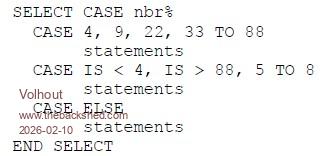
Alternatively use SELECT CASE Similar to this (from the manual)
robert.rozee Guru Joined: 31/12/2012 Location: New ZealandPosts: 2552
Posted: 01:15pm 10 Feb 2026
Copy link to clipboard
Print this post
the two key lines in the below program are:
If (month<8) Xor (month And 1) Then days=30 Else days=31 If month=2 Then days=28+((year And 3)=0)-((year Mod 100)=0)
the above also checks if the year is a multiple of 4, but not a multiple of 100, in which case February has 29 days.
cheers, rob :-)
Micromite MKII MMBasic Ver 5.05.05 Copyright 2011-2022 Geoff Graham > > > LIST Data "January ", "February ", "March ", "April " Data "May ", "June ", "July ", "August " Data "September", "October ", "November ", "December "
year=2026
For month=1 To 12 If (month<8) Xor (month And 1) Then days=30 Else days=31 If month=2 Then days=28+((year And 3)=0)-((year Mod 100)=0) Read name$ Print name$, month, days Next month End > > > RUN January 1 31 February 2 28 March 3 31 April 4 30 May 5 31 June 6 30 July 7 31 August 8 31 September 9 30 October 10 31 November 11 30 December 12 31 > >
Edited 2026-02-10 23:18 by robert.rozee
Martin H. Guru Joined: 04/06/2022 Location: GermanyPosts: 1552
Posted: 02:23pm 10 Feb 2026
Copy link to clipboard
Print this post
Clever , but ... Physically, a year has 365.2422 days. To compensate for this, the 400-year exception was introduced.
so to make it 100% perfect you have to add the 400-year rule.
If month=2 and Not(year Mod 400) Then days=29
that is why 2000 was a leap year
Cheers Martin Edited 2026-02-11 00:31 by Martin H.'no comment
robert.rozee Guru Joined: 31/12/2012 Location: New ZealandPosts: 2552
Posted: 03:18pm 10 Feb 2026
Copy link to clipboard
Print this post
Martin: well spotted, i'd forgotten about the 400 year rule!
it could probably be handled by:
If month=2 Then days=28+((year And 3)=0)-((year Mod 100)=0)+((year Mod 400)=0) EndIf
or
If month=2 Then days=28+((year And 3)=0) If (year Mod 100)=0 Then days=days-((year Mod 400)<>0) EndIf
both look messy - can you think of a more elegant way?
cheers, rob :-) Edited 2026-02-11 01:20 by robert.rozee
Martin H. Guru Joined: 04/06/2022 Location: GermanyPosts: 1552
Posted: 03:53pm 10 Feb 2026
Copy link to clipboard
Print this post
Hi Rob
I am working with Excel since 1997. Including true and false in the calculation formulas looked similar to your example.
days=28+((year And 3)=0)-((year Mod 100)=0)+((year Mod 400)=0)
is already elegant
A more elegant solution that comes to mind could only be cosmetic in nature.
days=28+(Not (year Mod 4))-(Not(year Mod 100))+(Not(year Mod 400))
test:
cls for year=1994 to 2010 month=2 if month=2 then days=28+(not (year mod 4))-(Not(year Mod 100))+(Not(year mod 400)) ?year,days next
Cheers Martin'no comment
PilotPirx Senior Member Joined: 03/11/2020 Location: GermanyPosts: 138
Posted: 04:04pm 10 Feb 2026
Copy link to clipboard
Print this post
Thanks, you've really helped me out. With so much feedback, I'll ask another question about the new V6.02.00:
Can “object” (unquoted token) be replaced by a variable in the new STAR and ASTRO commands? I tried using a string variable and an ARRAY element, but I always get the “Argument count” error. How do I convert a string into a token?
Program excerpt:
OPTION BASE 1 Dim solar$(9)=("SUN","MOON","MERCURY","VENUS","MARS","JUPITER","SATURN","URANUS","NEPTUNE") Dim x%
for x%=1 to 9 Astro solar$(x%), alt,az print alt,az next x%
phil99 Guru Joined: 11/02/2018 Location: AustraliaPosts: 3381
Posted: 08:34pm 10 Feb 2026
Copy link to clipboard
Print this post
Have encountered a similar error in other situations where a function wont accept a parameter that needs to be evaluated. The solution was an intermediate variable.
See if this works. Untested:-
OPTION BASE 1 Dim solar$(9)=("SUN","MOON","MERCURY","VENUS","MARS","JUPITER","SATURN","URANUS","NEPTUNE") Dim x%, Planet%
for x%=1 to 9 Planet% = solar$(x%) Astro Planet%, alt,az print alt,az next x%
Edited 2026-02-11 06:35 by phil99
Footnote added 2026-02-11 06:43 by phil99 JohnS (below) may be right. the coma may be the issue. The intermediate variable may avoid the need to "Execute" the command.
OPTION BASE 1 Dim solar$(9)=("SUN","MOON","MERCURY","VENUS","MARS","JUPITER","SATURN","URANUS","NEPTUNE") Dim x%, Planet%
for x%=1 to 9 Planet% = solar$(x%) Astro Planet% alt,az print alt,az next x%
JohnS Guru Joined: 18/11/2011 Location: United KingdomPosts: 4380
Posted: 08:35pm 10 Feb 2026
Copy link to clipboard
Print this post
I think you may need to remove the comma after object and also use such as EXECUTE
The syntax will be a bit painful...
John
Volhout Guru Joined: 05/03/2018 Location: NetherlandsPosts: 6118
phil99 Guru Joined: 11/02/2018 Location: AustraliaPosts: 3381
Posted: 09:06pm 10 Feb 2026
Copy link to clipboard
Print this post
Too early, not thinking yet.
OPTION BASE 1 Dim solar$(9)=("SUN","MOON","MERCURY","VENUS","MARS","JUPITER","SATURN","URANUS","NEPTUNE") Dim x%, Planet$
for x%=1 to 9 Planet$ = solar$(x%) Astro Planet$ alt,az print alt,az next x%
Edited 2026-02-11 07:10 by phil99
JohnS Guru Joined: 18/11/2011 Location: United KingdomPosts: 4380
Posted: 09:17pm 10 Feb 2026
Copy link to clipboard
Print this post
I didn't notice the % on Planet%, yes would need to be Planet$
The manual says the object needs to be a literal (my term), i.e. without quotes, so Planet$ is unlikely to work, which is why I think EXECUTE will be needed.
John
phil99 Guru Joined: 11/02/2018 Location: AustraliaPosts: 3381
Posted: 10:04pm 10 Feb 2026
Copy link to clipboard
Print this post
Even EXECUTE doesn't work.
> LIST Option BASE 1 Dim x%, Planet$ Dim solar$(9)=("SUN","MOON","MERCURY","VENUS","MARS","JUPITER","SATURN","URANUS","NEPTUNE") Location "25/12/2025 22:30:00", -33.86, 151.21
For x%=1 To 9 Planet$ = solar$(x%) Execute "Astro Planet$ alt,az" Print alt,az Next x% End
phil99 Guru Joined: 11/02/2018 Location: AustraliaPosts: 3381
Posted: 10:33pm 10 Feb 2026
Copy link to clipboard
Print this post
I am really not thinking clearly today. Forgot to assemble the string properly. You just need to "Print alt, az" to see.
> LIST Option BASE 1 Dim x% Dim solar$(9)=("SUN","MOON","MERCURY","VENUS","MARS","JUPITER","SATURN","URANUS","NEPTUNE") Location "25/12/2025 22:30:00", -33.86, 151.21
For x%=1 To 9 Execute "Astro "+solar$(x%)+" alt,az" Print alt,az Next x% End
JohnS had the answers all along. Edited 2026-02-11 08:58 by phil99
Volhout Guru Joined: 05/03/2018 Location: NetherlandsPosts: 6118
Posted: 06:08am 11 Feb 2026
Copy link to clipboard
Print this post
Question is… why do you need EXECUTE. Sounds like the same reason you have to use execute with GPxx pins. Pre-defined numerics (indexes in a list) in the C code.

 Notice. New forum software under development. It's going to miss a few functions and look a bit ugly for a while, but I'm working on it full time now as the old forum was too unstable. Couple days, all good. If you notice any issues, please contact me.


 Print this post