Notice. New forum software under development. It's going to miss a few functions and look a bit ugly for a while, but I'm working on it full time now as the old forum was too unstable. Couple days, all good. If you notice any issues, please contact me.
Geoffg Guru Joined: 06/06/2011 Location: AustraliaPosts: 3368
Posted: 02:07pm 25 Mar 2026
Copy link to clipboard
Print this post
Peter has released the latest version of the PicoMite firmware V6.02.01.
This can be downloaded from https://geoffg.net/picomite.html (scroll to the bottom of the page). It includes the updated user manual and additional specialised manuals (see the Extra Documentation folder in the firmware zip).
This release includes many bug fixes and enhancements. Also included are five new commands and support for the PicoCalc. Below is listed the full change log.
stanleyella Guru Joined: 25/06/2022 Location: United KingdomPosts: 2807
Posted: 09:05pm 25 Mar 2026
Copy link to clipboard
Print this post
@Geoffg thank you. installed with rpi 400. picomite usb hdmi working and usb keyboard. go to set options to test mmedit on rpi400
homa Guru Joined: 05/11/2021 Location: GermanyPosts: 693
Posted: 09:16pm 25 Mar 2026
Copy link to clipboard
Print this post
First of all, thank you so much for all your hard work!
Special thanks to Peter for creating all the PicoMite versions. And to you too, Geoff, for the excellent manual. (I’d like to have the doc for the German translation again ;-)
I do have one question, though. What led to the change of heart regarding the PicoCalc? Up until now, your statement about the developer and the background had put me off buying it. I had also pinned my hopes on Peter’s hardware development. However, I am currently considering ordering the ver2 for myself. It would be great to have a gadget like this for mmbasic in my pocket. Is support now guaranteed? I’d really appreciate a brief explanation.
Matthias
matherp Guru Joined: 11/12/2012 Location: United KingdomPosts: 11879
Posted: 09:52pm 25 Mar 2026
Copy link to clipboard
Print this post
I wrote about this previously. Although I strongly dislike the vendor's business practices, the reality is that multiple hobbiests just like TBS members bought the thing. A PicoCalc forum member Ernst did a great job of pulling together the various mods to the PicoMite firmware that were needed to run the PicoCalc AND sorted the crappy keyboard "BIOS". I therefore decided to incorporate these together with some additional code that automatically configures the PicoCalc if the PicoMite firmware sees it is running on a PicoCalc. This means that MMBasic runs fully supported on the PicoCalc. What I won't do is compromise MMBasic to run when launched from one of various mechanisms that load binaries from SDCard that are available in the PicoCalc world. I borrowed a PicoCalc to get the firmware working and my view of it FWIW is, looks nice, but unusable keyboard and too small screen. Over-complicated hardware design and use of many Chinese components with no English datasheets and a screen that uses a controller chip which is not specified. Strange and compromised serial port. Not open source despite including multiple open source software components. Nice toy but pretty useless in practice. Your view may vary.
toml_12953 Guru Joined: 13/02/2015 Location: United StatesPosts: 722
Posted: 10:21pm 25 Mar 2026
Copy link to clipboard
Print this post
Speaking of screen size how big is the screen on your Palm Pico? Also, how's it coming along? Will we see Gerbers and a BOM soon? Until it arrives, the PicoCalc is just about the only all-in-one handheld for MMBasic available.
homa Guru Joined: 05/11/2021 Location: GermanyPosts: 693
Posted: 10:39pm 25 Mar 2026
Copy link to clipboard
Print this post
Peter, thank you very much for the detailed explanation — it was extremely helpful. I really appreciate your perspective on open-source philosophy and your assessment of the components used in this context. Sometimes, though, compromises have to be made. I don’t think it’s completely useless in terms of my vision for the project. My absolute dream would be for it to have touch functionality, but yes... I’m also really looking forward to your project, and I hope I’ll be able to build the replica. Matthias
stanleyella Guru Joined: 25/06/2022 Location: United KingdomPosts: 2807
Posted: 11:20pm 25 Mar 2026
Copy link to clipboard
Print this post
This version doesn't work with mmedit-mmcc. the terminal goes red highlight text and no keyboard, All working before PicoMiteHDMI MMBasic USB RP2350A Edition V6.01.00b11 OPTION SERIAL CONSOLE COM2,GP20,GP21 OPTION FLASH SIZE 4194304 OPTION COLOURCODE ON OPTION KEYBOARD UK, 0, 0, 600, 150 OPTION RESOLUTION 640x480 @ 315000KHz OPTION DISPLAY 20, 40 OPTION SDCARD GP2, GP6, GP7, GP4 OPTION AUDIO GP0,GP1', ON PWM CHANNEL 0 OPTION DEFAULT FONT 3, 1 I don't know why and only know mmedit not xterm regards, stan
TassyJim Guru Joined: 07/08/2011 Location: AustraliaPosts: 6606
Posted: 05:09am 26 Mar 2026
Copy link to clipboard
Print this post
Sorry Stan, I can't help you with MMEdit. I don't have a HDMI USB configuration set up but I thought that once the firmware is loaded you can forget about the PC terminal program and use your keyboard/monitor stand alone. MMCC only talks to your USB-serial chip which I assume hasn't changed.
Every other version I have loaded performs as expected.
Jim Edited 2026-03-26 15:14 by TassyJimVK7JH MMedit
Volhout Guru Joined: 05/03/2018 Location: NetherlandsPosts: 6118
Posted: 07:33am 26 Mar 2026
Copy link to clipboard
Print this post
Stan,
Wrong thread. This is the V6.02.01 release thread. You are asking about a beta of V6.01.00.
Geoff, Peter,
What I have tested so far, all seems to work on RP2040 VGA. Congratulations on this new milestone. I am especially happy with the speed gain for 2040 (also Game*Mite).
bfwolf Senior Member Joined: 03/01/2025 Location: GermanyPosts: 258
Posted: 09:57am 26 Mar 2026
Copy link to clipboard
Print this post
"LOAD DATA fname$, address": I may have overlooked this before? It can be very useful, but: extremely dangerous!!! A total crash is practically guaranteed if the file is larger than the allocated RAM!
Couldn't this be supplemented with an optional argument?
Something like "LOAD DATA fname$, address [, nmaxbytes]"?
Perhaps if a bugfix release is needed anyway? (which we certainly hope isn't the case.) Otherwise, it could be included in the next main release.
Anyway — and I'll say it again: a huge thank you to @Peter for his fantastic work! And also to @Geoff!
Regards, bfwolf
Mixtel90 Guru Joined: 05/10/2019 Location: United KingdomPosts: 9136
Posted: 10:12am 26 Mar 2026
Copy link to clipboard
Print this post
There isn't anywhere guaranteed to be safe to load data into apart from the screen buffer. I think it's OK that the user simply understands what the command does and does their homework first. :) Yes, a complete crash is almost guaranteed if you don't be careful - same with the POKE commands. It all adds to the fun. :)Mick
stanleyella Guru Joined: 25/06/2022 Location: United KingdomPosts: 2807
Posted: 02:33pm 26 Mar 2026
Copy link to clipboard
Print this post
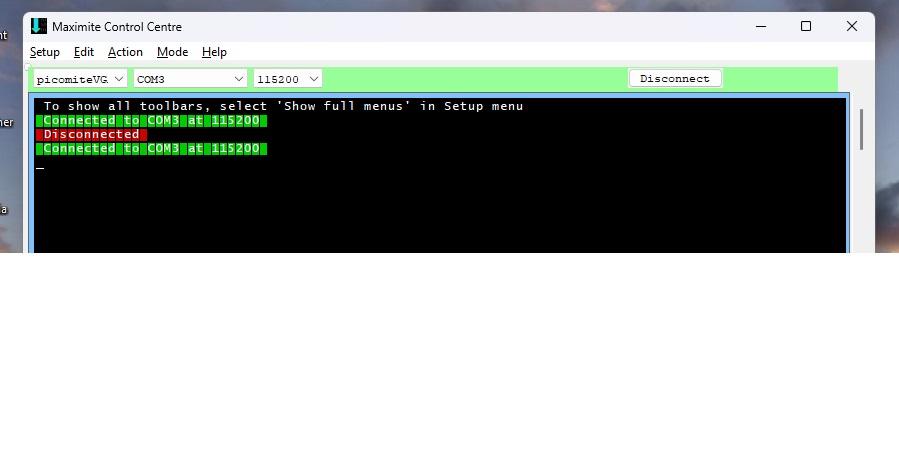
That is my old options list that I got to set up on latest version but mmcc says connected and I chose picomite vga-hdmi but mmcc no pc ketboard response. The pico usb keyboard works, characters typed appear on hdmi monitor. maybe I should have flash nuked before but mmcc terminal doesn't work.
mozzie Guru Joined: 15/06/2020 Location: AustraliaPosts: 431
Posted: 04:49pm 26 Mar 2026
Copy link to clipboard
Print this post
G'day, Many thanks once again to Geoff, Peter and everyone else who makes this awesome piece of kit available to all of us, it is very much appreciated
I will hopefully post up some info on the CNC machine when time allows, with a bit of luck it may inspire others to give it a wurle and try it out.
@Stanleyella, I have had problems with colour 0 in teraterm not being set to black, this gives a full highlighted screen in the terminal with the same colour text, might be worth a look in your software just in case. YMMV
Regards, Lyle.
stanleyella Guru Joined: 25/06/2022 Location: United KingdomPosts: 2807
Posted: 11:13pm 26 Mar 2026
Copy link to clipboard
Print this post
to see if mmedit faulty connected an ili9341 usb board and worked ie programmable so no idea why latest don't work with mmedit/mmcc. option list PicoMite MMBasic USB RP2350A Edition V6.01.00b10 OPTION SERIAL CONSOLE COM2,GP8,GP9 OPTION SYSTEM SPI GP18,GP19,GP16 OPTION AUTORUN ON OPTION FLASH SIZE 4194304 OPTION COLOURCODE ON OPTION KEYBOARD UK OPTION CPUSPEED (KHz) 378000
OPTION LCDPANEL CONSOLE OPTION DISPLAY 20, 40 OPTION LCDPANEL ILI9341, LANDSCAPE,GP15,GP14,GP13 OPTION GUI CONTROLS 4 OPTION TOUCH GP12,GP11 GUI CALIBRATE 0, 3900, 3816, -886, -658 OPTION SDCARD GP22 OPTION AUDIO GP0,GP1', ON PWM CHANNEL this works but the new version doesn't work in mmedit like image, no keyboard, Edited 2026-03-27 09:18 by stanleyella
Volhout Guru Joined: 05/03/2018 Location: NetherlandsPosts: 6118
Posted: 08:29am 27 Mar 2026
Copy link to clipboard
Print this post
Stan,
Please confirm.
You have a pico-2 system that uses an ILI9341 LCD display, and connects to a USB keyboard. The console is a CH340 connected to GP8/GP9 and works in TeraTerm. But not in MMEdit/MMCC.
Please show a photo of your setup. It is hard to help with little information.
Maybe OPTION AUTORUN OFF ???
Volhout
P.S. I have seen a similar incident before on my linux system, and re-installed MMEdit/MMCC 5.37 to solve it. The strange thing was that when MMEdit opened MMCC that MMCC would connect to the pico, but when I manually opened MMCC and pressed the CONNECT button, it would not connect. Regardless the settings I changed. After re-install all worked. Maybe a configuration file got corrupt. Edited 2026-03-27 18:59 by VolhoutPicomiteVGA PETSCII ROBOTS
ville56 Guru Joined: 08/06/2022 Location: AustriaPosts: 612
Posted: 09:02am 27 Mar 2026
Copy link to clipboard
Print this post
MMedit/MMCC do work reliably if the setup is ok. I was outsmarting myself already several times with the Olimex USB/HDMI board. It is a bit tricky if the defaults in MMBasic and the board hardware or setup are not the same as soon as you lose the USB/serial connection. So connecting the serial console forth and back and uuups... where has my serial gone to now??? It was always my bad, connecting the the serial converter to the right pins always solved it. And yes, there is always the chance to reverse TX and RX too. I've done all that already 73 de OE1HGA, Gerald
dddns Guru Joined: 20/09/2024 Location: GermanyPosts: 910
Posted: 10:20am 27 Mar 2026
Copy link to clipboard
Print this post
PicoMite MMBasic USB RP2350B Edition V6.02.01 runs excellent! The minor graphical glitches I noticed in earlier versions have all been fixed. This also applies to the HDMIUSB firmware I tested. Many thanks @matherp!
I've also tested MMedit/MMCC 5.4.0 under Ubuntu 22.04 base and I can confirm that it works without problems. @Jim, the escape key issue with miniFM is gone too!
stanleyella Guru Joined: 25/06/2022 Location: United KingdomPosts: 2807
Posted: 02:42pm 27 Mar 2026
Copy link to clipboard
Print this post
pico 2350 connected to hdmi screen says PicoMiteHDMI MMBasic USB RP2350A Edition V6.02.01 UK Keyboard Connected onchannel 1 option list option serial console com2,gp8,gp9 option flash size 4194304 option colourcode on option keyboard uk option resolution 640x480 @ 252000KHz option audio gp0,gp1 ' m on pwm channel 0
I didn't enter those options,
Page 1 of 7
Print this page
The Back Shed's forum code is written, and hosted, in Australia.

 Notice. New forum software under development. It's going to miss a few functions and look a bit ugly for a while, but I'm working on it full time now as the old forum was too unstable. Couple days, all good. If you notice any issues, please contact me.


 Print this post