Home
JAQForum Ver 24.01
Log In or Join  
Active Topics
Local Time 03:43 06 Apr 2026 Privacy Policy
Jump to

Notice. New forum software under development. It's going to miss a few functions and look a bit ugly for a while, but I'm working on it full time now as the old forum was too unstable. Couple days, all good. If you notice any issues, please contact me.

Forum Index : Microcontroller and PC projects : PicoMite V6.02.02 betas

Author Message
matherp
Guru

Joined: 11/12/2012
Location: United Kingdom
Posts: 11141
Posted: 02:25pm 04 Apr 2026
Copy link to clipboard 
Print this post

V6.02.02b0

PicoMiteV6.02.02B0.zip

PicoMiteRP2040 no longer supports the CAMERA command

All versions:
Support for 4 and 8 bit parallel memory sharing interconnect

MEMORY_SHARE_User_Manual.pdf

USB versions
Support as host for up to 4 CDC devices allowing a USB PicoMite to connect directly over USB to a non-USB PicoMite
  Quote  # USB CDC Host Serial Ports (COM3–COM6) User Manual

## Overview

USB builds of the PicoMite firmware (PicoMiteUSB, PicoMiteVGAUSB, PicoMiteHDMIUSB, and the RP2350 equivalents) can act as a USB **host** for up to four USB CDC (Communications Device Class) serial devices. These appear in BASIC as **COM3**, **COM4**, **COM5**, and **COM6**.

This allows a PicoMite with a USB host port to communicate with any device that presents a standard USB CDC serial interface — including other PicoMites running non-USB firmware, USB-to-serial adapters, and microcontroller boards with CDC endpoints. Devices may be connected directly or through a USB hub.

COM1 and COM2 continue to use the hardware UARTs. COM3–COM6 are available only on USB builds.

## Requirements

- A **USB build** of PicoMite firmware (any build with `USBKEYBOARD` defined).
- The connected device must present a standard **USB CDC ACM** interface.
- A standard PicoMite (non-USB build) is a CDC device by default and works without any special configuration on the device side.
- The USB device must be plugged in and enumerated **before** the `OPEN` command is issued. TinyUSB typically takes 1–2 seconds after power-on to enumerate a newly connected device.

## Channel and Port Mapping

Each CDC interface discovered by TinyUSB is assigned a fixed index (0–3). The mapping to COM ports and internal channel numbers is:

| COM Port | CDC Index | Channel | Notes |
| :--- | :--- | :--- | :--- |
| COM3 | 0 | 5 | First CDC device enumerated |
| COM4 | 1 | 6 | Second CDC device |
| COM5 | 2 | 7 | Third CDC device |
| COM6 | 3 | 8 | Fourth CDC device |

Channels 1–4 are reserved for USB HID devices (keyboard, mouse, gamepads). CDC channels start at 5 to avoid any conflict.

When a CDC device is connected or disconnected at the command prompt, a message is displayed:

```
USB CDC Device Connected on channel 5 (COM3)
>
```

```
USB CDC Device Disconnected on channel 5 (COM3)
>
```

These messages are suppressed while a program is running.

## Syntax

### Opening a Port

```basic
OPEN "COMn:baud" AS #fnbr
OPEN "COMn:baud,buf_size" AS #fnbr
OPEN "COMn:baud,buf_size,interrupt,int_level" AS #fnbr
```

Where:
- **n** is the port number: **3**, **4**, **5**, or **6**
- **baud** is a required baud rate value (see note below)
- **buf_size** is the optional receive buffer size in bytes (default 1024)
- **interrupt** is the optional name of a BASIC subroutine to call when data arrives
- **int_level** is the number of characters in the buffer that triggers the interrupt

The trailing **colon** after `COMn` is required, just as for COM1 and COM2.

**Baud rate note:** The baud rate parameter is required by the COM port parser but is **ignored** for CDC ports. USB CDC operates at whatever speed the USB bus supports. You can use any valid value (e.g. `9600`) as a placeholder.

### Closing a Port

```basic
CLOSE #fnbr
```

Closing the port releases the receive buffer, clears any interrupt, and de-asserts DTR/RTS on the USB interface.

## Parameters

| Parameter | Description |
| :--- | :--- |
| `baud` | Required but ignored for CDC ports. Use any valid value (e.g. `9600`). |
| `buf_size` | Receive buffer size in bytes. Default is **1024**. Increase for high-throughput applications. |
| `interrupt` | Name of a BASIC subroutine to call when the receive buffer reaches `int_level` characters. |
| `int_level` | Number of characters in the receive buffer that triggers the interrupt. Must be between 1 and `buf_size`. |

## Reading and Writing

Once opened, COM3–COM6 work identically to COM1/COM2 with standard file I/O:

```basic
' Send a string
PRINT #1, "Hello from host"

' Send a single character
x = 65
PUT #1, x

' Read a line (blocks until CR received)
LINE INPUT #1, response$

' Non-blocking check for available data
IF LOC(#1) > 0 THEN
 LINE INPUT #1, a$
END IF

' Read a single character
c = ASC(INPUT$(1, #1))

' Check if data is available
n = LOC(#1)
```

### Line Ending Behaviour

`PRINT #n` to a CDC port sends a **carriage return only** (CR, `0x0D`). The linefeed (LF, `0x0A`) that is normally appended for file and UART ports is suppressed. This matches the line ending convention expected by a PicoMite console on the receiving end.

If you need to send CR+LF explicitly:

```basic
PRINT #1, "text" + CHR$(10);
```

## Interrupts

COM3–COM6 support receive interrupts, exactly like COM1 and COM2. When the number of characters in the receive buffer reaches the specified level, the nominated subroutine is called.

```basic
OPEN "COM3:9600,1024,OnData,1" AS #1
' ...
DO
 ' main loop - interrupt fires when data arrives
LOOP

SUB OnData
 LINE INPUT #1, msg$
 PRINT "Received: " msg$
END SUB
```

The interrupt parameters are:
- The subroutine name (e.g. `OnData`) — must be a valid BASIC `SUB`
- The trigger level (e.g. `1`) — the interrupt fires when `LOC(#fnbr)` reaches this value

Interrupts are checked during the normal MMBasic polling cycle, not at hardware interrupt level. Latency depends on what the main program is doing.

## Transparent Reconnect

If a USB CDC device is physically disconnected while its COM port is open, the port remains open in BASIC. Any attempt to send data (`PRINT`, `PUT`) is silently ignored while the device is absent.

When the same device (or another CDC device) is plugged back into the same USB port and enumerates at the same CDC index, the firmware automatically re-asserts DTR/RTS and communication resumes. No BASIC code changes or `CLOSE`/`OPEN` cycle is needed.

This makes it possible to write programs that tolerate brief cable disconnections without error handling.

**Note:** If the device enumerates at a *different* CDC index after reconnection (e.g. because it was plugged into a different hub port), it will appear on a different COM port number. The original COM port will remain open but non-functional until closed.

## Error Messages

| Error | Cause |
| :--- | :--- |
| `Invalid COM port` | The port specifier is not `COM1:` through `COM6:` (or COM3–COM6 on a non-USB build). |
| `Already open` | The COM port is already opened by another `OPEN` statement. |
| `No USB CDC device on channel N for COMn` | No CDC device is currently enumerated at the required index. Check that the device is plugged in and has finished enumerating. |
| `COM specification` | The format of the COM specifier string is invalid. |

## Examples

### Basic Send and Receive

```basic
' Open COM3 with default 1024-byte buffer
OPEN "COM3:9600" AS #1

' Send a command to the connected device
PRINT #1, "Hello"

' Wait for and read the response
DO WHILE LOC(#1) = 0 : LOOP
LINE INPUT #1, response$
PRINT "Got: " response$

CLOSE #1
```

### Two-Way Communication with Interrupt

```basic
' Host PicoMite program - communicates with a device on COM3
DIM msg$ LENGTH 128

OPEN "COM3:9600,1024,OnReceive,1" AS #1

PRINT #1, "STATUS"

DO
 k$ = INKEY$
 IF k$ = "q" THEN EXIT DO
 IF k$ <> "" THEN PRINT #1, k$;
LOOP

CLOSE #1
END

SUB OnReceive
 LINE INPUT #1, msg$
 PRINT "[Device] " msg$
END SUB
```

### Larger Buffer for High Throughput

```basic
' Use a 4096-byte receive buffer for bulk data transfer
OPEN "COM3:9600,4096" AS #1

DO WHILE LOC(#1) = 0 : LOOP

' Read all available data
DO WHILE LOC(#1) > 0
 LINE INPUT #1, dat$
 PRINT dat$
LOOP

CLOSE #1
```

### Multiple CDC Devices

```basic
' Communicate with two CDC devices simultaneously
OPEN "COM3:9600" AS #1
OPEN "COM4:9600" AS #2

PRINT #1, "IDENTIFY"
PRINT #2, "IDENTIFY"

PAUSE 500

IF LOC(#1) > 0 THEN
 LINE INPUT #1, id1$
 PRINT "Device on COM3: " id1$
END IF

IF LOC(#2) > 0 THEN
 LINE INPUT #2, id2$
 PRINT "Device on COM4: " id2$
END IF

CLOSE #1
CLOSE #2
```

### Device-Side Program (Standard PicoMite)

This program runs on a standard (non-USB) PicoMite that is connected via USB to the host PicoMite. No special configuration is needed on the device side — it simply reads from and writes to the console:

```basic
' Device-side: echo back whatever the host sends, prefixed with "ACK:"
DO
 IF LOC(#0) > 0 THEN
   LINE INPUT a$
   PRINT "ACK:" a$
 END IF
 PAUSE 10
LOOP
```

## Limitations

- **USB builds only.** COM3–COM6 are not available on non-USB firmware builds (PicoMite, PicoMiteVGA, PicoMiteHDMI without the USB suffix).
- **Maximum four CDC devices.** The TinyUSB host stack is configured for up to 4 simultaneous CDC interfaces.
- **No flow control.** Hardware flow control (CTS/RTS) is not used for data flow. DTR/RTS are asserted when the port is opened and de-asserted when closed, but they serve as a ready signal only.
- **No baud rate control.** The baud rate parameter in the `OPEN` string is parsed but ignored. CDC operates at USB bus speed.
- **Options not supported.** The `S2` (two stop bits), `7BIT`, `INV` (inverted), `OC` (open collector), and `DE` (driver enable) options that apply to hardware UARTs have no effect on CDC ports.
- **Device must be enumerated before OPEN.** Unlike hardware UARTs, the USB device must be connected and enumerated before the port can be opened. Allow 1–2 seconds after plugging in before attempting `OPEN`.
- **PRINT sends CR only.** Line endings from `PRINT #n` on CDC ports are CR-only (no LF). This differs from COM1/COM2, which send CR+LF.
- **No transmit buffer.** Characters are written directly to the USB stack. `LOF(#n)` always returns 0 for CDC ports.
- **CDC index is determined by USB enumeration order.** If multiple CDC devices are connected through a hub, the assignment of CDC index 0–3 depends on the order in which TinyUSB enumerates them. This is generally deterministic for a fixed physical arrangement but may change if devices are plugged into different hub ports.


Easter Egg - all versions
' MandelbrotTest.bas
' Demonstrates all features of the MANDELBROT command
'
' Requires a configured display (SPI LCD, VGA, etc.)
' Press Ctrl-C at any time to abort a draw in progres
s

' Start with a clean slate
MODE 2
CLS

' --- 1. Basic draw (default 64 iterations) ---
Print "Drawing Mandelbrot set (default view)..."
Timer = 0
Mandelbrot Draw
Print "Done in " Str$(Timer) "ms"
Pause 2000

' --- 2. Draw with higher iteration count ---
CLS
Print "Redrawing with 128 iterations..."
Mandelbrot Reset
Timer = 0
Mandelbrot Draw 128
Print "Done in " Str$(Timer) "ms"
Pause 2000

' --- 3. Bare command (no subcommand, 64 iters) ---
CLS
Print "Bare MANDELBROT command..."
Mandelbrot Reset
Timer = 0
Mandelbrot 64
Print "Done in " Str$(Timer) "ms"
Pause 2000

' --- 4. Centre on a point of interest ---
'   Re-centre on approx (3/4 width, 1/2 height) - nea
r the
'   boundary of the main cardioid, then zoom in
CLS
Print "Centre on interesting region..."
Mandelbrot Reset
Mandelbrot Draw
Pause 1000
Mandelbrot Centre MM.HRES*3\4, MM.VRES\2
Print "Centred and redrawn"
Pause 2000

' --- 5. Zoom in sequence ---
CLS
Print "Zooming in x2, x2, x2..."
Mandelbrot Reset
Mandelbrot Draw
Pause 1000

Mandelbrot Zoom 2
Print "Zoom x2"
Pause 1000

Mandelbrot Zoom 2
Print "Zoom x4 total"
Pause 1000


' --- 6. Zoom out ---
CLS
Print "Zooming back out..."
Mandelbrot Zoom 0.5
Print "Zoom x2 total (zoomed out x4)"
Pause 2000

' --- 7. Pan around ---
CLS
Print "Panning right 50 pixels..."
Mandelbrot Reset
Mandelbrot Draw
Pause 1000

Mandelbrot Pan 50, 0
Print "Panned right"
Pause 1000

Print "Panning down 30 pixels..."
Mandelbrot Pan 0, 30
Print "Panned down"
Pause 1000

Print "Panning left and up..."
Mandelbrot Pan -80, -30
Print "Panned left+up"
Pause 2000

' --- 8. Combined: centre, zoom, pan workflow ---
CLS
Print "Interactive-style exploration..."
Mandelbrot Reset
Mandelbrot Draw
Pause 1000

' Centre on the seahorse valley (approx left-centre o
f set)
Mandelbrot Centre MM.HRES\4, MM.VRES\2
Pause 1000

' Zoom in deep
Mandelbrot Zoom 4
Pause 1000
Mandelbrot Zoom 4
Pause 1000
Mandelbrot Zoom 2
Pause 1000
Mandelbrot Zoom 2
Print "Deep zoom into seahorse valley"
Pause 2000

' Increase iterations for detail at this depth
Mandelbrot Draw 256
Print "Re-rendered with 256 iterations"
Pause 2000

' --- 9. Reset back to default ---
CLS
Print "Resetting to default view..."
Mandelbrot Reset
Mandelbrot Draw
Print "Back to default"
Pause 2000

CLS
Print "Mandelbrot demo complete!"
End


Edited 2026-04-05 00:45 by matherp
 
lizby
Guru

Joined: 17/05/2016
Location: United States
Posts: 3729
Posted: 04:09pm 04 Apr 2026
Copy link to clipboard 
Print this post

This looks terrific if I understand correctly.

Does this mean I can plug a powered 4-port USB hub into Picomite1's USB_C port, and plug Picomite2-5 into the hub, and Picomite1 can talk to all as if talking to their consoles?

What provides console on Picomite1?

And I can plug a usb-serial module into the hub and connect the serial to any device which outputs serial and have a link to PicoMite1?

And at the same time have another Picomite connected with 4-pin parallel?

~
Edited 2026-04-05 02:10 by lizby
PicoMite, Armmite F4, SensorKits, MMBasic Hardware, Games, etc. on FOTS
 
matherp
Guru

Joined: 11/12/2012
Location: United Kingdom
Posts: 11141
Posted: 04:34pm 04 Apr 2026
Copy link to clipboard 
Print this post

The USB CDC host capability applies to the USB variants of the firmware. For these the console by default is standard UART serial on GP8/GP9. This is how it has been forever.
The code is tested connecting my HDMIUSB reference design to a VGARP2350. You can have up to 4 connections simultaneously. I theory it could connect to a USB-serial module but untested. and in theory this can run at the same time as the parallel link - untested.
 
bfwolf
Senior Member

Joined: 03/01/2025
Location: Germany
Posts: 208
Posted: 09:10pm 04 Apr 2026
Copy link to clipboard 
Print this post

  matherp said  V6.02.02b0

PicoMiteV6.02.02B0.zip
...
All versions:
Support for 4 and 8 bit parallel memory sharing interconnect


Great that you took my suggestion about 4 bits into account!  Just in case that was the reason? Otherwise, anyway fantastic!

  matherp said  USB versions
Support as host for up to 4 CDC devices allowing a USB PicoMite to connect directly over USB to a non-USB PicoMite
  Quote  # USB CDC Host Serial Ports (COM3–COM6) User Manual

...

### Opening a Port

```basic
OPEN "COMn:baud" AS #fnbr
OPEN "COMn:baud,buf_size" AS #fnbr
OPEN "COMn:baud,buf_size,interrupt,int_level" AS #fnbr
```

Where:
- **n** is the port number: **3**, **4**, **5**, or **6**
- **baud** is a required baud rate value (see note below)
...

**Baud rate note:** The baud rate parameter is required by the COM port parser but is **ignored** for CDC ports. USB CDC operates at whatever speed the USB bus supports. You can use any valid value (e.g. `9600`) as a placeholder.


First of all: Brilliant! Super! Thanks again!  

Question: Isn't the baud parameter passed trough to USB-to-serial converters (like the FT232)? How do USB-to-RS232 adapter cables then determine the baud rate, nbits, and parity?

Regards
 
dddns
Guru

Joined: 20/09/2024
Location: Germany
Posts: 816
Posted: 09:30pm 04 Apr 2026
Copy link to clipboard 
Print this post

Thank you for the enhancements!
Would it be possible to use Xmodem with a custom com port?
 
toml_12953
Guru

Joined: 13/02/2015
Location: United States
Posts: 592
Posted: 11:34pm 04 Apr 2026
Copy link to clipboard 
Print this post

I'm trying the beta. When I exit the editor with Esc, the prompt disappears except for a tiny dot in the upper left corner. Before you blame it on the PicoCalc, the final version of 6.02.01 runs fine.

Here's my OPTION LIST:

PicoMite MMBasic RP2350B V6.02.02B0
OPTION SERIAL CONSOLE COM1,GP0,GP1,BOTH
OPTION LCD SPI GP10,GP11,GP12
OPTION SYSTEM I2C GP6,GP7, SLOW
OPTION BAUDRATE 19200
OPTION FLASH SIZE 16777216
OPTION LIBRARY_FLASH_SIZE  51000
OPTION COLOURCODE ON
OPTION CONTINUATION LINES ON
OPTION CASE UPPER
OPTION TAB 8
OPTION DEFAULT COLOURS GREEN, BLACK
OPTION KEYBOARD PICOCALC
OPTION PICO OFF
OPTION CPUSPEED (KHz) 384000
OPTION LCDPANEL CONSOLE ,, FF00
OPTION DISPLAY 26, 40
OPTION LCDPANEL ST7365P, PORTRAIT,GP14,GP15,GP13
OPTION BACKLIGHT LCD 80
OPTION SDCARD GP17, GP18, GP19, GP16
OPTION AUDIO GP26,GP27', ON PWM CHANNEL 5
OPTION RTC AUTO ENABLE
OPTION MODBUFF ENABLE  192
OPTION PLATFORM PicoCalc
OPTION PSRAM PIN GP47

Edited 2026-04-05 09:37 by toml_12953
 
lizby
Guru

Joined: 17/05/2016
Location: United States
Posts: 3729
Posted: 12:05am 05 Apr 2026
Copy link to clipboard 
Print this post

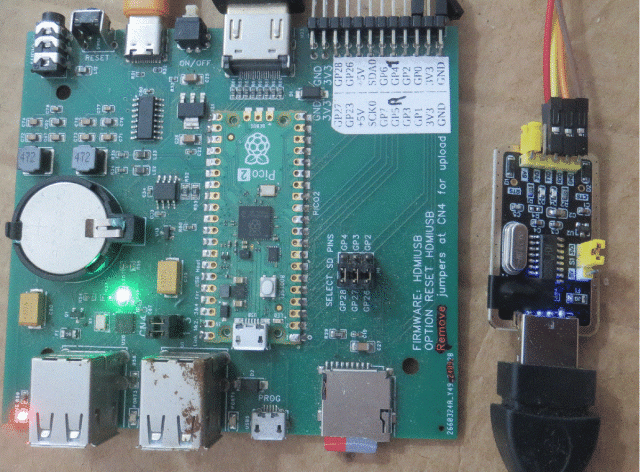
I got it to work with this module (Peter's):


I plugged a RP2350A-Zero pcb with ILI9341 LCD directly into one of the board's USB connectors, got recognition, did OPEN "COM3:9600" as #1 and then PRINT #1, "CLS RGB(BLUE)" and got a blue screen. But the PCB didn't supply enough power to do much more--it would restart.

So now I'm looking for a USB-A to USB-A cable for my powered hub. I'm pretty sure I used one back in December for something.

Found one--right in front of me, connecting to my USB-3 HDMI recorder. But it's not working with the powered hub, which has switchable USB ports. I switch one on, and nothing happens on the host.

I tried another powered hub--no joy. Is this an issue of a hub being plugged into another hub (on the HDMI PCB)?

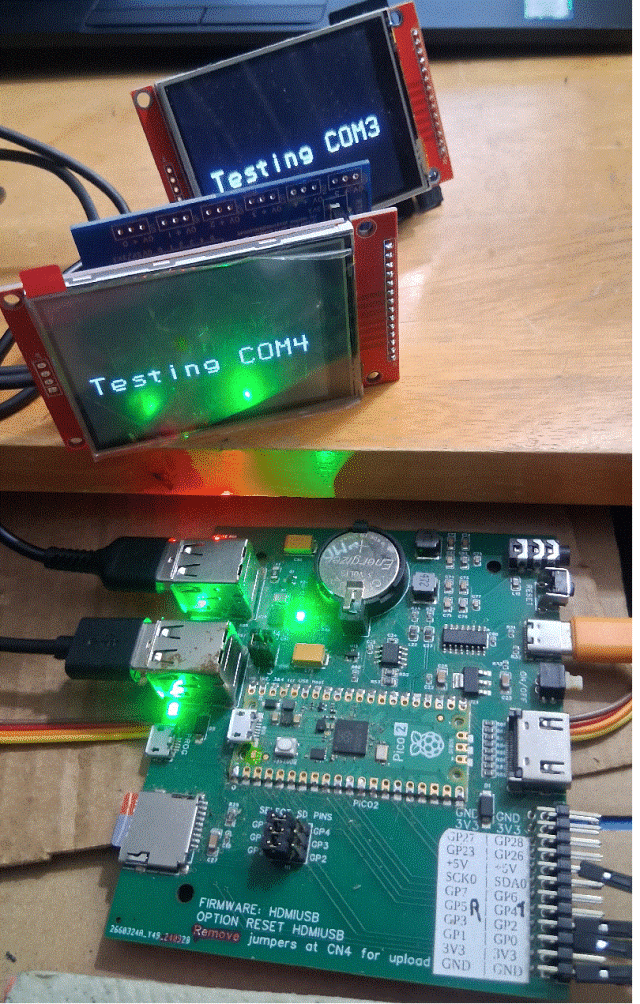
Ok, I plugged the two into the HDMI PCB. Then:

  Quote  > open "com3:9600" as #1
> open "com4:9600" as #2
> print #1,"Text mm.hres/2,mm.vres/2,"+chr$(34)+"Testing COM3"+chr$(34)+",C,,3"
> print #2,"Text mm.hres/2,mm.vres/2,"+chr$(34)+"Testing COM4"+chr$(34)+",C,,3"


Pretty nifty.  So how do you power locally?

~
Edited 2026-04-05 11:20 by lizby
PicoMite, Armmite F4, SensorKits, MMBasic Hardware, Games, etc. on FOTS
 
phil99

Guru

Joined: 11/02/2018
Location: Australia
Posts: 3111
Posted: 02:00am 05 Apr 2026
Copy link to clipboard 
Print this post

  Quote  So how do you power locally?
Perhaps connect VSYS and ⏚ of all 3 Picos together.
 
mozzie
Senior Member

Joined: 15/06/2020
Location: Australia
Posts: 251
Posted: 04:44am 05 Apr 2026
Copy link to clipboard 
Print this post

G'day,
From memory (could be faulty) you cannot connect more than 1 USB hub, either in series or parallel, to the PicoMite USB host, maybe try a bare PicoMite with just the powered hub, and USB to serial for console.

YMMV

Regards,
Lyle.
 
matherp
Guru

Joined: 11/12/2012
Location: United Kingdom
Posts: 11141
Posted: 07:39am 05 Apr 2026
Copy link to clipboard 
Print this post

One line fix for editor bug for TFT versions - no version change


PicoMiteV6.02.02B0.zip


The PicoMite supports 2 hubs. This allows a Raspberry Pi keyboard with its in-built hub to be plugged into the HDMIUSB reference board hub
Edited 2026-04-05 17:42 by matherp
 
lizby
Guru

Joined: 17/05/2016
Location: United States
Posts: 3729
Posted: 01:23pm 05 Apr 2026
Copy link to clipboard 
Print this post

  matherp said  The PicoMite supports 2 hubs. This allows a Raspberry Pi keyboard with its in-built hub to be plugged into the HDMIUSB reference board hub


Does that mean that in theory, my plugging a powered hub into a USB port on the HDMIUSB reference board should work?
PicoMite, Armmite F4, SensorKits, MMBasic Hardware, Games, etc. on FOTS
 
matherp
Guru

Joined: 11/12/2012
Location: United Kingdom
Posts: 11141
Posted: 02:48pm 05 Apr 2026
Copy link to clipboard 
Print this post

Try it and tell us. From the manual
  Quote  If you use a USB hub it is better to use an unpowered hub (ie, one that is powered by the Raspberry Pi Pico).
This is because the USB protocol stack cannot reset the hub and it may be confused if the power on the Pico is
cycled without doing the same for the hub. The hub can also be confused if devices are swapped while the hub
is powered. If this happens you should cycle the power on the Pico followed by the hub then add the USB
devices one by one.
 
terekgabor
Newbie

Joined: 02/01/2026
Location: Hungary
Posts: 31
Posted: 04:04pm 05 Apr 2026
Copy link to clipboard 
Print this post

OPTION FLASH SIZE 16777216
OPTION LIBRARY_FLASH_SIZE  51000

These are I haven’t found in documentation.
How to use them?
Thx!
 
matherp
Guru

Joined: 11/12/2012
Location: United Kingdom
Posts: 11141
Posted: 04:06pm 05 Apr 2026
Copy link to clipboard 
Print this post

For info only
 
terekgabor
Newbie

Joined: 02/01/2026
Location: Hungary
Posts: 31
Posted: 04:07pm 05 Apr 2026
Copy link to clipboard 
Print this post

Thanks!
 
toml_12953
Guru

Joined: 13/02/2015
Location: United States
Posts: 592
Posted: 04:33pm 05 Apr 2026
Copy link to clipboard 
Print this post

What versions run the MANDELBROT command? Only the VGA and HDMI versions? The LCD version doesn't seem to understand it.
 
matherp
Guru

Joined: 11/12/2012
Location: United Kingdom
Posts: 11141
Posted: 04:43pm 05 Apr 2026
Copy link to clipboard 
Print this post

  Quote  The LCD version doesn't seem to understand it.

Does for me.
 
Print this page


To reply to this topic, you need to log in.

The Back Shed's forum code is written, and hosted, in Australia.
© JAQ Software 2026