Notice. New forum software under development. It's going to miss a few functions and look a bit ugly for a while, but I'm working on it full time now as the old forum was too unstable. Couple days, all good. If you notice any issues, please contact me.
Peter63 Senior Member Joined: 28/07/2017 Location: SwedenPosts: 206
Posted: 01:30am 19 Apr 2026
Copy link to clipboard
Print this post
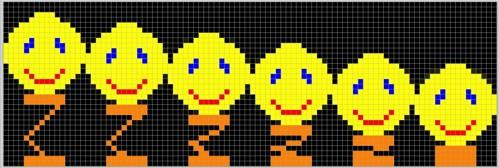
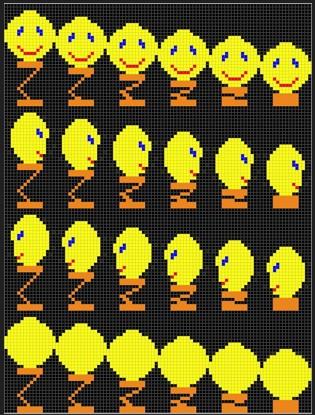
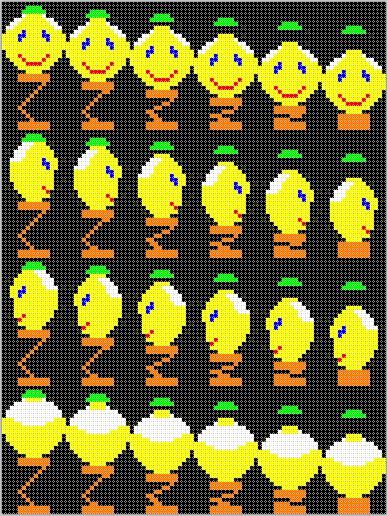
I made a simple animation that I did in Paint.NET. Try it out and give comments on how it can be improved. I might be programming completely wrongly or unnecessarily. Change the program and give suggestions on how it can be written instead.
Martin H. Guru Joined: 04/06/2022 Location: GermanyPosts: 1552
Posted: 02:33pm 19 Apr 2026
Copy link to clipboard
Print this post
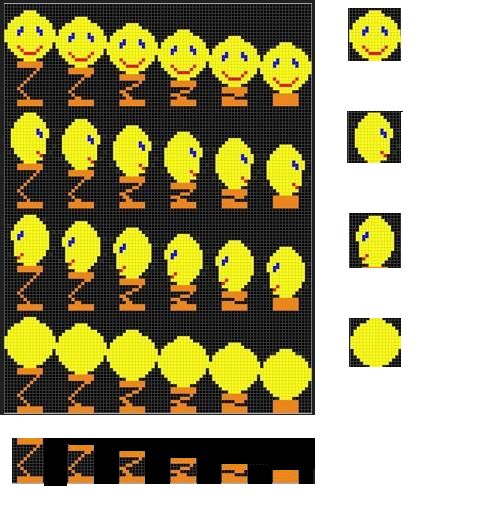
Just a quick tip for optimisation A large proportion of your sprites are identical, so if you split your sprites into two elements, you can save quite a lot of memory.
Horizontally, the face remains the same; vertically, the spring. That way, 10 sprites would be enough for everything; if you mirror the left/right face, you’d only need 9 Edited 2026-04-20 00:34 by Martin H.'no comment
Peter63 Senior Member Joined: 28/07/2017 Location: SwedenPosts: 206
Posted: 04:56pm 19 Apr 2026
Copy link to clipboard
Print this post
Hello, Martin
Yep, you're right, optimization is needed to minimize memory usage.
Thank you for your feedback, I appreciate that.
Then I don't really know how to optimize the program code, someone who is good at it is welcome to give suggestions.
/Peter63
Martin H. Guru Joined: 04/06/2022 Location: GermanyPosts: 1552
Posted: 06:43pm 19 Apr 2026
Copy link to clipboard
Print this post
Peter, Functionality comes before optimisation
First of all, it’s important that you manage to turn your thoughts into a programme that actually does what you want it to do.
' --- main loop --- Do
k=Asc(Inkey$)
If k=27 Then Exit Do
If k=32 Then ' space = compress jump compress_jump x,y,30 End If
If k=128 And y>50 Then ' up arrow y=y-8 compress_jump x,y,30 End If
If k=129 And y<200 Then ' down arrow y=y+8 compress_jump x,y,30 End If
If k=130 And x>8 Then ' left arrow x=x-8 compress_jump x,y,30 End If
If k=131 And x<300 Then ' right arrow x=x+8 compress_jump x,y,30 End If Loop
You could certainly do it that way; I’d actually prefer to replace it like that (untested).
do nope=0 k=Asc(Inkey$) Select case k Case 27 Exit do Case 32 ' space = just compress jump case 128 ' up arrow Inc y,-8*(y>50) Case 129' down arrow inc y,8*(y<200) Case 130 ' left arrow inc x,-8*(x>8) Case 131' right arrow inc x,8*(x<300) case else nope=1 end select if not nope then compress_jump x,y,30 Loop
and even that can be optimised further:
do k=asc(inkey$) Inc y,-8*(y>50)*(k=128)+8*(y<200)*(k=129) inc x,-8*(x>8)*(k=130)+8*(x<300)*(k=131) select case k Case 27 exit do Case 32,128 to 131 compress_jump x,y,30 end select loop
(Its all related to your Version V3)
So what does this line? Inc y,-8*(y>50)*(k=128)+8*(y<200)*(k=129)
Here, we make use of the fact that in mmbasic, `False` corresponds to 0 and `True` to 1. So the left-hand side adds -8 when y > 50 and k = 128, if neither of these cases applies, it adds -0. Then, by the same logic, we add 8 when y<200 and k=129. If neither the “Up” nor the “Down” key is pressed, exactly 0 is added to y, so it remains unchanged. X is processed in exactly the same way in the line below.
But it’s a learning process, so give it a go your own way. That way, the sense of achievement will feel more genuine. Cheers Martin Edited 2026-04-20 21:29 by Martin H.'no comment

 Notice. New forum software under development. It's going to miss a few functions and look a bit ugly for a while, but I'm working on it full time now as the old forum was too unstable. Couple days, all good. If you notice any issues, please contact me.

 Print this post