Notice. New forum software under development. It's going to miss a few functions and look a bit ugly for a while, but I'm working on it full time now as the old forum was too unstable. Couple days, all good. If you notice any issues, please contact me.
jvanderberg Regular Member Joined: 06/05/2026 Location: United StatesPosts: 86
Posted: 06:22pm 18 May 2026
Copy link to clipboard
Print this post
This is no-compromises RP2350B dev board that breaks out all 48 GPIOs. It's inspired by the Pimoroni Pico LiPo 2 XL W, which still supports the original 40 pin layout of the 'classic' Pi Pico boards. I think the pimoroni board does way too much, and I am not sure why it has castellated edges, because it's got chips on both sides, it can't be soldered down.
My goals for this version:
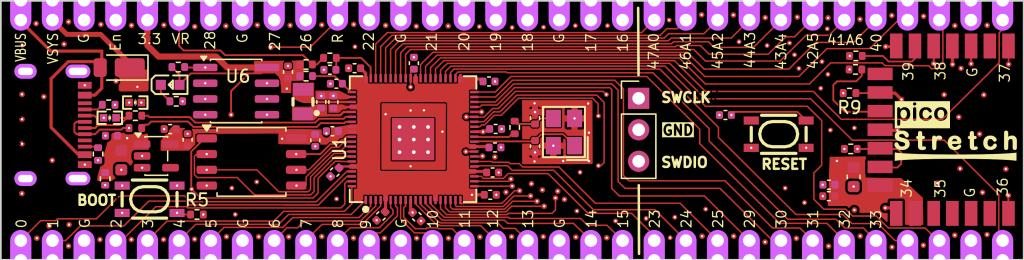
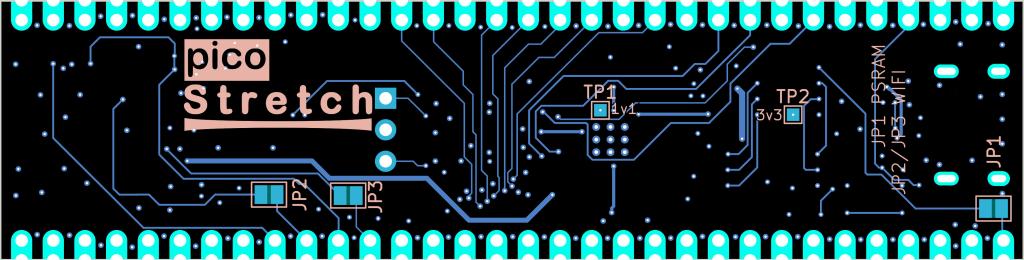
- 16MB Flash / 8MB PSRAM (CS GP0) - Expose all 48 GPIOs with castellated edges (a common nit with previous versions) - Support the original Pi Pico footprint for the first 20 pins on either side - USB-C / Radio Module 2 - Everything on the top side so it's solderable (there are solder jumpers on the back side) - Try to keep trace routing sane with not too many vias.
I haven't sent this version to production yet, and am looking for feedback. I have made PCBs based based on the same schematic but with a different PCB layout, and it all works. I have one in my PicoCalc right now.
You can find the kicad files here: https://github.com/jvanderberg/pico-stretch2. It's a 4 layer board with Inner1/Inner2 as ground planes. This helps with signal integrity and EMI for the traces that do have to move from the front to the backside.
Definitely would appreciate feedback before I send this off to production.
javavi Guru Joined: 01/10/2023 Location: UkrainePosts: 609
Posted: 06:49pm 18 May 2026
Copy link to clipboard
Print this post
Please make the PSRAM CS signal configurable via solder jumpers, at least between GP0 and GP47.
And route the USB signals to the contact pads on the underside of the board near the connector. Edited 2026-05-19 04:54 by javavi
jvanderberg Regular Member Joined: 06/05/2026 Location: United StatesPosts: 86
Posted: 06:55pm 18 May 2026
Copy link to clipboard
Print this post
I'll think about the first, it might be pretty hard given the layout, but there's still a lot of freedom once you get to the backside.
The USB pads are a good idea, I think that should be easy.
javavi Guru Joined: 01/10/2023 Location: UkrainePosts: 609
Posted: 07:20pm 18 May 2026
Copy link to clipboard
Print this post
I wasn’t able to view the schematic; if possible, please export it in an accessible format. Preferably, the radio module should not use any of the ports of the original Pico module.
Pay attention to the quality of the components in the chip’s power circuitry. With proper core power, the RP2350 chip is capable of operating at 504 MHz. Edited 2026-05-19 05:34 by javavi
jvanderberg Regular Member Joined: 06/05/2026 Location: United StatesPosts: 86
Posted: 08:33pm 18 May 2026
Copy link to clipboard
Print this post
I posted the link to the full KiCad repo, that’s got everything. Images of schematics on the web just tend not to turn out well.
My existing boards based on this same schematic are pretty overclockable. I think you just have to get the 1v1 inductor right, and they basically hand hold you through the proper layout and give you the exact part they bless.
bfwolf Senior Member Joined: 03/01/2025 Location: GermanyPosts: 258
Posted: 09:08pm 18 May 2026
Copy link to clipboard
Print this post
I agree with you! AFAIK GP0 is default for SPI0_RX or UART0_TX in PicoMite (don't remeber exactly). Pimoroni-Pico+2 also uses GP47 for PSRAM_CS.
@jvanderberg: Many compliments and thx for your "Portable MMBasic" !!!
Perhaps you achieve by AI-help to add loadable DLLs to MMBasic (e.g. on PicoMite)? I wrote several suggestions about this in the forum. Peter didn't like it.. A nice method would be the one used in the old MS-AmigaBasic.. If you have questions about: Feel free to ask!
Regards, bfwolf
jvanderberg Regular Member Joined: 06/05/2026 Location: United StatesPosts: 86
Posted: 09:37pm 18 May 2026
Copy link to clipboard
Print this post
Can you explain the use case?
bfwolf Senior Member Joined: 03/01/2025 Location: GermanyPosts: 258
Posted: 10:01pm 18 May 2026
Copy link to clipboard
Print this post
It's nice of you to ask back and show interest! Use cases would be supporting e.g. new hardware features by DLL-calls instead of extending the built-in commands and functions. Or to implement functionalities/algorithms in compiled-code instead of MMBasic-SUBs to increase execution-speed.
This would prevent the MMBasic-language from growing with every new appplication. Could also be helpful for keeping the basic portable by supplying different DLLs for different architectures/hardware.
A principle similar to that of C: Keep the language vocabulary minimal and utilize library functions depending on the application.
jvanderberg Regular Member Joined: 06/05/2026 Location: United StatesPosts: 86
Posted: 10:27pm 18 May 2026
Copy link to clipboard
Print this post
So not so much RAM savings as dynamic composition. I like the idea in general, it's pretty cool, but definitely has versioning issues.
The attraction would be that for a specific MCU I could have a single build with a 'config.sys' sort of thing that would load the drivers and associated commands for that hardware. The downside is of course user complexity. Remember DLL hell? How do you get the DLL? Is it the right version? How do you get it onto your MCU?
For the user it's a lot simpler to just build everything into a single firmware image. You've got all you need, and they are all the right version, because they came from the same code base.
I'll think about it, but MMBasic Anywhere has bigger fish to fry. I want to get the esp32 port up and published, I want to get PicoCalc release builds published and tested. I want to look at porting over a couple more newer features. Then I might try to target the STM32 (Maximite!)
I also want to see if I can put together a dynamic firmware generation website, where you basically tell the webpage your MCU and board details, attached hardware, and it builds a custom image for you. That would save having to create a single build for each unique combination of hardware, or builds with all the hardware compiled in but sitting unused. Edited 2026-05-19 09:21 by jvanderberg
bfwolf Senior Member Joined: 03/01/2025 Location: GermanyPosts: 258
Posted: 11:21pm 18 May 2026
Copy link to clipboard
Print this post
It is perfectly clear to me that you have your own priorities! Naturally, your primary focus must be on implementing what is important to *you*!
Yes, Windows and its DLLs are "a subject all their own"... There are certainly more elegant implementations out there.
Amiga libraries (the Amiga equivalent of "DLLs") possessed several key features: - Each library contained a version number stored at a specific, defined location right at the beginning of the file; furthermore, when using the core system function `OpenLibrary` (contained within `exec.library`), one could specify the *minimum* version number required. - Crucially, the libraries were designed to ensure they remained fully backward-compatible at all times. This meant that the order of function vectors was never altered; new functions were always appended to the *end* of the list; and functions that had been "deprecated" — meaning their use was no longer "recommended" — continued to function nonetheless. If these "deprecated" functions were subsequently "replaced" by newer, superior alternatives, the vectors for those new functions were simply appended to the end of the list.
A similar concept — DLLs for MMBasic — could be implemented by storing them directly on the filesystem. On the Amiga, there was a dedicated directory for this purpose called `libs/`, as well as a specific search path. The search path typically began with the "current directory", followed — if I recall correctly — by the directory from which the executable program had been launched, and finally, the system-wide `libs/` directory belonging to AmigaOS itself. To be more precise, there existed a specific "volume" (created by the ASSIGN command) named `LIBS:`, which was initially mapped to `SYS:libs/`; in later versions of the OS, this volume could even be defined as a *list* of directories (separated, I believe, by semicolons) — much like the `PATH` environment variable in Windows. Edited 2026-05-19 09:23 by bfwolf
dddns Guru Joined: 20/09/2024 Location: GermanyPosts: 910
Posted: 06:39am 19 May 2026
Copy link to clipboard
Print this post
Agree with PSRAM CS and I think the best for own designs with your board is to expose USB and bootsel to the pinheader.
Mixtel90 Guru Joined: 05/10/2019 Location: United KingdomPosts: 9136
Posted: 07:20am 19 May 2026
Copy link to clipboard
Print this post
DLLs & similar are a curse. > It's taken Microsoft many years to get something even approaching stability - and that's only by digital signing. > Linux libraries - a tossup whether you got the right version for your application on the kernel you are running. About all you are safe with is to run Debian stable and don't update or install anything until the next stable release. > Arduino has similar problems to linux because, once again, there is no control and there are multiple versions and hacked libraries for just about everything.
Please, please don't inflict this stuff on MMBasic. If you want a library of routines then create one for the Library on the Pico or as a #INCLUDE file, document it properly and publish it for others. It should *never* be installed into MMBasic itself, that way madness lies. MMBasic is *not* an OS no matter what it appears to be. Don't attempt to make it into one, you'll only break it irretrievably.Mick
Mixtel90 Guru Joined: 05/10/2019 Location: United KingdomPosts: 9136
Posted: 08:33am 19 May 2026
Copy link to clipboard
Print this post
GP0 isn't used by default for anything using MMBasic. The Pico pinout shows it as default for COM1 TX (UART0) but the one to avoid is GP8 as that is COM2 TX, default for the MMBasic serial console or PS2 keyboard.
GP19 conflicts with VGA.
GP47 is best avoided as that's ADC7, even though Pimoroni use it for PSRAM select. It's easy enough to rewire their PGA2350 to use GP0 rather than GP47 providing you do it before installing the pins.
For MMBasic GP0 is definitely the best choice for PSRAM.
-----------------
If I have a niggle it's the format in general. I can see a huge advantage in that it's breadboard compatible, but like Peter's design it's not a format I fancy attempting to fit onto a PCB unless it's a big one. As a development board, yes, maybe, but it's a fragile thing at that length with very fine traces. Only my own preferences, of course. :)Mick
dddns Guru Joined: 20/09/2024 Location: GermanyPosts: 910
Posted: 08:46am 19 May 2026
Copy link to clipboard
Print this post
GP0 is the default for SSD1963 so I like GP47 better.
I agree that it is going to be mechanically fragile, Pimoroni had quite the same with the Pico Plus 2W XL but as I looked today it seems they took it out of their shop..
My idea would be to separate the RM2 and design a breakout board for it. With this every Pico could be turned into a Webmite..
jvanderberg Regular Member Joined: 06/05/2026 Location: United StatesPosts: 86
Posted: 10:45am 19 May 2026
Copy link to clipboard
Print this post
Hah, yeah, don't worry. I do think it could probably work *better* in this sort of space because things tend to move more slowly and there are more hardware constraint. Like I told the OP, I think there are bigger fish to fry. Making MMBasic more modular and portable I think is a worthy goal.
MMBasic is pretty much an OS, more competent than DOS ever was.
jvanderberg Regular Member Joined: 06/05/2026 Location: United StatesPosts: 86
Posted: 11:03am 19 May 2026
Copy link to clipboard
Print this post
Thank you for the feedback.
Yeah, GP0 has worked well for me so far with MMBasic on previous versions of this board. If it's not hard I will probably add selectable solder jumpers for 0 or 47.
One of the reasons I spent 12 hours re-laying out this PCB was because previous versions used extremely thin traces, very closely spaced. This version isn't perfect, but it's better. Cross-talk will be a thing, but it's minimized by the interior ground planes. 4 layer boards appear to be rare in the space, but with JLCPCB, it's not really much of a cost concern.
It's not physically fragile, and electrically it seems robust enough. It overclocks well. I've got a previous version with an HDMI hat running fully loaded MMBasic - I2S sound, SD, Wifi, HDMI out, USB keyboard.
The big benefit (I think) is being able to put this into existing designs that take a Pico. Raspberry Pi made a defacto 40 pin standard with their original board, and so many hobbiest projects use it, but it's really limiting on the GPIO front. So this is an attempt to square that circle. If there's physical room, this board can still drop into those projects, but if you want to use it for prototyping with all the GPIOs, you can do that too. And dare to dream, maybe I could start a new defacto 64 pin standard.
jvanderberg Regular Member Joined: 06/05/2026 Location: United StatesPosts: 86
Posted: 11:03am 19 May 2026
Copy link to clipboard
Print this post
[deleted... double post] Edited 2026-05-19 21:04 by jvanderberg
Mixtel90 Guru Joined: 05/10/2019 Location: United KingdomPosts: 9136
Posted: 11:40am 19 May 2026
Copy link to clipboard
Print this post
I did a design some time ago (I don't think it was published, I never got one made anyway) using a SSD1963 with a PGA2350. That was remarkably compact when laying out the traces. I used GP0 for PSRAM as you can now specify DB0pin for the SSD1963 - I started the 16 data lines at GP2 so that the high speed counter on GP1 could be brought out.
AFAIK it's only Pimoroni that have standardised on GP47 for PSRAM. Everyone else would rather have 8 ADC inputs and have to use an alternative pin for UART0 TX. :)Mick

 Notice. New forum software under development. It's going to miss a few functions and look a bit ugly for a while, but I'm working on it full time now as the old forum was too unstable. Couple days, all good. If you notice any issues, please contact me.


 Print this post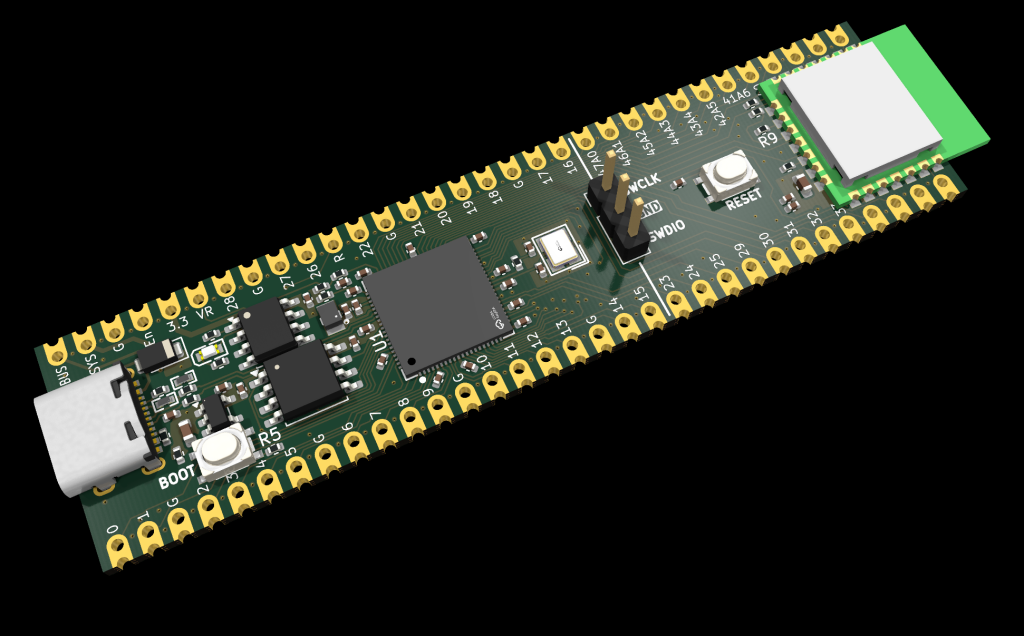


 AFAIK GP0 is default for SPI0_RX or UART0_TX in PicoMite (don't remeber exactly). Pimoroni-Pico+2 also uses GP47 for PSRAM_CS.


