Notice. New forum software under development. It's going to miss a few functions and look a bit ugly for a while, but I'm working on it full time now as the old forum was too unstable. Couple days, all good. If you notice any issues, please contact me.
In the next days I'll get all this packaged up for Geoff to include on his site and will post release notes on this thread.
As far as I'm aware the release picks up the various comments on the RC thread and the documentation thread (where I agree with them ).
matherp Guru Joined: 11/12/2012 Location: United KingdomPosts: 11755
Posted: 04:57pm 30 Jun 2026
Copy link to clipboard
Print this post
For info, the github is now completely re-organised. If you want to build the PicoMite firmware for yourself and assuming you have the compiler and pico sdk loaded and set up then all you need to do is as follows:
Create a new directory and cd to that directory git clone https://github.com/UKTailwind/PicoMite.git cd Picomite buildpicomite [what] 'what' can be nothing (builds every version) rp2350, rp2040, or a specific build PICOMIN:PicoMiteRP2040MIN PICOUSB:PicoMiteRP2040USB VGA:PicoMiteRP2040VGA VGAUSB:PicoMiteRP2040VGAUSB WEB:WebMiteRP2040 WEBRP2350:WebMiteRP2350 VGARP2350:PicoMiteRP2350VGA VGAUSBRP2350:PicoMiteRP2350VGAUSB PICORP2350:PicoMiteRP2350 PICOUSBRP2350:PicoMiteRP2350USB PICOBTRP2350:PicoMiteRP2350BT PICOBTHRP2350:PicoMiteRP2350BTH HDMI:PicoMiteHDMI HDMIUSB:PicoMiteHDMIUSB HDMIWEB:PicoMiteHDMIWEB Edited 2026-07-01 03:04 by matherp
Frank N. Furter Guru Joined: 28/05/2012 Location: GermanyPosts: 1148
Posted: 05:13pm 30 Jun 2026
Copy link to clipboard
Print this post
Peter, this version doesn't start up every time on my PicoCalc; it takes a long time to boot and then displays the following message:
Invalid clock speed - reset to default
In addition, you hear a "pop" through the speaker every time a launch is successful. That wasn't the case with version PicoMiteRP2350V6.03.00RC26 - everything was fine back then...
Frank
matherp Guru Joined: 11/12/2012 Location: United KingdomPosts: 11755
Posted: 05:30pm 30 Jun 2026
Copy link to clipboard
Print this post
Nuke the pico and try again. I've borrowed the PicoCalc again and it works perfectly for me. If you still have problems then we need to wait for any other PicoCalc users to report
Frank N. Furter Guru Joined: 28/05/2012 Location: GermanyPosts: 1148
Posted: 05:35pm 30 Jun 2026
Copy link to clipboard
Print this post
I nuked it again ( universal_flash_nuke.uf2 ) and flashed it with PicoMiteRP2350V6.03.00.uf2.
No difference...
Frank
matherp Guru Joined: 11/12/2012 Location: United KingdomPosts: 11755
Posted: 05:52pm 30 Jun 2026
Copy link to clipboard
Print this post
Do the following, if this doesn't work I'm beginning to suspect your PicoCalc is on the way out.
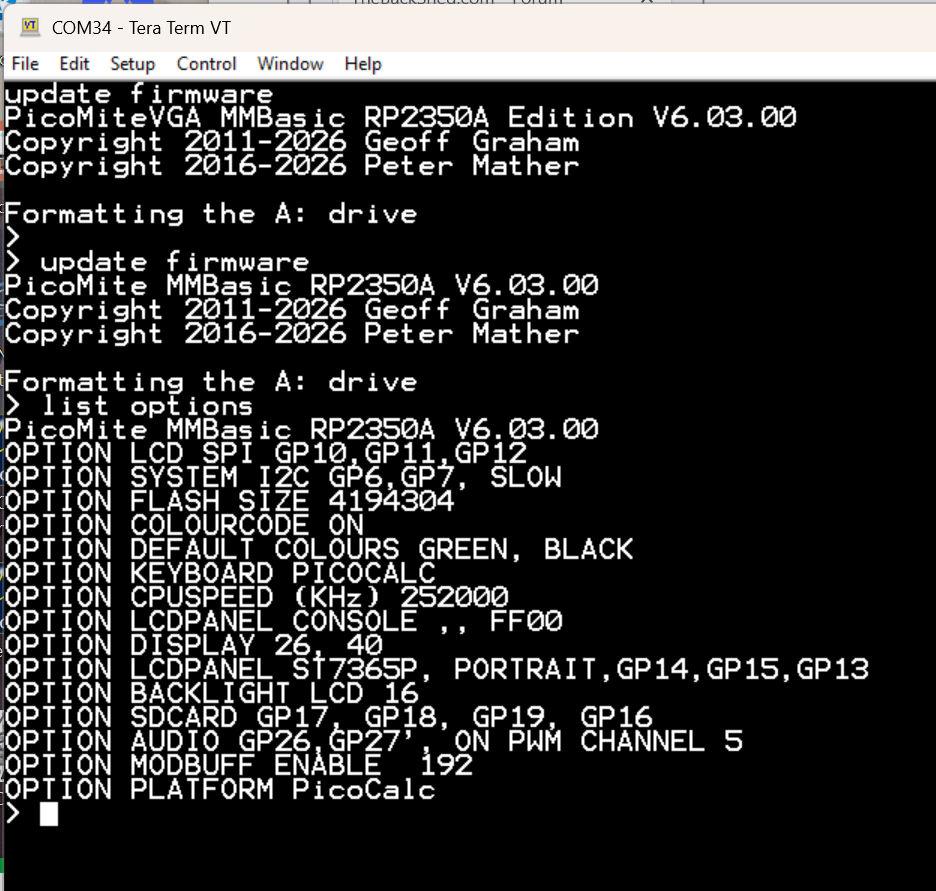
Load PicoMiteRP2350VGAV6.03.00.uf2
You should see it boot up as follows: then reload PicoMiteRP2350V6.03.00.uf2 and it should immediately re-confiure for the PicoCalc
Frank N. Furter Guru Joined: 28/05/2012 Location: GermanyPosts: 1148
Posted: 06:10pm 30 Jun 2026
Copy link to clipboard
Print this post
On this PC, the terminal only works through the USB-C port. And that port isn't enabled by default yet.
Okay, I loaded universal_flash_nuke.uf2, then the USB version, and then the regular version. I had to restart PicoCalc twice, then I saw the message "Formatting the A: drive," and when I entered "OPTION LIST", "OPTION PLATFORM PicoCalc" was displayed. After a restart, the following message appeared again: Invalid clock speed - reset to default
Frank
Frank N. Furter Guru Joined: 28/05/2012 Location: GermanyPosts: 1148
Posted: 06:30pm 30 Jun 2026
Copy link to clipboard
Print this post
What's really striking is that it almost never starts up with an SD card inserted, but it works more often without one. Sometimes the "Invalid clock speed" message doesn't appear either...
Frank
matherp Guru Joined: 11/12/2012 Location: United KingdomPosts: 11755
Posted: 06:49pm 30 Jun 2026
Copy link to clipboard
Print this post
The console should work connected to the Pico irrespective of whether the PicoCalc is turned on or not
al18 Senior Member Joined: 06/07/2019 Location: United StatesPosts: 248
Posted: 07:05pm 30 Jun 2026
Copy link to clipboard
Print this post
Peter, thanks for all your hard work on this release. You’ve made huge improvements over the years!
toml_12953 Guru Joined: 13/02/2015 Location: United StatesPosts: 704
Posted: 07:06pm 30 Jun 2026
Copy link to clipboard
Print this post
What OS is this for? It won't run in Ubuntu at all, it fails in PowerShell Admin mode with a permission error. It looks like a windows batch file but it won't run in Windows, either. Edited 2026-07-01 05:12 by toml_12953
dddns Guru Joined: 20/09/2024 Location: GermanyPosts: 909
Posted: 07:30pm 30 Jun 2026
Copy link to clipboard
Print this post
No idea of the hardware design but if the 3V3 output of the Pico itself is used I would check if the current is for some reason too high.
Edit: ..and if the Pico runs isolated with these cpu speeds. Do you use a diffent SD card than before? Edited 2026-07-01 05:53 by dddns
JohnS Guru Joined: 18/11/2011 Location: United KingdomPosts: 4366
Posted: 07:56pm 30 Jun 2026
Copy link to clipboard
Print this post
Looks to use buildpicomite.bat
so, Windows
John
homa Guru Joined: 05/11/2021 Location: GermanyPosts: 669
Posted: 08:53pm 30 Jun 2026
Copy link to clipboard
Print this post
I’ve just updated the PicoCalc with a 2350 (also known as pico2) to version 6.03. It’s been running smoothly so far.
However, the "new" command alone sometimes results in a screen that isn’t displayed properly (the command simply appears twice at the bottom of the screen). But "cls" sorts it out. Edited 2026-07-01 06:58 by homa
matherp Guru Joined: 11/12/2012 Location: United KingdomPosts: 11755
Posted: 10:01pm 30 Jun 2026
Copy link to clipboard
Print this post
W11, run in a developer command prompt window. Get an AI to convert to linux, should be trivial, but first make sure you can execute cmake and nmake from the command prompt to build one of the Pico example programs
toml_12953 Guru Joined: 13/02/2015 Location: United StatesPosts: 704
Posted: 11:28pm 30 Jun 2026
Copy link to clipboard
Print this post
I tried Linux commands directly.
One problem was that I had to edit PicoMite/net/mbedtls_config.h to add
#include <stdio.h>
then I actually get the compile stage to 98% Now I get this:
Relocating gpio_default_irq_handler into RAM (.time_critical) CMake Error at cmake/relocate_gpio_irq_to_ram.cmake:36 (message): relocate_gpio_irq_to_ram: no hardware_gpio/gpio.c.obj found under /home/tlake/PicoMite/CMakeFiles/PicoMite.dir
I'm stuck. Any ideas? Edited 2026-07-01 09:57 by toml_12953
ville56 Guru Joined: 08/06/2022 Location: AustriaPosts: 561
Posted: 06:21am 01 Jul 2026
Copy link to clipboard
Print this post
The release version cannot be reset to OLIMEX USB ....
> option list PicoMiteHDMI MMBasic USB RP2350B Edition V6.03.00 OPTION SERIAL CONSOLE COM2,GP8,GP9 OPTION FLASH SIZE 16777216 OPTION COLOURCODE ON OPTION KEYBOARD US OPTION PICO OFF OPTION RESOLUTION 640x480 @ 315000KHz
> option reset list PICO COMPUTER 3 HDMIUSB OLIMEX USB PICO COMPUTER HDMIUSBI2S
> option reset olimex usb Error : Invalid board for this firmware > 73 de OE1HGA, Gerald
Frank N. Furter Guru Joined: 28/05/2012 Location: GermanyPosts: 1148
Posted: 06:42am 01 Jul 2026
Copy link to clipboard
Print this post
Yes, you're right about that! That's a problem with my stupid Linux PC. Knoppix doesn't have a driver for the Raspberry's serial port. That's why I can only access it through the USB-C port.
I think I'm going to toss that piece of crap PicoCalc in the trash soon!!!
Frank Edited 2026-07-01 16:44 by Frank N. Furter
fred777 Regular Member Joined: 01/07/2021 Location: United KingdomPosts: 99
Posted: 08:12am 01 Jul 2026
Copy link to clipboard
Print this post
I would also like to say thank you for the new release. You are doing fantastic work!
matherp Guru Joined: 11/12/2012 Location: United KingdomPosts: 11755
Posted: 08:22am 01 Jul 2026
Copy link to clipboard
Print this post
The github is updated (8:21 UTC 1/7/26) with a fix to OPTION RESET OLIMEX USB and a fix to LIST PINS if no display is connected
Page 1 of 5
Print this page
The Back Shed's forum code is written, and hosted, in Australia.

 Notice. New forum software under development. It's going to miss a few functions and look a bit ugly for a while, but I'm working on it full time now as the old forum was too unstable. Couple days, all good. If you notice any issues, please contact me.


 Print this post
 ).
).