Notice. New forum software under development. It's going to miss a few functions and look a bit ugly for a while, but I'm working on it full time now as the old forum was too unstable. Couple days, all good. If you notice any issues, please contact me.
TassyJim Guru Joined: 07/08/2011 Location: AustraliaPosts: 6620
Posted: 12:50am 19 Aug 2026
Copy link to clipboard
Print this post
V5.4.3 has been uploaded.
No significant changes to the editor. My next task is to try and update the syntax files. It might be time to add another syntax for the USB range of picomites
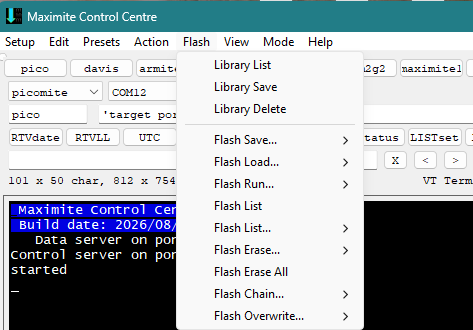
MMCC has a layout change, speed improvements and more error trapping.
All flash commands are moved from the file manager to the MMCC menu. (Drive A: is still accessed through the file manager.) Delete Library and delete all flash slots ask for confirmation.
The number of device families has been reduced and any new or unknown device is assumed to be a member of the picomite family.
File manager has also had a layout change.
The top line:
TFTP is available on the webmite when connected via TCPIP.
Ymodem is available on some picomite variants. IF Ymodem fails to start, it will revert to Xmodem. (TFTP and Ymodem are both much faster than Xmodem)
When transferring to a 'mite, you can choose to create a temporary file first. This is more secure and less likely to delete a valid file if the transfer fails. It does require sufficient drive space. Transfers TO the PC always use a temporary file.
Progress indicator. It may not appear for small files. It resets to zero once the transfer is complete
File name and transfer speed followed by a direction indicator.
Abort lets you interrupt a transfer. If you have temporary file selected, nothing is lost.
No change to the second line.
Next is the device currently connected to as shown by MM.Device$
Below that are 3 "Change to drive" and 3 "copy to Drive" It is the users responsibility to know how many drive their device supports.
Volhout Guru Joined: 05/03/2018 Location: NetherlandsPosts: 6151
Posted: 06:42am 19 Aug 2026
Copy link to clipboard
Print this post
Hi Jim,
Are the "change to drive" and "copy to drive" buttons for local copy ? (i.e. from picomite A: drive to picomite B: drive )?
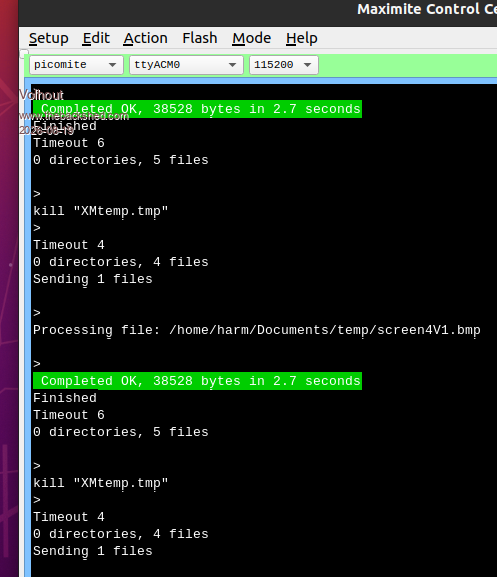
Small bug in MMCC: when transferring a file from PC to pico, using "temporary file". When that file already exists (overwriting): everything is okay. When that file did not previously exist(a new file): the renaming fails, and a file called XMtemp.tmp is left on the pico.
TassyJim Guru Joined: 07/08/2011 Location: AustraliaPosts: 6620
Posted: 07:02am 19 Aug 2026
Copy link to clipboard
Print this post
Yes Drive X to drive Y on the picomite. There were buttons for drive A and drive B previously. I was hiding the ones that weren't relevant. With the much larger range of devices out there, had to let the user work out which drives he has.
I don't have anything with the 3 drives to test. I have started reading the latest manuals to see what I have missed in the last few versions.
What sort of picomite? I have tested with a picomite geek V6.3.0 and it transfers a new file correctly on both drive a and b
Pseudo code
KILL "fname$" ' will give an error message if it doesn't exist but doesn't stop things. RENAME "XMtemp.tmp" AS "fname$" ' try the first version of rename command NAME "XMtemp.tmp" AS "fname$" 'try alternatinve command to rename
Jim Edited 2026-08-19 17:21 by TassyJimVK7JH MMedit
Volhout Guru Joined: 05/03/2018 Location: NetherlandsPosts: 6151
Posted: 08:40am 19 Aug 2026
Copy link to clipboard
Print this post
Hi Jim,
PicoMiteVGA V6.03.00
On the MMCC there is no error message, but on the VGA screen it is something like
XMODEM RECEIVE "filename.ext"
KILL "filename.ext" Error: could not find the file
Visible for 0.1 seconds, then immediately the VGA screen shows the result of a FILES command (the directory listing).
There is no RENAME and NAME on the VGA screen.
In the directory listing is XMtemp.tmp.
The behaviour is independent on file size (tested 4k...500k) or file name (also tried 4 character extensions like ".flac").
On MMCC screen there is a timout message that I cannot relate.
TassyJim Guru Joined: 07/08/2011 Location: AustraliaPosts: 6620
Posted: 05:04am 20 Aug 2026
Copy link to clipboard
Print this post
@Volhout, I wish I could work out what the difference is between our setups. It would make finding the errors you are getting much easier.
You can ignore the Timeout error message. It is a loop counter when waiting for a response. When the number approaches 100, I know there is a problem.
I have added a few delays and now only use the temporary file when the target exists. That won't find the reason for the error but it should get around it.
ville56 Guru Joined: 08/06/2022 Location: AustriaPosts: 624
Posted: 12:45pm 27 Aug 2026
Copy link to clipboard
Print this post
Jim,
just a question:
what is the best way to automatically include .BAS files into another .BAS file at MMEdit level?
The background of my question is that I have some functions and subs on the PC in their respective directories. I do want to include their sources at the time of downloading the main program to the Pico. So the latest version of these functions/subs is always included automatically.
I found the #INCLUDE directive, but that works only for CMM2 and only on the target processor. What I imagine is kind of a "preprocessor" that includes the sources at the position where a #INCLUDE-like directive is placed at IDE level. Maybe something like a "#EXPAND filename [function/sub-name]" directive ....
Do you think such a change to MMEdit could be possible or does it make no sense from your pov ?
Regards, Gerald 73 de OE1HGA, Gerald
disco4now Guru Joined: 18/12/2014 Location: AustraliaPosts: 1157
Posted: 01:15pm 27 Aug 2026
Copy link to clipboard
Print this post
I have not updated the release of this for sometime, but it is what I used all the time. MMReplaceF4H7FotSF4xGT
ville56 Guru Joined: 08/06/2022 Location: AustriaPosts: 624
Posted: 03:50pm 27 Aug 2026
Copy link to clipboard
Print this post
Thanks disco4now for the link, wasn't aware of this tool. But after reading thru the .pdf, I don't think it addresses my idea of code substitution. Maybe I have to write my own preprocessor. 73 de OE1HGA, Gerald
TassyJim Guru Joined: 07/08/2011 Location: AustraliaPosts: 6620
Posted: 08:49pm 27 Aug 2026
Copy link to clipboard
Print this post
MMReplace is the closest to what you are asking for. A long time ago MMEdit had a "Library" function but that was back when you only had the one file open. Once I added tabs, it was easier to copy and paste between files.
The best way to proceed would be to do something like MMReplace. The MMEdit help explains how to run an external program and return the processed file back to MMEdit.
If you only include functions as the code is deployed, you loose some of the testing available in MMEdit.
ville56 Guru Joined: 08/06/2022 Location: AustriaPosts: 624
Posted: 05:54am 28 Aug 2026
Copy link to clipboard
Print this post
Thanks Jim,
tried to play around with it but failed to get it running. In the top menue when I click Action -> MMReplace it says "not installed". How do I install MMReplace? I've copied the files from disco4now into the MMEdit directories as per the pdf.
From an older thread about MMReplace I've also copied the definitions for external programs. That used to somwhow work once, but now it refuses to do anything by just opening a Dos window for a millisecond so I cannot see what is being run and if there is any errormessage. Happens with "MMReplace --> MMCC" and "MMReplace --> MMEdit". The "test" for the external programs shows existing directories/files and destinations.
Regards, Gerald 73 de OE1HGA, Gerald
TassyJim Guru Joined: 07/08/2011 Location: AustraliaPosts: 6620
Posted: 07:54am 28 Aug 2026
Copy link to clipboard
Print this post
I haven't played with MMreplace for many years. I think the version you have is for earlier versions on MMEdit. I will try and find the latest version for you.
Gerry's program doesn't go as far as substituting from external files.
You need an external program. MMEdit can pas the name of your BAS file to the program which reads each line looking for "#EXPAND filename [function/sub-name]" your program then looks for the file + SUB and substitutes the SUB/Function into its copy of the bas file. At the conclusion, the expanded bas file is saved then passed back to MMEdit (or to MMCC)
I will look at the source for MMreplace to see if I can easily modify it for you.
You are welcome to write your own version.
Jim
Edit: Do you have a "base folder" for your library files? If not you will have to include the full path as well as function name. That could make for long lines in the bas files and the opportunity for typos. Edited 2026-08-28 18:20 by TassyJimVK7JH MMedit
Thanks a lot,I use MMCC and MMEDIT on my "retro dev machine" running windows vista on a old acer travelmate (intel core T7400 and 4gb ram !). But I need vista for my 3d printer and some stuff I want to keep from my childhood
The portable version allow me to use your software since the installer is not win32 compatible.
ville56 Guru Joined: 08/06/2022 Location: AustriaPosts: 624
Posted: 09:33am 28 Aug 2026
Copy link to clipboard
Print this post
Thank you Jim,
I hope the zip-file for MMReplace Gerry attached a few posts above should be the latest... even though it does not contain any .tkn files. Dunno if they are still required. At least #REPLACE is not highlighted in MMBasic. Found a user.tkn in some other old thread and copied it into the MMBasic directory. Hope it does not do some harm anywhere else.
If you could tell me how to integrate MMReplace in order to get rid of the "not installed" menue item it would be great. ATM I have it in the "Action" menue via the external programs.
At least I got #REPLACE working a few times when sending from MMBasic to MMCC but the code is not reliably replaced, sometimes it is, somtimes not. Didn't find out a root cause by now or what I'm doing wrong.
I think about using the MMBasic for Dos as a vehicle to implement my relpacement logic. Still have to figure out how the wrapper files work and how to automate the transfer to MMCC. Thanks for the remark on file/diretory-names. I'll think about that when I have understood how to integrate all that in MMEdit/MMCC workflow.
And I want to thank you for the great IDE you have written. It raises productivity by magnitudes for me. I really like it.
73 de Gerald 73 de OE1HGA, Gerald
disco4now Guru Joined: 18/12/2014 Location: AustraliaPosts: 1157
Posted: 12:04pm 28 Aug 2026
Copy link to clipboard
Print this post
Sorry, the link above pointed to MMReplace that worked with MMEdit3 and 4. This is latest that should work with MMEdit5 MMREPLACE Latest
Jim has given it its own menu item but I am not sure how to point it to the MMReplace location. I still use the original method of making it a new item under Action.F4H7FotSF4xGT
ville56 Guru Joined: 08/06/2022 Location: AustriaPosts: 624
Posted: 01:50pm 28 Aug 2026
Copy link to clipboard
Print this post
disco4now,
I got it partially working now. #REPLACE is working but I also found a #INCLUDE directive in the pdf for the last version but I cannot get it to work. Are there other limitations?
#INCLUDE Directive The #INCLUDE directive allows the inclusion of code from another file when the code is loaded via MMEdit5. e.g. #INCLUDE filename.inc, #Include "../list.inc"
btw, the #REPLACE directve is now highlighted in MMBasic wheras #INCLUDE is not. It's not including anything neither at MMBasic load nor at MMCC transfer.
Gerald 73 de OE1HGA, Gerald
TassyJim Guru Joined: 07/08/2011 Location: AustraliaPosts: 6620
Posted: 09:57pm 28 Aug 2026
Copy link to clipboard
Print this post
Gerry, This is the contents of MMReplace.inf which needs to be placed into the MMEdit data folder
; MMReplace menu items.
[MMReplace startup] ; %bas% The full path and filename to the current BAS file. ; %basshort% The filename to the current BAS file without any path. ; %baspath% The path to the current BAS file ; %MMRpath% The path to the MMReplace program folder including trailing \ ; %mmepath% The path to the MMEdit And MMCC program folder including trailing \ ; %q% = quote Chr(34) ; ; You must change this to point to your MMReplace program folder. MMReplace folder = C:\apps\MMReplace\ ; MMReplace0 = Replace and Deploy|%q%%MMRpath%%q%|%q%%MMRpath%MMReplace.exe%q% | %q%%bas%%q% %q%%mmepath%%q% %q%MMCC%q%|0 MMReplace1 = Replace |%q%%MMRpath%%q%|%q%%MMRpath%MMReplace.exe%q% | %q%%bas%%q% %q%%mmepath%%q% %q%MMEdit%q%|0 MMReplace2 = PIOCHECK|%q%%MMRpath%%q%|%q%%MMRpath%MMReplace.exe%q% | %q%%bas%%q% %q%%mmepath%%q% %q%PIOCHECK%q%|0 MMReplace3 = Find Line No.|%q%%MMRpath%%q%|%q%%MMRpath%findlineno.exe%q% | %q%%mmepath%%q% |0
That will activate the MMReplace menu Users need to change hthe line pointing to their MMReplace exe
disco4now Guru Joined: 18/12/2014 Location: AustraliaPosts: 1157
Posted: 03:50am 29 Aug 2026
Copy link to clipboard
Print this post
Gerald,
#INCLUDE will need to be added to the User.tkn file for it to highlight.
When using #Include the filename needs to be in quotes. e.g. #INCLUDE "../MyLibrary.inc"
Are you using windows. This is the latest MMReplace.exe This has a few fixes since the original release but as far as I know #INCLUDE should work. If on Linux I will have to refresh my memory to compile latest for Linux.
If you place MMReplace.exe and findlineno.exe in C:/apps/MMReplace and then place the MMReplace.inf Jim posted above in the MMEdit home directory e.g. C:\Users\gerry\AppData\Local\MMedit5 it seems to work OK from the new menu item. The user.tkn file should also be placed there to get the highlighting to work.
Are you looking to just INCLUDE files at load time or are you hoping to pull SUB and FUNCTION blocks out of a reference library at load time?
TassyJim Guru Joined: 07/08/2011 Location: AustraliaPosts: 6620
Posted: 07:20am 29 Aug 2026
Copy link to clipboard
Print this post
Gerry, Gerald would like to " pull SUB and FUNCTION blocks out of a reference library at load time" To make it more of a challenge, there will be multiple source files and code needs to be extracted from more than 1 each time.
I have been playing a bit. If the source/library files used tags to indicate the start and end of blocks of interest, code that is not within a SUB can be extracted. Multiple SUBs can be grouped together and extracted in one go.
'#MODULE INA3221 ' all registers are 16 bit so write register number then read 2 bytes function INA3221_read(reg as integer) as integer local registers$ i2c2 write ina3221addr,0,1,reg i2c2 read ina3221addr,0,2,registers$ INA3221_read = str2bin(int16,registers$,BIG) end function
' all registers are 16 bit so write register number then 2 data bytes sub INA3221_write reg as integer, value as integer local integer hibyte, lobyte lobyte = value and &hFF hibyte = (value >> 8) and &hFF i2c2 write ina3221addr,0,3,reg,hibyte,lobyte end sub
sub INA3221_reset local integer config config = INA3221_read(0) config = config or &h8000 INA3221_write(0,config) end sub '#ENDMODULE INA3221
In the main code
#CODEMODULE filename$ modulename$
I also suggest that all the source files be stored under a common root folder to keep file names short. Subdirectories are OK I can save the codebase folder name between sessions (in MMReplace.inf withot upsetting anything else) so if that doesn't change it won't need to be specified very often.
I have started butchering MMReplace to see how it works in practice. I will try and use your existing functions where possible so my hack can be rolled in if desired.
ville56 Guru Joined: 08/06/2022 Location: AustriaPosts: 624
Posted: 08:14am 29 Aug 2026
Copy link to clipboard
Print this post
Jim and Gerry,
currently I'm trying to get an absolute file specifier to work with #INCLUDE (like "C:\dir1\dir2\filename"). ATM it seems to get resolved into the %baspath% and the ansolute filespecifier concatenated which results in a illegal filename of course. This gives something like "Z:\source_directory\C:\dir1\dir2\filename". Couldn' find out yet where the %baspath% is inserted as it seems not to be in mmreplace.inf
BTW: Action -> MMReplace -> Replace and Deploy throws an error: A 'target entry not found. Cannot send file to MMCC. Please add the 'target and retry.
Jim, great idea to selectively include modules !!!
Gerald Edited 2026-08-29 18:18 by ville56 73 de OE1HGA, Gerald
Page 1 of 3
Print this page
The Back Shed's forum code is written, and hosted, in Australia.

 Notice. New forum software under development. It's going to miss a few functions and look a bit ugly for a while, but I'm working on it full time now as the old forum was too unstable. Couple days, all good. If you notice any issues, please contact me.


 Print this post