matherp
Guru

Joined: 11/12/2012
Location: United KingdomPosts: 12082 |
| Posted: 02:08pm 27 Oct 2026 |
 Copy link to clipboard Copy link to clipboard |
 Print this post |
|
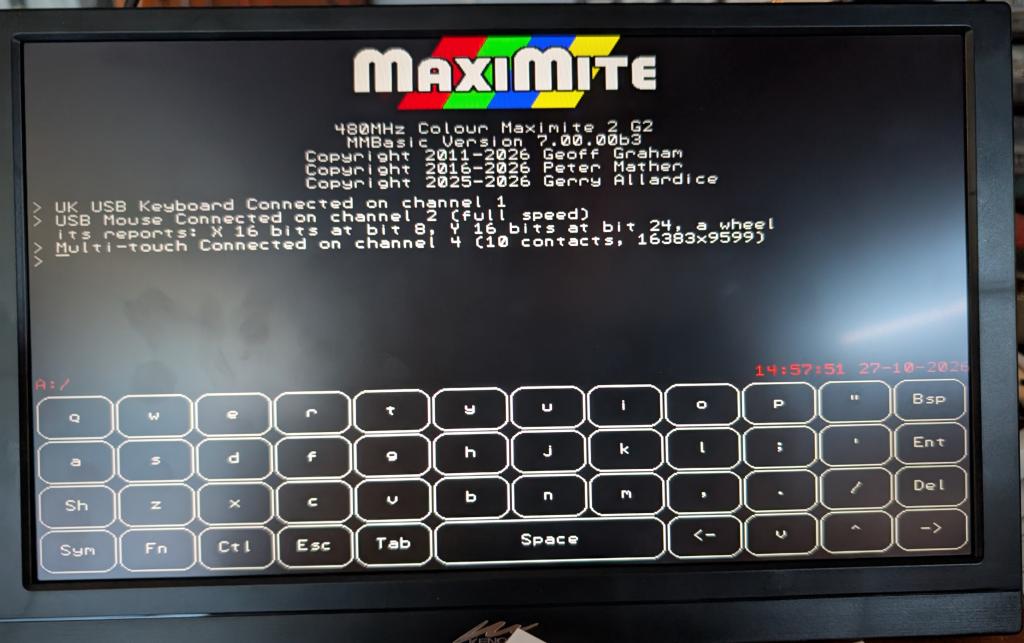
Plugs into a usb host port on the Picomite (and soon the CMM2) and then can be read with the touch function. It can also be used for GUI controla and there is an on screen keyboard available
' tt.bas - USB touch screen test: touch the screen; the program stops after 5 minutes or Ctrl-C. The screen shows the
' touch on three fixed lines and a dot under each finger; PRINT goes to the serial console only (the log).
Option Explicit
Dim integer s, p, r, d, was, x, y, n, lastn
Dim g$, last$
Dim float t0 = Timer
Option Console Serial
CLS
Do While Timer - t0 < 295000
d = Touch(Down) : x = Touch(X) : y = Touch(Y) : n = Touch(XN 0)
Text 0, 0, "X " + Str$(x, 5) + " Y " + Str$(y, 5) + " DOWN " + Str$(d) + " contacts " + Str$(n) + " ", "LT"
If n >= 2 Then
Text 0, 14, "2nd contact X " + Str$(Touch(X2), 5) + " Y " + Str$(Touch(Y2), 5) + " ", "LT"
Else
Text 0, 14, Space$(40), "LT"
EndIf
If d Then Circle x, y, 3, , , RGB(yellow), RGB(yellow)
If n >= 2 Then Circle Touch(X2), Touch(Y2), 3, , , RGB(cyan), RGB(cyan)
If d And Not was Then Print "down"; x; y; " contacts"; n
If was And Not d Then Print "up"
If n <> lastn And n >= 2 Then Print " contacts"; n; " 2nd at"; Touch(X2); Touch(Y2)
lastn = n : was = d
g$ = ""
s = Touch(Swipe) : If s Then g$ = g$ + "swipe " + Choice(s = 1, "left ", Choice(s = 2, "right ", Choice(s = 3, "up ", "down ")))
If Touch(Tap) Then g$ = g$ + "tap "
If Touch(DTap) Then g$ = g$ + "double-tap "
If Touch(Hold) Then g$ = g$ + "hold "
p = Touch(Pinch) : If p Then g$ = g$ + Choice(p = 1, "expand ", "contract ")
r = Touch(Rotate) : If r Then g$ = g$ + Choice(r = 1, "clockwise ", "anticlockwise ")
If Touch(TTap) Then g$ = g$ + "two-finger-tap "
If g$ <> "" Then last$ = g$ : Print "gesture: "; g$
Text 0, 28, Left$("last gesture: " + last$ + Space$(50), 60), "LT"
Pause 10
Loop
Option Console Both
Print "done" |

 Notice. New forum software under development. It's going to miss a few functions and look a bit ugly for a while, but I'm working on it full time now as the old forum was too unstable. Couple days, all good. If you notice any issues, please contact me.