Notice. New forum software under development. It's going to miss a few functions and look a bit ugly for a while, but I'm working on it full time now as the old forum was too unstable. Couple days, all good. If you notice any issues, please contact me.
Martin H. Guru Joined: 04/06/2022 Location: GermanyPosts: 1552
Posted: 03:55pm 08 Feb 2026
Copy link to clipboard
Print this post
DDA method (Digital Differential Analyser).Much faster than my previous attempts.
' Raycaster 2 in MMBasic, DDA method (Digital Differential Analyser) mmb4w=0 CLS If mmb4w Then MODE -7 :CLS RGB(cyan) PAGE WRITE 1 Else MODE 2: CLS RGB(cyan) FRAMEBUFFER create:FRAMEBUFFER write f End If CLS mapS=64:mapy=24:mapx=24 ' --- Labyrinth Definition --- Dim mapW = 57 Dim mapH = 51 Dim m(mapW, mapH) Restore MapData1 For y = 0 To mapH-1 :Read k$:k$=k$+"1" For x=0 To Len(k$):m(x, y)=Val(Mid$(k$,x+1,1)):Next :Next 'For y = 0 To mapH-1 : For x = 0 To mapW-1 : Read m(x, y) : Next x : Next y ' --- Player Setup --- px = 26.5 : py = 45.5 dx = 1.0 : dy = 0.5 planeX = 0.0 : planeY = 0.66 moveSpeed = 0.2 rotSpeed = 0.1 buffer = 0.2 ' --- Grafic Setup --- resStep = 2 scrW = MM.HRES*.75 scrH = MM.VRES*.75
' Flag to force the first frame needsRedraw = 1
Do ' Only paint when something has changed If needsRedraw = 1 Then ' Ceiling and floor Box 0, 0, scrW, scrH/2, 0, RGB(0,128,255), RGB(0,128,255) Box 0, scrH/2, scrW, scrH/2, 0, RGB(255,128,0), RGB(255,128,0) 'DDA For x = 0 To scrW - 1 Step resStep cameraX = 2 * x / scrW - 1 rayDx = dx + planeX * cameraX rayDy = dy + planeY * cameraX mx = Int(px) : my = Int(py)
If rayDx = 0 Then dDx = 1e30 Else dDx = Abs(1 / rayDx) If rayDy = 0 Then dDy = 1e30 Else dDy = Abs(1 / rayDy)
If rayDx < 0 Then stepX = -1 : sdX = (px - mx) * dDx Else stepX = 1 : sdX = (mx + 1.0 - px) * dDx End If If rayDy < 0 Then stepY = -1 : sdY = (py - my) * dDy Else stepY = 1 : sdY = (my + 1.0 - py) * dDy End If hit = 0 Do While hit = 0 If sdX < sdY Then sdX = sdX + dDx : mx = mx + stepX : side = 0 Else sdY = sdY + dDy : my = my + stepY : side = 1 EndIf If m(mx, my) > 0 Then hit = 1 Loop If side = 0 Then pDist = (sdX - dDx) Else pDist = (sdY - dDy) If pDist < 0.1 Then pDist = 0.1
lH = Int(scrH / pDist) yS = (scrH / 2) - (lH / 2) wallCol = RGB(GREEN) If side = 1 Then wallCol = RGB(0, 128, 0) Box x, yS, resStep, lH, , wallCol Next x If mmb4w Then PAGE WRITE 0:Blit 0,0,0,0,scrW,scrH,1:PAGE WRITE 1 Else FRAMEBUFFER write n Text 290,0,"X="+Str$(Int(px))+" " Text 290,12,"Y="+Str$(Int(py))+" " FRAMEBUFFER write f Blit framebuffer F,N,0,0,0,0,scrW,scrH End If needsRedraw = 0 ' Reset Redraw Flag End If
' Wait for button (does not block, but checks efficiently) k$ = UCase$(Inkey$) If k$ <> "" Then ' Enable redraw when a movement key is pressed If Instr("WASD", k$) > 0 Then needsRedraw = 1 Select Case k$ Case "W" If m(Int(px + dx * buffer), Int(py)) = 0 Then px = px + dx * moveSpeed If m(Int(px), Int(py + dy * buffer)) = 0 Then py = py + dy * moveSpeed Case "S" If m(Int(px - dx * buffer), Int(py)) = 0 Then px = px - dx * moveSpeed If m(Int(px), Int(py - dy * buffer)) = 0 Then py = py - dy * moveSpeed Case "D" oldDx = dx : dx = dx * Cos(rotSpeed) - dy * Sin(rotSpeed) dy = oldDx * Sin(rotSpeed) + dy * Cos(rotSpeed) oldPx = planeX : planeX = planeX * Cos(rotSpeed) - planeY * Sin(rotSpeed) planeY = oldPx * Sin(rotSpeed) + planeY * Cos(rotSpeed) Case "A" oldDx = dx : dx = dx * Cos(-rotSpeed) - dy * Sin(-rotSpeed) dy = oldDx * Sin(-rotSpeed) + dy * Cos(-rotSpeed) oldPx = planeX : planeX = planeX * Cos(-rotSpeed) - planeY * Sin(-rotSpeed) planeY = oldPx * Sin(-rotSpeed) + planeY * Cos(-rotSpeed) End Select End If Loop Until k$ = Chr$(27) If mmb4w Then PAGE WRITE 0 MapData1: ' Data "11111111111111111111111111111111111111111111111111111111" Data "11111111111111111111111110000000000111111111111111111111" Data "11111000011111111010111110000000000111111111111111111111" Data "11111000011111100000000000000000000100111111111111111111" Data "11111000011111100000000010000000000100111111111111111111" Data "11111011111111110011111110000000000111111111111111111111" Data "11111000000000110011111110000000000111111111111111111111" Data "11111000000001110010111111111001111111111111111111111111" Data "11111000000000000000111111111001111111111111111111111111" Data "11111000000000000000111111111001111111111111111111111111" Data "10000000000001000000111111111001111111111111111111111111" Data "11111000000001111111111111111001111111111111111111111111" Data "10000011111101111111111111111001111111111111111111111111" Data "10011111001111111111111100000000011111111111111111111111" Data "10111111001111111111111100111001111111111111111111111111" Data "10011111001111111111111100111001111111111111111111111111" Data "10000001001111111111111100111001111111111111111111111111" Data "10000011001111111111111111111001111111111111111111111111" Data "10010101111011111111111111111001010100111111101111110111" Data "10011000000001111111111101110000111011111111101000000011" Data "10010000000001111111111100000000000010010001001000000000" Data "10011000000001111111111000000000000001111111101000000011" Data "10001000000000111111111000000000000000000000001000000000" Data "10001000000001111111111000000000000000000000000000000001" Data "10001000000001111111111000000000000001000000001000000000" Data "10011000000001111111111000000000000000111001111000000001" Data "10011000000001111111111111010000101111110000101000000011" Data "10011111011011111111111111111101110100110001001011110101" Data "10001111001111111111111111111000111111111000100110010001" Data "10011111001111111111111111110000111111110001001000100100" Data "10010001001111111111111111111000111111111000111111111111" Data "10000001001111111111111111110001111111110001001000010111" Data "10011111001111101111111111111001111111111000000000000111" Data "10001010001111011110101111110001011111110000000000001111" Data "10000000000000000000011111111000111111111011001010110111" Data "10000000000000000000000111110000111111111111111111111111" Data "10000000000000010000011111110001111111111111111111111111" Data "11101110111101111111111111111000111111111111111111111111" Data "11111111110010000111111111101101111011111111111111111111" Data "11111111110000011111111100000000000011111111111111111111" Data "11111111111011111111111100001001000001111111111111111111" Data "11111111111001111111111000000000000011111111111111111111" Data "11111111111001111111111111111001111111111111111111111111" Data "11111111111111111111111100001001000011111111111111111111" Data "11111111111111111111111100000000000001111111111111111111" Data "11111111111111111111111100001001000011111111111111111111" Data "11111111111111111111111111111001111111111111111111111111" Data "11111111111111111111111100000000000011111111111111111111" Data "11111111111111111111111100000000000011111111111111111111" Data "11111111111111111111111100101010001011111111111111111111" Data "11111111111111111111111111111111111111111111111111111111"
This is just a basic framework. Feel free to change and expand it. Cheers Martin'no comment
LeoNicolas Guru Joined: 07/10/2020 Location: CanadaPosts: 625
Posted: 05:10pm 08 Feb 2026
Copy link to clipboard
Print this post
Nice job Martin
For anyone that wants to know more about DDA and ray casting
Martin H. Guru Joined: 04/06/2022 Location: GermanyPosts: 1552
Posted: 05:25pm 08 Feb 2026
Copy link to clipboard
Print this post
I forgot to mention, the keys are ‘AD WS’ and ESC to quit.'no comment
Peter63 Senior Member Joined: 28/07/2017 Location: SwedenPosts: 206
Posted: 01:28am 09 Feb 2026
Copy link to clipboard
Print this post
Hello Martin
I tried it on PicoMiteHDMIUSB V6.02.00RC6 and it works perfectly.
/Peter63
Martin H. Guru Joined: 04/06/2022 Location: GermanyPosts: 1552
Posted: 06:47am 09 Feb 2026
Copy link to clipboard
Print this post
Hi Peter, Thanks for the feedback. I also tried it on Pico2 with HDMI (Try MODE 3). It should also run on CMM2 and MMBasic for Windows if you set mmb4w=1 at the start of the Programm.
Cheers Martin Edited 2026-02-09 16:49 by Martin H.'no comment
Volhout Guru Joined: 05/03/2018 Location: NetherlandsPosts: 6118
Posted: 07:51am 09 Feb 2026
Copy link to clipboard
Print this post
Hi Martin,
Works nice (RP2040 VGA), but requires quite a lot of math. So it is somewhat slow. Maybe a lot better on 2350.
Now I look at what you are planning to do, could you not make use of the 3D DRAW commands in MMBasic. I am not sure the 3D DRAW routines Peter implemented can handle the whole map, but they certainly could handle the visible part of the map (they also can rotate a multiface football). If you place your camera inside the football (inside your maze) this could work ?
Regards,
Volhout
EDIT: Martin, I tried to speed things up by changing "resStep" from 2 to 5, but that corrupts the drawing. Change line 78 into adding "wallCol" as fill color. Edited 2026-02-09 18:42 by VolhoutPicomiteVGA PETSCII ROBOTS
Martin H. Guru Joined: 04/06/2022 Location: GermanyPosts: 1552
Posted: 08:46am 09 Feb 2026
Copy link to clipboard
Print this post
Volhout, You can speed it up by increasing resStep = 2 to resStep = 4 and changing the box command before NEXT X to ‘Box x, yS, resStep, lH, , wallCol, wallCol’. This halves the number of calculations required, but also the x resolution.
It could be, of course, possible to use the 3D DRAW routines, but this is a completely different approach to ray casting. To do this, the field of view would have to be vectorised and converted into 3D models. This is certainly possible, but I'm not sure if it would be faster in the end. The initial aim here was to limit the raycast calculations to simple/fast calculations(certainly still room for improvement). I have no experience with the 3D DRAW routines, but I am open to being convinced. Cheers Martin Edited 2026-02-09 19:02 by Martin H.'no comment
thwill Guru Joined: 16/09/2019 Location: United KingdomPosts: 4398
Posted: 10:48am 09 Feb 2026
Copy link to clipboard
Print this post
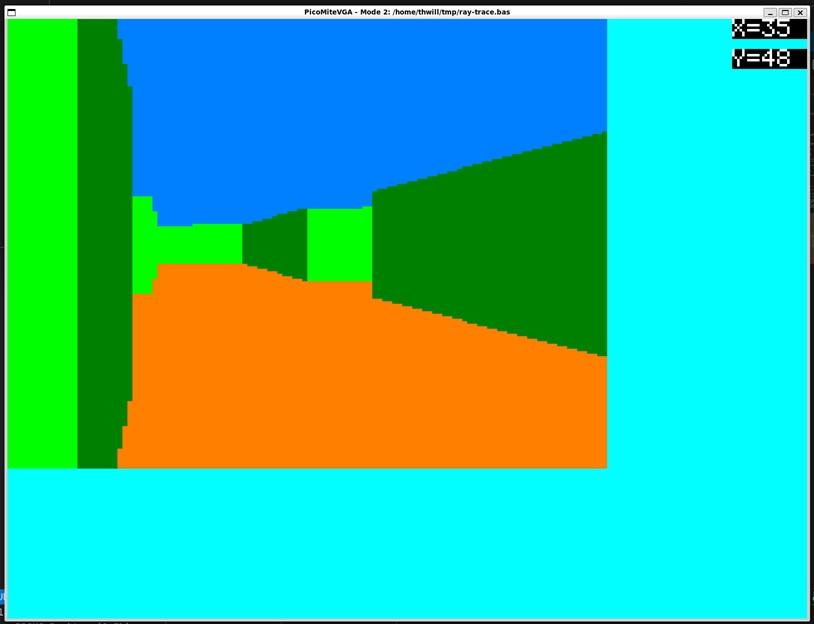
A screenshot for those who are interested, but not enough to crank up the 'Mite:
Generated by MMB4L running under WSL2 on Windows whilst simulating a PicoMite .
thwill Guru Joined: 16/09/2019 Location: United KingdomPosts: 4398
Posted: 05:13pm 09 Feb 2026
Copy link to clipboard
Print this post
Hi Peter,
It's technically impressive, but in my view it's unnecessary "bloat", a piece of functionality that perhaps one person might used to write a Wolfenstein knock-off.
IMO it would be better not to include it and let that one person "show their chops" and get the achievement of doing it in MMBasic alone (might not be possible on the PicoMite) or writing some CSUBs.
phil99 Guru Joined: 11/02/2018 Location: AustraliaPosts: 3381
Posted: 08:50pm 09 Feb 2026
Copy link to clipboard
Print this post
On this forum there appear to be three main uses for MMBasic, games, retro computing and embedded controllers. The CMM2-G2 has the power to be perfect for the first two. MMB4W and MMB4L extend that to PCs and where portability is needed to notebooks.
For embedded controllers the size, price and power consumption make those platforms unattractive leaving mainly the PicoMite and MicroMite to do the job.
As there are fewer options for embedded controllers my preference would be to leave as much room as practical for that on the Pico non HDMI / VGA / USB versions.
gadgetjack Senior Member Joined: 15/07/2016 Location: United StatesPosts: 236
Posted: 11:50pm 09 Feb 2026
Copy link to clipboard
Print this post
Ok, I am hooked. Where do I get the code for that??? Can it be added as a library or what?
Turbo46 Guru Joined: 24/12/2017 Location: AustraliaPosts: 1694
Posted: 05:13am 10 Feb 2026
Copy link to clipboard
Print this post
Very impressive but I also wonder how many people would actually make use of it. I feel that already too much has been done to cater for too few people and too many different boards. I would love to see some things come out as Csubs so that only those who want or need them can add the.
There is a bewildering number of options. I was gobsmacked to see that in the latest manual there are 10 pages of options!
I don't expect that my opinion will carry any weight at all but there it is for what it's worth.
BillKeep safe. Live long and prosper.
Volhout Guru Joined: 05/03/2018 Location: NetherlandsPosts: 6118
Posted: 07:16am 10 Feb 2026
Copy link to clipboard
Print this post
All,
For some who may have followed the discussions, Peter is putting effort into bringing Mauro Xavier back on board. Mauro is a skilled game designer, that provided several top games for CMM2. Peter plans to send him a picomite HDMI and these RAY commands may be all that is needed for Mauro to port his version of "INTO THE DARK" to picomite.
I do realize that Peters implementation trampling over Martin.H's work. But this could be coincidental. Peter could have started with these implementation much earlier. At time he invited Mauro. Writing the code (10+ commands), the demo, the manual, all in few hours ?
And this RAY command will not exist in RP2040. So Martin.H's work is valuable to me... call me "mister_2040"..
Mixtel90 Guru Joined: 05/10/2019 Location: United KingdomPosts: 9136
Posted: 07:42am 10 Feb 2026
Copy link to clipboard
Print this post
CSUBs aren't always the answer as, at least in the past, they don't seem to have remained compatible with MMBasic upgrades. They have the advantage of speed though - and that is also the argument for having the routines built-in. This is pretty intensive stuff. I considered suggesting putting it into Library routines but that might be too slow.Mick
Martin H. Guru Joined: 04/06/2022 Location: GermanyPosts: 1552
Posted: 08:51am 10 Feb 2026
Copy link to clipboard
Print this post
Very well explained, Tom. I wrote this Code to show how it can be done at a reasonable speed on the Pico in Basic. I'm not the one writing a Wolfenstein Clone, but I'm happy to provide the tools for it. In my opinion, extending Basic doesn't make sense due to the very specific task, but implementing it as CSUB would be appropriate. Cheers Martin'no comment
matherp Guru Joined: 11/12/2012 Location: United KingdomPosts: 11879
Posted: 09:05am 10 Feb 2026
Copy link to clipboard
Print this post
We should get over the concept that this sort of thing can be done in a CSUB. They are limited in what they can do and don't have full access to MMBasic internals. Moreover, they are extremely difficult to write with no real debugging possible other than go/no-go (often crash). Adding commands to MMbasic has almost no overhead other than possibly increasing the size of the image which in turn reduces the amount of the A: drive available. In fact, as the image has to increase in 16K chunks the implementation above had NO impact on the RP2350 VGA firmware image size. My approach to all these "niche" commands is now to only reference their existence in the main manual and produce a separate manual for the command - STAR, SPRITE, STEPPER etc. Thus the impact on anyone who doesn't want to use them is negligible. If we take the stepper command as an example, this categorically couldn't be done as a CSUB, nor could it be done in Basic with adequate speed. For a user who wants to drive a stepper properly with a PicoMite it provides a solution. For those who don't it has zero impact.
thwill Guru Joined: 16/09/2019 Location: United KingdomPosts: 4398
Posted: 09:20am 10 Feb 2026
Copy link to clipboard
Print this post
For some time my base opinion on MMBasic development is that nobody is paying the piper so he gets to play his own tune - i.e. Peter can do what he likes ;-)
However if it were my project (it isn't) and I had the time (I don't) then ...
This is where I think the most bangs for the buck in terms of taking MMBasic to the next level now lie. Proper CSUB (and CFUNCTION) documentation and a documented and where necessary extended API by which CSUBs can access MMBasic internals so it isn't an ever extending monolith.
However I'm not a micro-controller programmer I'm a PC app developer so I might well be talking out of my derrière.
Mixtel90 Guru Joined: 05/10/2019 Location: United KingdomPosts: 9136
Posted: 10:16am 10 Feb 2026
Copy link to clipboard
Print this post
TBH, Tom, I don't find that "Peter can do what he likes" is such a terrible option. :) I don't even mind losing chunks of A: drive on the RP2350 very much. It's a bit more of a problem on the RP2040 but the new commands aren't generally applicable to that anyway.
IMHO retro-fitting a full implementation of CSUB/CFUNCTION with API would be virtually impossible without a major re-write of almost all of the code. It was probably designed to be monolithic, not to be extendable like that and I suspect that many low level (and maybe not so low) routines are shared in order to keep the code compact. Even if it was available how useful would it *really* be on a microcontroller? Be honest. This isn't even a tiny SBC like a Raspberry Pi. I don't personally think that CSUBs and CFUNCTIONs are a great idea anyway. Yes, they can do some things very fast but they make the code unreadable, virtually impossible to understand and mostly unsupportable by anyone other than the original writer. It's a lot to lose from BASIC in the interests of speed.Mick

 Notice. New forum software under development. It's going to miss a few functions and look a bit ugly for a while, but I'm working on it full time now as the old forum was too unstable. Couple days, all good. If you notice any issues, please contact me.


 Print this post


 .
.


