Notice. New forum software under development. It's going to miss a few functions and look a bit ugly for a while, but I'm working on it full time now as the old forum was too unstable. Couple days, all good. If you notice any issues, please contact me.
Bryan1 Guru Joined: 22/02/2006 Location: AustraliaPosts: 2297
Posted: 06:50am 15 Apr 2026
Copy link to clipboard
Print this post
G'day Guy's, Last week got 3 stepper boards and 2 each of the stepper driver chips and as I have got one of Peter's big 2350B boards so first job was getting my 3.5" touch screen working again.
Tried everything and just had no luck with a 2350B board at all with the LCD screen just flickering so decided to setup my 2040 zero mounted on one of Mixtels boards which fits on my breadboard nicely and put RP2040 V6.02.00 on the zero.
Yesterday had big think about it and drew the connections on a sheet of paper and this morning wired it all up only to find the same.
Now looking on my Ali purchase it did state the lcd was a ILI9341 so with the zero test had the same flickering problem so just set it up for later.
Reading thru the pico manual it came flooding back the big problem I had before was the MISO pin on the lcd must not be connected and sure enough clearing the options and going with the ILI9488 the GUI TEST LCDPANEL came up with the bubbles also got the touch and SDCard working.
So in the morning I will rewire the big board backup with the LCD and then wire up one of the stepper boards and see if I can get the first stepper moving
Regards Bryan
Volhout Guru Joined: 05/03/2018 Location: NetherlandsPosts: 6184
Posted: 07:38am 15 Apr 2026
Copy link to clipboard
Print this post
Hi Bryan,
Good you found it. Good luck with the steppers.
I planned to suggest another LCD type. The 2.1, 2.4, 2.8 and 3.2 inch where 9341 (I own those). Larger sizes typically use a different chip (i.e. 9488) and more pixels.
Bryan1 Guru Joined: 22/02/2006 Location: AustraliaPosts: 2297
Posted: 07:53am 15 Apr 2026
Copy link to clipboard
Print this post
Decided it wouldn't take long and when I looked at the sheet with the pinouts for the 2350B board I did find they corresponded with the setup I had on the 2040 zero
So just had to change a few pin assignments and had the LCD going on the big board where doing the GUI TEST LCDPANEL came up with the bubbles straight away but like before with my fun with calibrating the touch where after the second touch it went to error so thought as the tummy bones are complaining that's a job for the morning.
Regards Bryan
Bryan1 Guru Joined: 22/02/2006 Location: AustraliaPosts: 2297
Posted: 05:01am 16 Apr 2026
Copy link to clipboard
Print this post
Ok got everything hooked but just keep getting errors
The code
OPTION EXPLICIT
On error skip Stepper close Stepper Init 0.05, 150, GP22
Stepper Axis X, GP27, GP25, GP26, 1, 800, 100, 100 Stepper Position X, 0.1 Stepper run 1 Stepper gc g1 x0 f100 Stepper gc g1 x100 f100 Stepper gc g1 x0 f100 end sub
The error in MCCC
RUN Stepper initialized - 100KHz timer active Warning: Soft limits not configured. Use STEPPER LIMITS to set working area. Stepper armed - executing buffered commands [33] Stepper Axis X, GP24, GP25, GP26, 1, 800, 100, 100 Error : Pin 42/GP24 is in use
So tried GP27
RUN Stepper initialized - 100KHz timer active Warning: Soft limits not configured. Use STEPPER LIMITS to set working area. Stepper armed - executing buffered commands [33] Stepper Axis X, GP27, GP25, GP26, 1, 800, 100, 100 Error : Pin 32/GP27 is in use
Now my idea is simply go forward 100 then back 100 and if the E-Stop is pressed stop the output
Bryan1 Guru Joined: 22/02/2006 Location: AustraliaPosts: 2297
Posted: 07:31am 16 Apr 2026
Copy link to clipboard
Print this post
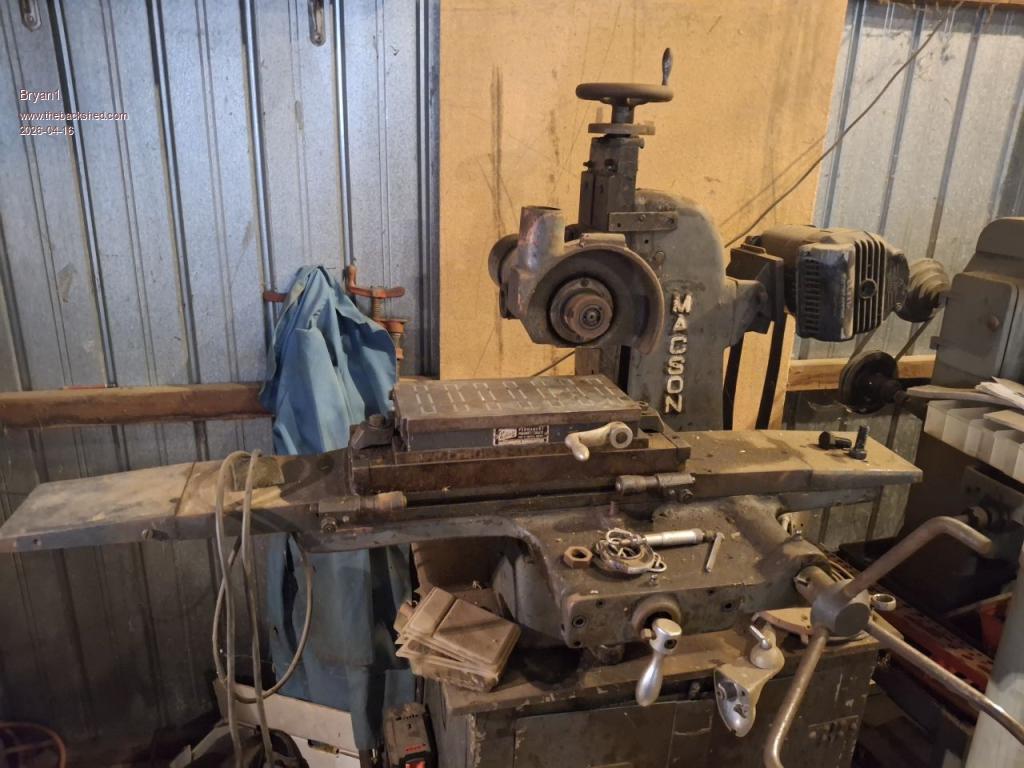
Ok Guy's the whole point of this project is to make a state machine so I can run my old Macson surface grinder.
Now the inherent problem is with the Z axis on this machine where the lead screw has a heap of backlash and when setting the grinding wheel doing 2,000 RPM it tends to jump and I have already broken a grinding wheel trying to use this machine.
This is where a ball screw can come into play for the Z axis so if needed a step by step can set the cut then the DRO on the screen can be set to zero where the predetermined cut is done.
I do have a 2 pole 3 phase motor for this project and a Delta VFD so the motor can run off single phase and the best part the Delta VFD does have a serial interface where the hertz can be changed so the speed once calibrated can be dialed in using the G-code.
Now the X axis rack and pinion drive and as it's only going back and forth I can machine the stepper mount off the original handle and fabricate up the securing mount for the stepper motor.
The Y axis in operation is going to increment in steps every forward pass depending on the width of the grinding wheel.
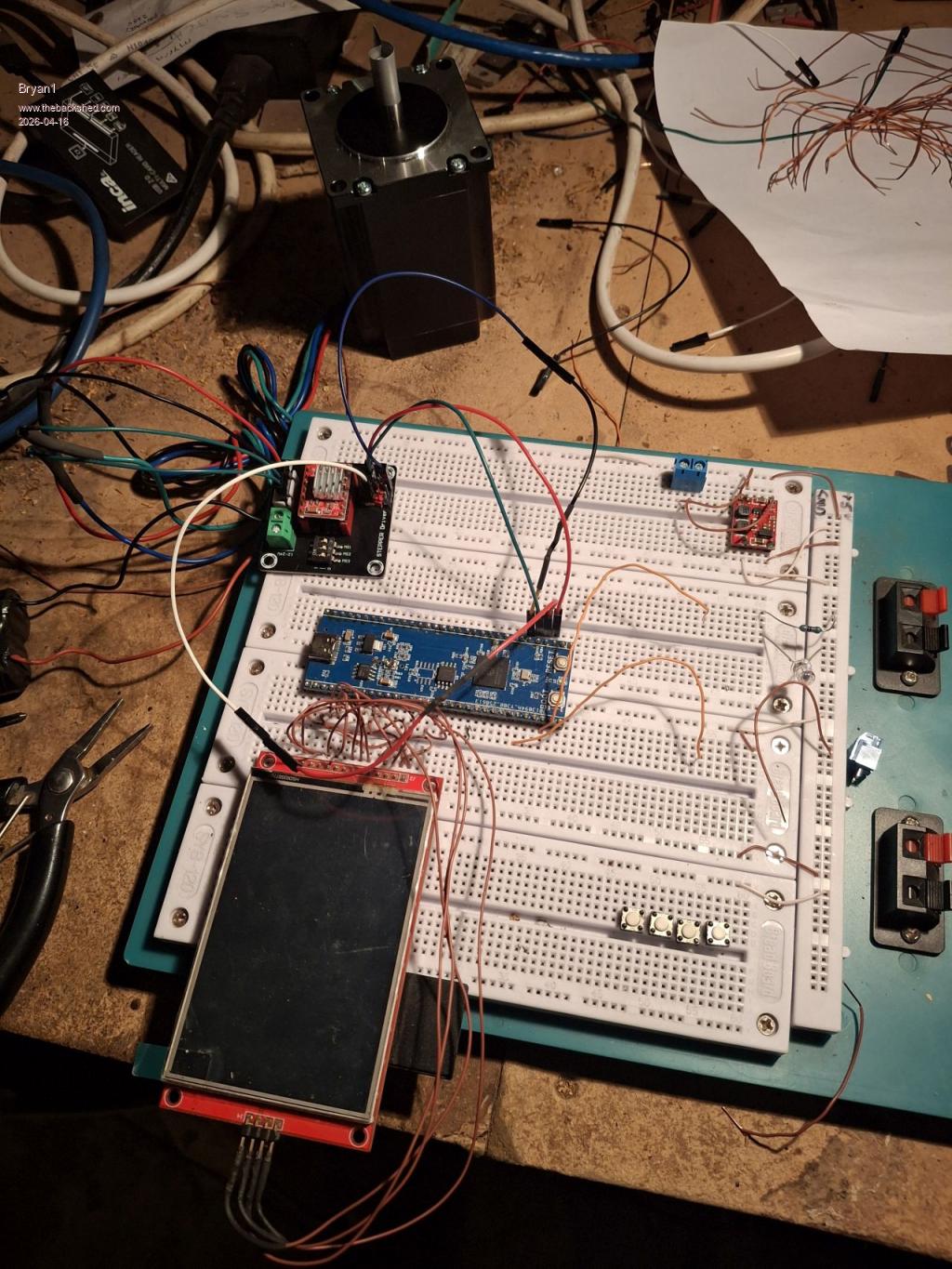
Now here is a pic of my test setup
For now the 3.5" touch screen can do while the code is built up and as there are so many spare pins I do think a 9" touchscreen in 16 bit mode as reading in the manual today 16 bit can be done. I do need to order more dupoint cables for this project so no rush as I have been thinking about this project for a long time.
Regards Bryan
PhenixRising Guru Joined: 07/11/2023 Location: United KingdomPosts: 2098
Posted: 09:06am 16 Apr 2026
Copy link to clipboard
Print this post
Yeah that backlash needs fixed. No fun busting a grinding wheel
Those VFDs are fun, fun, fun
I fitted one to an old Bridgeport knee mill and it runs beautifully. The original fwd/rev selector failed and it was £70 for a replacement. This was a good opportunity to try eliminating it altogether. The VFD + remote pendant was < £50. No need to mess with the belt/pulleys to change speeds now.
Mine also has the serial interface but I prefer the external 0 to 10V analogue and fwd/rev-select option.
It seems that most of these units have the option of VFD/Vector (FOC) modes. The Vector mode runs quieter.
Pretty sure I could close the loop on this thing with encoder feedback to the PicoMite. It would be a bit of a dog compared to a true servo, due to the high rotor inertia and for continuous operation, I would need inverter-rated windings but there are many applications that are not so demanding.
On two occasions over the past year, I have been called-out to a dead production line due to a failed motor starter. One was DOL and the other was star/delta. I didn't have time to order VFDs but I could've installed TWO (one as a spare) for similar cost.
Bryan1 Guru Joined: 22/02/2006 Location: AustraliaPosts: 2297
Posted: 10:47am 16 Apr 2026
Copy link to clipboard
Print this post
Phonix back in the day when I worked as a heavy machinist I was starting my 30' planer motor when I went from star to delta a arc went over the the planer bed and one guy walking by copped it full on and he was gone.That 200 Kw motor was toast and that planer was never run again.
Now as the steppers I have here are 2.4 Nm I don't think they will handle the current needed to run this surface grinder so I am thinking of getting somemore DM556 micro stepper modules off ebay.
I did look at my old code in MMEdit that was still there and I'm sure you will remember that code Harm gave did run the stepper on my cnc.
The problem is when I did that code GP numbers wern't needed so I do think this can done on 2040 without the new stepper code
PhenixRising Guru Joined: 07/11/2023 Location: United KingdomPosts: 2098
Posted: 11:58am 16 Apr 2026
Copy link to clipboard
Print this post
Holy moly....that sounds to me like the planer wasn't grounded (earthed). Somehow a phase made the entire machine live and found a human pathway to ground.
Bryan1 Guru Joined: 22/02/2006 Location: AustraliaPosts: 2297
Posted: 12:34pm 16 Apr 2026
Copy link to clipboard
Print this post
na mate when I hit the star from delta switch a blue arc went across the planer and the poor worker copped it full on. Anyway the hole in the seconday on the motor I could stick 2 fingers in.
mozzie Guru Joined: 15/06/2020 Location: AustraliaPosts: 468
Posted: 01:50pm 16 Apr 2026
Copy link to clipboard
Print this post
G'day Brian, You have likely figured this out already but you don't need to set the GPIO pins to DOUT first, let the STEPPER AXIS command do it for you. Should stop the error messages.
There is a version of that surface grinder in the shed here, we fitted a pneumatic cylinder under the grinder spindle head that takes the weight and backlash out of the leadscrew, a cheap regulator sets the pressure accordingly. Works so much better now
Good luck.
Regards, Lyle.
PhenixRising Guru Joined: 07/11/2023 Location: United KingdomPosts: 2098
Bryan1 Guru Joined: 22/02/2006 Location: AustraliaPosts: 2297
Posted: 12:25am 17 Apr 2026
Copy link to clipboard
Print this post
As this surface grinder is fully manual my idea of automating it does make sense so the grinder is more efficient.
Now going a damper on the Z axis could work but I already have a ball screw that is suitable to fit. I got this off an old Hercus cnc lathe and length wise it will fit easily.
Now I commented out the pin setting code and tried again.
Stepper initialized - 100KHz timer active Warning: Soft limits not configured. Use STEPPER LIMITS to set working area. Stepper armed - executing buffered commands [33] Stepper Axis X, GP27, GP25, GP26, 1, 800, 100, 100 Error : Pin 32/GP27 is in use
Now I commented out the const for the and got the same error.
On error skip Stepper close Stepper Init 0.05, 150, GP22
'Stepper run 1 Stepper gc g1 x0 f100 Stepper gc g1 x100 f100 Stepper gc g1 x0 f100 end sub
Now after loading got this error
RUN Stepper initialized - 100KHz timer active Warning: Soft limits not configured. Use STEPPER LIMITS to set working area. Hardware limit switches configured [19] Stepper limits X, 0, 200 Error : Axis not configured
Bryan1 Guru Joined: 22/02/2006 Location: AustraliaPosts: 2297
Posted: 02:38am 17 Apr 2026
Copy link to clipboard
Print this post
Ok getting alot closer but getting a buffer full error so commented out so only the one G-code line was there
Stepper initialized - 100KHz timer active Warning: Soft limits not configured. Use STEPPER LIMITS to set working area. Hardware limit switches configured Stepper armed - executing buffered commands [39] Stepper gc g1 x100 f100 Error : G-code buffer full
Now I've taken out the Y axis and gave it a good clean, now found there a dual nut setup for the backlash, now mounting the stepper is a pinch as I'll just put the leadscrew in my lathe and drill a 8mm hole where a couple of grub screws can be used for the drive. Then a simple mount can be made to clamp the stepper.
I sort of figure once I can get the code working may aswell have the stepper under load and thats one axis sorted for the project.
Bryan1 Guru Joined: 22/02/2006 Location: AustraliaPosts: 2297
Posted: 05:22am 17 Apr 2026
Copy link to clipboard
Print this post
Ok still having fun so I decided to setup my scope and set channel 1 to the step pin but haven't seen any action on the scope.
It does seem it's going in an endless state
Stepper initialized - 100KHz timer active Warning: Soft limits not configured. Use STEPPER LIMITS to set working area. Hardware limit switches configured Stepper armed - executing buffered commands Homing axes...
The code
OPTION EXPLICIT
On error skip Stepper close Stepper Init 0.05, 150, GP22
STEPPER HWLimits GP23, GP21, GP20, GP19, GP18, GP17 'Stepper limits X, 0, 200 Stepper Axis X, GP27, GP25, GP26, 0, 800, 100, 100 Stepper Position X, 0 Stepper run 1 'Stepper Position Home
do
RunStepper
loop
Sub RunStepper
Stepper gc g28 x0 f100 Stepper gc g1 x100 f100 Stepper gc g1 x0 f100 end sub
I have declared X position as 0 but the software is homing the axis in an endless loop
phil99 Guru Joined: 11/02/2018 Location: AustraliaPosts: 3412
Posted: 05:50am 17 Apr 2026
Copy link to clipboard
Print this post
Just a guess after looking at the manual. As it appears to require hardware limits for all 3 axis perhaps you need to set software limits for all 3 as well, even though you are only using 1 axis. Might not work but easy enough to try.
eg.
STEPPER HWLimits GP23, GP21, GP20, GP19, GP18, GP17 Stepper limits X, 0, 200 Stepper limits Y, 0, 20 Stepper limits Z, 0, 20 Stepper Axis X, GP27, GP25, GP26, 0, 800, 100, 100 Stepper Position X, 0 Stepper run 1 'Stepper Position Home
Here is your endless loop:-
do RunStepper loop
Sub RunStepper is being called endlessly. Maybe try without Do and Loop. Edited 2026-04-17 16:03 by phil99
Bryan1 Guru Joined: 22/02/2006 Location: AustraliaPosts: 2297
Posted: 06:41am 17 Apr 2026
Copy link to clipboard
Print this post
Ok did the Stepper Limits X, 0, 200 also the same for Y and Z now when I run it got the error Y axis wasn't set so commented Y and Z out.
Now when I removed the do loop
Stepper initialized - 100KHz timer active Warning: Soft limits not configured. Use STEPPER LIMITS to set working area. Hardware limit switches configured X axis limits: 0.000 to 200.000 mm (0 to 160000 steps) Stepper armed - executing buffered commands]
Then it goes straight to the prompt so it exits the stepper program
Now with the Do Loop
Stepper initialized - 100KHz timer active Warning: Soft limits not configured. Use STEPPER LIMITS to set working area. Hardware limit switches configured X axis limits: 0.000 to 200.000 mm (0 to 160000 steps) Stepper armed - executing buffered commands [44] Stepper gc g1 x0 f100 Error : G-code buffer full
Now I did put a Stepper Clear in so the buffer was reset
OPTION EXPLICIT
On error skip Stepper close Stepper Init 0.05, 150, GP22

 Notice. New forum software under development. It's going to miss a few functions and look a bit ugly for a while, but I'm working on it full time now as the old forum was too unstable. Couple days, all good. If you notice any issues, please contact me.


 Print this post
 also got the touch and SDCard working.


 so commented out so only the one G-code line was there