Notice. New forum software under development. It's going to miss a few functions and look a bit ugly for a while, but I'm working on it full time now as the old forum was too unstable. Couple days, all good. If you notice any issues, please contact me.
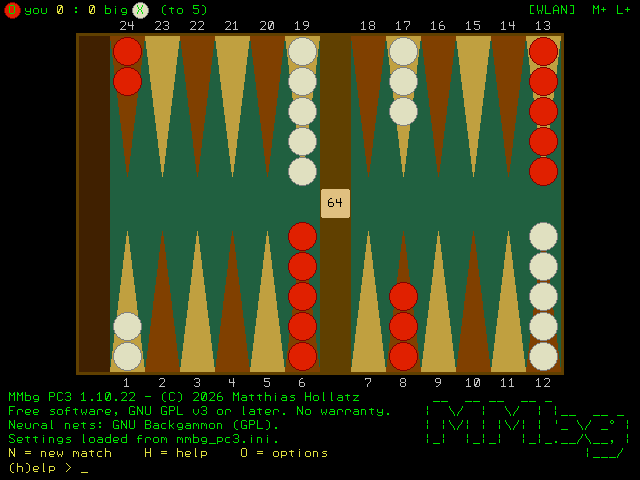
I'd like to introduce MMbg PC3 - a complete backgammon program for the Pico Computer 3.
Features - match play 1 to 15 points with doubling cube and Crawford rule - uses the neural nets of GNU Backgammon: the "big" engine plays at about gnubg "Expert" level (0-ply) and wins ~47 % of 5-point matches against gnubg "World class" (2-ply), measured over 1236 matches - written completely in MMBasic - no CSUB needed - HDMI graphics (MODE 3) with smooth animation, plus an ASCII board on the serial terminal - keyboard or USB mouse, multi-level undo, auto save and resume - .mat export and GNUbg IDs for analysis in gnubg, optional sound - for tinkerers: gnubg on a PC as opponent over WLAN, overnight test runs
Requirements PC3 with firmware PicoMitePC3 V7.00.00 RC2 or later.
Installation Unzip the ZIP onto the SD card, then:
CHDIR "B:/mmbg" LOAD "mmbg_pc3.bas", C RUN
The manual (English and German PDF) is included.
The version for the PicoCalc (PiCa) will follow ...
Have fun playing and testing! Please report all bugs here.
PilotPirx Senior Member Joined: 03/11/2020 Location: GermanyPosts: 176
Posted: 07:20am 20 Oct 2026
Copy link to clipboard
Print this post
That's great, I'm looking forward to the PicoCalc version. Does it also require MMbasic V7? If so, I'll have to update.
javavi Guru Joined: 01/10/2023 Location: UkrainePosts: 642
Posted: 05:45pm 21 Oct 2026
Copy link to clipboard
Print this post
Great, I really liked your game. I lost five times in a row. It must have a really good built-in opponent, or maybe I'm just a bad player, probably because I've always played the Eastern version of backgammon. :))
By the way, is it possible to make a game using the rules of Eastern backgammon?
Thanks.
homa Guru Joined: 05/11/2021 Location: GermanyPosts: 777
Posted: 07:47pm 21 Oct 2026
Copy link to clipboard
Print this post
Hi Javavi,
Thanks a lot for your kind feedback! I'm really glad to hear you enjoyed playing the game (even if the AI gave you a tough time! :)).
To answer your question about adding Eastern backgammon rules: to be honest, I'm not familiar with all the specific details and variations of Eastern backgammon.
More importantly, the game's strong AI is based on the gnubg neural network, which was trained strictly on the standard Western rules. Teaching an AI to play Eastern backgammon would require building and training a whole new neural network from scratch for those specific rules.
That isn't something I am planning to pursue for this project right now. However, the code is open for anyone who would like to adapt it or implement those rules themselves!
Matthias
PilotPirx Senior Member Joined: 03/11/2020 Location: GermanyPosts: 176
Posted: 11:58am 23 Oct 2026
Copy link to clipboard
Print this post
I have the Pico Computer 2B FW V7.0.00b3 with 6MB PSRAM and 16MB Flash. MMBG starts wit ERROR "Not enough memory". Is there anything I can do about it? I changed to V7.00.00RC3 but same Error Edited 2026-10-23 22:23 by PilotPirx
matherp Guru Joined: 11/12/2012 Location: United KingdomPosts: 12252
Posted: 12:27pm 23 Oct 2026
Copy link to clipboard
Print this post
Matthias
Great work
PilotPirx
You don't stay what variant of the firmware - HDMIUSB?. Also try updating to the latest version. Edited 2026-10-23 22:28 by matherp
homa Guru Joined: 05/11/2021 Location: GermanyPosts: 777
Posted: 12:45pm 23 Oct 2026
Copy link to clipboard
Print this post
Thanks for trying MMbg! The current version is made for the Pico Computer 3 only (PicoMitePC3 firmware, 256 KB program memory, PSRAM). The PC2 has less RAM, so MMbg runs out of memory there.
At the moment I'm working on the PicoCalc version, which has to get by with much less memory. Once that is done, a version for the PC2 should be possible too - but please be patient, it can't be done quickly.
Matthias
PilotPirx Senior Member Joined: 03/11/2020 Location: GermanyPosts: 176
Posted: 12:59pm 23 Oct 2026
Copy link to clipboard
Print this post
matherp
Yes, PicoMiteHDMIUSBV7.00.00RC3 Is it possible to get more program memory?
matherp Guru Joined: 11/12/2012 Location: United KingdomPosts: 12252
Posted: 01:38pm 23 Oct 2026
Copy link to clipboard
Print this post
Just tested works perfectly with RC3. Did you load the program with LOAD "mmbg_pc3.bas", C as in Matthias' post and in the program header? The ,C is critical
PilotPirx Senior Member Joined: 03/11/2020 Location: GermanyPosts: 176
Posted: 02:50pm 23 Oct 2026
Copy link to clipboard
Print this post
matherp
One step further! Now i get the Error "[247] String too long" after loading neural nets (gnubg)
matherp Guru Joined: 11/12/2012 Location: United KingdomPosts: 12252
Posted: 03:05pm 23 Oct 2026
Copy link to clipboard
Print this post
I think that is because you are running from the A: drive. It is a bug in the program. Run from the B: drive. If you follow Matthias' directions exactly it definitely works Edited 2026-10-24 01:05 by matherp
PilotPirx Senior Member Joined: 03/11/2020 Location: GermanyPosts: 176
Posted: 03:06pm 23 Oct 2026
Copy link to clipboard
Print this post
I run from the b: drive (sd-card). It seems to work when I comment out that line.
PilotPirx Senior Member Joined: 03/11/2020 Location: GermanyPosts: 176
Posted: 03:16pm 23 Oct 2026
Copy link to clipboard
Print this post
OK, i found it. The program seems to use absolute paths. I had moved the directory one level down. Now it works. Thanks!!!
matherp Guru Joined: 11/12/2012 Location: United KingdomPosts: 12252
Posted: 03:19pm 23 Oct 2026
Copy link to clipboard
Print this post
are you running from a subdirectory or direct from B:/mmbg?
PilotPirx Senior Member Joined: 03/11/2020 Location: GermanyPosts: 176
Posted: 07:33pm 23 Oct 2026
Copy link to clipboard
Print this post
At first i was running from a subdirectory b:/games/mmbg which doesn't work. Direct from b:/mmbg and loading with ,C work fine now.
homa Guru Joined: 05/11/2021 Location: GermanyPosts: 777
Posted: 07:35pm 23 Oct 2026
Copy link to clipboard
Print this post
I am aware of the problem and it is on my agenda.
homa Guru Joined: 05/11/2021 Location: GermanyPosts: 777
Posted: 10:22pm 25 Oct 2026
Copy link to clipboard
Print this post
MMbg 1.10.34 – Backgammon for MMBasic, now also on the Colour Maximite 2 and the PicoCalc
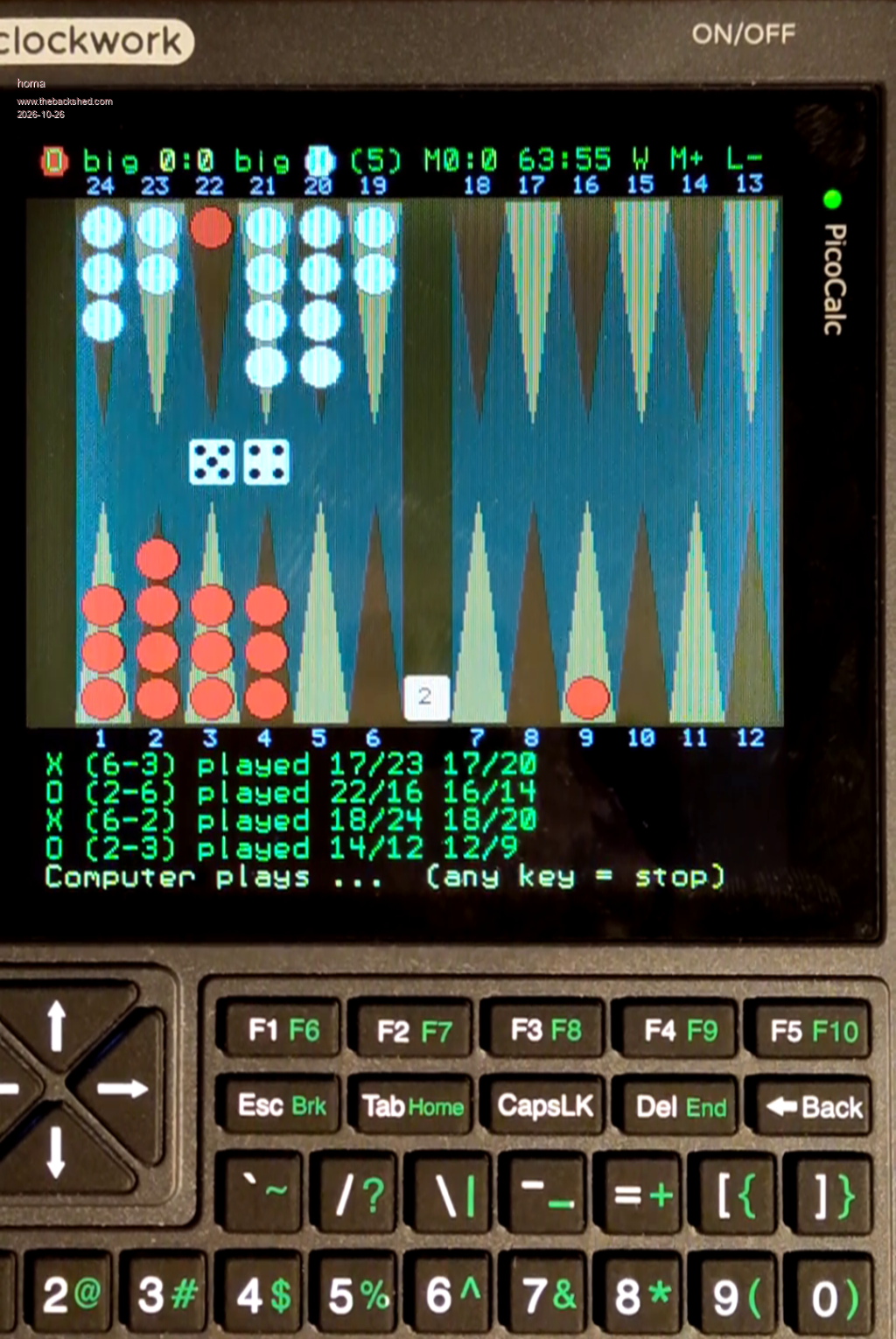
A new version of MMbg is available. The program mmbg_pc3.bas now runs on both the PC3 and the Colour Maximite 2, and for the PicoCalc there is the separate edition mmbg_pica.bas.
New in this release
Colour Maximite 2: firmware 7.00.00b3 or later with OPTION PICOMITE HDMI. Tested on a CMM2 G2 with a 10-hour turbo run (404 matches big vs. big) without a single error. The speed is similar to the PC3 (big ~0.6 s per move, deep ~10 s). PicoCalc (MMbg PiCa 1.10.33): the same game with all engines up to big and deep, for a Pico 2 or Pico 2 W (PicoMite / WebMite RP2350, V7.00.00 RC3 or later). Runs with RAM and SD card only – see below. PS/2 mouse: besides a USB mouse, a PS/2 mouse (channel 2) is also recognised. On the CMM2, plug a dual-mode mouse into the lower USB socket and set OPTION MOUSE 0. Enter key: CR/LF no longer stops a running computer by accident (the CMM2 sends CR+LF for Enter).
Setting up the CMM2 (only once)
OPTION PICOMITE HDMI OPTION MOUSE 0 ' only with a mouse in the lower socket
Then copy the folder mmbg to the SD card and start it:
CHDIR "A:/mmbg" LOAD "mmbg_pc3.bas", C RUN
There is no WLAN on the CMM2, so gnubg as an opponent (engine E) is not available. Everything else works as it does on the PC3.
Hint for 7.00.00b3: if you get "Could not find the file" when starting from the prompt, start mmbg_pc3.bas from the file manager (FM) instead. This works fine and appears to be a beta issue.
Behind the scenes: the big nets in the PicoCalc's small RAM The big gnubg nets (contact and crashed) have 250 inputs x 128 neurons = 32 000 weights each. As floating-point numbers that is 256 KB per net, 512 KB for both. The PC3 keeps them in PSRAM. The PicoCalc has no PSRAM and only about 270 KB of free RAM after loading MMbg, of which the game itself needs a good part. How it fits anyway:
16-bit weights with one scale per input row: each weight is stored as weight = lo + u x q, where lo and q are taken from the smallest and largest weight of its row. One net shrinks from 256 KB to 64 KB (Pico 2 W). The Pico 2 uses 32 bit. Only the rows that are needed: in a real position only about 50 of the 250 inputs are non-zero, so each evaluation needs only those ~50 rows. Each row is processed with three fast firmware commands: MEMORY UNPACK, MATH SCALE and MATH C_ADD. Row buffer plus SD card: as many rows as the free RAM allows stay in a buffer (about 170 to 190 of the 250, with a 44 KB reserve left for the game). A missing row is read from the SD card in under 1 ms. A "clock" method decides which rows may be overwritten. In practice that means about 3 SD reads per second, and the computing time stays at ~0.5 s per move, the same as on the PC3.
Does the rounding cost playing strength? Checked against the full-precision evaluation of the PC3: over more than 3 000 positions the equity differed by at most 0.0012, and 679 of 680 move decisions were identical (the one exception: two practically equal moves swapped places). An overnight run on a Pico 2 W against gnubg 2-ply won 199 of 450 matches (44.2 % ± 4.6 %), compared with 46.7 % on the PC3 – well within the statistical spread. The PicoCalc plays as strongly as the PC3.
Bleep Guru Joined: 09/01/2022 Location: United KingdomPosts: 886
Posted: 01:16pm 26 Oct 2026
Copy link to clipboard
Print this post
Hi Matthias, I can confirm that your BG game will also run on a HDMIUSBI2S variant, which came before the PC3. Thanks for this. Regards Kevin.
homa Guru Joined: 05/11/2021 Location: GermanyPosts: 777
Posted: 02:00pm 26 Oct 2026
Copy link to clipboard
Print this post
Hi Kevin,
thanks a lot for testing and for letting me know!
I only have the "PC1" myself, i.e. the PicoMite HDMI/USB Reference Design, unfortunately without PSRAM. That's why I started developing MMbg on the PC3. Good to know that the "PC2", the HDMIUSBI2S with PSRAM, runs it as well. I'll add it to a device compatibility list.
Are there any other backgammon players here? I'd be glad to hear how MMbg plays on your machines.
Matthias
Page 1 of 2
Print this page
The Back Shed's forum code is written, and hosted, in Australia.

 Notice. New forum software under development. It's going to miss a few functions and look a bit ugly for a while, but I'm working on it full time now as the old forum was too unstable. Couple days, all good. If you notice any issues, please contact me.


 Print this post