Notice. New forum software under development. It's going to miss a few functions and look a bit ugly for a while, but I'm working on it full time now as the old forum was too unstable. Couple days, all good. If you notice any issues, please contact me.
matherp Guru Joined: 11/12/2012 Location: United KingdomPosts: 12242
Posted: 02:48pm 14 Nov 2026
Copy link to clipboard
Print this post
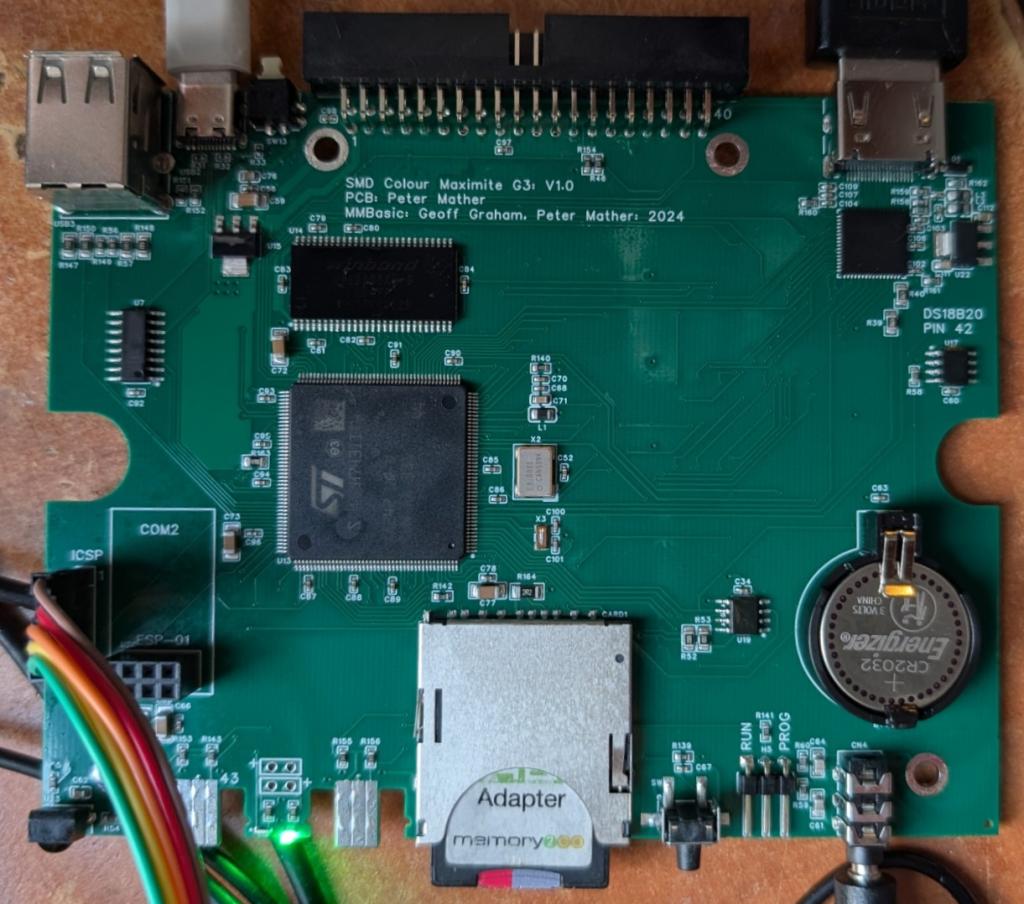
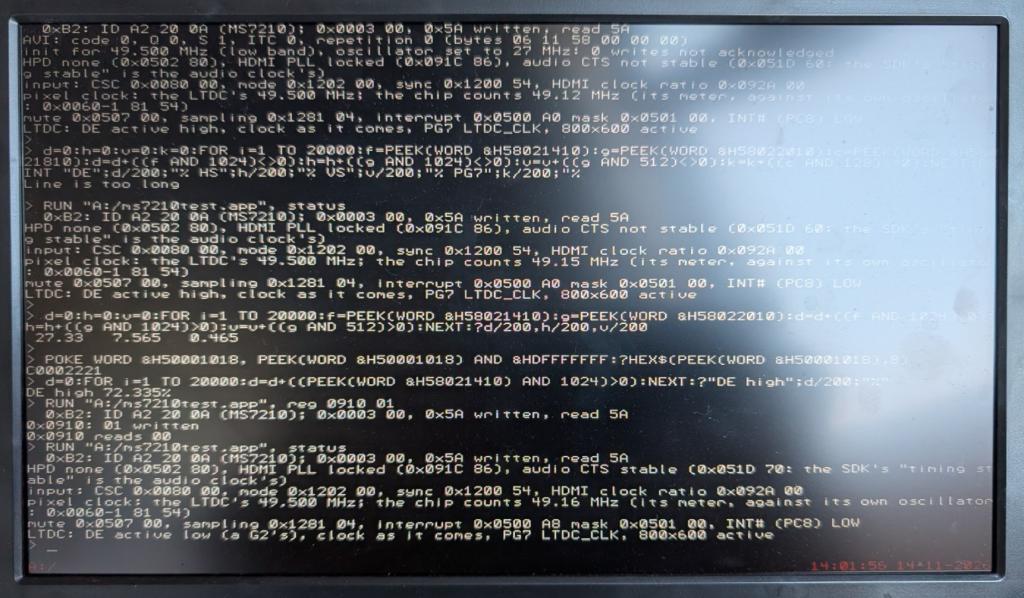
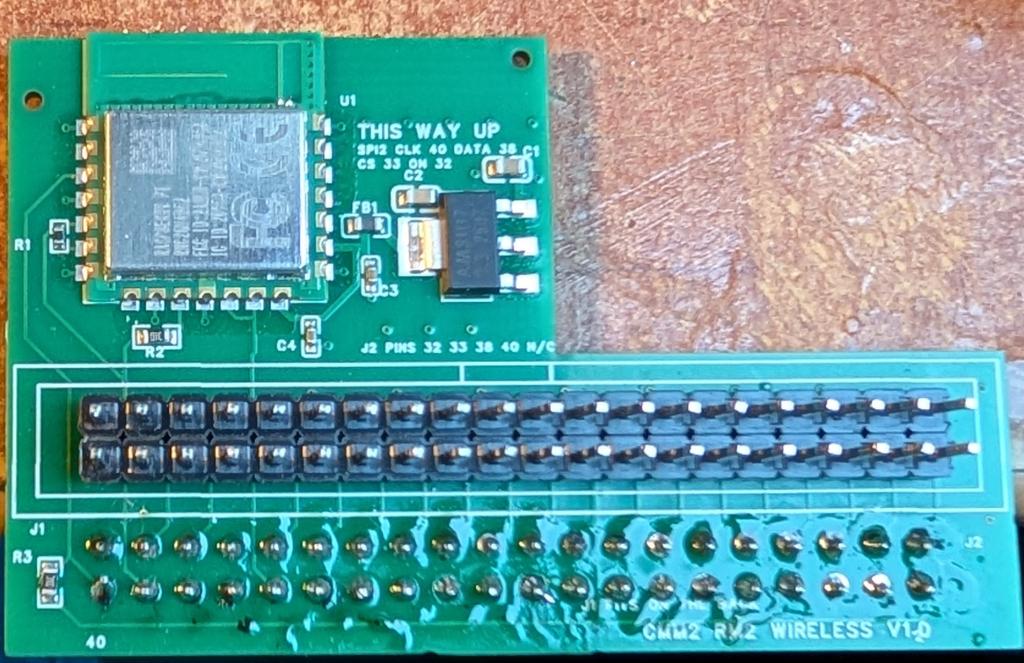
The boards have arrived for the Colour Maximite 2 V3 G3. This is a version with on-board HDMI and below is the very first image after the MS7210 chip was correctly programmed over I2C. The image quality is stunning up to and including 1080p. This was driven with an app so the next step is to embed the driver code into the firmware. Once everything is tested I'll put the design files on github. Bottom pic is of the all-new wifi dongle. If I can get this working the CMM2 will have all the web functionality currently available on the PC3/Webmite
Mixtel90 Guru Joined: 05/10/2019 Location: United KingdomPosts: 9373
Posted: 03:58pm 14 Nov 2026
Copy link to clipboard
Print this post
OOH! Those are rather nice boards. :) I may need surgical modification for the power switch (if that's what it is) though, it looks a bit tight in the pic, especially with a WiFi adapter plugged in as well.Mick
Wölfi Regular Member Joined: 14/10/2026 Location: GermanyPosts: 49
Posted: 05:28pm 14 Nov 2026
Copy link to clipboard
Print this post
I’m looking forward to seeing more and learning more about it.
matherp Guru Joined: 11/12/2012 Location: United KingdomPosts: 12242
Posted: 05:33pm 14 Nov 2026
Copy link to clipboard
Print this post
UPDATE
Video fully working. Now implementing HDMI audio
homa Guru Joined: 05/11/2021 Location: GermanyPosts: 771
Posted: 05:34pm 14 Nov 2026
Copy link to clipboard
Print this post
I had a feeling!
Will the Wi-Fi also work on the older CMM2?
Matthias Edited 2026-11-15 03:35 by homa
matherp Guru Joined: 11/12/2012 Location: United KingdomPosts: 12242
Posted: 05:41pm 14 Nov 2026
Copy link to clipboard
Print this post
If it works at all, then yes
Grogster Admin Group Joined: 31/12/2012 Location: New ZealandPosts: 10128
Posted: 03:39am 15 Nov 2026
Copy link to clipboard
Print this post
STOP! STOP, PETER!!!
YOU'RE GONNA EXPLODE IF YOU KEEP RELEASING THINGS AT THIS SPEED!
The MS7210 chip looks like a very interesting little beast, and I can't believe it is less then two bucks per chip($1.80) for a full 1080p HDMI interface with audio!
Does the new beast of a PCB actually NEED the power-switch? Do people actually USE it now?
Any CMM2G2's I have been shipping, I leave the little power switch in the "ON" position anyway.
Kinda like the Raspberry PI idea - the power switch is the USB power connector and plug. Plug it in, it's "ON". Pull the plug out, it's "OFF".
I doubt the switch costs much, so I guess if it can be fitted in at all....
What do others here think?Smoke makes things work. When the smoke gets out, it stops!
Mixtel90 Guru Joined: 05/10/2019 Location: United KingdomPosts: 9373
Posted: 08:10am 15 Nov 2026
Copy link to clipboard
Print this post
Personally, and being ancient, I still love the toggle switch on the front. You can see exactly what it's doing, you can have it actuating either way up and it has a nice, satisfying clonk. However, it's not great for preassembled boards. It has to be hand-soldered, it's much more expensive and it makes the board more fragile, leading to higher shipping costs. It also isn't ideal for switching 5V at low current (toggle switches rarely are as the self-cleaning action can be poor).
I moved onto push-push mechanical buttons, which are good but take up a little more width on the panel than I like, but they aren't as deep on the board as toggle switches. Self-cleaning is better than a toggle switch. They still need hand soldering though.
My latest experiment is to use mosfet power switching. Although it takes up board area and demands the use of a SMD mosfet as the power device (I can't find low enough RDSon for P-channel in any other package), the actuating button can be tiny and tucked away just about anywhere.
IMHO if the power switch isn't on the front then it's not going to be used by many people. They *will* put stuff on top of the enclosure and unplugging the PC end of the lead might be easier. :)Mick
PhenixRising Guru Joined: 07/11/2023 Location: United KingdomPosts: 2156
Posted: 09:38am 15 Nov 2026
Copy link to clipboard
Print this post
Me no-like and I also regard the tinned edge-connectors, on the PCB, an eye-sore.
Mixtel90 Guru Joined: 05/10/2019 Location: United KingdomPosts: 9373
Posted: 09:53am 15 Nov 2026
Copy link to clipboard
Print this post
The edge connectors aren't great, but availability of WII controller PCB connectors is poor now that the WII has been out of production for many years. You can get them from one or two Chinese sellers, but they are not easy to find.Mick
matherp Guru Joined: 11/12/2012 Location: United KingdomPosts: 12242
Posted: 10:01am 15 Nov 2026
Copy link to clipboard
Print this post
If you don't like the switch don't specify it and link the pads - easy. The nunchuck connectors stay, they are part of the cmm2 concept
Mixtel90 Guru Joined: 05/10/2019 Location: United KingdomPosts: 9373
Posted: 10:42am 15 Nov 2026
Copy link to clipboard
Print this post
I've been trying to find that sort of switch. Usually such things can be found on AE, but not in this case. I can find plenty of latching switches but not horizontal operating, only vertical.Mick
matherp Guru Joined: 11/12/2012 Location: United KingdomPosts: 12242
Posted: 10:44am 15 Nov 2026
Copy link to clipboard
Print this post
I will add a 2-pin header that you can either bridge or use to connect a remote switch.
UPDATE
Wifi dongle now tested and wifi networks identified
javavi Guru Joined: 01/10/2023 Location: UkrainePosts: 640
Posted: 10:57am 15 Nov 2026
Copy link to clipboard
Print this post
Will this MS7210 chip work here in both HDMI mode (with audio) and DVI mode (without audio) for older DVI monitors?
Would it have been possible to retain the VGA video output alongside this media converter chip, so as to have two types of video output on the board?
Mixtel90 Guru Joined: 05/10/2019 Location: United KingdomPosts: 9373
Posted: 11:10am 15 Nov 2026
Copy link to clipboard
Print this post
There seems to be an audio output jack, which would be pointless if audio was only via HDMI. So, yes, the display can probably ignore the audio.
AFAIK the main difference between Gen 2 and Gen 3 is the change in display. You are probably be better sticking with a Gen 2 (or Gen 1) if you want VGA. Fitting both would probably have been a pain (and needed a bigger box!).Mick
matherp Guru Joined: 11/12/2012 Location: United KingdomPosts: 12242
Posted: 11:11am 15 Nov 2026
Copy link to clipboard
Print this post
yes, audio is output both on the hdmi and on the existing DAC
No, no space on the edge connector, also the R2R DAC is marginal electrically in terms of the chips pin drive and can cause some clock jitter. In any case the G2 is still a perfectly viable design. This doesn't add anything to the G2 other than the different video output. The wifi dongle will work on both
javavi Guru Joined: 01/10/2023 Location: UkrainePosts: 640
Posted: 11:21am 15 Nov 2026
Copy link to clipboard
Print this post
What concerns me more is whether a DVI monitor will be able to accept an HDMI signal from this chip. I have several such DVI monitors (because they are very cheap), and I connect to them using a simple HDMI-to-DVI adapter and an HDMI cable. These monitors absolutely refuse to accept an HDMI signal; even when the audio is disabled, the data packets (data islands) still remain. Does this chip have the capability to be configured for a true DVI output?
Mixtel90 Guru Joined: 05/10/2019 Location: United KingdomPosts: 9373
Posted: 11:41am 15 Nov 2026
Copy link to clipboard
Print this post
Ah... DVI is a subset of HDMI. HDMI should accept DVI signals but DVI doesn't usually accept HDMI - they are different. I'll be surprised if that chip can produce what is now an obsolete format.Mick

 Notice. New forum software under development. It's going to miss a few functions and look a bit ugly for a while, but I'm working on it full time now as the old forum was too unstable. Couple days, all good. If you notice any issues, please contact me.


 Print this post