Notice. New forum software under development. It's going to miss a few functions and look a bit ugly for a while, but I'm working on it full time now as the old forum was too unstable. Couple days, all good. If you notice any issues, please contact me.
so that it now contains a source directory from which you should be able to build a binary for Raspbian. you will first need to install FPC and Lazarus IDE on your RPi, after which you can attempt a compile from a terminal/command window using:
user@user-DH61BE:~/test/source$ lazbuild project1.lpi Hint: (11030) Start of reading config file /etc/fpc.cfg Hint: (11031) End of reading config file /etc/fpc.cfg Free Pascal Compiler version 3.2.2 [2025/01/17] for x86_64 Copyright (c) 1993-2021 by Florian Klaempfl and others (1002) Target OS: Linux for x86-64 (3104) Compiling project1.lpr (3104) Compiling start.pas (3104) Compiling unit1.pas (3104) Compiling unit2.pas (3104) Compiling unit3.pas /home/user/tests/source/unit3.pas(153,16) Note: (6058) Call to subroutine "function FpOpen(const path:RawByteString;flags:LongInt):LongInt;" marked as inline is not inlined (3104) Compiling unit4.pas (3104) Compiling unit5.pas (3104) Compiling unit6.pas /home/user/test/source/serial.inc(164,26) Note: (6058) Call to subroutine "function FpOpen(const path:RawByteString;flags:LongInt):LongInt;" marked as inline is not inlined /home/user/test/source/engine.inc(117,24) Hint: (5057) Local variable "VTline" does not seem to be initialized (9022) Compiling resource /home/user/test/source/lib/x86_64-linux/project1.or (9015) Linking /home/user/test/source/project1 (1008) 24960 lines compiled, 1.7 sec (1022) 3 hint(s) issued (1023) 2 note(s) issued user@user-DH61BE:~/test/source$
report back on where it fails, and i'll attempt to make any fixes needed. as i recall someone did successfully make a RPi build five years back, with minimal changes needed. the performance wasn't stellar, but then we have gone through a couple of generations of RPi since then!
cheers, rob :-) Edited 2025-12-21 23:52 by robert.rozee
Frank N. Furter Guru Joined: 28/05/2012 Location: GermanyPosts: 1154
Posted: 11:53am 18 Dec 2025
Copy link to clipboard
Print this post
Hi Rob,
thank you very much!!!
Frank
Frank N. Furter Guru Joined: 28/05/2012 Location: GermanyPosts: 1154
Posted: 04:34pm 29 Dec 2025
Copy link to clipboard
Print this post
Hi Rob,
I finally got around to trying out the compilation. For me, the result looks like this:
pi400@raspberrypi:~/Desktop/source $ lazbuild project1.lpi CopySecondaryConfigFile /etc/lazarus/environmentoptions.xml -> /home/pi400/.lazarus/environmentoptions.xml Hint: (lazarus) [RunTool] "/usr/bin/fpc" "-iWTOTP" Hint: (lazarus) [RunTool] "/usr/bin/fpc" "-va" "compilertest.pas" Hint: (lazarus) [RunTool] "/usr/bin/fpc" "-iWTOTP" "-Parm" "-Tlinux" Hint: (lazarus) [RunTool] "/usr/bin/fpc" "-va" "compilertest.pas" "-Parm" "-Tlinux" TProject.DoLoadStateFile Statefile not found: /home/pi400/Desktop/source/lib/arm-linux/project1.compiled Info: (lazarus) Execute Title="Projekt kompilieren, Modus: Default, Ziel: project1" Info: (lazarus) Working Directory="/home/pi400/Desktop/source/" Info: (lazarus) Executable="/usr/bin/fpc" Info: (lazarus) Param[0]="-B" Info: (lazarus) Param[1]="-MObjFPC" Info: (lazarus) Param[2]="-Scghi" Info: (lazarus) Param[3]="-CX" Info: (lazarus) Param[4]="-Os3" Info: (lazarus) Param[5]="-XX" Info: (lazarus) Param[6]="-l" Info: (lazarus) Param[7]="-vewnhibq" Info: (lazarus) Param[8]="-vm5024" Info: (lazarus) Param[9]="-Fi/home/pi400/Desktop/source/lib/arm-linux" Info: (lazarus) Param[10]="-Fu/usr/lib/lazarus/2.0.10/lcl/units/arm-linux/gtk2" Info: (lazarus) Param[11]="-Fu/usr/lib/lazarus/2.0.10/lcl/units/arm-linux" Info: (lazarus) Param[12]="-Fu/usr/lib/lazarus/2.0.10/components/lazutils/lib/arm-linux" Info: (lazarus) Param[13]="-Fu/usr/lib/lazarus/2.0.10/packager/units/arm-linux" Info: (lazarus) Param[14]="-Fu/home/pi400/Desktop/source/" Info: (lazarus) Param[15]="-FU/home/pi400/Desktop/source/lib/arm-linux/" Info: (lazarus) Param[16]="-FE/home/pi400/Desktop/source/" Info: (lazarus) Param[17]="-o/home/pi400/Desktop/source/project1" Info: (lazarus) Param[18]="-dLCL" Info: (lazarus) Param[19]="-dLCLgtk2" Info: (lazarus) Param[20]="-dUseCThreads" Info: (lazarus) Param[21]="project1.lpr" Hint: (11030) Start of reading config file /etc/fpc.cfg Hint: (11031) End of reading config file /etc/fpc.cfg Free Pascal Compiler version 3.2.0+dfsg-12+rpi1 [2021/02/05] for arm Copyright (c) 1993-2020 by Florian Klaempfl and others (1002) Target OS: Linux for ARMHF (3104) Compiling project1.lpr (3104) Compiling start.pas (3104) Compiling unit1.pas (3104) Compiling unit2.pas (3104) Compiling unit3.pas (3104) Compiling unit4.pas (3104) Compiling unit5.pas (3104) Compiling unit6.pas /home/pi400/Desktop/source/engine.inc(117,24) Hint: (5057) Local variable "VTline" does not seem to be initialized (9022) Compiling resource /home/pi400/Desktop/source/lib/arm-linux/project1.or (9015) Linking /home/pi400/Desktop/source/project1 /home/pi400/Desktop/source/project1.lpr(27,1) Warning: (9034) "crtbegin.o" not found, this will probably cause a linking failure /home/pi400/Desktop/source/project1.lpr(27,1) Warning: (9034) "crtend.o" not found, this will probably cause a linking failure (1008) 24960 lines compiled, 6.4 sec (1021) 2 warning(s) issued (1022) 3 hint(s) issued pi400@raspberrypi:~/Desktop/source $
Is that a successful run? How can I start the program now, or where can I find it? THANK YOU VERY MUCH!
Frank Edited 2025-12-30 02:36 by Frank N. Furter
Frank N. Furter Guru Joined: 28/05/2012 Location: GermanyPosts: 1154
Posted: 04:54pm 29 Dec 2025
Copy link to clipboard
Print this post
Okay, I found the file. It's called "project1" and is now in the same folder as the source code. It seems to be working!!! For anyone interested, I've uploaded it here. It should also run on other Raspberry models. project1.zip
Rob, thank you so much for your help!!!
Frank Edited 2025-12-30 02:55 by Frank N. Furter
robert.rozee Guru Joined: 31/12/2012 Location: New ZealandPosts: 2552
Posted: 04:52am 31 Dec 2025
Copy link to clipboard
Print this post
brilliant! unfortunately i have no means of testing it myself
it looks like you've produced a build that should work on (presumably 64-bit) RPi4 and later (incl RPi400, RPi5, RPi500) using the GTK2 widgetset.
the warnings about missing crtbegin.o and crtend.o can (as far as i can tell) be ignored if the produced binary works ok. the warnings are caused by the FPC compiler failing to find the .o files, but as the binary works the linker was able to find them ok itself.
can any other forum members please test Frank's binary on RPi4's and RPi5's?
Frank: once verified by a couple of other users, would it be ok if i add your binary to the others on the GFXterm GitHub repository?
cheers, rob :-)
Frank N. Furter Guru Joined: 28/05/2012 Location: GermanyPosts: 1154
Posted: 09:46am 31 Dec 2025
Copy link to clipboard
Print this post
Rob, I think it's the 32-bit version that I have running here... (The version was included with my PI400...)
OF COURSE! This is YOUR project, and I am indebted to YOU!
THANK YOU VERY MUCH!
Frank
robert.rozee Guru Joined: 31/12/2012 Location: New ZealandPosts: 2552
Posted: 11:29am 31 Dec 2025
Copy link to clipboard
Print this post
looks like you are right. but it appears that 64-bit versions of raspbian can also run 32-bit applications, so the (32-bit) binary you have created should cover both
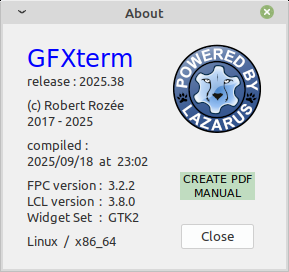
from the right-click menu in GFXterm, if you select 'about' you should see a small window pop up containing some build information, similar to this:
what information does yours contain?
btw, from the above window you can click on "CREATE PDF MANUAL" to cause a copy of the user manual to be saved to the desktop.
cheers, rob :-) Edited 2025-12-31 21:30 by robert.rozee
Frank N. Furter Guru Joined: 28/05/2012 Location: GermanyPosts: 1154
Posted: 01:20pm 31 Dec 2025
Copy link to clipboard
Print this post
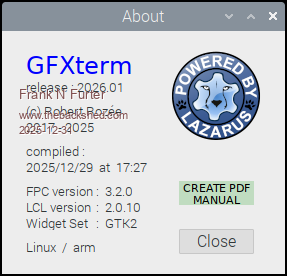
This is my pop up window:
I've already tried “CREATE PDF MANUAL” - it works very well and is a great feature!
Frank
KeepIS Guru Joined: 13/10/2014 Location: AustraliaPosts: 2282
Posted: 12:44am 01 Jan 2026
Copy link to clipboard
Print this post
Hi Rob, just a shout out for your great terminal program, I've been using it under Linux MX-25-64 bit.
I had been using gtkterm, but I find your app is really nice and stable, and I also found the "Create PDF Manual" button when I first installed it, very nice touch. NANO:Inverter V 8.4ks - Linux AvrDude GUI script V4.1
Grogster Admin Group Joined: 31/12/2012 Location: New ZealandPosts: 10063
Posted: 12:56am 01 Jan 2026
Copy link to clipboard
Print this post
Yes, I LOVE GFXterm. I have been using it for YEARS now, pretty much since the first or 2nd release. When I decided to move to Linux, I was DELIGHTED to discover that Rob had released a Linux version, and I pretty much use it on a daily basis, talking to various MMBASIC boards.
I have a PI4 or PI5 lying around here somewhere, so I will dig it out and try Frank's compile and report back.Smoke makes things work. When the smoke gets out, it stops!
TassyJim Guru Joined: 07/08/2011 Location: AustraliaPosts: 6624
Posted: 03:17am 01 Jan 2026
Copy link to clipboard
Print this post
I tried RPi5 trixie and bookworm 64bit with no joy. "can't find required file"
When time permits, I will try and set up the toolchain and compile it.
edit: got stuck running lazarus During install I couldn't find "libgdk-pixbuf2.0-dev" so ran the suggested alternatives. Trying to run lazarus and the project1 script: can't find libgdk-x11-2.0.so.0
I don't want to upset my own toolchain by changing from Wayland.
Jim Edited 2026-01-01 14:41 by TassyJimVK7JH MMedit
Frank N. Furter Guru Joined: 28/05/2012 Location: GermanyPosts: 1154
Posted: 09:28am 01 Jan 2026
Copy link to clipboard
Print this post
@TassyJim:
Did you install Lazarus via the repository manager? That worked for me...
Franks binary (project1) runs on my RPi 3B (bullseye 32) but NOT on my RPi 4B (bullseye 64). No error messages, just no go.
update: Runs on RPi 4B with (trixie 32)
/Lasse Edited 2026-01-02 00:39 by Doktorn
robert.rozee Guru Joined: 31/12/2012 Location: New ZealandPosts: 2552
Posted: 03:10pm 01 Jan 2026
Copy link to clipboard
Print this post
so if you try to run it from a terminal window (the equivalent of a command prompt in winXP), there are no error messages reported on that terminal window?
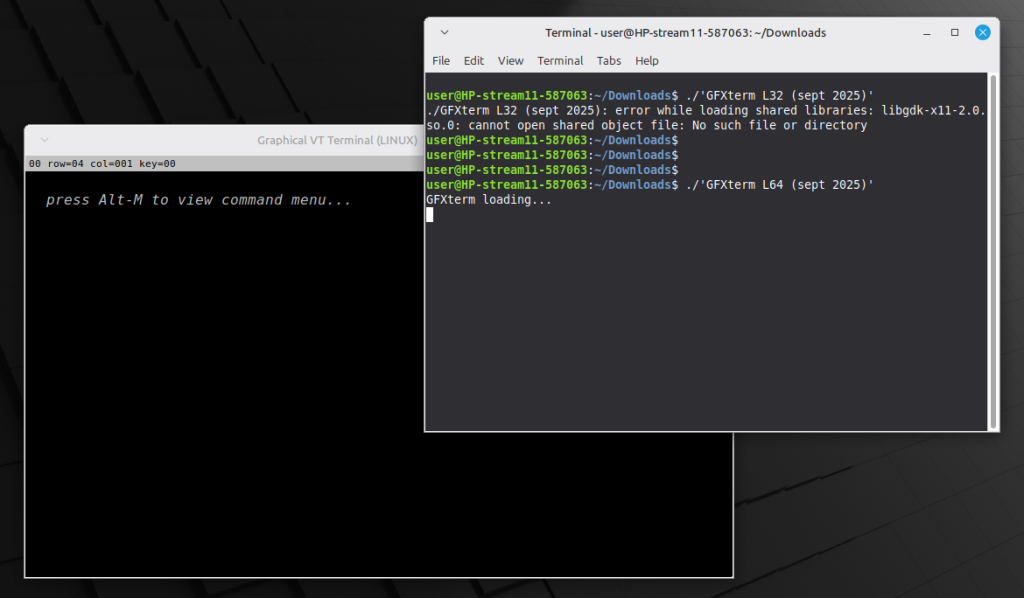
i just tried both L32 and L64 versions of the GFXterm binary from GitHub on a clean install of Linux Mint 22.3 XFCE (INTEL processor). this is the results i saw:
note the 32-bit binary produced a similar error message to what Jim was seeing, while the 64-bit binary ran fine. i was then able to add some 32-bit packages to allow the 32-bit binary to run.
for INTEL platforms, the required incantation was:
this all suggests to me that we will need both 32-bit and 64-bit versions of GFXterm for ARMHF in order to avoid 64-bit Raspbian users needing to jump through hoops installing additional libraries.
i also suspect that Jim may have ended up with a 32-bit version of Lazarus/FPC. likely 64-bit Raspbian out-of-the-box contains enough smarts to run a 32-bit non-GUI application, but not enough to run a GUI (in particular GTK2) application; the Lazarus IDE is just a GUI GTK2 application, while the FPC compiler (used by lazbuild) is a non-GUI application.
hopefully the above makes some sense - it is 4am here and well past my bedtime!
cheers, rob :-) Edited 2026-01-02 01:16 by robert.rozee
Page 2 of 3
Print this page
The Back Shed's forum code is written, and hosted, in Australia.

 Notice. New forum software under development. It's going to miss a few functions and look a bit ugly for a while, but I'm working on it full time now as the old forum was too unstable. Couple days, all good. If you notice any issues, please contact me.


 Print this post


 unfortunately i have no means of testing it myself