Notice. New forum software under development. It's going to miss a few functions and look a bit ugly for a while, but I'm working on it full time now as the old forum was too unstable. Couple days, all good. If you notice any issues, please contact me.
thwill Guru Joined: 16/09/2019 Location: United KingdomPosts: 4405
Posted: 06:13pm 17 Jul 2025
Copy link to clipboard
Print this post
Thank you for this @Volhout, I have conducted a Pico-ectomy on one of my Game*Mites to fit it with a Pico2 (alas the original Pico died ... they are a swine to desolder and some mechanical force was required ... I might give it a blast with the hot air rework station in-case it's just some connection that needs reflowing).
I can't promise to do anything more with it, but in time I hope to, there are some improvements I'd like to make to the setup files and menu program.
Volhout Guru Joined: 05/03/2018 Location: NetherlandsPosts: 6184
Posted: 06:27am 18 Jul 2025
Copy link to clipboard
Print this post
Hi Tom,
Glad you have succeeded in converting a game*mite to 2350. With its larger flash it can hold more games on the A drive. I remember you where scratching your head what to put in it. I didn’t make a (2) uf2 yet. But the zip should work with either 2040 and 2350. I am holding off atm since the 60003 release seems to have one uggly bug with run edit.when these are frozen I plan to release the uf2.
matherp Guru Joined: 11/12/2012 Location: United KingdomPosts: 12034
Posted: 07:51am 18 Jul 2025
Copy link to clipboard
Print this post
6.00.02 has bugs relating to chain, save/restore context, and edit file (all the same code). The last post of 6.00.03 fixes these bugs to the extent they have been demonstrated. Prior to 6.00.02RC12, EDIT FILE could only edit files as big as any remaining heap which in the case of FM was pretty small. Hence I spent considerable time and effort creating a mechanism to snapshot the complete variable space (save context) and subsequently restore it (restore context). This underlying mechanism is then used in CHAIN and EDIT FILE. This works perfectly if PSRAM is enabled including in FM (AFAIK). Without PSRAM, the snapshot takes place to to the A: drive and since talking to the A: drive uses heap I have had to include workarounds to try and protect against this corrupting the snapshot. Any remaining bug, if it is a firmware issue, is in 6.00.02 as well and since no-one can give me a test program to demonstrate it is likely to remain unsolved.
Volhout Guru Joined: 05/03/2018 Location: NetherlandsPosts: 6184
Posted: 08:30am 18 Jul 2025
Copy link to clipboard
Print this post
I may be starting a flame war, but the whole EDIT FILE is a feature with low prio anyway. Simply use the fm browse, run, ctrl-c, F4
If the fm just remembers the last folder you where in, after edit, F1, F9..
Fast, reliable, and ctrl-c is the mmbasic alternative of ctrl-alt-delete, something in your genes..
Peter, I know you like implementation like these, they challenge you. But I would not have implemented it at all.
thwill Guru Joined: 16/09/2019 Location: United KingdomPosts: 4405
Posted: 06:19pm 21 Jul 2025
Copy link to clipboard
Print this post
I didn't really expect that to work ... but it did. The old Pico board though very slightly bent and missing a few GPIO pads lives once more ... not sure I'd trust if for much though .
thwill Guru Joined: 16/09/2019 Location: United KingdomPosts: 4405
Posted: 06:31pm 21 Jul 2025
Copy link to clipboard
Print this post
This was just a cheap 2 in 1 hot air and soldering iron SMD rework station (YiHUA 878AD) wielded by an ignorant monkey who had an idea ... I guess learning by osmosis is continuing to work for me.
EDIT: I didn't buy this thing, I "inherited" it from @lew247. Hello Lewis if you are still out there
Volhout Guru Joined: 05/03/2018 Location: NetherlandsPosts: 6184
Posted: 09:12pm 07 Aug 2025
Copy link to clipboard
Print this post
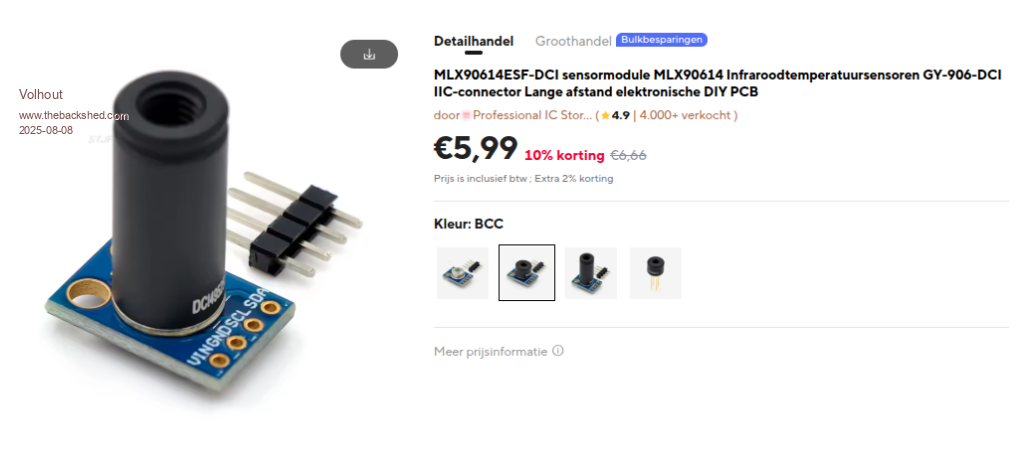
In an earlier post I gave a small preview of a Game*Mite in combination with a thermal sensor. This sensor is a single pixel IR sensor with a very small opening angle (6 degrees). Usefull measuring temperature of small objects (SMT components on a PCB, or a glow bulb in the ceiling). It is not a multi pixel camera.
The sensor can be purchased for few euro's on Ali.
With 4 wires you connect it to the expansion header on the Game*Mite (GND/GP16/GP17/3V3). It communicates I2C.
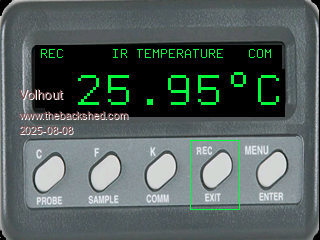
The Game*Mite shows something that looks similar to a FLUKE reference temperature meter. Which this (obviously) not is....;-)
The software displays degrees C/F/K, can output the data on the USB(console) port, and can record on the A: drive.
Navigation:
Left and Right buttons move the focus B select the top function A selects the bottom function
The functions MENU and ENTER are not implemented yet, but could be used to change the file name of the log file on A:.
Volhout
P.S. for the record, this is running on 6.00.03 dated 7-7-2025 Edited 2025-08-12 19:57 by VolhoutPicomiteVGA PETSCII ROBOTS
Volhout Guru Joined: 05/03/2018 Location: NetherlandsPosts: 6184
Posted: 09:21am 03 Sep 2025
Copy link to clipboard
Print this post
Tom, others,
This is a small bug-fix in the "sound demo" in the alternative Game*Mite install package. It removes the option M (mono) from the sound selector. Tested to work on 6.01.00b11 for both 2040 as well as 2350.
Volhout Guru Joined: 05/03/2018 Location: NetherlandsPosts: 6184
Posted: 08:45pm 12 Feb 2026
Copy link to clipboard
Print this post
Tom,
This is my first shot at a new GameMite image. You have to install it the classical way.
On the Game*Mite
- install "ClearFlash.uf2" to make sure the RP2040 is erased - install "PicoMiteRP2040V6.02.01b2.uf2", the current latest release. - after reboot, type
OPTION RESET GAMEMITE
- when prompted, press Y to format A:
Attached ZIP can be extracted to a SD card. Put the SD card in the GameMite.
B: CHDIR "GameMite2026" run "install-a.bas"
Now the A: drive is filled with programs.
load "startup.bas" flash save 1 OPTION AUTORUN 1,NORESET
Now you are ready. Press RESET on the GameMite, and let it start in the menu.
What has changed: - the software is a mix of PicoGamer and GameMite software. the PicoGamer software is by Geoff Graham, and when response is positive, I will ask his formal permission to use it. Before I create a uf2. This is only a test. - The sound test and key test software is removed. You needed to use the keys, and heard the beep sound anyway in your navigation to these tools. - Games: 3D-Maze, Circle, Flappy Bird, Lazer-Cycle, Pico Blocks, Pico Man, Snake, Kingdom, Pico Vaders. - The GameMite filemanager is also available. - after creating high scores with Lazer Cycle, there is 8k free on A: This implies, that if you want your own game on it, you have to remove something first, -or- use SD card. Note that you can navigate between A and B with the GameMite A and B keys.
To squeeze this all in, I have minimized the MOD files, and used Geoff's menu system in flash slot 1.
Happy Gaming..
Volhout
P.S. only tested on RP2040 P.P.S. Geoff, the only RP2040 system I had with 4G flash was a GEEK. So I loaded your uf2 onto the GEEK and analyzed the menu system and games. Very educating. Esecially the annoying watchdog in the menu system.
Bleep Guru Joined: 09/01/2022 Location: United KingdomPosts: 863
Posted: 05:04pm 13 Feb 2026
Copy link to clipboard
Print this post
Hi Harm, I can confirm your zip works fine with a 2350 Game*Mite :-) The only nicety I'd like is an option to use a WII controller, I have one connected to the GPIO pins on the back, the WII buttons are much nicer than the built in ones, which are fine, if that is all you have. :-) Regards Kevin. Ooh... I just noticed it now gives an indication of battery level, very neat. :-) Edited 2026-02-14 03:21 by Bleep
Volhout Guru Joined: 05/03/2018 Location: NetherlandsPosts: 6184
Posted: 06:34pm 13 Feb 2026
Copy link to clipboard
Print this post
HiKevin,
WII requires an adaptation of every individual game. And for the menu (although that is not priority ). Is your WII connected to system I2C. We could adapt game for game.
Bleep Guru Joined: 09/01/2022 Location: United KingdomPosts: 863
Posted: 07:58pm 13 Feb 2026
Copy link to clipboard
Print this post
Hi Harm, Yes, connected to GP26 and GP27, on the rear connector, and set up as system I2C. Just because I can I added the Bubble Universe for something to idely look at, and that auto magically appeared in the menu and works. :-) Regards Kevin.
Volhout Guru Joined: 05/03/2018 Location: NetherlandsPosts: 6184
Posted: 10:59am 14 Feb 2026
Copy link to clipboard
Print this post
Hi Kevin,
I readthat in Geoffs introduction of the PicoGamer, and was immediately enthousiastic. That is one of the reasons I adopted Geoffs menu system. I still need his approval though. But since you like it too, I will ask him for permission.
Turbo46 Guru Joined: 24/12/2017 Location: AustraliaPosts: 1694
Posted: 08:23pm 16 Feb 2026
Copy link to clipboard
Print this post
Thanks Harm,
How will this affect Geoff's Pico Gamer version?
BillKeep safe. Live long and prosper.
Volhout Guru Joined: 05/03/2018 Location: NetherlandsPosts: 6184
Posted: 08:32pm 16 Feb 2026
Copy link to clipboard
Print this post
Hi Bill,
I don't own a Pico Gamer, but in essence it is identical to the Game*Mite, only has more flash (a RP2040 with 4M/16M) where the RP2040 Game*Mite has 2M and the RP2350 Game*Mite has 4M.
When the Pico Gamer has free flash in the A:drive, you can store the games in the GameMite folder on A. The Menu system on Game*Mite and Pico Gamer is the same now. Only the splash screen and the menu title say Game*Mite, where the original Pico Gamer has it's own Title. So .. if you put above firmware on the PicoGamer you - loose Petscii Robots - Pico Gamer is called Game*Mite in the menu
Volhout P.S. I tried to shrink ChemiChaos by changing the sprite files to a JPG, and in essence that works (save 70kbyte) but you get pixel artifacts on screen. So I kept the larger BMP file. Edited 2026-02-17 06:37 by VolhoutPicomiteVGA PETSCII ROBOTS
Page 2 of 4
Print this page
The Back Shed's forum code is written, and hosted, in Australia.

 Notice. New forum software under development. It's going to miss a few functions and look a bit ugly for a while, but I'm working on it full time now as the old forum was too unstable. Couple days, all good. If you notice any issues, please contact me.


 Print this post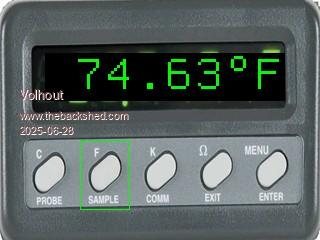

 .
.