Notice. New forum software under development. It's going to miss a few functions and look a bit ugly for a while, but I'm working on it full time now as the old forum was too unstable. Couple days, all good. If you notice any issues, please contact me.
The latter in effect says nvidia's newer proprietary driver has dropped support for such as Fermi if I'm reading it right :(
Granted, a workaround may be done but for now looks like Win11 and hope that's OK.
John
Grogster Admin Group Joined: 31/12/2012 Location: New ZealandPosts: 10071
Posted: 10:43pm 20 Oct 2025
Copy link to clipboard
Print this post
Wow - I have to say that graphics card is a BEAST. Crikey! Smoke makes things work. When the smoke gets out, it stops!
Mixtel90 Guru Joined: 05/10/2019 Location: United KingdomPosts: 9220
Posted: 06:59am 21 Oct 2025
Copy link to clipboard
Print this post
But it's "old tech" now and no longer supported! Microsoft seem to have been to the school of Nvidia thinking now. Generation of someone else's electronic waste doesn't matter if it secures future sales for the company. Luckily Linux makes it more of a 2-horse race. You *can* use an older version if you want to continue using your older hardware, something that Windows doesn't allow (in theory). Very often you can run a newer desktop on an older kernel and lose very little in actual operation or appearance.Mick
Gizmo Admin Group Joined: 05/06/2004 Location: AustraliaPosts: 5199
Posted: 03:43am 29 Oct 2025
Copy link to clipboard
Print this post
OK a update
After reading many forums, it seams the latest versions of Linux do not support older NVidia cards. In fact, seams like the newer nvidia cards are not well supported either, with a variety or problems from install drivers, freezes, etc, etc. If you get it working, consider yourself one of the lucky ones.
AMD cards, thats a different matter. Easy to get going, and stable.
So no matter what, if I want to run Linux on dual monitors, and play a game or two, I'll need a new ( see - expensive ) AMD video card.
I did play around with Fedora MATE and Cinamon desktops ( on one screen only ), and was impressed. Its faster than the Mint/Zorin versions I tried, especially at running aps under Wine, like Dreamweaver. I'm actually pretty keen to use it daily, but not until I buy a new video card. A few other bills to pay first.
GlennThe best time to plant a tree was twenty years ago, the second best time is right now. JAQ
robert.rozee Guru Joined: 31/12/2012 Location: New ZealandPosts: 2552
Posted: 04:13am 29 Oct 2025
Copy link to clipboard
Print this post
hi Gizmo, your video card (a NVidia GeForce 660 Ti i believe) dates from around 2012 as far as i can tell. have you looked at, instead, buying a comparable AMD card from the same era 2nd hand?
i don't know about in Oz, but here in NZ most cities have one or two outfits that recycle PCs and sell components at quite reasonable prices. for example, here in Christchurch there is Molten Media (https://molten.org.nz/ ) and Ecotech (https://www.ecotechservices.co.nz/).
cheers, rob :-)
Volhout Guru Joined: 05/03/2018 Location: NetherlandsPosts: 6184
Posted: 06:19am 29 Oct 2025
Copy link to clipboard
Print this post
Glenn,
You could Try a slightly older version of Mint/Ubuntu. That is still supported. And even after support ends it may be a valid OPTION.
Grogster Admin Group Joined: 31/12/2012 Location: New ZealandPosts: 10071
Posted: 06:48am 29 Oct 2025
Copy link to clipboard
Print this post
The NUC thing I am using, has dual-screens, and runs LMDE6 really, really well. EQUALLY as fast as W10, and with less CPU and RAM use.
MSI Cubi-i3 based(12th Gen Intel Core i3-1215U x6) with Intel HD graphics. (Alder Lake-UP3 GT1 UHD Graphics)
Can actually support a 3rd screen on USB-C if wanted, but two screens works for me.
As with Windows of old, WITHOUT correct graphics support, even Windows would not want to work well, and some Windows machines were really unstable, if you did NOT install the graphics driver. Normally, on those systems with Windows, you'd install the system drivers first, and the graphics driver was always the #2 driver install, to settle the system down in that department, so you could then install everything else.
Linux is really no different in that respect, with the exception being that nVidia drivers for Linux have been difficult to obtain, utterly refused to be developed by nVidia themselves, and therefore leaving it to the Linux community, to develop generic drivers.
The golden rule is this: If you have OLDER nVidia-based on-board graphics or are using a separate OLDER nVidia graphics card, then Linux is probably not for you, simply cos of the problems there are, with getting nVidia-based graphics cards to work inside Linux - especially any of the older ones.
Intel and AMD - no problems.
Just in case you have not seen this famous video, Gizmo, have a look at this:
nVidiaSmoke makes things work. When the smoke gets out, it stops!
Gizmo Admin Group Joined: 05/06/2004 Location: AustraliaPosts: 5199
Posted: 11:55am 30 Oct 2025
Copy link to clipboard
Print this post
Finally some success. But not with NVidia.
While out and about I called into a second hand computer shop, and they had a AMD Radeon RX 480 on the shelf for $100, comes with a 5 year warranty.
The AMD card only had one HDMI port, and 3 Display Ports. I wasnt sure if my monitors had a DP sockets, so called into Jaycar on the way home and grabbed a DP to HDMI adapter, so I could use the cards HDMI output for one screen, and the cards DP output with the adapter for the other monitor.
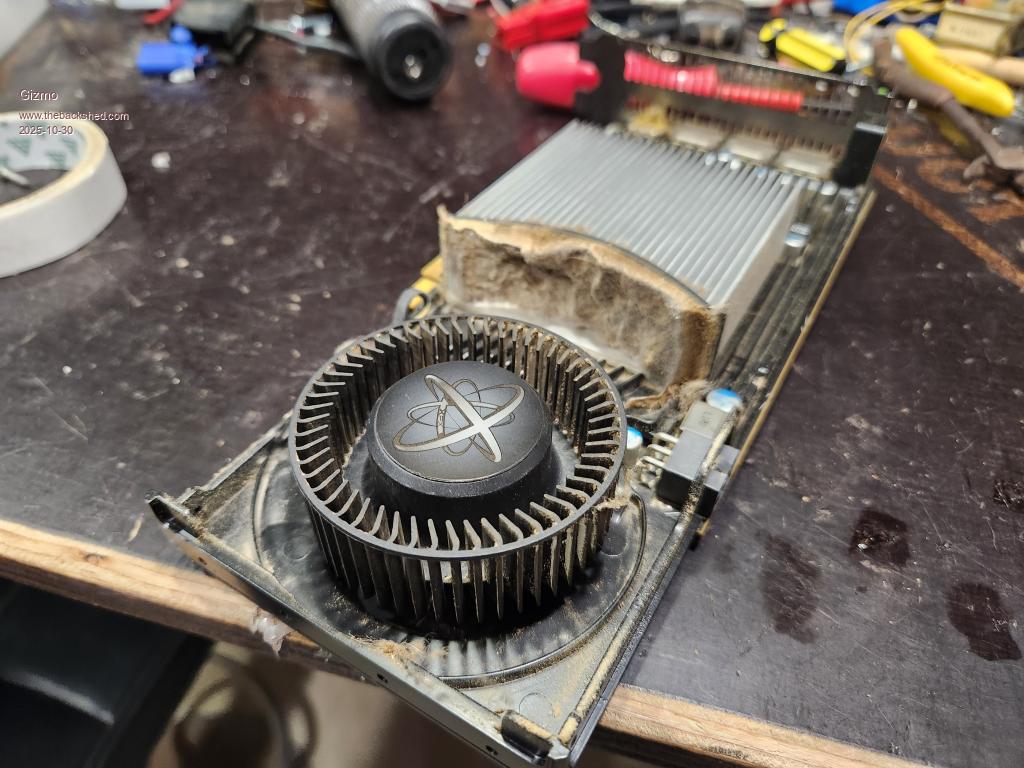
Brought it home, swapped out the NVidia 660Ti with the new graphics card. Booted into Windows and installed drivers for the AMD card. Noticed the fan on the AMD card was very loud. While testing in windows I got a message about the GPU running hot, and then it shut down. Pulled the card, off to the workbench we go. Removed the cover, and saw the heatsink was clogged up with fluff, almost like it was a carpet.
I cleaned it out, used some compressed air and paint brush. Then removed the heatsink and put on some fresh heat transfer grease. Back together and back in the PC, its now working properly, I can barely hear the fan.
I did noticed one screen was a different resolution than the other. My monitors are 2560 pixels wide, but one was limited to 1920. It was the Jaycar adapter, its only got a output resolution of 1920 X 1200! Well that's $30 wasted, I should have looked closer at the specs.
Discovered my monitors do have DP ports, so ducked back into town and grabbed 2 DP cables.
Back home, the big test, Linux. Grabbed the install USB stick, booted up into linux, and both screens were working Ran the full install, and I now have my desktop spread across two screens. My server guy was right, AMD stuff just works.
GlennThe best time to plant a tree was twenty years ago, the second best time is right now. JAQ
Volhout Guru Joined: 05/03/2018 Location: NetherlandsPosts: 6184
Posted: 12:20pm 30 Oct 2025
Copy link to clipboard
Print this post
Hi Gizmo,
That is a card from 2016. Is that sufficient graphics power for todays gaming ? It is like 10x slower than the current top of the line. Don't take this wrong, I have no knowledge, and just ask.
Gizmo Admin Group Joined: 05/06/2004 Location: AustraliaPosts: 5199
Posted: 10:53pm 30 Oct 2025
Copy link to clipboard
Print this post
Its about 70% faster than my NVidia card ( 2012 ). I dont play any of the latest games. My go to games are Minecraft ( relaxing ), Quake ( fast paced ), and Fallout 4 ( adventure and story ), which was released in 2015. So for those games this is still a high end card.
The prices of the latest graphics card is crazy, $400 is low end. I just dont need that sort of grunt.
GlennThe best time to plant a tree was twenty years ago, the second best time is right now. JAQ
Revlac Guru Joined: 31/12/2016 Location: AustraliaPosts: 1309
Posted: 12:03am 31 Oct 2025
Copy link to clipboard
Print this post
Glenn, I wasn't sure what sort of games you were into, but those are quite good I stopped (as did many others) buying games when the new games had Steam install that stuffed it all up.
On Ubuntu (or Mint) in software manager there was AssaultCube ................I think the later one is AssaultCube Reloaded (ACR) perhaps you have tried it, it was a bit of fun. Edited 2025-10-31 10:04 by RevlacCheers Aaron Off The Grid
Volhout Guru Joined: 05/03/2018 Location: NetherlandsPosts: 6184
Posted: 07:50am 31 Oct 2025
Copy link to clipboard
Print this post
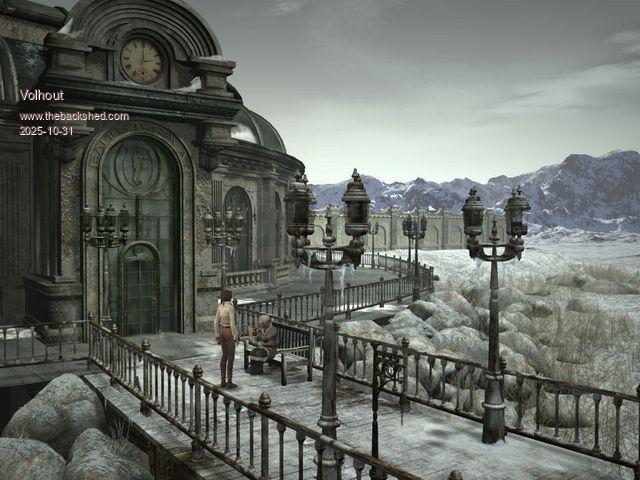
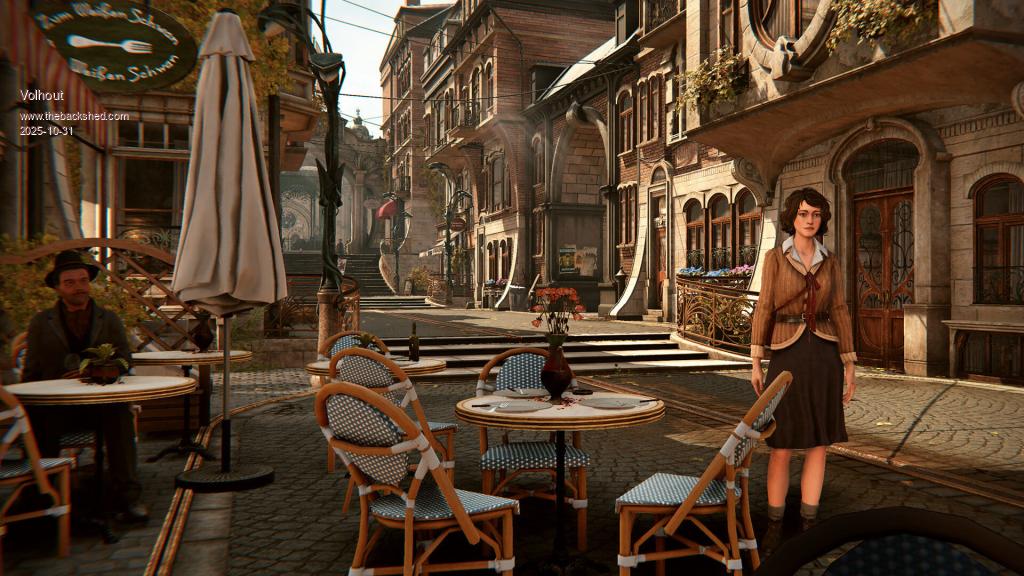
I like point-click adventures. Puzzles. Most impressed by the fantasy world of Syberia (game series). Every scene and location is beautiful.
This year a remake of the original game. Re-rendered. Above screenshot is of the original. Below is from a later game in the series. Stunning graphics.
Grogster Admin Group Joined: 31/12/2012 Location: New ZealandPosts: 10071
Posted: 08:32am 31 Oct 2025
Copy link to clipboard
Print this post
Well....nVidia....F-you. (refer to my link above.)
This is an old video, but is still current. nVidia ONLY want to support Windoze - that's it.
AMD and Intel, have very good Linux support.Smoke makes things work. When the smoke gets out, it stops!
Mixtel90 Guru Joined: 05/10/2019 Location: United KingdomPosts: 9220
Posted: 08:35am 31 Oct 2025
Copy link to clipboard
Print this post
An excellent game similar to Minecraft is available natively on Linux. Luanti is in the Mint repros, probably in others too. Luanti itself is the "core" and a server. You load your choice of game on top of it. VoxeLibre is "Minetest 2" and is very much like Minecraft - there are quite a few others. It's all free software, of course.Mick
Mixtel90 Guru Joined: 05/10/2019 Location: United KingdomPosts: 9220
Posted: 08:14am 02 Nov 2025
Copy link to clipboard
Print this post
I'm just wondering...
This monitor, although it has 2 hdmi sockets, has a problem if I have both connected (the screen starts to flicker off after a few mins) so I can only have one device plugged in. I have no space for a second monitor.
I'm happy running Mint but I'm unsure about using Wine for SL6 and my 2D CAD program. Te latter used to be unstable under Wine and I never tested SL6 for long enough to be certain.
I'm considering the virtual desktop approach, watching the Win10/Win11 desktop from Mint. Has anyone any experience of running these sorts of programs like this? The alternative is simply to swap back to Windows to do this stuff but the monitor is a pain. I really should swap it but it's one of those things that has to wait for spare cash to appear.
(I wondered if it was a problem with leakage current between earth connections on the different power supplies. I tried measuring the AC voltage between the Earth of the unused device and the Earth at the monitor and there's nothing measurable so it's not that. I think it's just something weird in the monitor.)Mick
Gizmo Admin Group Joined: 05/06/2004 Location: AustraliaPosts: 5199
Posted: 04:04am 05 Nov 2025
Copy link to clipboard
Print this post
Week 3 of the move from Windows to Linux.
In installed Steam from the Software app, easy. Installed Quake ( the 2021 release ), also easy. Next I tried Fallout 4. Insufficient disk space. Huh?
OK, so Steam was installed as a Flatpak. I dont really understand this, you can install software as a native application, but also Flatpak and Snap versions, the later two are sandboxes. Seams these sandboxes have limited space, and limited permissions. Quake installed ok, its only small, but Fallout needed about 35Gig, and the sandbox couldn't handle that. After a lot of searching, I came to the conclusion Steam as a flatpack is a stupid idea, and reinstalled it as a native application. I could then install Fallout.
Next was email. I use Thunderbird, with about 20 years and 15Gigs of emails. The safe way is to move all the emails into local folders in Thunderbird, shutdown Thunderbird, and copy this folder from the user directory to a shared drive. Then, on the new PC, install Thunderbird, set up accounts, exit, and copy the folder into the new user directories. Fire up Thunderbird, and you can transfer all the emails back to where you like them ( Inbox, Sent, etc ). Thats the theory.
Not so fast. Thunderbird in the latest Unbunto releases is flatpack or snap only, the recently removed the native application. You can install the native ap if you type a few hundred commands in the terminal, very messy. The snap version of Thunderbird has very little space in the sandbox for your files, it wont let you transfer over anything bigger than a couple gig. The flatpak version is kinder, but permission issues mean you need to use rsync as root to get the folders into the right place. It seams permission issues were partly to blame with the Steam running under Flatpak, I dont know, its confusing.
Eventually, I got Thunderbird working in Flatpak with all my old email. I've learned to stay well away from Snap or Flatpak as much as possible.
Little steps, with broken legs.
GlennThe best time to plant a tree was twenty years ago, the second best time is right now. JAQ
Mixtel90 Guru Joined: 05/10/2019 Location: United KingdomPosts: 9220
Posted: 07:46am 05 Nov 2025
Copy link to clipboard
Print this post
More and more applications are now installed as Snap or Flatpack, unfortunately. The big advantages are that it's less work for the distro to have to handle and it's easy, but it's not kind to the user's PC if storage and RAM are limited. At least Mint's own installer loads "Proper" applications by default.
I'm rather surprised that you needed to load Thunderbird as a Flatpack. It's been around so long now that I'd have thought it would have been in every distro of any size by default.
I'm now at almost a week without running a Windows machine, I think. However, I want to run SL6 so that run is due to be broken, I'm afraid.Mick
JohnS Guru Joined: 18/11/2011 Location: United KingdomPosts: 4389
Posted: 07:47am 05 Nov 2025
Copy link to clipboard
Print this post
Glenn,
Thanks for the update. Which exact variant of Linux are you using? (Sorry if I've missed it.)
John
robert.rozee Guru Joined: 31/12/2012 Location: New ZealandPosts: 2552
Posted: 11:21am 05 Nov 2025
Copy link to clipboard
Print this post
"Snap" is an Ubuntu-only thing. Linux Mint, which is derived from an Ubuntu base, has Snap disabled by default. Note that there is a big difference between Canonical's Ubuntu distributions and distros derived from an Ubuntu base.
some folks argue that Snap was created by Canonical (the company that produces Ubuntu) as a means to 'lock in' customers in a manner similar to what Microsoft has variously attempted over the years. i tend to agree with this stance, while others may disagree. either way, Snap images are enormous.
personally, i shy away from all of them: Snap, FlatPak, and Appimage. if i have something that needs a specific configuration i just create a VM (virtual machine) to run it in. One application that can create and run VMs is VirtualBox, and is available directly from Oracle: https://www.virtualbox.org/wiki/Linux_Downloads
VMware is an alternative to VirtualBox, there are others too. i've only ever used VirtualBox myself. i have half a dozen or so different VMs on my desktop machine, and will often have several running at once without issue; this is an i7 3770s with 16gb of RAM. each VM 'lives' in an image file whose size is variable up to a preset limit, and can also be configured to access areas of the host computer's disk space.
cheers, rob :-) Edited 2025-11-05 21:23 by robert.rozee
Page 2 of 5
Print this page
The Back Shed's forum code is written, and hosted, in Australia.

 Notice. New forum software under development. It's going to miss a few functions and look a bit ugly for a while, but I'm working on it full time now as the old forum was too unstable. Couple days, all good. If you notice any issues, please contact me.


 Print this post


 Ran the full install, and I now have my desktop spread across two screens. My server guy was right, AMD stuff just works.
 I stopped (as did many others) buying games when the new games had Steam install that stuffed it all up.