Notice. New forum software under development. It's going to miss a few functions and look a bit ugly for a while, but I'm working on it full time now as the old forum was too unstable. Couple days, all good. If you notice any issues, please contact me.
JohnS Guru Joined: 18/11/2011 Location: United KingdomPosts: 4386
Posted: 02:46pm 19 Dec 2025
Copy link to clipboard
Print this post
This one seems OK:
Dec 18 20:54 PicoMite_User_Manual.pdf
John
Pluto Guru Joined: 09/06/2017 Location: FinlandPosts: 412
Posted: 05:54pm 19 Dec 2025
Copy link to clipboard
Print this post
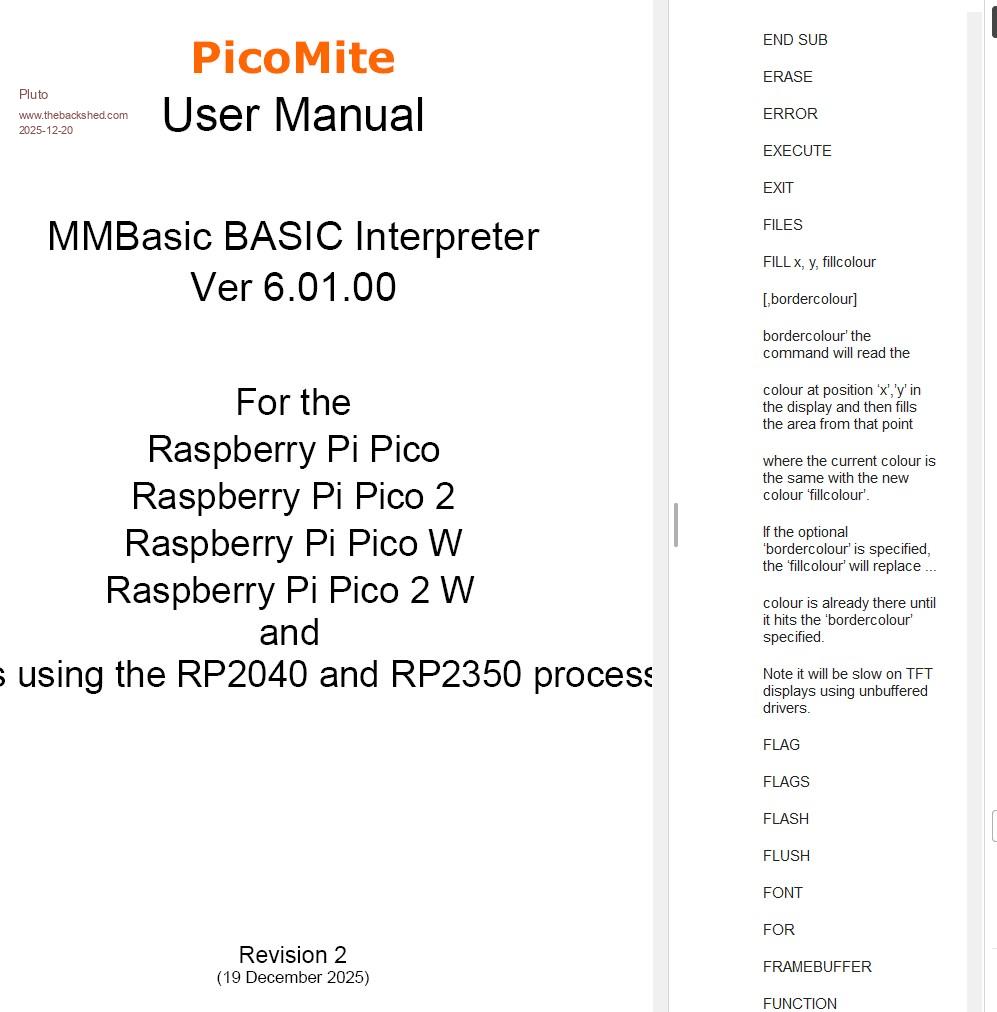
This is what I see:
Maybe something wrong with my pdf-reader? Updated Adobe, but the "corruption" persists.
matherp Guru Joined: 11/12/2012 Location: United KingdomPosts: 11996
Posted: 06:38pm 19 Dec 2025
Copy link to clipboard
Print this post
Confirmed there is a buglet in the doc. Some content is being picked up in the contents list - Revision 2
Geoffg Guru Joined: 06/06/2011 Location: AustraliaPosts: 3369
Posted: 01:21am 20 Dec 2025
Copy link to clipboard
Print this post
The firmware download now has an updated version of the manual (revision 3) which fixes the bookmarks, but the major change is the inclusion of the MATH SINC command.
JanVolk Guru Joined: 28/01/2023 Location: NetherlandsPosts: 420
Posted: 11:24pm 20 Dec 2025
Copy link to clipboard
Print this post
I'm missing some commands and functions in the manual. (program) They're included in the "The 3D Engine" PDF, but not in the program function list. Draw3D( Is it present in the command list, but not in the manual? Stepper (there is a separate Stepper PDF). Is it better to have it in the manual? In the "Advanced Graphics Functions" PDF, I also see the following functions: CLICK(DOWN), CLICK(UP), CLICK(LASTX), CLICK(LASTY), CLICK(REF), CLICK(LASTREF), and PAGE, but they might not work in PicoMite Basic? (Page = GUI Page?)
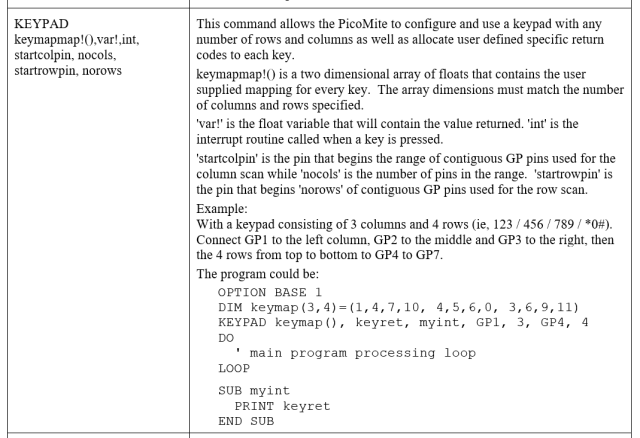
In the manual on page 132, in the example for KEYPAD, the values of the numbers are not all correct. Compare this with the following:
So, for example, if I have a keypad with 3 columns and 4 rows: 123 / 456 / 789 / *0# And I wire gp1 to the left column, gp2 to the middle, and gp3 to the right, then the 4 rows from top to bottom to gp4 to gp7 My program could be:
GP 1 2 3 4 1 2 3 5 4 5 6 6 7 8 9 7 * 0 #
Option base 1 ' columns columns columns Dim keymap(3, 4) = (1,4,7,10, 2,5,8,0, 3,6,9,11) Keypad keymap(), keyret, myint, gp1, 3, gp4, 4 Do Loop Sub myint Print keyret End Sub
Kind regards,
Jan.
Geoffg Guru Joined: 06/06/2011 Location: AustraliaPosts: 3369
Posted: 12:51am 21 Dec 2025
Copy link to clipboard
Print this post
Jan,
I'm not sure what to do with commands that are documented in separate PDFs. Some times they are repeated in the main manual, sometimes not. This should be consistent and I will have a look at it.
I agree, the KEYPAD command is a mess. Below is my attempt to rewrite it and fix the example program but it needs checking. Peter?
Edit. See "PicoMite Firmware Release Version 6.01.00" thread. Keypad keymap(),... is a RP2350 command only. Manual to be updated on pages 59 (Special Devices - Keypad Interface) and 132 (Commands). Edited 2025-12-22 10:04 by phil99
Footnote added 2026-01-13 09:21 by phil99 To use large keypads on the RP2040 see this thread
Volhout Guru Joined: 05/03/2018 Location: NetherlandsPosts: 6169
Posted: 08:22pm 23 Dec 2025
Copy link to clipboard
Print this post
Geoff,
If there is going to be an update to the manual, Maybe a mini section on the watchdog.
ville56 Guru Joined: 08/06/2022 Location: AustriaPosts: 630
Posted: 01:06pm 29 Dec 2025
Copy link to clipboard
Print this post
I think the on page 93 the numbers for the maximum number of variables are outdated. I've checked with the 2 samples below:
PicoMite RP2040: max # global vars max # local vars ex manual 256 256 my tests 448 448
PicoMite VGA RP2040: max # global vars max # local vars ex manual 256 224 my tests 448 448
Didn't test for the other variants but Peter should be able to give the correct numbers. 73 de OE1HGA, Gerald
Volhout Guru Joined: 05/03/2018 Location: NetherlandsPosts: 6169
Posted: 09:05am 02 Jan 2026
Copy link to clipboard
Print this post
On RP2040 non VGA it is 255 global, and 223 local vars. Try this:
'test variatble space OPTION EXPLICIT OPTION DEFAULT integer
dim a,b,c,d,e,f,g,h,i,j,k,l,m,n,o,p,q,r,s,t,u,v,w,x,y,z dim a1,b1,c1,d1,e1,f1,g1,h1,i1,j1,k1,l1,m1,n1,o1,p1,q1,r1,s1,t1,u1,v1,w1,x1,y1,z1 dim a2,b2,c2,d2,e2,f2,g2,h2,i2,j2,k2,l2,m2,n2,o2,p2,q2,r2,s2,t2,u2,v2,w2,x2,y2,z2 dim a3,b3,c3,d3,e3,f3,g3,h3,i3,j3,k3,l3,m3,n3,o3,p3,q3,r3,s3,t3,u3,v3,w3,x3,y3,z3 dim a4,b4,c4,d4,e4,f4,g4,h4,i4,j4,k4,l4,m4,n4,o4,p4,q4,r4,s4,t4,u4,v4,w4,x4,y4,z4 dim a5,b5,c5,d5,e5,f5,g5,h5,i5,j5,k5,l5,m5,n5,o5,p5,q5,r5,s5,t5,u5,v5,w5,x5,y5,z5 dim a6,b6,c6,d6,e6,f6,g6,h6,i6,j6,k6,l6,m6,n6,o6,p6,q6,r6,s6,t6,u6,v6,w6,x6,y6,z6 dim a7,b7,c7,d7,e7,f7,g7,h7,i7,j7,k7,l7,m7,n7,o7,p7,q7,r7,s7,t7,u7,v7,w7,x7,y7,z7 dim a8,b8,c8,d8,e8,f8,g8,h8,i8,j8,k8,l8,m8,n8,o8,p8,q8,r8,s8,t8,u8,v8,w8,x8,y8,z8 dim a9,b9,c9,d9,e9,f9,g9,h9,i9,j9,k9,l9,m9,n9,o9,p9,q9,r9,s9,t9,u9',v9,w9,x9,y9,z9
hello memory end
sub hello local a,b,c,d,e,f,g,h,i,j,k,l,m,n,o,p,q,r,s,t,u,v,w,x,y,z local a1,b1,c1,d1,e1,f1,g1,h1,i1,j1,k1,l1,m1,n1,o1,p1,q1,r1,s1,t1,u1,v1,w1,x1,y1,z1 local a2,b2,c2,d2,e2,f2,g2,h2,i2,j2,k2,l2,m2,n2,o2,p2,q2,r2,s2,t2,u2,v2,w2,x2,y2,z2 local a3,b3,c3,d3,e3,f3,g3,h3,i3,j3,k3,l3,m3,n3,o3,p3,q3,r3,s3,t3,u3,v3,w3,x3,y3,z3 local a4,b4,c4,d4,e4,f4,g4,h4,i4,j4,k4,l4,m4,n4,o4,p4,q4,r4,s4,t4,u4,v4,w4,x4,y4,z4 local a5,b5,c5,d5,e5,f5,g5,h5,i5,j5,k5,l5,m5,n5,o5,p5,q5,r5,s5,t5,u5,v5,w5,x5,y5,z5 local a6,b6,c6,d6,e6,f6,g6,h6,i6,j6,k6,l6,m6,n6,o6,p6,q6,r6,s6,t6,u6,v6,w6,x6,y6,z6 local a7,b7,c7,d7,e7,f7,g7,h7,i7,j7,k7,l7,m7,n7,o7,p7,q7,r7,s7,t7,u7,v7,w7,x7,y7,z7 local a8,b8,c8,d8,e8,f8,g8,h8,i8,j8,k8,l8,m8,n8,o8',p8,q8,r8,s8,t8,u8,v8,w8,x8,y8,z8 'local a9,b9,c9,d9,e9,f9,g9,h9,i9,j9,k9,l9,m9,n9,o9,p9,q9,r9,s9,t9,u9,v9,w9,x9,y9,z9 end sub
PicoMite MMBasic RP2040 V6.01.00 OPTION SYSTEM SPI GP18,GP19,GP16 OPTION SYSTEM I2C GP14,GP15 OPTION COLOURCODE ON OPTION CPUSPEED (KHz) 200000 OPTION SDCARD GP17 OPTION F5 flash run > AUTOSAVE N Progress: 1/31 Upload completed 1 Enter ctrl-Z, F1, or F2 to exit Saved 1730 bytes > Time taken: 2252mS RUN Program: 2K ( 1%) Program (31 lines) 122K (99%) Free
ville56 Guru Joined: 08/06/2022 Location: AustriaPosts: 630
Posted: 03:34pm 02 Jan 2026
Copy link to clipboard
Print this post
Testing on plain RP2040, non VGA non USB:
- the default settings for RP2040 seem to be:
global vars 255 local vars 223 total vars 478
but you can change that with "option local variables 32" to
global vars 447 local vars 31 total vars 478 (memory displays 477) so
1) the memory display seem to me not to be consistent or just buggy 2) the headings of the table on page 93 say "Maximum number of global/local variables". If I get it right, the maximum number one can use varies, depending on the setting of "Option local variables n", between
the number of total vars available changes but I have no idea why.
And the option seems to be buggy!!
If using OPTION LOCAL VARIABLES 448 and - specifying 30 global vars and more than 224 local variables a "Error: Invalid address - resetting" is thrown.
- specifying 31 global vars and more than 224 local variables a "Error : Too many global variables" is thrown
- specifying 32 global vars and more than 224 local variables a "Error : Not enough Global variable memory" is thrown
*) this was the maximum of local vars I could achieve despite the setting is 448.
Btw: I interprete "maximum number ... " as the maximum number of specific variables either global or local that can be made usable. The number of the other variable type will be decreased to a minimum (not specified).
Gerald 73 de OE1HGA, Gerald
matherp Guru Joined: 11/12/2012 Location: United KingdomPosts: 11996
Posted: 07:21pm 02 Jan 2026
Copy link to clipboard
Print this post
The maximum number of variables is given by MM.INFO(max vars) this never changes. You can adjust the way this is shared out using OPTION LOCAL VARIABLES n The minimum global or local variables you can have is 32. If you create a program that loads up either to at or near the maximum it is likely to crash as the hash table is nearly full and it will take forever to locate a space for a variable or find an existing one. By default, MMbasic partitions the space roughly equally. Subroutines if nested can use far more local variable slots than you expect. The Solar eclipse program uses more than 200. The best thing is to only use the OPTION if you absolutely have to and even then be conservative. The firmware tries to protect the user by always leaving on variable slot in each area unused but depending on the code it isn't a perfect protection. Me thinks I should never have included the OPTION in the manual Edited 2026-01-03 05:49 by matherp
bfwolf Senior Member Joined: 03/01/2025 Location: GermanyPosts: 258
Posted: 08:04pm 02 Jan 2026
Copy link to clipboard
Print this post
Yes, sometimes you should keep "certain things" secret so as not to "give anyone stupid ideas" or "scare any chickens".
ville56 Guru Joined: 08/06/2022 Location: AustriaPosts: 630
Posted: 09:43pm 02 Jan 2026
Copy link to clipboard
Print this post
The option is excellent and I already had to use it (in a very conservative amount), so please leave it. What should be done is to review the relevant manual section to reflect the facts you mentioned in you last post and also add a word of warning as you did. The current numbers in the manual for the number of available variables are currently simply wrong, at least for the cases I tested.
Maybe the default numbers for global/local variables allowed for each firmware variant would be sufficient, and changing "maximum number", to "default number". 73 de OE1HGA, Gerald
Mixtel90 Guru Joined: 05/10/2019 Location: United KingdomPosts: 9185
Posted: 08:29am 03 Jan 2026
Copy link to clipboard
Print this post
I would argue that, wrong or not, the numbers stated in the manual should be very conservative indeed. As matherp pointed out, as the hash table fills up the speed decreases and that's a major performance hit. Far better to encourage the programmer to be more efficient in the use of variables by not telling him/her the true capabilities. That will keep program speeds up. If the average user is using more than 200 variables *including global and local* in addition to arrays then that's probably being very inefficient indeed.
If someone is *testing* an MMBasic platform then conditions are different. It's fair enough to squeeze every last variable space out providing the tests still run properly, but that's a different kettle of fish and details should NOT appear in the manual for ordinary users to play with or attempt to use. . Edited 2026-01-03 18:35 by Mixtel90Mick
ville56 Guru Joined: 08/06/2022 Location: AustriaPosts: 630
Posted: 03:59pm 03 Jan 2026
Copy link to clipboard
Print this post
I'm not a friend of covering up features and restrictions, they should be communicated openly. To use them was hopefully intended. 73 de OE1HGA, Gerald
Page 2 of 3
Print this page
The Back Shed's forum code is written, and hosted, in Australia.

 Notice. New forum software under development. It's going to miss a few functions and look a bit ugly for a while, but I'm working on it full time now as the old forum was too unstable. Couple days, all good. If you notice any issues, please contact me.


 Print this post