Notice. New forum software under development. It's going to miss a few functions and look a bit ugly for a while, but I'm working on it full time now as the old forum was too unstable. Couple days, all good. If you notice any issues, please contact me.
homa Guru Joined: 05/11/2021 Location: GermanyPosts: 777
Posted: 04:25pm 24 Oct 2026
Copy link to clipboard
Print this post
Peter,
On the CMM2 the Enter key gives CR+LF (13 10) in INKEY$, on the USB keyboard and on the serial terminal. On the PicoMite my program never sees the LF, so on the CMM2 the stray LF stops my "any key = stop" check.
> option list 480MHz Colour Maximite 2 G2 MMBasic 7.00.00b3 CURRENT VGA mode 640x480 ARGB8888 CURRENT DISPLAY 50,100 OPTION PICOMITE PicoMiteHDMIUSB RP2350B, 640x480 OPTION USBKEYBOARD DE OPTION COMPILE ON
Test, pressing only Enter:
> DO : DO : k$ = INKEY$ : LOOP UNTIL k$ <> "" : PRINT ASC(k$); : LOOP 10 13 10 13 10
The first 10 is left over from the Enter that started the line. Is the LF intended?
Matthias
matherp Guru Joined: 11/12/2012 Location: United KingdomPosts: 12254
Posted: 04:31pm 24 Oct 2026
Copy link to clipboard
Print this post
Manual page 101
OPTION CRLF CR | LF | CRLF Defines what the USB keyboard will send when the Enter key is pressed: CR (a carriage return), LF (a line feed) or CRLF (both, the default). This command can only be used in a program. The setting returns to CRLF when a program is loaded and when it ends.
Assuming it is benign I will change OPTION PICOMITE to automatically set OPTION CRLF CR in the next beta Edited 2026-10-25 02:42 by matherp
Volhout Guru Joined: 05/03/2018 Location: NetherlandsPosts: 6276
Posted: 05:37pm 24 Oct 2026
Copy link to clipboard
Print this post
Take care, this could impact the communication with MMCC.
hhtg1968 Guru Joined: 25/05/2023 Location: GermanyPosts: 320
Posted: 08:48pm 24 Oct 2026
Copy link to clipboard
Print this post
I updated my cmm2 and use it with option picomite hdmi.
inkey$ is never "".
but I am testing further wether it is true.
matherp Guru Joined: 11/12/2012 Location: United KingdomPosts: 12254
Posted: 09:48pm 24 Oct 2026
Copy link to clipboard
Print this post
OPTION PICOMITE HDMI
dim k$ option crlf cr do:do:k$=inkey$:loop while k$="": print asc(k$);:loop
Edited 2026-10-25 07:52 by matherp
homa Guru Joined: 05/11/2021 Location: GermanyPosts: 777
Posted: 10:45pm 24 Oct 2026
Copy link to clipboard
Print this post
I’m continuing to test it… I came across another oddity: RUN throws an error from the loaded programme saying “Cannot open file”. The same programme runs when launched via FM. The active folder was the same… I’ll keep an eye on this!
The FW7 on the cmm2 is brilliant!
Matthias
hhtg1968 Guru Joined: 25/05/2023 Location: GermanyPosts: 320
Posted: 07:38am 25 Oct 2026
Copy link to clipboard
Print this post
your test runs correctly at my cmm2.
in my program I added 2 lines to clear key buffer
do loop until inkey$=""
and there is no problem any longer.
on my pico3 computer it runs without cleaning buffer correctly.
I will test it more exactly.
hhtg1968 Guru Joined: 25/05/2023 Location: GermanyPosts: 320
Posted: 08:13am 25 Oct 2026
Copy link to clipboard
Print this post
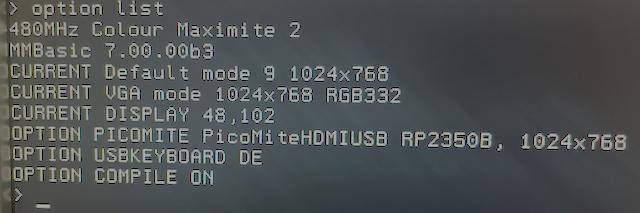
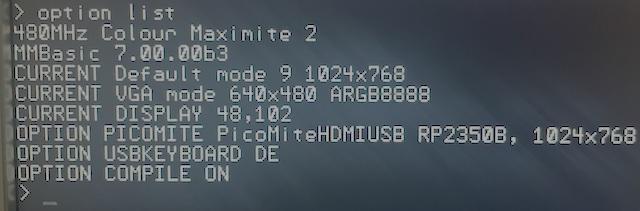
I am confused about screen resolutions, modes and so on. I think I do not understand the system.
I use my cmm2 on a vga monitor with resolution 1024,768.
so I entered "option default mode 9" because I want to "use" the pixels 1:1.
I also entered "option picomite hdmi, 1024x768.
option list:
When I now start a program without any command like resolution, mode etc...
(1 liner : Print "Hello")
the computer switches to 640x480. and it stays so in the command line.
the "current vga" changed to 640x480
if I enter now "edit" the editor opens in 1024x768 and it stays so after esc.
is "option default mode 9" incompatible with "option picomite"? Edited 2026-10-26 19:59 by hhtg1968
disco4now Guru Joined: 18/12/2014 Location: AustraliaPosts: 1162
Posted: 12:00am 27 Oct 2026
Copy link to clipboard
Print this post
Peter, There seems to be issue in both the CMM2 and Picomite latest code where an error in an interrupt triggered by SETTICK leaves something behind that prevents the first SETTICK interrupt when the program is run again from triggering. A second one is triggered OK. A CPU RESTART will allow both to be triggered on the next run.
> CPU RESTART
> run =============== INT1 TRIGGERED 0 1 INTERRUPT CALLED OK 16 foo =============== INT1 TRIGGERED 0 1 INTERRUPT CALLED OK 16 foo =============== INT6 TRIGGERED Error in line 46: foo
> run =============== 0 INTERRUPT NOT CALLED 16 foo =============== INT1 TRIGGERED 0 1 INTERRUPT CALLED OK 16 foo =============== INT6 TRIGGERED Error in line 46: foo
Sub test_error_normal() 'test error in main not seen in interrupt local i%,eline$ interrupt_called% = 0 On Error Skip 1 Error "foo" SetTick 10, interrupt1 Pause 100 if interrupt_called% then ? interrupt_called% , "INTERRUPT CALLED OK" ELSE ? interrupt_called% , "INTERRUPT NOT CALLED" END IF ? Mm.ErrNo, MM.ERRMSG$
' Test that an ON ERROR RESTART is not passed to an interrupt
Sub test_interrupt_not_inherit() 'test_interrupt_does_not_inherit RESTART interrupt_called% = 0 On Error RESTart SetTick 10, interrupt6 Pause 100 if interrupt_called% then ? interrupt_called% , "INTERRUPT CALLED OK" ELSE ? interrupt_called% , "INTERRUPT NOT CALLED" END IF ? Mm.ErrNo, MM.ERRMSG$
Although the list below looks short, this is a huge update. Review the full release notes and see the manual for more information. This version should run pretty much any Picomite program, including csubs, that doesn't use PIO when in Picomite compatibility mode.
Colour Maximite 2: MMBasic 7.00.00b4 (beta)
27 October 2026. What has changed since 7.00.00b3.
The fourth beta of MMBasic 7.00 for the Colour Maximite 2 is out. The source is now public on GitHub, and the firmware, the manual and the release notes are on the release page:
The same firmware file runs on the Generation 1 and the Generation 2. This is a beta: please report problems here.
Before you update Nothing is lost this time: all options, the program held in flash, the library and VAR SAVE data are kept.
The highlights • USB touch screens. ◦ A touch monitor, or a touch panel with a USB controller, works as on the PicoMite: up to ten fingers. ◦ The GUI controls respond to it, and TOUCH() reads the fingers and the gestures: swipes, taps, double taps, holds, pinches and twists. ◦ The editor scrolls with a swipe and moves its cursor with a tap. ◦ Monitors with the WingCoolTouch/WCH controller (the Corsair Xeneon Edge, the Verbatim HD14T and others) give all ten fingers. • An on-screen keyboard. OPTION SCREEN KEYBOARD n [, M] puts a keyboard on a touch screen at the prompt and in the editor and file manager. A program can show it with KEYBOARD ON. • GUI CURSOR, GUI CLICK and CLICK() now work as on the PicoMite. A program can steer the pointer and click with it, and the mouse pointer of the GUI controls follows the GUI CURSOR commands. • STEPPER. The PicoMite's stepper motor controller drives three axes and a rotary axis from G-code, with TMC2209/TMC2208 drivers. Stepper_Reference.pdf describes it. • Screen captures. SAVE PNG, and Print Screen or Ctrl-\ save the screen as a PNG. • The PicoMite's GP pin names work in every mode, and so do its 64-bit GPIO masks. BITSTREAM, DEVICE SERIALRX/SERIALTX and SETPIN ARAW are as on the PicoMite. • More of the PicoMite's commands, functions and options: ◦ BLIT COMPRESSED and BLIT RESIZE; ◦ LIST VARIABLES, OPTIONS, PINS and COLLISIONS; ◦ PEEK(BP/WP/SP), MM.USB, CPU SLEEP and MM.INFO$(PLATFORM); ◦ OPTION F1 and F5 to F9, OPTION LOGGING and OPTION AUTORUN n. • OPTION PICOMITE comes closer to the PicoMite: MM.INFO(CPUSPEED), KEYDOWN, LOAD PNG's alpha and GETSCANLINE.
Worth knowing • TOUCH() and CLICK() are now separate, as on the PicoMite: CLICK() has the GUI's keywords, TOUCH() everything else. • GUI CURSOR no longer gives errors for SHOW, UNLINK MOUSE, or x, y with the cursor off. • RBOX limits its corner radius to half the shorter side, and a filled box keeps its outline. • A touch monitor that is also the CMM2's display may disconnect for a moment when MODE changes the resolution.
Fixed • After an error in an interrupt: an interrupt that ended in an error no longer stops the next run's first PAUSE and SETTICK from working. • GUI CLICK PIN no longer stays set after RUN. • The G2's console no longer drops characters after a restart. • DRAW3D: fixes to HIDE, the lighting and the checks. • Smaller fixes to RESTORE, READ, LONGSTRING MID, MATH(C_DIV), the editor and the RAM library.
The full notes, compared with b3 and with 5.07.02, are on the release page with the manual.
PhenixRising Guru Joined: 07/11/2023 Location: United KingdomPosts: 2168
Posted: 08:23pm 27 Oct 2026
Copy link to clipboard
Print this post
This is scary good
homa Guru Joined: 05/11/2021 Location: GermanyPosts: 777
Posted: 09:41pm 27 Oct 2026
Copy link to clipboard
Print this post
@Peter: thanks for b4 - the file manager now shows the PNG screenshots on the CMM2
One small wish: a PNG smaller than the screen (e.g. a 640x480 screenshot from MMbg in MODE 3) is shown in the top left corner, and the rest of the screen still shows parts of the file manager behind it.
Nicer would be: - clear the screen and show the picture centred, or - switch to the matching resolution if the picture fits a known mode (just an idea).
Not urgent at all - the viewer itself works fine now.
Matthias
Edit - PicoMiteHDMI RC6 (RP2350A, no PSRAM): With OPTION PRINTSCREEN FORMAT PNG the screenshot file is created with 0 bytes. With BMP it works fine. Edited 2026-10-28 07:46 by homa
matherp Guru Joined: 11/12/2012 Location: United KingdomPosts: 12254
Posted: 07:07pm 01 Nov 2026
Copy link to clipboard
Print this post
Colour Maximite 2: MMBasic 7.00.00b5 (beta)
1 November 2026. What has changed since 7.00.00b4.
The fifth beta of MMBasic 7.00 for the Colour Maximite 2 is out. The firmware, the manual and the release notes are on the release page:
The same firmware file runs on the Generation 1 and the Generation 2. This is a beta: please report problems here.
Before you update Nothing is lost: all options, the program held in flash, the library and VAR SAVE data are kept.
The highlights This beta comes from running published Colour Maximite 2 games and programs on 7.00: Wolf3D, Gauntlet, Into the Darkness, Z-MIM, NOMIS, BoxDot, Cuno, the Welcome Tape and SP Tools. The firmware problems they found are fixed. The changes some of the programs need are in the next post.
• Music in games. MM.INFO(SOUND) gives "MODFILE" again while a module plays, and a bare "PAUSED", as 6.00 did. ◦ Wolf3D, Gauntlet and Into the Darkness test for "MODFILE" before a sound effect, and lost their music at the first one. ◦ Into the Darkness stopped with "Samples play over MOD file". ◦ With OPTION PICOMITE you still get the PicoMite's strings. • Programs that use a new command's name as a variable run again. NOMIS's flash = 1 gave "Syntax" once FLASH became a command. Now name = value at the start of a statement is an assignment, for any command but a few such as TIMER, FLAGS and CASE. • MM.MOUSE gives the channel of the mouse that is connected: 2 for a USB mouse, otherwise a PS2 or I2C mouse's channel, and -1 if there is none. A program that uses it works with any mouse. • A mode change centres the mouse and the GUI cursor on the new screen. Before, a program's cursor started where the mouse was left in the start-up mode. • RUN f$: the program's name can be a string expression, as on the PicoMite. • More MM.INFO keys from the PicoMite: LINE, CALLTABLE, MAX VARS, SYSTEM HEAP, and OPTION WIDTH, HEIGHT, AUDIO and KEYBOARD.
Worth knowing • GETSCANLINE in the 4-bit and 1-bit doubled modes counts the mode's own lines, as the other depths do. • Print Screen and Ctrl-\ save the screen as it is shown: the page on display, and in the 12-bit depth both layers. • DEVICE(MOUSE n), MOUSE INTERRUPT and MOUSE SET take any channel from 0 to 4.
Fixed • A FOR or DO right after a single-line IF's THEN or ELSE, inside another loop, ended the outer loop at the wrong NEXT. Gauntlet has such a line. • MM.FONTHEIGHT in font 7 is 10, its line spacing, again. Z-MIM's small font drew its lines over each other. • A restart could hang the computer, with no display or console, if a Ctrl-C arrived while it started up in a new video mode, such as after OPTION DEFAULT MODE. • MM.ERRNO and MM.ERRMSG$ are kept at the command prompt after an error. • The file manager: Up and Down repeat when held. • C: with no USB flash drive gives "USB drive not present". • USB connect messages no longer appear in a program's output when it runs another program.
The full notes, compared with b4 and with 5.07.02, are on the release page with the manual.
Programs tested with 7.00.00b5, and the changes some need
1 November 2026. Changes you can make to your own copies.
These programs were run on MMBasic 7.00.00b5. Where a program needed a change and has a home on GitHub, the change was sent to its author there. The others are below, for you to make to your own copy.
Fixes on GitHub • Wolf3D (version 0.7a): duplicate labels and SEEK #1,0 stop it on current firmware, and there are four game bugs. The changes are in https://github.com/mauroxavierneto/wolf3d_cmm2/issues/1 • Gauntlet: StopWAV at the start of each stage is a label, not a call, so sounds can stay silent in rooms 3 and 5 and the treasure rooms. The change is in https://github.com/mauroxavierneto/gauntlet_cmm2/issues/2 • The Welcome Tape: four small fixes, which Tom has merged into its release 1.0.3. • Z-MIM: tst_obj and tst_rand don't load, RANDOM's end values come up half as often, and file.resolve$ doubles a trailing separator. The patch is in https://github.com/thwill1000/mmbasic-zmim/issues/30. It runs 1.8 times faster with OPTION COMPILE ON.
No change needed • Into the Darkness runs unchanged on b5. On b4 it stopped at the first sound effect with "Samples play over MOD file". • NOMIS runs unchanged on b5 with a USB mouse. On b4 it stopped with "Syntax" at flash = 1. It needs MODE 1 (800 x 600), the Colour Maximite 2's default mode. To use a PS2 or I2C mouse as well, make the change below.
NOMIS: any mouse NOMIS is written for a mouse on channel 2. These changes use MM.MOUSE (b5 or later), the channel of whatever mouse is connected.
Near the top, replace
' Mouse I2C channel const MCHAN = 2
with
' Mouse channel: the mouse that is connected, -1 if none const MCHAN = MM.MOUSE
A few lines below, replace if MCHAN > 0 then InitMouse with InitMouse.
In SUB InitMouse, replace the first three lines
on error skip 1 controller mouse open MCHAN, LeftClick if mm.errno <> 0 then
with
if MCHAN >= 0 then on error skip 1 controller mouse open MCHAN, LeftClick end if if MCHAN < 0 or mm.errno <> 0 then
In SUB LeftClick and SUB UpdateCursor, give MOUSE() the channel: mouse(X) becomes mouse(X, MCHAN) and mouse(Y) becomes mouse(Y, MCHAN).
In SUB Quit, controller mouse close becomes controller mouse close MCHAN.
BoxDot: any mouse BoxDot expects its mouse on channel 3, so with a USB mouse it says "Sorry, this program needs a mouse". Replace the line
CONST mouseport = 3 ' change if needed, 1/2/3
with
CONST mouseport = MM.MOUSE ' the mouse that is connected; -1 if none
On firmware before b5, which has no MM.MOUSE, use CONST mouseport = 2 for a USB mouse.
Cuno: the screen mode, and any mouse Cuno asks for MODE 15, which is 1280 x 1024 on the Colour Maximite 2, but it is laid out for 1920 x 1080. In MODE 15 its board runs off both sides of the screen and over the tiles in your hand, and its table of wins is off the screen. MODE 16 is 1920 x 1080 and needs a Generation 2 with the Rev V processor (MM.INFO(CPUSPEED) gives 480000000).
• In the main program and at the end of SUB ShowHelp, mode 15, 8 becomes mode 16, 8 (two places). • Near the top, const MCHAN = 2 becomes const MCHAN = MM.MOUSE, so that any mouse works. • In SUB LeftClick, mouse(X) and mouse(Y) become mouse(X, MCHAN) and mouse(Y, MCHAN). • In SUB UpdateCursor, gui cursor mouse(X), mouse(Y) becomes gui cursor mouse(X, MCHAN), mouse(Y, MCHAN).
If you don't want it, you can also remove if ntplayed = 20 then save image "cuno.bmp" from SUB DoMove. It saves the screen to a file in every game.
Edited 2026-11-02 05:15 by matherp
okwatts Regular Member Joined: 27/09/2022 Location: CanadaPosts: 93
Posted: 09:13pm 01 Nov 2026
Copy link to clipboard
Print this post
Sorry Peter link takes me to a 404 error and only release available is beta4
Volhout Guru Joined: 05/03/2018 Location: NetherlandsPosts: 6276
Posted: 09:26pm 01 Nov 2026
Copy link to clipboard
Print this post
Peter,
The name = command has been a pain in pico since 5.08.00, with all the added commands. Does this fix for CMM2 also fix picomite?
darthvader Senior Member Joined: 31/01/2020 Location: FrancePosts: 106
Posted: 02:58pm 03 Nov 2026
Copy link to clipboard
Print this post
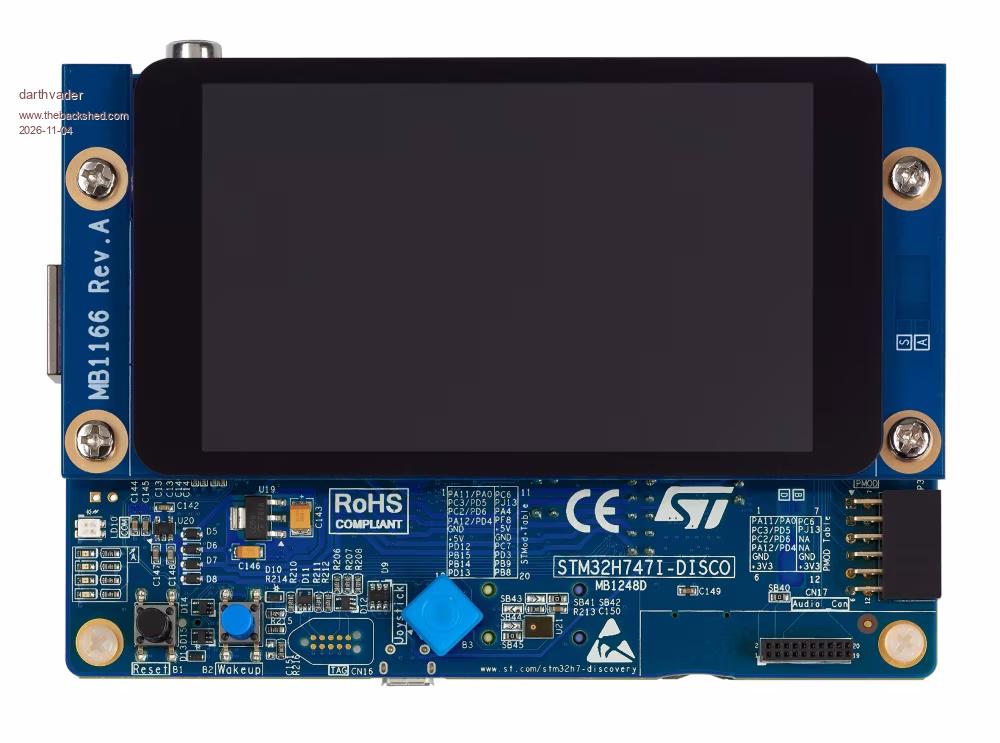
Ho ! , i just discover that you updated the STM32Hxxx version I just wonder if they are option to use this firmware with the STM32H747I-DISCO
Theory is when we know everything but nothing work ... Practice is when everything work but no one know why ;)
Mixtel90 Guru Joined: 05/10/2019 Location: United KingdomPosts: 9387
Posted: 04:30pm 03 Nov 2026
Copy link to clipboard
Print this post
I'm only guessing, but don't build up your hopes too much on this one.
Proprietary boards with built-in stuff are usually a curse to MMBasic. They are almost always designed around the Arduino or Python stuff and are simply not flexible enough for MMBasic to use.
To make any sort of a guess you need to go over the schematic with a fine tooth comb before you do anything else. Certainly don't buy one on the assumption that MMBasic will support it because there is a version for that processor family. Remember that the STM32-H7 is a core, not a normal microprocessor, and it may be totally incompatible.Mick

 Notice. New forum software under development. It's going to miss a few functions and look a bit ugly for a while, but I'm working on it full time now as the old forum was too unstable. Couple days, all good. If you notice any issues, please contact me.


 Print this post