Home
JAQForum Ver 24.01
Log In or Join  
Active Topics
Local Time 07:46 28 Oct 2026 Privacy Policy
Jump to

Notice. New forum software under development. It's going to miss a few functions and look a bit ugly for a while, but I'm working on it full time now as the old forum was too unstable. Couple days, all good. If you notice any issues, please contact me.

Forum Index : Microcontroller and PC projects : Dig out your Colour Maximite 2 and try the new firmware

     Page 2 of 2    
Author Message
hhtg1968
Senior Member

Joined: 25/05/2023
Location: Germany
Posts: 258
Posted: 11:37am 26 Oct 2026
Copy link to clipboard 
Print this post

perhaps I posted it in the wrong category earlier...:

I am confused about screen resolutions, modes and so on. I think I do not understand the system.

I use my cmm2 on a vga monitor with resolution 1024,768.

so I entered "option default mode 9" because I want to "use" the pixels 1:1.

I also entered "option picomite hdmi, 1024x768.

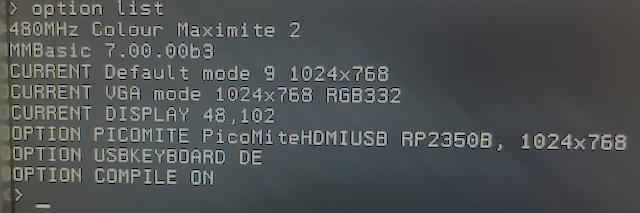
option list:


When I now start a program without any command like resolution, mode etc...

(1 liner : Print "Hello")

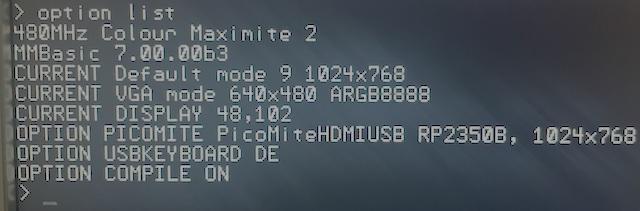
the computer switches to 640x480. and it stays so in the command line.


the "current vga" changed to 640x480

if I enter now "edit" the editor opens in 1024x768 and it stays so after esc.

is "option default mode 9" incompatible with "option picomite"?
 
PhenixRising
Guru

Joined: 07/11/2023
Location: United Kingdom
Posts: 2107
Posted: 11:37am 26 Oct 2026
Copy link to clipboard 
Print this post

Those closed-loop steppers are really neat. I have been following a few projects that use them.

With the Picomite, any stepper can be closed-loop because we have PIO quadrature encoder interfaces (QEI)
 
hhtg1968
Senior Member

Joined: 25/05/2023
Location: Germany
Posts: 258
Posted: 02:09pm 26 Oct 2026
Copy link to clipboard 
Print this post

this problem is eventually not a new problem at v7 (or my mistake):

I changed the sd card in my cmm2 (g1). everything is in order but in the status line (down at the screen) is the text recent filename + "check disk". if I take the card out (and put it back again) I can read there "... wrong disk".

what is the reason?
 
TrevorC
Newbie

Joined: 15/07/2020
Location: United Kingdom
Posts: 19
Posted: 03:58pm 26 Oct 2026
Copy link to clipboard 
Print this post

I am also getting the status line text recent filename + "check disk". Also removing disk and putting it back in gives "wrong disk". This on a CMM2 gen1.

Trevor
 
matherp
Guru

Joined: 11/12/2012
Location: United Kingdom
Posts: 12082
Posted: 04:00pm 26 Oct 2026
Copy link to clipboard 
Print this post

Thanks for the report - it shows a trap in how these options are entered.

What the two options do

OPTION DEFAULT MODE sets the Colour Maximite 2's own display: the command prompt, the editor, the file manager, and Colour Maximite 2 programs.
OPTION PICOMITE is for running PicoMite programs. While it is set, every program that does not set a MODE starts in the PicoMite's MODE 1 - a two-colour mode - at the PicoMite resolution given in the option. That includes a one-liner like Print "Hello". When the program ends its display stays at the prompt (as on the PicoMite) until you use EDIT or FM, which use DEFAULT MODE again.


Why you got 640x480
The resolution must follow a comma:
OPTION PICOMITE HDMI, 1024x768

Without the comma, OPTION PICOMITE HDMI 1024x768 is accepted without an error but the resolution is lost, and 640x480 is used. Please check OPTION LIST: the line should read
OPTION PICOMITE PicoMiteHDMIUSB RP2350B, 1024x768

If it says 640x480, enter the option again with the comma. Then programs, the prompt and the editor all stay at 1024x768.

If you are not running PicoMite programs, OPTION PICOMITE NONE puts everything back to the Colour Maximite 2's own modes.

In the next beta

OPTION PICOMITE without a resolution uses the resolution of OPTION DEFAULT MODE (1024x768 with DEFAULT MODE 9), so the monitor keeps one resolution throughout.
A resolution without the comma gives the error "A comma is needed before the resolution".
The PicoMite's own OPTION RESOLUTION 1024x768 is accepted.
OPTION LIST shows the resolution in use as CURRENT PICOMITE resolution.
 
hhtg1968
Senior Member

Joined: 25/05/2023
Location: Germany
Posts: 258
Posted: 05:46pm 26 Oct 2026
Copy link to clipboard 
Print this post

@matherp:

many thanks so far.
 
     Page 2 of 2    
Print this page


To reply to this topic, you need to log in.

The Back Shed's forum code is written, and hosted, in Australia.
© JAQ Software 2026