Notice. New forum software under development. It's going to miss a few functions and look a bit ugly for a while, but I'm working on it full time now as the old forum was too unstable. Couple days, all good. If you notice any issues, please contact me.
Fixes minor colouring issue in FM Adds STEPPER TUNE command Changes STEPPER functionality to ensure steps cannot be missed by drivers that need a pause between step pulses. Note this limits the maximum pulse rate to 50KHz (100KHz interrupt rate). The code will warn you if you specify a maximum axis speed which when multiplied by the steps/unit exceeds this.
Adds BLIT MEMORY332 which Blits RLE-RGB332 memory to the display (as used in the video demo) works on HDMI mode 5 and buffered display drivers Reduces memory footprint of the json$ function (was in RC20 but not mentioned) Edited 2026-06-17 19:54 by matherp
toml_12953 Guru Joined: 13/02/2015 Location: United StatesPosts: 723
Posted: 11:38am 17 Jun 2026
Copy link to clipboard
Print this post
Trying to compile source and getting this error in MM.MISC.c
error: 'struct stats_' has no member named 'mem' 8600 | iret = (int64_t)(uint32_t)lwip_stats.mem.max;
bfwolf Senior Member Joined: 03/01/2025 Location: GermanyPosts: 258
Posted: 12:04pm 17 Jun 2026
Copy link to clipboard
Print this post
Just a minor cosmetic thing: The PDF manual has no index entries for commands and functions below "Detailed Listing" (for each single command/function), as in the "official" manual of previous releases. Would be nice to have to quickly navigate when viewing for "inconsistencies".. Regards. Edited 2026-06-17 22:05 by bfwolf
matherp Guru Joined: 11/12/2012 Location: United KingdomPosts: 11882
bfwolf Senior Member Joined: 03/01/2025 Location: GermanyPosts: 258
Posted: 03:11pm 17 Jun 2026
Copy link to clipboard
Print this post
Thx !!!
Bleep Guru Joined: 09/01/2022 Location: United KingdomPosts: 854
Posted: 03:27pm 17 Jun 2026
Copy link to clipboard
Print this post
Hi Peter, I'm still having problems with Math(crossing), B21, RP2040 standard and Min. as per my earlier post as previously using
Dim Float percentv(8)=(25.0,25.6,26.0,26.2,26.4,26.5,26.6,26.7,26.8)
the first 2 crossing array elements both return 1, assuming I'm using it right I would think the first sould be 0, above element 1 it is now working fine up to 7 (which didn't work previously) but I would think I should get 8 if I use ?math(crossing percentv(),26.85,1) Unless this is considered out of bounds? which I can easily fix by adding an extra element with a value of say 100. I also still always get -1 if I specify the direction as -1 ?math(crossing percentv(),26.55,-1) I think this should produce 6, unless I don't understand what the direction does? Maybe the manual could expand a bit on what to expect from this command. Regards Kevin.
matherp Guru Joined: 11/12/2012 Location: United KingdomPosts: 11882
Posted: 04:08pm 17 Jun 2026
Copy link to clipboard
Print this post
I think that explains your first point. 25.0 hasn't "passed" 25.0 -1 means passing the value in a negative direction i.e. a value has been found that is bigger than the target and then a value that is less. Think scope trigger direction. Nothing in your list is bigger than 26,85 so -1 is the correct answer
Bleep Guru Joined: 09/01/2022 Location: United KingdomPosts: 854
Posted: 04:39pm 17 Jun 2026
Copy link to clipboard
Print this post
Hi Peter, I first test 25.0 then I test 25.01 25.0 returns -1 fair enough, 25.01 I think should return 0 but actually returns 1.
?math(crossing percentv(),26.85,1) (note direction is 1) This has crossed 26.8, so I would think it should return 8, unless it is now considered out of bounds?
As for the direction of -1 as in ?math(crossing percentv(),26.55,-1) This is in the middle of the array of values, so should return something other than -1 I think, unless I still don't understand?
There is no value I can find that will give me anything other than -1 returned if I use the reverse direction ie -1 for direction. Regards Kevin.
matherp Guru Joined: 11/12/2012 Location: United KingdomPosts: 11882
Posted: 05:44pm 17 Jun 2026
Copy link to clipboard
Print this post
No: what is the element number of the first element that is bigger than 25.0
Your values are all increasing. There is no negative going edge. 26.8 is less than 26.85. You are looking for values in an array that have crossed your threshold level. Again - think about an oscilloscope. The value in the command is the setting of the trigger level. Unless the analogue input get bigger than the trigger level the scope won't trigger. The direction then specifies if it triggers on the way up or on the way down but there has to be an element either side of the trigger level
Bleep Guru Joined: 09/01/2022 Location: United KingdomPosts: 854
Posted: 07:54pm 17 Jun 2026
Copy link to clipboard
Print this post
Ok thanks I think I understand the -1 direction. But I still have a problem with the first elements of the array in the forward direction.
As above I get 1 returned a soon as I pass 25.0, but it stays at 1 when I pass 25.6 shouldn't I get 2 when the value passes 25.6, not when it subsequently gets to (not passes) 26.0? similarly at 26.2 etc. Again assuming I have any understand what it is doing. :-(
vegipete Guru Joined: 29/01/2013 Location: CanadaPosts: 1185
Posted: 12:38am 18 Jun 2026
Copy link to clipboard
Print this post
Thank you for the new RC21. I am though still seeing odd behaviour. Much the same program as before, same options also.
Also, thank you so much for the StallGuard as found in the TMC2209! I was starting to wade through the TMC data sheet to figure out how to use it, and suddenly, there it is, already in the firmware! WOW!
> list all Const M_EN = MM.Info(PINNO GP30) ' stepper enable Const M_STEP = MM.Info(PINNO GP26) ' stepper step Const M_DIR = MM.Info(PINNO GP27) ' stepper direction
On error skip Stepper Close Stepper Init Stepper Axis A,M_STEP,M_DIR,M_EN,,16,20000,1000 Stepper Position Home Stepper Run 1 ' disable stepper when not moving
Pause 200 For i = 1 To 100 Stepper gs "g1 f12500 g91 a" + Str$(i) ' Stepper gs "g1 f12500 g90 a" + Str$(i) Do : Loop While Peek(stepper active) > 0 ' wait for motion to stop Pause 200 ' wait some more Print i,Peek(stepper a) Next i >
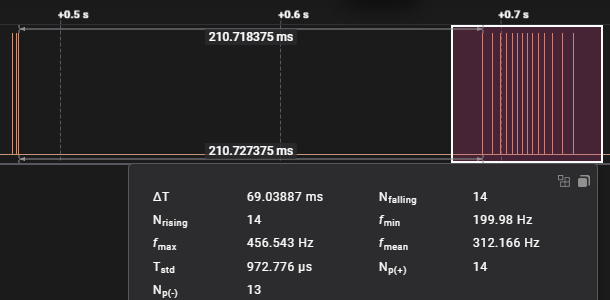
I put a logic analyzer on the STEP pin to see what's going on. Some move requests loose 2 steps. The capture below is for the first move of 1 unit. There are only 14 step pulses generated. There should be 16. (Note also the 3 stray pulses at the beginning, when the stepper system is initialized. I didn't check the state of the enable pin during these pulses - sorry.)
Here's a comparison of the output with RC20 and RC21. No change. "x" on the right indicates a move request with 2 missing pulses. The error is consistent each run. "Pulses out" is the pulse count from the logic analyzer. I haven't seen an error on moves above 32.
Note my configuration of 16 steps per "unit". This means a move of 100 on the A-axis turns the motor exactly once. Also, X,Y and Z are not used and unconfigured.
Just checked something: Moves of A.5 and A.75 work fine, A.25 loses 2 steps.
TassyJim Guru Joined: 07/08/2011 Location: AustraliaPosts: 6606
Posted: 07:15am 18 Jun 2026
Copy link to clipboard
Print this post
* on it's own used to RUN the currently load program. I assume that the introduction of the Calculator functions resulted in * without filename$ being dropped.
matherp Guru Joined: 11/12/2012 Location: United KingdomPosts: 11882
Posted: 07:28am 18 Jun 2026
Copy link to clipboard
Print this post
Not by intent. Single key run is F2
vegipete: Thanks for the excellent diagnostic. I'm working on it and will try and post a fix later today
Bleep: looking at it again and will also update the manual entry to make it clearer Edited 2026-06-18 17:49 by matherp
Bleep Guru Joined: 09/01/2022 Location: United KingdomPosts: 854
Posted: 09:01am 18 Jun 2026
Copy link to clipboard
Print this post
Thanks Peter, I probably won't have a use for the reverse crossing, I was only trying to work out how it worked and what it did, however as you can probably see, the array values are resting voltages for a 24v battery so I am using the forward crossing to give me an array number which then references into a approximate % state of charge, which I can then use to decide if the battery needs a boost charge overnight, on Economy7. :-) I was going to do it the manual way, but then noticed the Math(crossing) command & thought that might work. :-) Thanks for investigating. Regards Kevin.
matherp Guru Joined: 11/12/2012 Location: United KingdomPosts: 11882
Posted: 09:11am 18 Jun 2026
Copy link to clipboard
Print this post
Bleep, The use for it is specifically with the continuous background ADC. In this case a "miss" of the index by a place is completely irrelevant. Note the new manual entry and the additional parameter
Bleep Guru Joined: 09/01/2022 Location: United KingdomPosts: 854
Posted: 10:08am 18 Jun 2026
Copy link to clipboard
Print this post
Ok thanks Peter, I think it will still be ok for my use, I'll test it thoroughly to be sure, I can, already have, added extra 'guard' elements to the voltage array at either end. If not I'll go back to the manual method. Regards Kevin. Edited 2026-06-18 20:08 by Bleep
matherp Guru Joined: 11/12/2012 Location: United KingdomPosts: 11882

 Notice. New forum software under development. It's going to miss a few functions and look a bit ugly for a while, but I'm working on it full time now as the old forum was too unstable. Couple days, all good. If you notice any issues, please contact me.


 Print this post

 Thx !!!