Notice. New forum software under development. It's going to miss a few functions and look a bit ugly for a while, but I'm working on it full time now as the old forum was too unstable. Couple days, all good. If you notice any issues, please contact me.
matherp Guru Joined: 11/12/2012 Location: United KingdomPosts: 11882
Posted: 11:30am 18 Jun 2026
Copy link to clipboard
Print this post
I can probably re-institute it, easier than changing the manual, but I can't see any utility * then return vs F2
vegipete: please test the version posted above. Hopefully fixes the dropped steps
Bleep Guru Joined: 09/01/2022 Location: United KingdomPosts: 854
Posted: 11:33am 18 Jun 2026
Copy link to clipboard
Print this post
Hi Peter, Yes that is now doing exactly what I hoped for, I've also given the reverse a cursory test and that also seems to be working as you describe, including the new parameter confirm. :-) Thanks very much for persevering, and the extra detail in the manual. Regards Kevin.
ville56 Guru Joined: 08/06/2022 Location: AustriaPosts: 612
Posted: 11:55am 18 Jun 2026
Copy link to clipboard
Print this post
you are right... just saw the inconsistence. 73 de OE1HGA, Gerald
mozzie Guru Joined: 15/06/2020 Location: AustraliaPosts: 435
Posted: 05:01pm 18 Jun 2026
Copy link to clipboard
Print this post
G'day Peter, Some further testing with the firmware posted above for VegiPete has shown the following symptoms:
In both cases the axis never reaches 100 and the program requires ctrl-c to exit.
It would appear the steps are lost when the output frequency is slightly below the 50khz stepper system frequency. Something is telling me that perhaps the maximum output frequency for an axis should be 50khz/2 to stop ?? heterodyning ?? when the frequencies are close.
This is repeatable with many combinations where (steps/mm * mm/min) / 60 is close to 50000. Different acceleration rates also change the outcome.
Timer=0 SetTick 200,Show_Pos Stepper init 0.05,32,,1 Stepper axis x,gp1,gp2,gp3,,600,4996,1000,5 Stepper axis y,gp4,gp5,,,400,7498,1000,5 Stepper axis z,gp6,gp7,,,300,9996,1000,5 Stepper axis a,gp8,gp9,,,300,9996,1000,5 Stepper position home Stepper run 0
Do Pause 1000 Print @(0,84)" " Print @(0,84)""; Line Input "G_Code? = ",A$ If a$="" Then Exit Do If UCASE$(LEFT$(A$,1))="G" Then Stepper gs A$ Else AXIS_CNG Timer = 0 Do :Loop Until Peek(stepper active)=0 ' wait until motion complete Loop
Pause 250 ' wait for final position update Stepper close End
Also did a OPTION DISK SAVE and OPTION DISK LOAD and my GUI controls went from 128 to 254, both RC21
Regards, Lyle.
Frank N. Furter Guru Joined: 28/05/2012 Location: GermanyPosts: 1153
Posted: 05:47pm 18 Jun 2026
Copy link to clipboard
Print this post
Is this actually supposed to appear when an error message occurs while accessing a file via the File Manager?
Error: Invalid in a program (F2 line 10)
Shouldn't that be "F4"?
Are there no more automatic backups now? That's too bad. I know that Volhout complained that he only has limited space on his drive. Couldn't this feature be made optional?
Frank
vegipete Guru Joined: 29/01/2013 Location: CanadaPosts: 1185
Posted: 05:54pm 18 Jun 2026
Copy link to clipboard
Print this post
My tests of the above firmware are good. I'm seeing the correct number of step pulses for every value I've tried from A0.0625 (1 pulse) and up. If I request a move of A100, I actual get it, both in the number of pulses, and the reported A position afterwards. And it works fine even up to a 50kHz pulse rate. (An actual motor has other ideas, what with resonance and all, but that is a different story.) The rogue pulses at sub-system start-up also seem to be gone.
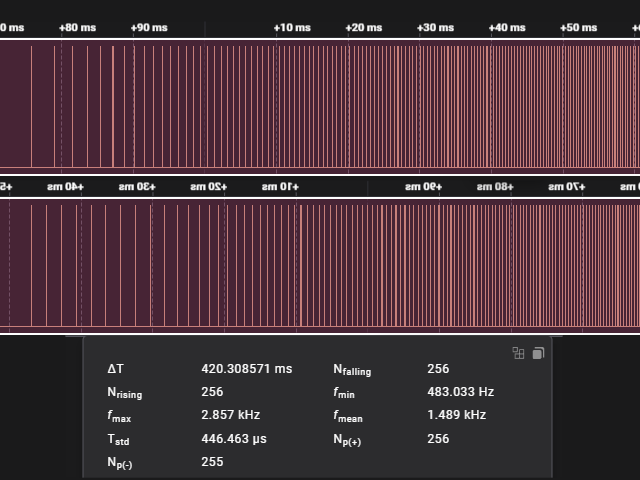
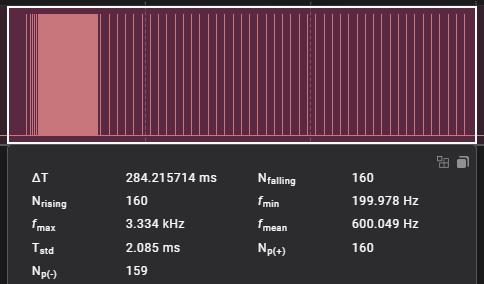
The pulse pattern looks like a brute force fix at the end of the pulse train, with a few pulses at 5ms intervals added to get the correct number. ;-) With an S-Curve accel profile, this is very noticeable. 44 of 'em in this capture. (Accel = 50000 in this example.)
JanVolk Guru Joined: 28/01/2023 Location: NetherlandsPosts: 411
Posted: 06:23pm 18 Jun 2026
Copy link to clipboard
Print this post
Peter,
Test starting MP3 player from FM with various OPTION RESOLUTION and OPTION PLATFORM OLIMEX USB OPTION RESOLUTION 640, 848, 1024, and 1280 play the entire MP3 file correctly. OPTION RESOLUTION 800 Error: Not enough Heap memory OPTION RESOLUTION 720 freezes after a certain time, and only a hard reset helps. Very occasionally also with OPTION RESOLUTION 1024 and 1280, where the MP3 file (> 3 MB) is not played completely, after which only a hard reset helps.
> US USB Keyboard Connected on channel 1 > Mouse Type: Gaming 16-bit X/Y bits: 16/16 Buttons: 5 Report length: 10 bytes Has wheel: Yes (byte 5) Has pan: No USB Mouse Connected on channel 2
> option list PicoMiteHDMI MMBasic USB RP2350A Edition V6.03.00RC21 OPTION SERIAL CONSOLE COM1,GP0,GP1 OPTION SYSTEM I2C GP20,GP21 OPTION FLASH SIZE 16777216 OPTION COLOURCODE ON OPTION MOUSE SENSITIVITY 1.0000 OPTION KEYBOARD US OPTION HEARTBEAT OFF OPTION PICO OFF OPTION RESOLUTION 720x400 @ 283200KHz OPTION DISPLAY 33, 90 OPTION HDMI PINS 1, 3, 7, 5 OPTION GUI CONTROLS 100 OPTION SDCARD GP22, GP6, GP7, GP4 OPTION AUDIO GP26,GP27', ON PWM CHANNEL 5 OPTION RTC AUTO ENABLE OPTION MODBUFF ENABLE 192 OPTION F1 help OPTION F5 list commands OPTION F6 list functions OPTION F7 list pins OPTION F8 option list OPTION F9 fm OPTION PLATFORM OLIMEX USB >
Error : Not enough Heap memory > option list PicoMiteHDMI MMBasic USB RP2350A Edition V6.03.00RC21 OPTION SERIAL CONSOLE COM1,GP0,GP1 OPTION SYSTEM I2C GP20,GP21 OPTION FLASH SIZE 16777216 OPTION COLOURCODE ON OPTION MOUSE SENSITIVITY 1.0000 OPTION KEYBOARD US OPTION HEARTBEAT OFF OPTION PICO OFF OPTION RESOLUTION 800x600 @ 360000KHz OPTION DISPLAY 50, 100 OPTION HDMI PINS 1, 3, 7, 5 OPTION GUI CONTROLS 100 OPTION SDCARD GP22, GP6, GP7, GP4 OPTION AUDIO GP26,GP27', ON PWM CHANNEL 5 OPTION RTC AUTO ENABLE OPTION MODBUFF ENABLE 192 OPTION F1 help OPTION F5 list commands OPTION F6 list functions OPTION F7 list pins OPTION F8 option list OPTION F9 fm OPTION PLATFORM OLIMEX USB
Jan.
matherp Guru Joined: 11/12/2012 Location: United KingdomPosts: 11882
Posted: 09:50pm 18 Jun 2026
Copy link to clipboard
Print this post
You cannot reliably do a load of options between versions. Any test before you OPTION RESET and load the options by hand are basically meaningless
Mp3 playback is very memory/CPU intensive, if it doesn't work in a particular resolution than you can't use it Edited 2026-06-19 07:51 by matherp
JanVolk Guru Joined: 28/01/2023 Location: NetherlandsPosts: 411
Posted: 11:51pm 18 Jun 2026
Copy link to clipboard
Print this post
Peter,
Thanks for answering my previous question.
Another question regarding sound. Why do standard .wav files play very loudly and .mod files very softly on an RP2040VGAUSB with I2S? (Tested with flappy.bas and blocks.bas) Or does this need to be specifically controlled with PLAY Volume in the program? This is the same with a PWM output (RP2350HDMIUSB) and with an I2S output (RP2040VGAUSB). Tested with PP2040VGAUSB (I2S module) and with RP2350HDMIUSB .mp3 with RP2350 also soft sound (PWM output Olimex HDMI USB).
Jan. Edited 2026-06-19 09:57 by JanVolk
mozzie Guru Joined: 15/06/2020 Location: AustraliaPosts: 435
Posted: 07:29am 19 Jun 2026
Copy link to clipboard
Print this post
G'day Peter, Found a new Pico2 so loaded RC21(2) onto it, same result, stepper system never reaches the value in the G-Code and peek(stepper active) is still 1, requires Ctrl-C to escape in this instance:
Whilst these rates are at the upper end of normal use they are quite reasonable, consider a machine I did some work on: 200 step motor @ 4 microsteps geared 8.3333333:1(100/12) = 6666.6667 steps / rev 12mm winch drive with 1.5mm wire rope = 40mm / turn (measured) 6666.6667 step / rev @ 40mm / rev = 166.6667 steps / mm = 0.006mm / step Rapid feedrate of 18000mm / min = 300mm / sec (1.1km/h)
That is theoretical, whether the motor / drive could achieve that frequency is another matter, however some of these modern drivers are light years ahead of 20 years ago. Testing has shown this goes as far back as V6.02.01 Test program same as previous post.
What I would like to suggest is to limit the per axis (STEPS / MM * MAX FEEDRATE) to (25000 * 60), this is 50khz/2 and has been rock solid in all the testing so far.
> option list PicoMite MMBasic RP2350A V6.03.00RC21 OPTION FLASH SIZE 4194304 OPTION COLOURCODE ON OPTION CPUSPEED (KHz) 200000 >
Regards, Lyle.
matherp Guru Joined: 11/12/2012 Location: United KingdomPosts: 11882
Posted: 09:39am 19 Jun 2026
Copy link to clipboard
Print this post
mozzie and vegipete: please try attached. Definitely gets to 100 on all mozzie's examples and should remove most if not all of the tail guard pulses that vegipete was seeing
dddns Guru Joined: 20/09/2024 Location: GermanyPosts: 910
Posted: 10:36am 19 Jun 2026
Copy link to clipboard
Print this post
Hello,
I would like to transfer a file from one Pico to another over serial with X/Ymodem on a previously via Setpin defined Com port. Could it be possible to use X/Ymodem on an individual Com port?
PhenixRising Guru Joined: 07/11/2023 Location: United KingdomPosts: 2076
Posted: 11:58am 19 Jun 2026
Copy link to clipboard
Print this post
FWIW:
S-Curve in BASIC
dim as integer res,samptime, time_to_accel_ms,intspeed,tog dim as float f,ramp_segments,frac
time_to_accel_ms = 500
ramp_segments = 1/time_to_accel_ms
sync 1,M tog=1 do inc samptime,1 sync 'wait for next ms frac = samptime*ramp_segments
f=(3-2*frac)*frac^2
intspeed = f * 2000
if tog then print samptime, intspeed tog=not tog
loop until samptime=time_to_accel_ms
end
mozzie Guru Joined: 15/06/2020 Location: AustraliaPosts: 435
Posted: 01:09pm 19 Jun 2026
Copy link to clipboard
Print this post
G'day, Peter, testing so far looking good, always hitting target value and pulses counted with CIN tally with axis movement Will test on machine when next out in shed.
Phenix, neat solution tried implementing something similar on a 8 bit PIC micro in assembler years ago and gave up in the end. Peter has implemented S-Curve in the Stepper system, something I need to try out.
Regards, Lyle.
PhenixRising Guru Joined: 07/11/2023 Location: United KingdomPosts: 2076
Posted: 02:00pm 19 Jun 2026
Copy link to clipboard
Print this post
Yeah, bit concerned that the profiling sounds like it doesn't hit target. Shouldn't need to bang out extra pulses.
vegipete Guru Joined: 29/01/2013 Location: CanadaPosts: 1185
Posted: 05:13pm 19 Jun 2026
Copy link to clipboard
Print this post
For my configuration, I'm getting the correct number of pulses and complete moves. Trapezoidal moves look about the same as before - they look fine. SCurve moves are better but they show an asymmetry, as the stitched image below shows. The lower section is mirrored and aligned to show the difference. Still some number of trailing guard pulses, but many fewer than before.
Please don't reduce the max step rate unnecessarily - the fastest possible the better. Conventional mechanical systems may not handle it, but stranger use cases might benefit. (Ultrasonic piezo positioner, for example.)
PhenixRising Guru Joined: 07/11/2023 Location: United KingdomPosts: 2076
Posted: 05:52pm 19 Jun 2026
Copy link to clipboard
Print this post
Agreed. Annex32 RDS is 200KHz and others exceed 500KHz. It's not always about a stepper motor. Modern servo amplifiers take pulse & direction as a position command.
twofingers Guru Joined: 02/06/2014 Location: GermanyPosts: 1772
Posted: 07:02pm 19 Jun 2026
Copy link to clipboard
Print this post
PicoMiteHDMI MMBasic USB RP2350A Edition V6.03.00RC12
Hi Peter, I don't know if this is a bug, but in my view, it is at least strange or unexpected:
Print @(0,39*12)"test";:Input test Print @(0,20*12)"test";test Print @(0,38*12)"test";:Input test Print @(0,20*12)"test";test End
An INPUT command on the bottom line of the screen shifts the entire screen content up by one line. It appears that when entering data for the INPUT command, an extra line feed (Chr$(10) or \n) is generated after the input is finalized.
I am well aware that the INPUT command is very rarely used in the bottom line.
Regards Michael Edited 2026-06-20 07:18 by twofingers‚My name is Ozymandias, king of kings Look on my works, ye Mighty, and despair!‘ Nothing beside remains. Round the decay Of that colossal wreck, boundless and bare The lone and ...
toml_12953 Guru Joined: 13/02/2015 Location: United StatesPosts: 723
Posted: 05:59am 20 Jun 2026
Copy link to clipboard
Print this post
Is there a simple way to specify which serial port to use for the console on the fly? Sort of like this if it were possible:
OPTION CONSOLE SERIAL1 or OPTION CONSOLE SERIAL2
I know this syntax isn't supported but I'm looking for an easy way to do this. Edited 2026-06-20 15:59 by toml_12953
Mixtel90 Guru Joined: 05/10/2019 Location: United KingdomPosts: 9136
Posted: 06:46am 20 Jun 2026
Copy link to clipboard
Print this post
Not that I know of, and the reason is probably historical!
Access via the console is like using the root account in Linux. Everything is open, your program can be broken into and you need physical access to do it. It's a security issue. You don't give the program user access to the console under normal circumstances. That was the original view anyway.
Setting up the console port is permanent as you don't want it to get changed to something else and lose programmer's access to the machine because a user program has crashed.Mick

 Notice. New forum software under development. It's going to miss a few functions and look a bit ugly for a while, but I'm working on it full time now as the old forum was too unstable. Couple days, all good. If you notice any issues, please contact me.


 Print this post


 Will test on machine when next out in shed.