Notice. New forum software under development. It's going to miss a few functions and look a bit ugly for a while, but I'm working on it full time now as the old forum was too unstable. Couple days, all good. If you notice any issues, please contact me.
phil99 Guru Joined: 11/02/2018 Location: AustraliaPosts: 3411
Posted: 11:48pm 25 Dec 2025
Copy link to clipboard
Print this post
Above issue not evident on basic RP2040.
> OPTION SERIAL CONSOLE GP0,GP1,B > > option list PicoMite MMBasic RP2040 V6.01.00 OPTION SERIAL CONSOLE COM1,GP0,GP1,BOTH OPTION FLASH SIZE 16777216 OPTION COLOURCODE ON OPTION CPUSPEED (KHz) 378000 OPTION DISPLAY 45, 150
In the past I have seen a similar problem result from a poor ground connection.
JanVolk Guru Joined: 28/01/2023 Location: NetherlandsPosts: 420
Posted: 12:20am 26 Dec 2025
Copy link to clipboard
Print this post
Phil99,
I had no problems with the option serial console GP0, GP1, B with PicoMite MMBasic RP2040 Edition V6.01.00. I was playing with an RP2040-Zero, an ILI9341, and a Rii mini X1 keyboard, which I wanted to connect via USB with the OPTION LCDPANEL CONSOLE font. It wasn't working until I ran into this problem while checking the options list. Pins GP8 through GP13 are already used for the SD CARD and the I2C RTC. Therefore, I've set GP0 and GP1 for serial so I can use the rest of the pins for the LCDPANEL.
Kind regards,
Jan.
JanVolk Guru Joined: 28/01/2023 Location: NetherlandsPosts: 420
Posted: 02:23am 26 Dec 2025
Copy link to clipboard
Print this post
Tried again, and now it works. When the LCD screen is full, it turns white and returns to normal after CLS. I don't know what's causing this yet; possibly a memory leak? The mouse dot isn't working either, which might be related to the RP2040. If I don't include OPTION MOUSE SENSITIVITY 1 in the options list, my regular TeraTerm mouse's scroll wheel responds with strange characters.
> option list PicoMite MMBasic USB RP2040 Edition V6.01.00 OPTION SERIAL CONSOLE COM1,GP0,GP1 OPTION SYSTEM SPI GP6,GP7,GP20 OPTION SYSTEM I2C GP12,GP13 OPTION COLOURCODE ON OPTION MOUSE SENSITIVITY 1.0000 OPTION KEYBOARD US OPTION HEARTBEAT OFF OPTION PICO OFF OPTION CPUSPEED (KHz) 200000 OPTION LCDPANEL CONSOLE 8 OPTION DISPLAY 40, 80 OPTION LCDPANEL ILI9341, LANDSCAPE,GP2,GP3,GP5,GP4 OPTION SDCARD GP9, GP10, GP11, GP8 OPTION DEFAULT FONT 8, 1
> list pins GP0 1 Boot Reserved : SSD RESET GP1 2 Boot Reserved : CONSOLE RX GP2 4 Boot Reserved : LCD DC GP3 5 Boot Reserved : LCD Reset GP4 6 Boot Reserved : LCD BACKLIGHT GP5 7 Boot Reserved : LCD CS GP6 9 Boot Reserved : SPI SYSTEM CLK GP7 10 Boot Reserved : SPI SYSTEM MOSI GP8 11 Boot Reserved : SD MISO GP9 12 Boot Reserved : SD CS GP10 14 Boot Reserved : SD CLK GP11 15 Boot Reserved : SD MOSI GP12 16 Boot Reserved : SYSTEM I2C SDA GP13 17 Boot Reserved : SYSTEM I2C SCL GP14 19 OFF GP15 20 OFF GP16 21 OFF GP17 22 OFF GP18 24 OFF GP19 25 OFF GP20 26 Boot Reserved : SPI SYSTEM MISO GP21 27 OFF GP22 29 OFF GP23 41 OFF GP24 42 OFF GP25 43 OFF GP26 31 OFF GP27 32 OFF GP28 34 OFF GP29 44 OFF
PicoMite MMBasic USB RP2040 Edition V6.01.00 Copyright 2011-2025 Geoff Graham Copyright 2016-2025 Peter Mather
> US USB Keyboard Connected on channel 1 > Mouse Type: Standard 8-bit X/Y bits: 8/8 Buttons: 5 Report length: 11 bytes Has wheel: Yes (byte 1) Has pan: No USB Mouse Connected on channel 2
Kind regards,
Jan.
Volhout Guru Joined: 05/03/2018 Location: NetherlandsPosts: 6169
Posted: 09:33am 26 Dec 2025
Copy link to clipboard
Print this post
Make sure you do not power the LCD from the pico zero 3.3v. The onboard regulator does not have sufficiënt current left for the lcd backlight .
ville56 Guru Joined: 08/06/2022 Location: AustriaPosts: 630
Posted: 10:35am 26 Dec 2025
Copy link to clipboard
Print this post
Is there maybe a leftover from a previous setup? Have you tried to nuke the flash? There have always been some strange effects, even though only in very rare cases, with flash. This is at least my experiance. Nukeing, in most cases, did help. 73 de OE1HGA, Gerald
JanVolk Guru Joined: 28/01/2023 Location: NetherlandsPosts: 420
Posted: 11:40pm 26 Dec 2025
Copy link to clipboard
Print this post
The above problem also occurs with PicoMite MMBasic USB RP2040 Edition V6.00.03. GP0 1 Boot Reserved: SSD RESET (possibly not noticed before) The lcd screen turns WHITE on the bottom line after a full screen, and the output to the serial connection then becomes very slow. If a CLS or hard RESET is performed, everything returns to normal until the cursor returns to the last line. I also disconnected the display's power and performed a flash_nuke, which made no difference. The same problem also occurs with SD CARD DISABLE and OPTION SERIAL CONSOLE COM2, GP8, and GP9. Even without an LCD display, the delay on a serial console occurs after OPTION DISPLAY xx line, and I also noted that there is no diode on the RP2040-Zero.
PicoMite MMBasic USB RP2040 Edition V6.01.00RC25 or PicoMite MMBasic USB RP2040 Edition V6.00.03 or PicoMite MMBasic USB RP2040 Edition V6.01.00 OPTION SERIAL CONSOLE COM1,GP0,GP1 OPTION SYSTEM SPI GP6,GP7,GP20 OPTION SYSTEM I2C GP12,GP13 OPTION COLOURCODE ON OPTION KEYBOARD US OPTION HEARTBEAT OFF OPTION PICO OFF OPTION CPUSPEED (KHz) 200000 OPTION LCDPANEL CONSOLE 8 OPTION DISPLAY 40, 80 OPTION LCDPANEL ILI9341, LANDSCAPE,GP2,GP3,GP5,GP4 OPTION SDCARD GP9, GP10, GP11, GP8 OPTION RTC AUTO ENABLE OPTION PLATFORM RP2040-Zero 2MB OPTION DEFAULT FONT 8, 1
Even with standard firmware without an LCD screen connected, there is a delay after displaying xx lines on the Tera Term terminal.
> Option list PicoMite MMBasic RP2040 V6.01.00 OPTION SYSTEM SPI GP6, GP7, GP20 OPTION SYSTEM I2C GP12, GP13 OPTION COLOURCODE ON OPTION HEARTBEAT OFF OPTION PICO OFF OPTION CPUSPEED (KHz) 200,000 OPTION LCDPANEL CONSOLE 8 OPTION DISPLAY 40, 80 OPTION LCDPANEL ILI9341, LANDSCAPE, GP2, GP3, GP5, GP4 OPTION SD CARD GP9, GP10, GP11, GP8 OPTION RTC AUTO ENABLE OPTION PLATFORM RP2040-Zero 2MB OPTION DEFAULT FONT 8, 1
Kind regards,
Jan. Edited 2025-12-27 11:07 by JanVolk
Volhout Guru Joined: 05/03/2018 Location: NetherlandsPosts: 6169
Posted: 06:13am 27 Dec 2025
Copy link to clipboard
Print this post
Scrolling text on an spi lcd is very slow, but it should not reboot or crash.
phil99 Guru Joined: 11/02/2018 Location: AustraliaPosts: 3411
Posted: 06:59am 27 Dec 2025
Copy link to clipboard
Print this post
Most ILI9341 panels have an onboard 3V3 regulator and are supplied with 5V.
Mixtel90 Guru Joined: 05/10/2019 Location: United KingdomPosts: 9185
Posted: 08:51am 27 Dec 2025
Copy link to clipboard
Print this post
The RP2040-Zero is one of the better clones. The 3V3 linear regulator is mounted on the opposite side of the PCB to the USB-C socket so it gets a better heatsink than many designs. Very neat. It uses the RT9013-33 chip Potentially it can supply 500mA from 3V8 input (to limit the dissipated power) but I don't think you'll get that high even with the USB-C lead plugged in. Untested, but I bet you can get over 150mA at 3V3 with a 5V input.Mick
mozzie Guru Joined: 15/06/2020 Location: AustraliaPosts: 457
Posted: 03:11pm 27 Dec 2025
Copy link to clipboard
Print this post
G'day JanVolk, I would suggest you try:
OPTION LCDPANEL CONSOLE 8,,,,NOSCROLL
This stops the scroll on the LCD and fixes the slow response at the terminal.
Been caught out with this one before, just took a while to refresh the grey cells...
Merry Xmas and hope this helps
Regards, Lyle. Edited 2025-12-28 01:15 by mozzie
JanVolk Guru Joined: 28/01/2023 Location: NetherlandsPosts: 420
Posted: 08:28pm 27 Dec 2025
Copy link to clipboard
Print this post
Thank you all for your help with my problem. The power supply is under control. Thanks, Mozzie. You solved the problem for me. It now has the same functionality as with a VGA monitor. The optional NOSCROLL command was missing from my Dutch manual and has now been updated.
Kind regards,
Jan.
matherp Guru Joined: 11/12/2012 Location: United KingdomPosts: 11996
Posted: 10:31am 28 Dec 2025
Copy link to clipboard
Print this post
Attached updated versions of the HDMI variants of 6.01.00. I hope this fixes the mp3 playback issue. Please confirm and then I'll ask Geoff to update the official download.
Amnesie Guru Joined: 30/06/2020 Location: GermanyPosts: 763
Posted: 12:03pm 28 Dec 2025
Copy link to clipboard
Print this post
Hello Peter,
mp3 playback works now in all resolutions! Thank you!
Greetings Daniel
matherp Guru Joined: 11/12/2012 Location: United KingdomPosts: 11996
Posted: 02:07pm 28 Dec 2025
Copy link to clipboard
Print this post
Please note Geoff has updated the two HDMI firmware versions is the download on his site. The only change is to fix a stack overflow when playing an mp3 file.
ville56 Guru Joined: 08/06/2022 Location: AustriaPosts: 630
Posted: 08:09pm 28 Dec 2025
Copy link to clipboard
Print this post
Peter,
OPTION RESET Pico-ResTouch-LCD-3.5 does not setup the environment as it did before, in fact it seems to do nothing. Haven't tried all the other options. Same in V6.01.00EXP
----------- does not really do anything in V6.01.00 ------- PicoMite MMBasic RP2350B V6.01.00 OPTION FLASH SIZE 16777216 OPTION COLOURCODE ON OPTION PICO OFF OPTION CPUSPEED (KHz) 200000 OPTION MODBUFF ENABLE 192 OPTION PLATFORM Pico-ResTouch-LCD-3.5
Gerald 73 de OE1HGA, Gerald
matherp Guru Joined: 11/12/2012 Location: United KingdomPosts: 11996
Posted: 09:53am 29 Dec 2025
Copy link to clipboard
Print this post
Sorry, bug. You will have to set up by hand until the next release
mozzie Guru Joined: 15/06/2020 Location: AustraliaPosts: 457
Posted: 05:24pm 29 Dec 2025
Copy link to clipboard
Print this post
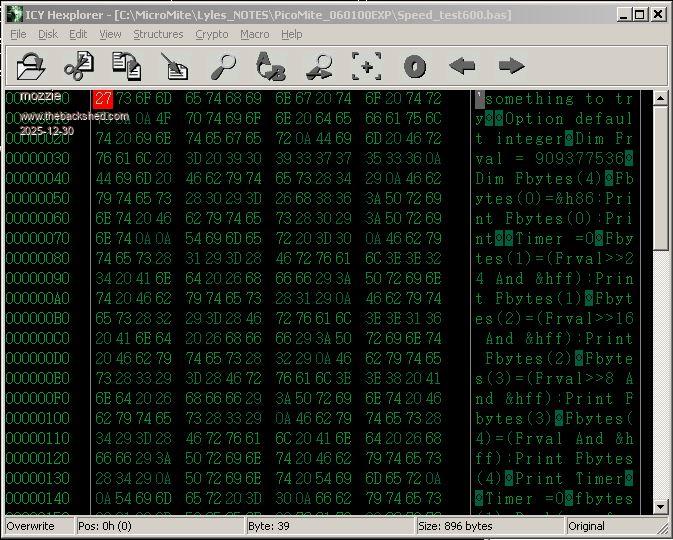
G'day, During testing of V6.01.00 and V6.01.00EXP2 using TeraTerm and Xmodem a problem has come to light, this is with xmodem s and xmodem s "filename.bas" The internal editor and Xmodem r appear to be working fine.
Tried: (with Clear_Flash before each upload) PicoMite RP2040 V6.01.00 PicoMite RP2350 V6.01.00 PicoMite RP2040 V6.01.00EXP2
PicoMite RP2040 V6.00.03 - working fine
The line ending characters are being removed from the file during transfer and being replaced by &h0A Also +++++++++++++ being added to end of file
Also tried with OPTION LCDPANEL NOCONSOLE with same result
Can anyone else please confirm?
Regards, Lyle.
Update: Xmodem s - removes &h0D but not &h0A from line endings Xmodem s "filename" - line endings ok Both add &h1A as padding characters to end of file. Edited 2025-12-30 04:01 by mozzie
JohnS Guru Joined: 18/11/2011 Location: United KingdomPosts: 4386
Posted: 06:46pm 29 Dec 2025
Copy link to clipboard
Print this post
Xmodem traditionally padded files to a multiple of 128 bytes using &h1a (0x1a, ctrl-z).
I think due to being on CP/M, with its block size of 128.
John
matherp Guru Joined: 11/12/2012 Location: United KingdomPosts: 11996
Posted: 07:32pm 29 Dec 2025
Copy link to clipboard
Print this post
No: works perfectly for me. Just the end of the file padded with &H1A which is correct. Is that your full option list? If so you should always configure touch if the display has it otherwise bad things can happen - floating CS for the touch chip
TassyJim Guru Joined: 07/08/2011 Location: AustraliaPosts: 6624
Posted: 07:33pm 29 Dec 2025
Copy link to clipboard
Print this post
XMODEM S without a file name sends a listing of the current file. MMBasic is probably listing with <LF> as the line ending. This is not a problem. MMBasic is happy with either <CR><LF> or <LF> The padding ctrl-Z is from the CP/M days but zeros are also acceptable. XMODEM requires a full packet of 128 bytes and may send a complete block of all crtl-Z if the file size happens to be a multiple of 128 bytes.

 Notice. New forum software under development. It's going to miss a few functions and look a bit ugly for a while, but I'm working on it full time now as the old forum was too unstable. Couple days, all good. If you notice any issues, please contact me.


 Print this post