Home
JAQForum Ver 24.01
Log In or Join  
Active Topics
Local Time 18:08 13 Mar 2026 Privacy Policy
Jump to

Notice. New forum software under development. It's going to miss a few functions and look a bit ugly for a while, but I'm working on it full time now as the old forum was too unstable. Couple days, all good. If you notice any issues, please contact me.

Forum Index : Microcontroller and PC projects : PicoMiteVGA: Framework for ray casting using the DDA method

     Page 3 of 6    
Author Message
Martin H.

Guru

Joined: 04/06/2022
Location: Germany
Posts: 1422
Posted: 07:35am 24 Feb 2026
Copy link to clipboard 
Print this post

  dddns said  ..is there a way to place a (3D) icon on the floor?
Best success!
In principle, it would work like this: the image is generated on framebuffer F. If you want to place an object, you must first draw the background, then place the object, and then copy the image from framebuffer F to N.
...snip...
  Next x
'---------------------------------
' MOVE YOUR DRAW-OBJECT-CODE HERE
' AND ADD "needsRedraw = 1"
'---------------------------------
  If mmb4w Then
  PAGE WRITE 0:Blit 0,0,0,0,scrW,scrH,1
...snip...
---

Currently, redrawing only occurs when the player moves.
If the object is also supposed to move within the space, it is necessary to replace the conditional redraw with a regular one, or at least take care the object change.
Edited 2026-02-24 17:46 by Martin H.
'no comment
 
Martin H.

Guru

Joined: 04/06/2022
Location: Germany
Posts: 1422
Posted: 02:49pm 25 Feb 2026
Copy link to clipboard 
Print this post

another millisecond/Frame saved @252000
Replace

 mx = Int(px) : my = Int(py)
 If Not rayDx  Then dDx = 1000 Else dDx = Abs(1 / rayDx)
 If Not rayDy  Then dDy = 1000 Else dDy = Abs( 1 / rayDy)

with
   mx = Int(px) : my = Int(py)
   dDx = 1000*Not rayDx + Abs(1 / (rayDx+.01))*(rayDx<>0)
   dDy = 1000*Not rayDy + Abs(1 / (rayDy+.01))*(rayDy<>0)
The additional  +.01 serves only to prevent division by zero.
Unfortunately, converting IF queries into mathematical functions only works in simple forms:
i.e. IF a=0 then doit=1 else doit=5
becomes something like
doit=not a +5*(a<>0)
Replacing Queries with multiple THEN conditions do sadly not save time, rather the opposite.
One important thing is to remove ‘expensive’ calculations and queries out of the loop for image calculation. As these are used several hundred times per frame. In contrast, the keyboard/gamepad query is only called once per frame. Of course, this can also be optimised, but it will do virtually nothing to improve the speed.
Edited 2026-02-26 01:03 by Martin H.
'no comment
 
Turbo46

Guru

Joined: 24/12/2017
Location: Australia
Posts: 1681
Posted: 02:06am 26 Feb 2026
Copy link to clipboard 
Print this post

I asked Claude AI what it could do to speed up this program.
  Caude said  Performance Bottlenecks & Fixes

1. Pre-compute invScrW multiplication (already done, good)

2. Reduce redundant math in the inner ray loop
The DDA loop is the hottest path. The current code recalculates Not(side) twice:
basicpDist=Max(0.1,(sdX - dDx)*Not(side)+(sdY-dDy)*side)
This is already fairly tight, but you can eliminate the branch:
basicIf side=0 Then pDist=Max(0.1,sdX-dDx) Else pDist=Max(0.1,sdY-dDy)

3. Biggest win: Skip columns with same wall hit
If adjacent columns hit the same wall cell at the same distance, skip recasting:
basicDim integer lastMx=-1, lastMy=-1, lastSide=-1, lastLH=0
For x = 0 To scrW - 1 Step resStep
 ' ... ray setup ...
 ' DDA loop ...
 If mx=lastMx And my=lastMy And side=lastSide Then
   lH=lastLH  ' reuse result, skip Blit call optionally
 Else
   pDist=Max(0.1,(sdX-dDx)*Not(side)+(sdY-dDy)*side)
   lH=scrH/pDist
   lastMx=mx:lastMy=my:lastSide=side:lastLH=lH
 End If

4. Avoid Int() inside the loop — use integer variables
basicDim integer imx, imy
imx = px : imy = py   ' MMBasic truncates on integer assign
mx = imx : my = imy

5. Increase resStep adaptively
If frame time exceeds a threshold, bump resStep from 2→4:
basicIf Timer-tt > 80 Then resStep=4 Else resStep=2
lw = Int((resStep+1)/2)

6. Replace Min/Max calls with inline If in the Blit line
basic' Instead of:
Blit shade+scrw-8+8*m(mx,my)+4*side, 0, x, Max(0,halfScrH-(lH>>1)), resStep, Min(lH,scrH)

' Use pre-clamped vars:
ys = halfScrH-(lH>>1)
If ys<0 Then ys=0
lhc=lH:If lhc>scrH Then lhc=scrH
Blit shade+scrw-8+8*m(mx,my)+4*side, 0, x, ys, resStep, lhc
Function call overhead in tight loops is significant in interpreted BASIC.

7. Pre-compute shade index
The shade/Blit source X calculation repeats every iteration:
basicDim integer blitSrcX
' inside loop after pDist:
shade = Min(Int(pDist>>3)*24, 72)*dither%
blitSrcX = shade + scrw - 8 + 8*m(mx,my) + 4*side
Blit blitSrcX, 0, x, ys, resStep, lhc
8. Only redraw floor/ceiling when angle changes

Since floor/ceiling are solid colors, draw them once and only redo on turn:
basic' Move the two Box calls outside needsRedraw, draw only on first frame or rotation
Summary of expected gains
OptimizationEstimated GainInline Min/Max in Blit line~10-15%Skip same-wall columns~20-30% in corridorsAdaptive resStepKeeps FPS stablePre-compute blitSrcX~5%If/Else vs Not(side)~3-5%
The column-skipping and inline Min/Max will give the biggest real-world speedup in an interpreted MMBasic environment where every function call and expression evaluation is expensive.


Here is Claude's version note I have set mmb4w=1 (
This could be set using:
MMB4W = 0
if MM.DEVICE$ = "MMBasic for Windows" then MMB4W = 1


Raycaster 2.zip

Bill
Keep safe. Live long and prosper.
 
Martin H.

Guru

Joined: 04/06/2022
Location: Germany
Posts: 1422
Posted: 07:27am 26 Feb 2026
Copy link to clipboard 
Print this post

Hello Bill,
Thank you for your efforts.  I will try to take your suggestions into account and test them.
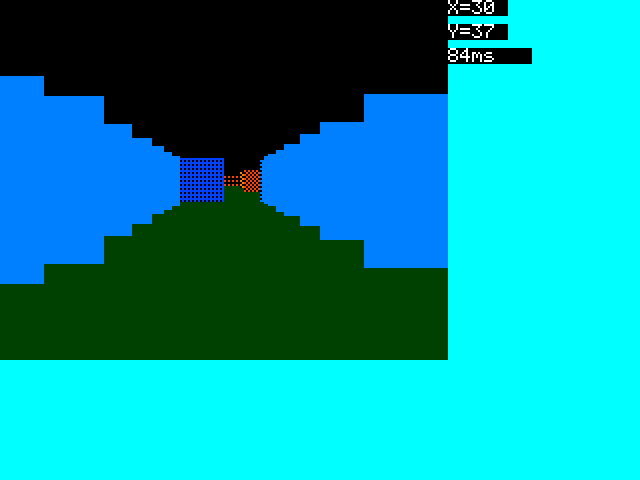
I don't quite understand the changes in your published file.
None of the suggested changes have been incorporated into the file you published.To me, that looks like the code I posted on 23 February 2026. Did you perhaps zip the wrong file?
As mentioned above,
  If Not rayDx  Then dDx = 1000 Else dDx = Abs(1 / rayDx)
  If Not rayDy  Then dDy = 1000 Else dDy = Abs( 1 / rayDy)

slower than
   dDx = 1000*Not rayDx + Abs(1 / (rayDx+.01))*(rayDx<>0)
   dDy = 1000*Not rayDy + Abs(1 / (rayDy+.01))*(rayDy<>0)

Replacing IF THEN ELSE with a logical formula whenever possible works faster in most cases.
I will look at the rest of the suggestions and try to implement them.
In my opinion, filling the  floor/ceiling  only when rotating is only correct if you are moving forwards; if you are moving backwards, the background must also be completely redrawn. Here, checking the possibilities would take more time than the 2 BOX commands at the beginning of the frame.  
Cheers
Martin
Edited 2026-02-26 17:30 by Martin H.
'no comment
 
Turbo46

Guru

Joined: 24/12/2017
Location: Australia
Posts: 1681
Posted: 07:49am 26 Feb 2026
Copy link to clipboard 
Print this post

Sorry Martin, I think this is the right one. I'm trying to do too many things at the one time.

raycaster_v087.zip


Bill
Keep safe. Live long and prosper.
 
Martin H.

Guru

Joined: 04/06/2022
Location: Germany
Posts: 1422
Posted: 08:53am 26 Feb 2026
Copy link to clipboard 
Print this post

  Turbo46 said   I'm trying to do too many things at the one time.

Haha, I know exactly what you're talking about
Thank you, but the result is, let's say, semi-good

This has more of a Minecraft feel to it than a Raicast. I'll will take a look at the code. I just had a discussion with MS-COPILOT about improving my DDA routine, he had a lot of suggestions, none of which really speeded things up, quite the opposite. (later, he then saw that too)  
That's why the AI ​​suggestions aren't always real improvements; for example, Copilot keeps forgetting that it's about interpreted basic and that TRUE=1 in MMBASIC
Cheers
Martin
Edited 2026-02-26 18:59 by Martin H.
'no comment
 
Martin H.

Guru

Joined: 04/06/2022
Location: Germany
Posts: 1422
Posted: 04:27pm 26 Feb 2026
Copy link to clipboard 
Print this post

' Raycaster 2 in MMBasic, DDA method (Digital Differential Analyser)
'V0.87.. added Lookuptables,changed to Blit vs Box,compressed math
'added possible dithering,compressed math more, changed map to 1D Array
'By Martin H. for https://www.thebackshed.com
'The software is subject to the terms of the GNU General Public Licence (GPL)
'and may be freely used, copied and updated.
'Individuals are encouraged to freely use and modify the software.

'Start
Dim integer dither%=1,mmb4w
'add CMM2 here
If MM.DEVICE$ = "MMBasic for Windows" Then MMB4W = 1
CLS
If mmb4w Then
  MODE -7 :CLS RGB(cyan)
PAGE WRITE 1
Else
  MODE 2: CLS RGB(cyan)
  FRAMEBUFFER create:FRAMEBUFFER write f
End If
CLS

'Pre-calculate complex things where possible and create lookup tables.
Dim integer angleIndex = 0 ' direction of view
Dim integer rotStep = 6,lh,ys
Dim integer stepX,stepY,x

'sin / cos LookUpTable
Const LUTSIZE=360,MULT=128
Dim integer sinLUT(LUTSIZE), cosLUT(LUTSIZE)
For i = 0 To LUTSIZE - 1
  angle = i * (2 * Pi / LUTSIZE)
  sinLUT(i) = Int(Sin(angle)*MULT)
  cosLUT(i) = Int(Cos(angle)*MULT)
Next

' --- Color scheme Definition ---
Dim integer Col(3,2)
Col(1,0)=RGB(green):Col(1,1)=RGB(0,170,0)
Col(2,0)=RGB(0,170,255):Col(2,1)=RGB(0,85,255)
Col(3,0)=RGB(255,170,0):Col(3,1)=RGB(255,85,0)
Dim integer colSky = RGB(0,0,0),colFloor = RGB(0,85,0)

' --- Labyrinth Definition ---
mapS=64:mapy=24:mapx=24
Dim integer mapW = 64,mapH = 51
Dim integer m(mapW*mapH),mx,my
Restore MapData1
Dim k$ length 64
For y = 0 To mapH-1 :Read k$:Inc k$,"1"
 For x=0 To Len(k$):m(x + (y << 6))=Val(Mid$(k$,x+1,1)):Next
Next

' --- Player Setup ---
Dim px = 26.5,py = 45.5,dx = 1, dy = 0.5
Dim planeX = 0,planeY = 0.66
moveSpeed = 0.3
rotSpeed = 0.1

' --- Grafic Setup ---
Dim integer resStep = 2 'Resolution
Dim integer scrW = MM.HRES-96
Dim integer scrH = MM.VRES*.75
precalc_shading  'precalculate the Dithering
Dim integer needsRedraw = 1 ' Flag to force the first frame
Dim invScrW = 2 / scrW
Dim integer halfScrH = scrH / 2
Dim integer lw=Int((resStep+1)/2)

'main
Do
' Only paint when something has changed
If needsRedraw Then
dx = cosLUT(angleIndex)/MULT
dy = sinLUT(angleIndex)/MULT
planeX = -dy * 0.66
planeY =  dx * 0.66
tt=Timer
  ' Ceiling and floor
  Box 0, 0, scrW, halfScrH, ,colSky, colSky
  Box 0, halfScrH, scrW, halfScrH, , colFloor, colFloor
'DDAA cast field of view
  For x = 0 To scrW -1 Step resStep
    cameraX = x * invScrW - 1
    rayDx =dx + planeX * cameraX
    rayDy = dy + planeY * cameraX
   mx = Int(px) : my = Int(py)
   dDx = Abs(1 / (rayDx+.001))
   dDy = Abs(1 / (rayDy+.001))
  If rayDx < 0 Then
    stepX=-1:sdX=(px - mx)*dDx
  Else
    stepX=1:sdX=(mx+1-px)*dDx
  End If
  If rayDy < 0 Then
      stepY=-1: sdY = (py - my) * dDy
  Else
      stepY=1 : sdY = (my + 1 - py) * dDy
  End If
   indx% = (my<<6) + mx
   yStepOffset% = stepY << 6
    'cast one Ray
   Do While Not m(indx%)
     If sdX < sdY Then
       Inc sdX, dDx: Inc indx%,stepX :side = 0
     Else
       Inc sdY, dDy: Inc indx%, yStepOffset% : side = 1
     End If
   Loop

    pDist=Max(0.1,(sdX - dDx)*Not side+(sdY-dDy)*side)
    lH = scrH / pDist
    shade = Min(Int(pDist>>3)*24,72)*dither%
Blit shade+scrw-8+8*m(indx%)+4*side,0,x,Max(0,halfScrH-(lH>>1)),resStep,Min(lH,scrH)
  Next x
  If mmb4w Then
    PAGE WRITE 0:Blit 0,0,0,0,scrW,scrH,1
    Text scrW,0,"X="+Str$(Int(px))+" "
   Text scrW,12,"Y="+Str$(Int(py))+" "
   Text scrW,24,Str$(Timer-tt)+"   ":tt=Timer
   PAGE WRITE 1
  Else
   FRAMEBUFFER write n
   Text scrW,0,"X="+Str$(Int(px))+" "
   Text scrW,12,"Y="+Str$(Int(py))+" "
   Text scrW,24,Str$(Timer-tt)+"   ":tt=Timer
   FRAMEBUFFER write f
   Blit framebuffer F,N,0,0,0,0,scrW,scrH
  End If
  needsRedraw = 0 ' Reset Redraw Flag
End If
' Wait for button (does not block, but checks efficiently)

'---> Insert game controller functions here

k$ = UCase$(Inkey$)
If k$ <> "" Then
 Do :Loop Until Inkey$=""
' Enable redraw when a movement key is pressed
  'If Instr("WASD", k$) Then
needsRedraw = 1 ' (Falls du nur bei Tastendruck zeichnen willst)

 dmx = dx * moveSpeed : dmy = dy * moveSpeed

 Select Case k$
   Case "W"
     ' Check X-Kollision: (Int(py) << 6) + Int(px + dmx)
     If m((Int(py) << 6) + Int(px + dmx)) = 0 Then px = px + dmx
     ' Check Y-Kollision: (Int(py + dmy) << 6) + Int(px)
     If m((Int(py + dmy) << 6) + Int(px)) = 0 Then py = py + dmy

   Case "S"
     ' Check X-Kollision rckwrts
     If m((Int(py) << 6) + Int(px - dmx)) = 0 Then px = px - dmx
     ' Check Y-Kollision rckwrts
     If m((Int(py - dmy) << 6) + Int(px)) = 0 Then py = py - dmy

   Case "D"   ' Rechts drehen
     angleIndex = (angleIndex + rotStep) Mod LUTSIZE

   Case "A"   ' Links drehen
     angleIndex = (angleIndex - rotStep + LUTSIZE) Mod LUTSIZE
 End Select
End If
Loop Until k$ = Chr$(27)
If mmb4w Then PAGE WRITE 0 Else FRAMEBUFFER close

Sub precalc_shading
Local integer d75%(3,3) = (1,0,1,0, 1,1,1,1, 0,1,0,1, 1,1,1,1)
Local integer d50%(3,3) = (1,0,1,0, 0,1,0,1, 1,0,1,0, 0,1,0,1)
Local integer d25%(3,3) = (1,0,1,0, 0,0,0,0, 0,1,0,1, 0,0,0,0)
Local integer s,n,y,x,p
For s = 1 To 3   ' 1=75%, 2=50%, 3=25%
shadeBase = scrw+24+ (s-1)*24   ' 24 Pixel pro Block
For n = 1 To 3
  For f = 0 To 1
    idx = (n-1)*2 + f        ' 0..5
    baseX = shadeBase + idx*4
    For y = 0 To MM.VRES-1
      For x = 0 To 3
        Select Case s
          Case 1: p = d75%(y And 3, x)
          Case 2: p = d50%(y And 3, x)
          Case 3: p = d25%(y And 3, x)
        End Select
          Pixel baseX + x, y, col(n,f)*p
      Next x
    Next y
  Next f
Next n
Next s
For n=1 To 3:For f=0 To 1
Box scrw+8*(n-1)+4*f,0,4,MM.VRES,,col(n,f),col(n,f):Next :Next
End Sub

MapData1: '
Data "11111111111111111111111133333333333331111111111111111111"
Data "11111111111111111111111130000000000333331111111111111111"
Data "11111000011111111111111130000000000333331111111111111111"
Data "11111000011111110000000000000000000300331111111111111111"
Data "11111000011111110000000030000000000300331111111111111111"
Data "11111110111111110011111130000000000333331111111111111111"
Data "11111000000001110011111130000000000333331111111111111111"
Data "11111000000001110011111133333003333331111111111111111111"
Data "11111000000001000000111133333003333331111111111111111111"
Data "11111000000000000000111111333003333331111111111111111111"
Data "11111000000001000000111111333003311111111111111111111111"
Data "11111000000001111111111333333003333111111111111111111111"
Data "10011111001111111111111333333003333111111111111111111111"
Data "10011111001111111111111300000000333111111111111111111111"
Data "11011111001111111111111300333003333111111111111111111111"
Data "10011111001111111111111300333003333111111111111111111111"
Data "10000000001111111111111300333003333111111111111111111111"
Data "10010000001111111111111333333003311111111111111111111111"
Data "10011111111111111111111111113003111111111111122222222222"
Data "10011000000001111111111111110000111111111111122222222222"
Data "10011000000001111111111100000000000011222222222000000022"
Data "10011000000001111111111000000000000002222222222000000022"
Data "10001000000001111111111000000000000000000000002000000022"
Data "10000000000001111111111000000000000000000000000000000022"
Data "10001000000001111111111000000000000002000000222000000022"
Data "10011000000001111111111000000000000001122002222000000022"
Data "10011000000001111111111111110000111111122002222000000022"
Data "10011111011111111111111111112202211111122002222222222222"
Data "10011111001111111111111111122002211111122002222222222222"
Data "10010001001111111111111111122002211111122002222222222211"
Data "10000001001111111111111111122002211111122002222020022211"
Data "10011111001111111111111111122002211111122000000000000211"
Data "10011111001111111111111111122002211111122000000000002211"
Data "10000000000000010000011111122002211111122022002020220211"
Data "10000000000000000000000111122002211111122222222222222211"
Data "10000000000000010000011111122002211111111111111111111111"
Data "11111111111111110111111122222002222221111111111111111111"
Data "11111111110010000111111222222202222221111111111111111111"
Data "11111111110000011111111200000000000021111111111111111111"
Data "11111111111011111111111200002002000021111111111111111111"
Data "11111111111001111111111200002002000021111111111111111111"
Data "11111111111001111111111222222002222221111111111111111111"
Data "11111111111111111111111200002002000021111111111111111111"
Data "11111111111111111111111200000000000021111111111111111111"
Data "11111111111111111111111200002002000021111111111111111111"
Data "11111111111111111111111222222002222221111111111111111111"
Data "11111111111111111111111200000000000021111111111111111111"
Data "11111111111111111111111222222222222221111111111111111111"
accelerated once again by ~5 ms.
'no comment
 
dddns
Guru

Joined: 20/09/2024
Location: Germany
Posts: 794
Posted: 07:40pm 26 Feb 2026
Copy link to clipboard 
Print this post

Hello Martin,

with the ILI9341 standard driver I get timer values between 40 and 60.
With the buffered driver it seems to be even faster, but I can't see the numbers.

In both cases the "Mode 2" needs to be removed, but with the buffered driver
Blit framebuffer F,N,0,0,0,0,scrW,scrH
doesn't work.
I replaced it with
framebuffer copy f,n
what does not give a complete correct screen, but the maze is fine and super fast. Maybe one for @matherp
 
Martin H.

Guru

Joined: 04/06/2022
Location: Germany
Posts: 1422
Posted: 08:26pm 26 Feb 2026
Copy link to clipboard 
Print this post

  dddns said  Hello Martin,

with the ILI9341 standard driver I get timer values between 40 and 60.
With the buffered driver it seems to be even faster, but I can't see the numbers.

In both cases the "Mode 2" needs to be removed, but with the buffered driver
Blit framebuffer F,N,0,0,0,0,scrW,scrH
doesn't work.
I replaced it with
framebuffer copy f,n
what does not give a complete correct screen, but the maze is fine and super fast. Maybe one for @matherp

Thanks for the feedback. I'm now nearing the end of my development and optimisation process. As far as I remember, we managed to get F to N Blitting working on LCD with Petscii robots..
What I'd still like to insert, before the version jump to 1.0 is the rhythmic swaying (‘view bobbing’) when running, as seen in Doom.
But not today ;-)
Cheers
Martin
Edited 2026-02-27 06:29 by Martin H.
'no comment
 
homa

Guru

Joined: 05/11/2021
Location: Germany
Posts: 548
Posted: 08:40pm 26 Feb 2026
Copy link to clipboard 
Print this post

Hello Martin,

That's really impressive!   I just looked at it on the 2350 HDMIUSB and think the speed is really good. Especially because it's completely in Basic. Now just add a small 2D pixel map and it's perfect.
Do you think it would be possible to add graphics to the walls? Or would that take too much time?
Best regards,
Matthias
Edited 2026-02-27 06:40 by homa
 
Martin H.

Guru

Joined: 04/06/2022
Location: Germany
Posts: 1422
Posted: 09:12pm 26 Feb 2026
Copy link to clipboard 
Print this post

  homa said  
Do you think it would be possible to add graphics to the walls? Or would that take too much time?

Matthias,
Yes, that would be nice, but I don't see any possibility for texture mapping at the moment, because apart from the size conversion, the walls would then really have to be drawn pixel by pixel or one has to pre-calculate every texture in every size and store it somewhere.. Apart from the fact that I don't have a idea for this yet, I'm not sure if we could manage 1 FPS with it.
Cheers
Martin
Edited 2026-02-27 07:14 by Martin H.
'no comment
 
homa

Guru

Joined: 05/11/2021
Location: Germany
Posts: 548
Posted: 10:50pm 26 Feb 2026
Copy link to clipboard 
Print this post

Martin,
I have sent you a private message (in German).
Matthias
 
Bleep
Guru

Joined: 09/01/2022
Location: United Kingdom
Posts: 769
Posted: 11:57am 27 Feb 2026
Copy link to clipboard 
Print this post

Hi Martin,
Another data point for you, I have tried out your latest DDA program from above on 480x320 LCD ST7796S, 2350 running at 420MHz.
All I had to do was remove the Mode 2, everything then just worked, full screen.
At this resolution I'm getting around 60 to 76mS per frame, If I limit the screen size to 320x240 (using Poke Display Hres 320 & Poke Display Vres 240) I'm seeing an update rate of about 30 to 45mS per frame. Not Bad! :-)
If I limit the CPU to 252MHz I get around 90 to 130mS and 50 to 75mS respectivly.

Regards Kevin.

PS. I've never tried "converting IF queries into mathematical functions" before, but I've now done it in a couple of pieces of code and mostly it made them faster :-) Thanks for the tip.
 
dddns
Guru

Joined: 20/09/2024
Location: Germany
Posts: 794
Posted: 01:59pm 27 Feb 2026
Copy link to clipboard 
Print this post

  Bleep said  Hi Martin,
Another data point for you, I have tried out your latest DDA program from above on 480x320 LCD ST7796S, 2350 running at 420MHz.
All I had to do was remove the Mode 2, everything then just worked, full screen.

With the legacy ILI9341 driver it works for me as well, but not with the buffered.This is on USB RP2350B Edition V6.02.01b6

Which one are you using?

@Martin
The dithering looks and works really superb.
Edited 2026-02-28 00:04 by dddns
 
Bleep
Guru

Joined: 09/01/2022
Location: United Kingdom
Posts: 769
Posted: 02:39pm 27 Feb 2026
Copy link to clipboard 
Print this post

Not sure what you mean by "buffered" as in framebuffer? in which case framebuffers are working fine on my LCD screen. As I said, the only change I made was to remove the 'Mode 2'.
Regards, Kevin.
 
dddns
Guru

Joined: 20/09/2024
Location: Germany
Posts: 794
Posted: 04:44pm 27 Feb 2026
Copy link to clipboard 
Print this post

Do you use the driver ST7796S or ST7796SBUFF ?

Edit: if you are running it on an RP2040 then this question is of cause obsolete..haven't thought about this possibility
Regards
Edited 2026-02-28 04:14 by dddns
 
Bleep
Guru

Joined: 09/01/2022
Location: United Kingdom
Posts: 769
Posted: 06:11pm 27 Feb 2026
Copy link to clipboard 
Print this post

Hi, Ok, no never use them, I prefer to know when the screen is actually updating. However I have just tested it and all I get is a cyan screen, with a single horizontal black line, so no, doesn't seem to work as is. But, if you remove all the Framebuffer create and write n  and f commands, and the Blit framebuffer line, you do get something, there is some strange corruption along the tops of the walls, almost looks like the text writing along the walls!! very strange effect, but at least you can see it working.
Regards Kevin.
Edited 2026-02-28 04:12 by Bleep
 
dddns
Guru

Joined: 20/09/2024
Location: Germany
Posts: 794
Posted: 06:16pm 27 Feb 2026
Copy link to clipboard 
Print this post

This was just in time :)
Many thanks for that answer, I'll maybe ask about in the beta thread
Regards Dietmar

Edit:How it works for me to get a picture of the maze
Edited 2026-02-28 04:20 by dddns
 
Bleep
Guru

Joined: 09/01/2022
Location: United Kingdom
Posts: 769
Posted: 06:32pm 27 Feb 2026
Copy link to clipboard 
Print this post

Hi Dietmar,

If you go back to the original code, just removing the Mode 2, then modify the main Blit
Blit framebuffer f,n,0,0,0,0,scrW,scrH
to
Blit framebuffer f,n,0,200,0,0,scrW,scrH


You can see some detail in the single line, so it looks like the blit is only copying a single line, not the whole height of the frame, ie scrH.

Regards, Kevin.
Edited 2026-02-28 04:33 by Bleep
 
dddns
Guru

Joined: 20/09/2024
Location: Germany
Posts: 794
Posted: 06:45pm 27 Feb 2026
Copy link to clipboard 
Print this post

If I replace with
framebuffer copy f,n
the maze is correct
 
     Page 3 of 6    
Print this page
The Back Shed's forum code is written, and hosted, in Australia.
© JAQ Software 2026

