Notice. New forum software under development. It's going to miss a few functions and look a bit ugly for a while, but I'm working on it full time now as the old forum was too unstable. Couple days, all good. If you notice any issues, please contact me.
Grogster Admin Group Joined: 31/12/2012 Location: New ZealandPosts: 10147
Posted: 06:59am 20 Oct 2026
Copy link to clipboard
Print this post
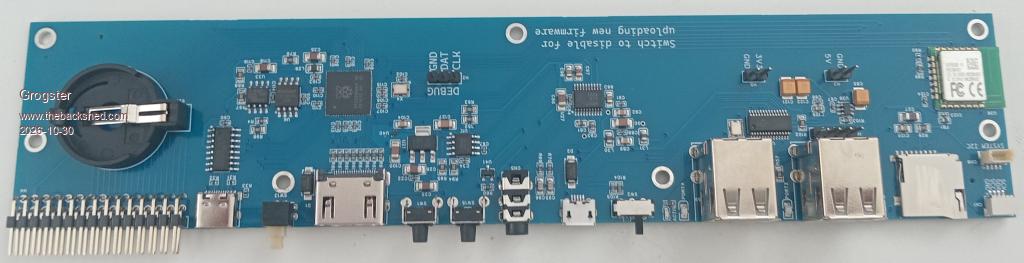
BOM and CPL do not include the RP WiFi module.
Peter?Smoke makes things work. When the smoke gets out, it stops!
Grogster Admin Group Joined: 31/12/2012 Location: New ZealandPosts: 10147
Posted: 07:07am 20 Oct 2026
Copy link to clipboard
Print this post
I suppose anyone can add that module later, but as with the PM3.1 standard PCB board, the RP WiFi board should be on the BOM and CPL, IMHO.......Smoke makes things work. When the smoke gets out, it stops!
matherp Guru Joined: 11/12/2012 Location: United KingdomPosts: 12266
Posted: 07:10am 20 Oct 2026
Copy link to clipboard
Print this post
They do, they just don't show on the image on JLC. I assume they are missing a 3d model. The part is item 57 in the BOM and row 131 in the CPL Edited 2026-10-20 17:13 by matherp
Grogster Admin Group Joined: 31/12/2012 Location: New ZealandPosts: 10147
Posted: 07:16am 20 Oct 2026
Copy link to clipboard
Print this post
You are SO CORRECT! Thanks.
They just never rendered it, so I thought it was not going to be there. Smoke makes things work. When the smoke gets out, it stops!
Grogster Admin Group Joined: 31/12/2012 Location: New ZealandPosts: 10147
Posted: 07:23am 20 Oct 2026
Copy link to clipboard
Print this post
US$256 for FIVE units, including DHL to me, therefore....
US$51.20 each, including DHL to land them here to me in NZ.
Furthermore, it will be US$51.20 + freight to anyone in Australia or New Zealand. This is a prototype run, so only shipping to Australia or NZ for now.
Once the design is proven stable and also that Peter is happy for production on bigger numbers, I will list these for sale on my website.Smoke makes things work. When the smoke gets out, it stops!
mozzie Guru Joined: 15/06/2020 Location: AustraliaPosts: 524
Posted: 10:49am 20 Oct 2026
Copy link to clipboard
Print this post
G'day Grogster, That sounds pretty good to me would you like payment in advance or wait until they land?
Regards, Lyle.
Grogster Admin Group Joined: 31/12/2012 Location: New ZealandPosts: 10147
Posted: 11:49pm 20 Oct 2026
Copy link to clipboard
Print this post
PM me your full address and phone number, and I will put you on the list, but no need to pay in advance. I've reserved one for you, so you won't loose it. Smoke makes things work. When the smoke gets out, it stops!
calcmandan Newbie Joined: 24/07/2020 Location: United StatesPosts: 25
Posted: 05:18am 28 Oct 2026
Copy link to clipboard
Print this post
I got my batch of boards delivered today (boards only). I will be keeping two. For any US members wishing to have one of the remaining three, or all three, send a pvt message.
Stellar quality on the board build. Nice, clean design. Props. Edited 2026-10-28 16:18 by calcmandancalcmandan sysop | air & wave bbs finger | info@bbs.airandwave.net
Grogster Admin Group Joined: 31/12/2012 Location: New ZealandPosts: 10147
Posted: 12:18am 30 Oct 2026
Copy link to clipboard
Print this post
My boards and panels arrived yesterday. I haven't had a chance to program or test anything yet, but hopefully over the weekend......
Smoke makes things work. When the smoke gets out, it stops!
Grogster Admin Group Joined: 31/12/2012 Location: New ZealandPosts: 10147
Posted: 01:33am 31 Oct 2026
Copy link to clipboard
Print this post
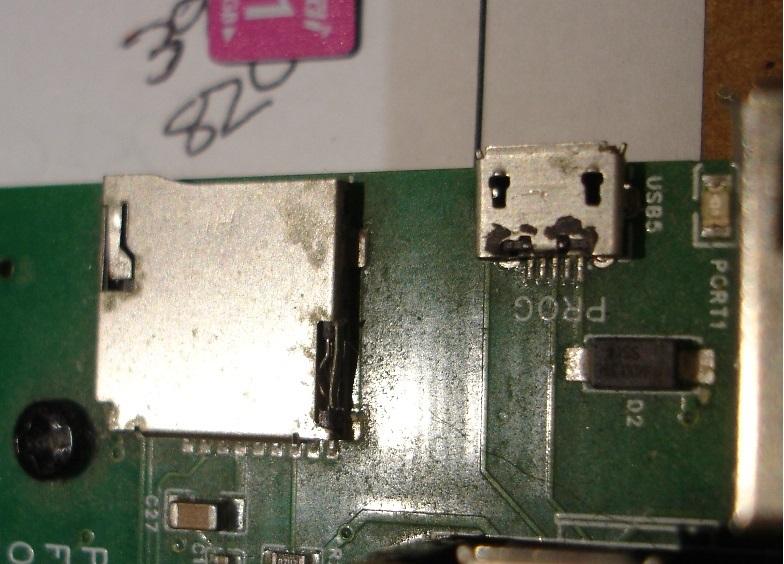
Those who have had these boards made - Peter included - can you check the condition of the micro-SD card slot please.
On my five boards, ALL OF THEM are sticky.
When you push the card in, the "Click" is non-existent, and pushing to try to eject the card does nothing - you have to physically pull the card out.
If I spray a bunch of PCB cleaner solvent into the socket, they all come right and operate 100% - until the solvent evaporates, then they all go sticky again.
I might have to remove and replace these sockets, but I would like to know if anyone else who has had these boards made, has this issue or is it just me.Smoke makes things work. When the smoke gets out, it stops!
robert.rozee Guru Joined: 31/12/2012 Location: New ZealandPosts: 2567
Posted: 02:01am 31 Oct 2026
Copy link to clipboard
Print this post
given the 30-pin connector extends well outside of the back panel, it may be a good idea to ship these to customers with a cover of some sort to prevent shorting or bending of pins. a matching 30-pin berg connector shell with only the four end pins installed would likely suffice.
cheers, rob :-)
Grogster Admin Group Joined: 31/12/2012 Location: New ZealandPosts: 10147
Posted: 03:22am 31 Oct 2026
Copy link to clipboard
Print this post
Not a bad idea, I must say, so I will take it under advisement. Smoke makes things work. When the smoke gets out, it stops!
mozzie Guru Joined: 15/06/2020 Location: AustraliaPosts: 524
Posted: 05:10am 31 Oct 2026
Copy link to clipboard
Print this post
G'day Graeme, This has been mentioned a few times in the past, not only the uSD Card socket but also USB-C and USB-Micro connectors.
I have had problems with both, the SD-Card socket on the original Pico Computer and a USB-C and USB-Micro on others. I think it is solder flux residue as it is bloody hard to remove, after trying the normal PCB cleaner and also a PCB "wax and oil" remover I ended up using a little more solder flux and then "brake and carby" cleaner to flush it out, still took a few goes and insert / remove cycles to get it right.
Might be worth a try. Also a bit of "potentiometer lubricant" might make things glide.
Regards, Lyle.
Grogster Admin Group Joined: 31/12/2012 Location: New ZealandPosts: 10147
Posted: 06:09am 31 Oct 2026
Copy link to clipboard
Print this post
Cheers for that.
I was wondering if it was just I had a bad batch, cos I have never had problems with the uSD sockets before.
The sockets all work just fine as far as the SD card operating, it's just the mechanical spring-loaded push-in/push-out bit.
"Hmmmmm..... Push in, pull out. How shall I remember that?" - Kelly, Married With Children.Smoke makes things work. When the smoke gets out, it stops!
mozzie Guru Joined: 15/06/2020 Location: AustraliaPosts: 524
Posted: 06:10am 31 Oct 2026
Copy link to clipboard
Print this post
G'day, From the PC3 thread:
And this is the board I cleaned up but obviously still a bit of residue:
Not easy stuff to remove and pretty corrosive as well
Regards, Lyle.
Grogster Admin Group Joined: 31/12/2012 Location: New ZealandPosts: 10147
Posted: 06:19am 31 Oct 2026
Copy link to clipboard
Print this post
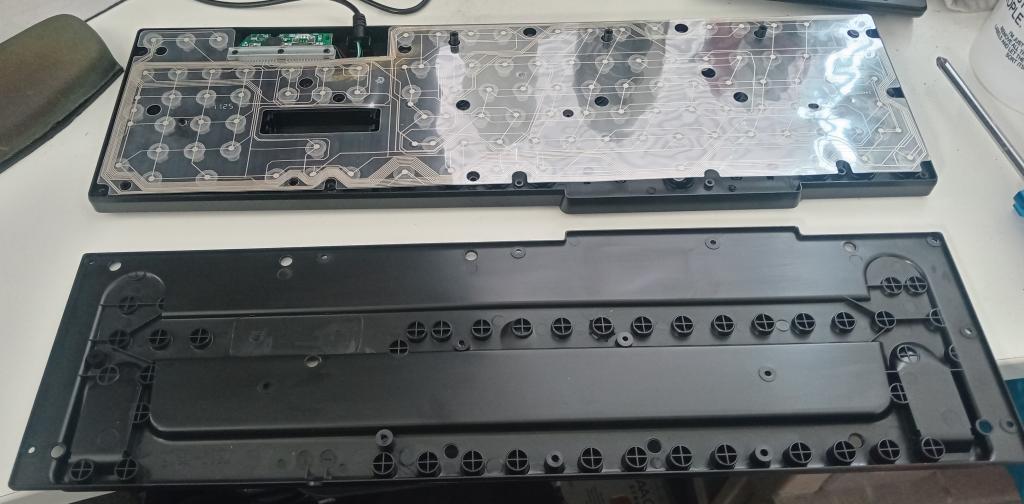
The keyboard I am using for my prototype build of this "In keyboard" concept, is this one from Jaycar:
It is only $16 in our Kiwi money(about nine bucks US), and has the feature of having holes on the bottom of the thing, that you can use to anchor the KB down to something.
I am going to use those, to anchor it to custom built wood box, that will then contain the PM3 PCB module on the rear, along with its panel.
I have tested that this KB does indeed work on the PM3, so I know I have something that will work with the PM3, before I get too carried away.
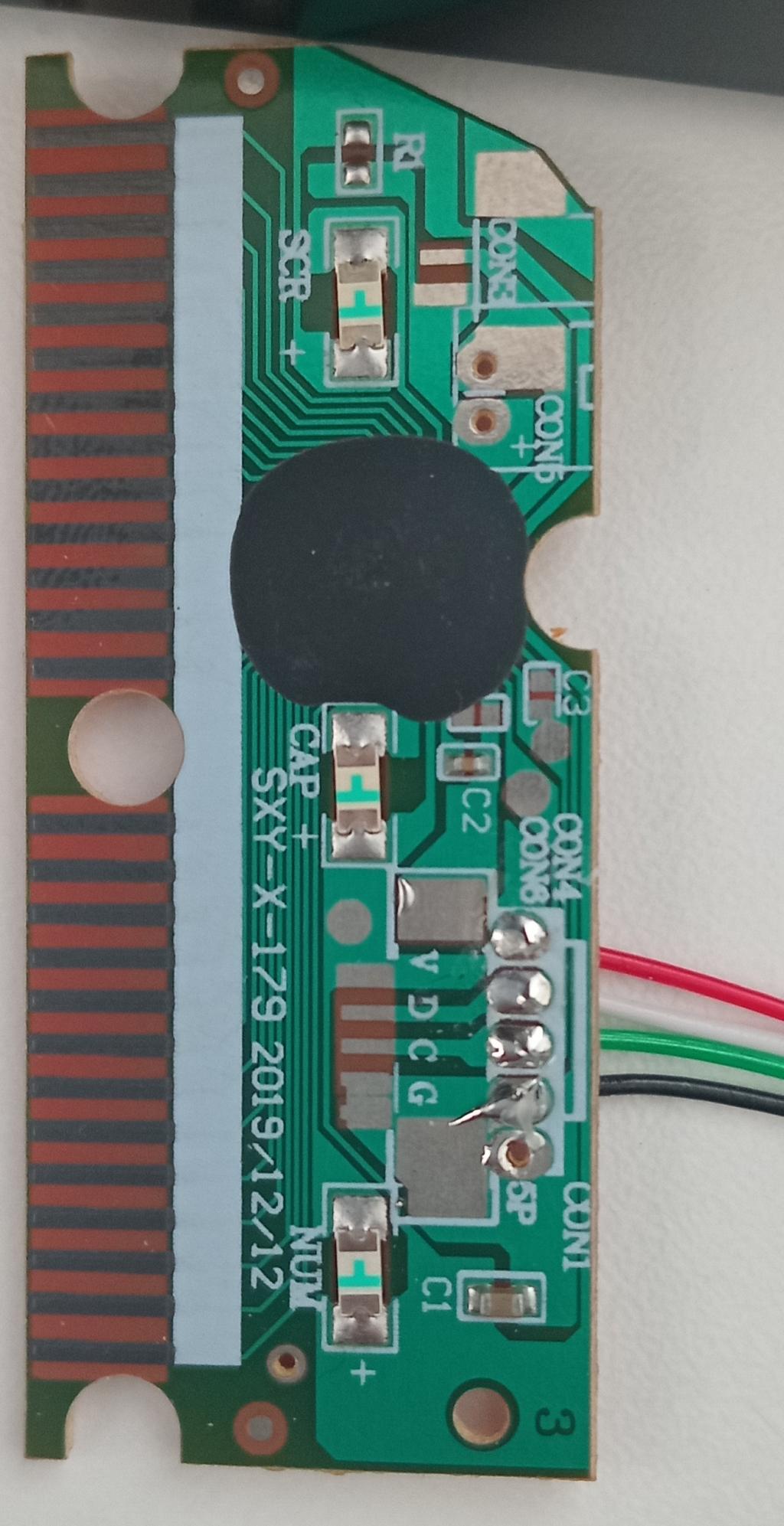
As far as customizing the actual KB is concerned, just open it up, remove the USB cable, and install four wires to the KB controller PCB, and then route them through a hole drilled in the bottom of the KB, and then connect them to the pin-header beside the USB sockets on the PM3 board, which Peter has designed in for this purpose.
The KB controller PCB is a COB design with the actual chip covered with a protective blob of black epoxy resin, so I have no idea what the actual controller chip is, but the unit DOES work just fine, when plugged into one of the USB ports on the PM3, so....
The PCB is labelled where the wires to the USB cord are soldered, with "VDCG", so even with the USB cable removed, I know which pads are what.
V = Volts Supply (5v) D = USB Data C = USB Clock G = GroundSmoke makes things work. When the smoke gets out, it stops!
Grogster Admin Group Joined: 31/12/2012 Location: New ZealandPosts: 10147
Posted: 06:29am 31 Oct 2026
Copy link to clipboard
Print this post
@ mozzie: Thanks for that quote. I missed that one. I have contact cleaner in my workshop, so I will give the boards a dose of that. PCB cleaner I thought would do it, but apparently not.
EDIT: Well, PCB cleaner DOES do it, but only till it evaporates, then the sockets go sticky again as mentioned. Edited 2026-10-31 16:30 by GrogsterSmoke makes things work. When the smoke gets out, it stops!
Mixtel90 Guru Joined: 05/10/2019 Location: United KingdomPosts: 9392
Posted: 08:24am 31 Oct 2026
Copy link to clipboard
Print this post
JLCPCB need to know about this. They don't see the sockets. They are just pulled off the reel by the pick & place. Either it's a socket manufacturing problem prior to reeling up or JLCPCB's cleaning process is leaving gunk behind after board manufacture.Mick
robert.rozee Guru Joined: 31/12/2012 Location: New ZealandPosts: 2567
Posted: 01:01pm 31 Oct 2026
Copy link to clipboard
Print this post
use PCB cleaner to dissolve the flux, then before it dries use IPA to wash away the residue. i used to have to do this with the E-28 boards.
cheers, rob :-)
Grogster Admin Group Joined: 31/12/2012 Location: New ZealandPosts: 10147
Posted: 05:09am 02 Nov 2026
Copy link to clipboard
Print this post
Did this(PCB cleaner followed by contact cleaner). Sockets are still a bit sticky.
IT DID HELP, but even after about five doses of PCB cleaner, work the card slot with a micro-SD card so it operates fine, then flood with contact cleaner, work the socket, then blow it dry - still sticky to some extent once the solvent has evaporated.
How many times have others had to repeat this process, before things come right?
I am thinking about reporting this to JLCPCB as per Mick's suggestion, cos this is a big F-in' pain in the arse, frankly......
EDIT: As a test, I will REMOVE one of the SD-card sockets, and replace it with one of my known-good ones here and see what happens. It could be that the batch of SD-sockets that JLC are currently using, have some kind of manufacturing problem.
Every other connector is fine, it is just the SD-card socket. Edited 2026-11-02 15:14 by GrogsterSmoke makes things work. When the smoke gets out, it stops!
Page 3 of 4
Print this page
The Back Shed's forum code is written, and hosted, in Australia.

 Notice. New forum software under development. It's going to miss a few functions and look a bit ugly for a while, but I'm working on it full time now as the old forum was too unstable. Couple days, all good. If you notice any issues, please contact me.


 Print this post


 would you like payment in advance or wait until they land?