Notice. New forum software under development. It's going to miss a few functions and look a bit ugly for a while, but I'm working on it full time now as the old forum was too unstable. Couple days, all good. If you notice any issues, please contact me.
Grogster Admin Group Joined: 31/12/2012 Location: New ZealandPosts: 10064
Posted: 08:01am 28 Oct 2025
Copy link to clipboard
Print this post
Beer is HAAGEN Strong(7.2%), and after a few of those, I have no fear. Joking aside, I would have simply done a copy/paste from the MMEDIT ZIP file instructions.
Beer is good.
Don't Tax Beer....Smoke makes things work. When the smoke gets out, it stops!
Volhout Guru Joined: 05/03/2018 Location: NetherlandsPosts: 6175
Posted: 08:21am 28 Oct 2025
Copy link to clipboard
Print this post
Hi Grogster,
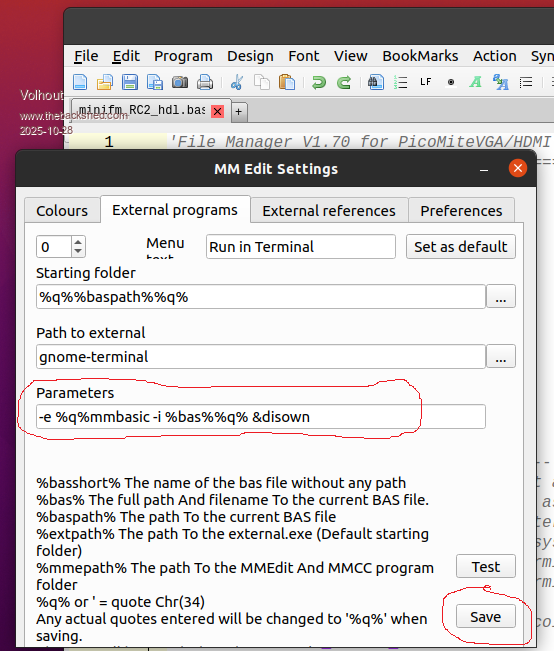
If you had enough beer, resulting in enough courage, you could install MMB4L on your Linux system. Tom provided nice instructions for that.
Then, in MMedit5, in the tab FILE/PREFERENCE you can make following changes:
Then you can run programs directly on your PC (without a mite attached).
Wolfgang Regular Member Joined: 03/11/2021 Location: GermanyPosts: 88
Posted: 03:15pm 28 Oct 2025
Copy link to clipboard
Print this post
@tgerbic Thank you very much for sharing your experience. What I take from this is, that I will also create an external clone boot HD for my Linux Mint. I don't know yet how to do that, but I'm confident I'll figure it out in time.
@all I am well aware that this is a Pico forum and, as I have read, Linux Mint problems have also been addressed here.
And based on that, I have not had any success with the helpful suggestions here for getting back into my Linux Mint 22.2.
Everything I try to recover calls me to enter the password. And a new password is also accepted in case of inputting it via passwd „newpassword“ but I further can't access Timeshift or User and groups. All other programs can be accessed.
I didn't think it would be so difficult for beginners in Linux that one was virtually blocked and can't update anything to return to the original state.
I think therefore its the only measure to completely update my PC and only use MMedit either in a VM or on one of my Windows PCs too.
Wolfgang
JohnS Guru Joined: 18/11/2011 Location: United KingdomPosts: 4386
Posted: 03:54pm 28 Oct 2025
Copy link to clipboard
Print this post
It's not. You've nothing to apologise for.
There's a lot about the Pico, yes, but anything that fits the site's description ( Microcontroller and PC projects) is OK (unless the owner says not).
John
Mixtel90 Guru Joined: 05/10/2019 Location: United KingdomPosts: 9212
Posted: 06:24pm 28 Oct 2025
Copy link to clipboard
Print this post
@ Wolfgang
You have to remember the big difference between Windows and Linux.
Windows was designed for a single user right from the start. The user could be any single one of a group of people that have passwords, but only one of them at once.
Linux was designed to be similar to Unix, a true multi-user system. All the users can be connected at the same time and use the system simultaneously without even knowing that there are other users.
This means that, for Linux, the users have to be sandboxed from each other. Parts of the system depend on what permissions a user has, which can be quite granular - even restricting access to a file or device to only one user. Windows, by default, assumes that its only user has access to everything apart from a few system files and settings.
So, on a Linux system, you normally have to have your account set up by someone with root/admin privileges. They will give you permission to use certain parts of the system and prevent you from messing with things that you shouldn't, possibly breaking it for the other users. When there is a single user it is they that have to configure their own account as there's no-one else to do it. :)Mick
Wolfgang Regular Member Joined: 03/11/2021 Location: GermanyPosts: 88
Posted: 08:45am 29 Oct 2025
Copy link to clipboard
Print this post
@JohnS Thank you very much for your encouraging and kind words.
@Mixtel90 I fully understand that, but unfortunately it doesn't help me much with my current problem.
dddns Guru Joined: 20/09/2024 Location: GermanyPosts: 924
Posted: 09:37am 29 Oct 2025
Copy link to clipboard
Print this post
What exactly happens? You can login and desktop comes up? You want to go to e.g."users and groups" and an administrative password is asked? You enter _your_ password and it refuses to process and says "wrong password"??
In the latter case the only solution is to boot it with the stick, mount your root partition and fix the problem.
Edit:
If your Mint desktop comes up and you don't need to enter a password, then it might run in public "kiosk" mode. Then you are not logged in with your useraccount and then your password won't work. Try to click on logout (abmelden) and see what happens. Is there a choice of usernames in the login window? Edited 2025-10-29 19:45 by dddns
Wolfgang Regular Member Joined: 03/11/2021 Location: GermanyPosts: 88
Posted: 04:00pm 29 Oct 2025
Copy link to clipboard
Print this post
@dddns
For information: My system is a NUC5i3RYH with 16Gb M2.Ram on which the operating system and the additional standard Linux-programms are located. All timeshift files are located on an external 1TB USB3.0 SSD. The NUC is intended exclusively for Mint. qt5-dev was installed.
Linux Mint 22.2 Zara starts without asking for a password, as was the case before attempting to integrate MMedit into Linux.
MMedit under WINE, which I had set up previously, ran ok except for integrating the serial port, which I was unable to achieve.
I then deleted this WINE-MMedit completely and tried the *.tar.gz Linux version. After unpacking and following the infos from Grogster, the generated ICON did not produce any reaction.
I can also use all programms without restrictions, but those that previously required a password do not respond at all, as if they did before.
When logging out (Herunterfahren), no further information appears: Mint shuts down without any further display-Output.
I think your suggestion to boot Mint again from a stick would be the last option.
Edit: What I just see is, if Linux switches itself into an low energiemode, then i was asked for the password for awakening, and I can work with the system, but the timeshift etc. will be further blocked.
Wolfgang Edited 2025-10-30 02:23 by Wolfgang
JohnS Guru Joined: 18/11/2011 Location: United KingdomPosts: 4386
Posted: 04:26pm 29 Oct 2025
Copy link to clipboard
Print this post
I'm not a Mint user but tried it briefly a while back. Mine didn't do what I think this one does... I think it's booting up into a logged-in user account and for some reason if you log out it shuts down.
MMEdit icon not working may mean one or more libraries not found. (I'm guessing.)
A mint user may know - hopefully!
John
dddns Guru Joined: 20/09/2024 Location: GermanyPosts: 924
Posted: 05:39pm 29 Oct 2025
Copy link to clipboard
Print this post
If it doesn't ask for a password when logging in then you enabled Autologin.
That's why I said "abmelden" and not shutdown!
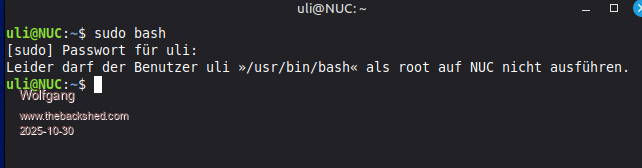
But anyway, open a terminal and post the complete dialog output of
sudo bash
It will ask for a password and that is your password. Please post all lines Edited 2025-10-30 03:39 by dddns
Wolfgang Regular Member Joined: 03/11/2021 Location: GermanyPosts: 88
Posted: 06:07pm 29 Oct 2025
Copy link to clipboard
Print this post
@dddns
Thanks for your effort to help me.
After "Abmelden" the system calls for my password. After input my password mint is available, but not timeshift etc.
Wolfgang
dddns Guru Joined: 20/09/2024 Location: GermanyPosts: 924
Posted: 06:37pm 29 Oct 2025
Copy link to clipboard
Print this post
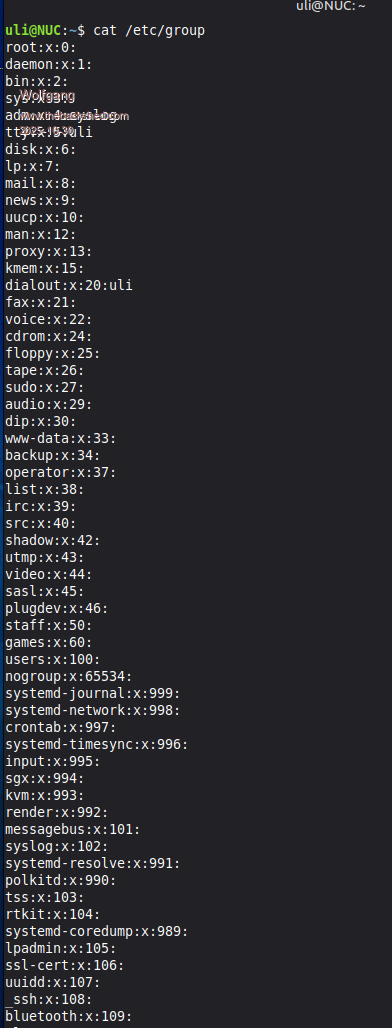
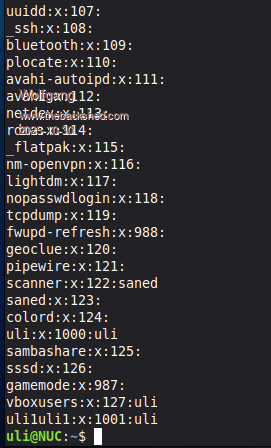
ok. Post the output of
cat /etc/group
Is your username in the group "sudo"?
Wolfgang Regular Member Joined: 03/11/2021 Location: GermanyPosts: 88
Posted: 07:16pm 29 Oct 2025
Copy link to clipboard
Print this post
@dddns
My current password is not in the list, only my very very first one. Due to the problems I was having before, I tried to enter a new one using Linux passwd ‘newpassword’, which lets me now login into the system after ‘Abmelden“.
Due to the long listing as response to cat /etc/group you find two parts of the list. The very very first password is in the last position of second part.
First-part:
second-part:
Wolfgang
Edit. I hope it is what you can use? Edited 2025-10-30 05:19 by Wolfgang
dddns Guru Joined: 20/09/2024 Location: GermanyPosts: 924
Posted: 08:22pm 29 Oct 2025
Copy link to clipboard
Print this post
Boot with your stick. Use filemanager and click on your root partion. Then goto etc subdirectory. Right click and chose "open terminal here" Edit file group with:
sudo nano group
Add your username behind: sudo:x:27: Ctrl-x to exit and save. Reboot and it should be fixed
Wolfgang Regular Member Joined: 03/11/2021 Location: GermanyPosts: 88
Posted: 09:46am 30 Oct 2025
Copy link to clipboard
Print this post
@dddns
Many thanks, I will do it at the weekend.
Wolfgang
Wolfgang Regular Member Joined: 03/11/2021 Location: GermanyPosts: 88
Posted: 10:03am 02 Nov 2025
Copy link to clipboard
Print this post
@dddns
I decided to completely reinstall Linux Mint 22.2 Zara to avoid any misunderstandings and incorrect entries.
And for Windows programs such as MMedit and others, I will continue to use my Win10 PC, but disconnected from the Internet.
This seems to be the easier and less complicated way for me at the moment.
Thanks again for everyone's support so far.
wolfgang
dddns Guru Joined: 20/09/2024 Location: GermanyPosts: 924
Posted: 11:16am 02 Nov 2025
Copy link to clipboard
Print this post
Ok..best success!
I think what has happened is simple: you changed something in "user and groups" and unchecked the group "sudo" for your username, thus can't execute sudo anymore.. The way I described puts it back in, that's it.
Grogster Admin Group Joined: 31/12/2012 Location: New ZealandPosts: 10064
Posted: 11:00pm 02 Nov 2025
Copy link to clipboard
Print this post
An interesting read, and I'm sorry you are having problems, but please do stick with it - Linux is now my go-to system both for me, and for several clients now, cos of the whole "Your computer is e-waste now" thing with the W11 requirements.
I've found Mint to be excellent as a system to migrate to from Windows, but as has been mentioned by other members, Linux is Linux - which is NOT Windows, so although it looks and feels very similar if using something like Mint, it is still Linux under the hood, which is fundamentally NOT Windows, so it does things fundamentally different.
That CAN be REALLY discouraging, and in my own experience, it made me drop Linux on more then one occasion, and just go back to Windows. I think MOST people who have moved more permanently to Linux from Windows, will tell you that when they were also a Linux newbie, it can be hard to get your head around how Linux works, and as soon as you run into a problem, you tend to grasp for Windows again because it is familiar!
But I found myself coming back to Linux more and more, and with each play around with it, you get to learn more and more about it, to the point where you do see that it is easily as good as Windows for most stuff.
Uptake of Linux from Windows users has been traditionally slow, while Windows still let Windows users do what they wanted, but W11 is a whole new kettle of fish, and MS's forcing people to NOT be allowed local accounts, forcing people to use a MS account even though people don't want to, everything is being tied to the cloud(usually in THEIR OneDrive app), TPM2 and SecureBoot requirements basically making your perfectly usable machine e-waste now.......MANY Windows users have had enough of this crap, and are taking a much more serious look at alternatives such as Linux Mint, or even moving to Apple computers.
As has been posted on many a forum: "Windows 11 is the best ad for Linux there ever was." Smoke makes things work. When the smoke gets out, it stops!
Wolfgang Regular Member Joined: 03/11/2021 Location: GermanyPosts: 88
Posted: 10:42am 03 Nov 2025
Copy link to clipboard
Print this post
@dddns, @Grogster
Sure, it's Linux, but to avoid the pitfall, one must have insider knowledge, which I don’t have, and I was therefore unsure whether I would have been able to carry out the suggested steps. The information provided were like a foreign language to me. That was the reason to make a new setup.
Like grogster, I had already made many attempts using Linux before, mainly with Ubuntu, but as a self-taught user due to time constraints, there was always something that prevented me, from using Linux as the main system.
Nevertheless, I will saying goodbye to WIN11 and will mainly use Mint. I am currently using three PCs, one only for Mint, the old one still for Win10 to use all programmes with no Linux equivalent, and shame on me, I still have a Win11 PC too as a backup.
I fully agree with everyone who is in favour saying goodbye to WIN11, and as I hear today, The International Criminal Court in The Hague (IStGH ) is planning to switch from Microsoft-Office to Opendesk. Other areas in my country are also in the process of switching to Linux. There is currently a lot of movement towards change.

 Notice. New forum software under development. It's going to miss a few functions and look a bit ugly for a while, but I'm working on it full time now as the old forum was too unstable. Couple days, all good. If you notice any issues, please contact me.


 Print this post