Notice. New forum software under development. It's going to miss a few functions and look a bit ugly for a while, but I'm working on it full time now as the old forum was too unstable. Couple days, all good. If you notice any issues, please contact me.
Bleep Guru Joined: 09/01/2022 Location: United KingdomPosts: 854
Posted: 06:56pm 27 Feb 2026
Copy link to clipboard
Print this post
Hi Dietmar,
Yes but the x, y and frame speed are not visible? Plus you get the coloured stripes down the side of the screen, which I believe are the dithering patterns, which should not be visible, so clearly something is not correct? Regards, Kevin.
dddns Guru Joined: 20/09/2024 Location: GermanyPosts: 910
Posted: 07:10pm 27 Feb 2026
Copy link to clipboard
Print this post
Kevin, my last post with this as I don't want to spoil Martin's thread. I think something goes wrong with blit framebuffer and might be a firmware issue. Try
Blit framebuffer F,N,0,0,0,0,MM.HRES,MM.VRES works while Blit framebuffer F,N,0,0,0,0,MM.HRES-1,MM.VRES
does not. Regards Dietmar
Bleep Guru Joined: 09/01/2022 Location: United KingdomPosts: 854
Posted: 07:21pm 27 Feb 2026
Copy link to clipboard
Print this post
Hi Dietmar, I've made a discovery, looks like it's a bug, if you'd like to post it up for Peter. If you set Blit framebuffer F,N,0,0,0,0,480,240 (ie full frame width, but reduced height) it works, except we are copying the whole width, which is not what we want, if you change the width to anything other than full width, it fails. Regards, Kevin.
Bleep Guru Joined: 09/01/2022 Location: United KingdomPosts: 854
Posted: 07:22pm 27 Feb 2026
Copy link to clipboard
Print this post
Perfect timing, we have found the same thing :-)
dddns Guru Joined: 20/09/2024 Location: GermanyPosts: 910
Posted: 07:29pm 27 Feb 2026
Copy link to clipboard
Print this post
Nice :) @Martin: I think this is somehow important because the speed is like 20% faster
Bleep Guru Joined: 09/01/2022 Location: United KingdomPosts: 854
Posted: 07:38pm 27 Feb 2026
Copy link to clipboard
Print this post
Yes, I think that is because, using the BUFF driver, Martins code is now writing to RAM, not the screen directly, so it's not limited by the speed the panel can work at, then in the background the physical screen is updated from the RAM by the second processor. Regards, Kevin.
Martin H. Guru Joined: 04/06/2022 Location: GermanyPosts: 1552
Posted: 07:55pm 27 Feb 2026
Copy link to clipboard
Print this post
Wasn't there something about Blit Memory that meant it always had to be an even number of horizontal pixels? So that it always worked with full bytes. It's quite possible that it's similar with BLIT Framebuffer. Edited 2026-02-28 05:57 by Martin H.'no comment
Martin H. Guru Joined: 04/06/2022 Location: GermanyPosts: 1552
Posted: 09:02am 01 Mar 2026
Copy link to clipboard
Print this post
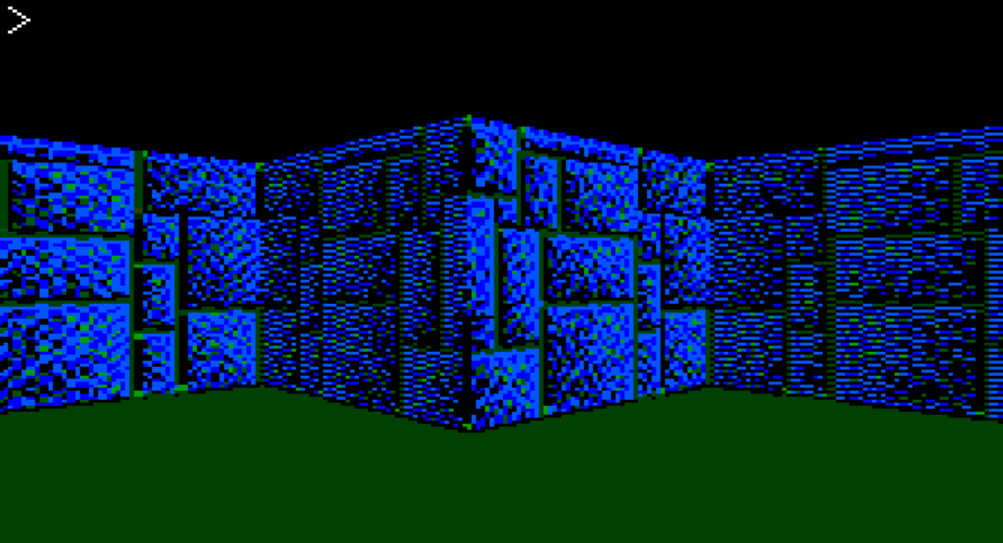
@Homa Hello Matthias, I took the time to implement your suggestion. It looks really good for a Pico. However, as expected, the frame rate drops to below 1 FPS/s. What still runs and looks quite acceptable under MMB4W is simply no longer (seriously) executable for the Pico or Pico2. I'm not sure if it's possible to improve the frame rate, but I'm afraid it's not possible to make it run on the Pico. Of course, as you suggest, you can increase the step width both horizontally and vertically and then work with the box command, but this will make the texture coarser beyond recognition. The solution here would be a scalable version of the Blit command, but we don't have that.For the sake of completeness, I'll attach it anyway. Maybe someone can speed things up after all. ccast.zip
Cheers Martin'no comment
homa Guru Joined: 05/11/2021 Location: GermanyPosts: 693
Posted: 01:22pm 01 Mar 2026
Copy link to clipboard
Print this post
Wow Martin,
That looks great. I'll take a look at it later, I'm on the road at the moment. But think back to the first attempts with ray casting. That took a few months and now runs great on a Pico in Basic! Maybe a solution will emerge here in the future too.
Best regards, Matthias
thwill Guru Joined: 16/09/2019 Location: United KingdomPosts: 4398
Posted: 03:35pm 01 Mar 2026
Copy link to clipboard
Print this post
Very pretty.
What's the FPS like on MMBasic for Windows (order of magnitude, I know it depends on the processor)?
MMB4L is reporting 2-3 FPS but it feels slightly more so I wonder about the measurement.
I'm guessing my under-development MMB4L4W (a break from MMB4A development) is going to be similar, but am concerned that Peter's MMBasic for Windows might outshine me .
Martin H. Guru Joined: 04/06/2022 Location: GermanyPosts: 1552
Posted: 04:20pm 01 Mar 2026
Copy link to clipboard
Print this post
Hi Tom in Mode 7 MMBasic for Windows shows ~between 20 and 70fps. (Dell 7300 I7 W11) in Mode 8 ~between 6 and 30fps Due to multitasking, this naturally always depends on the background processes and services. I removed another division from the loop (I had overlooked it), which makes the rendering a little faster.
For i = 0 To lH-1 Step 2-nide : ty=Int((i*TEX_SIZE)/lH) ...
replace with
stepY = TEX_SIZE / lH ty = 0 For i = 0 To lH - 1 Step 2 - nide Pixel x, drawY + i, tex(texX, int(ty)) inc ty, stepY ' Simple addition instead of multiplication/division Next i
Thank you Tom, for your support However, I will first pursue the path without textures, unless we find a way to pre-calculate all the scaling and then (as in previous versions) BLIT it in. Have a nice rest of your Sunday. Cheers Martin Edited 2026-03-02 02:22 by Martin H.'no comment
thwill Guru Joined: 16/09/2019 Location: United KingdomPosts: 4398
Posted: 04:57pm 01 Mar 2026
Copy link to clipboard
Print this post
> in Mode 7 MMBasic for Windows shows ~between 20 and 70fps. (Dell 7300 I7 W11) > in Mode 8 ~between 6 and 30fps
Hmm, that is very embarassing, and also quite odd. I always expected MMB4L to be a bit slower than MMB4W; MMB4L uses the heavier-weight SDL framework and has a different error handling/detection strategy. But I didn't expect it to be quite so appalling, and haven't seen anything like that slow-down with other programs.
Turbo46 Guru Joined: 24/12/2017 Location: AustraliaPosts: 1694
Posted: 04:48am 02 Mar 2026
Copy link to clipboard
Print this post
The frame rate is now not visible in MMB4W?
BillKeep safe. Live long and prosper.
Martin H. Guru Joined: 04/06/2022 Location: GermanyPosts: 1552
Posted: 05:15am 02 Mar 2026
Copy link to clipboard
Print this post
add Text scrW, 0, "FPS: "+Str$(Int(1000/Max(1,Timer-tt))) under the "Page Write 0" Line
' Frame auf Monitor bringen (Dein Original-Stil) If mmb4w Then PAGE WRITE 0 Text scrW, 0, "FPS: "+Str$(Int(1000/Max(1,Timer-tt))) Blit 0,0,0,0,scrW,scrH,1 : PAGE WRITE 1 Else ' Wichtig fr Pico: Von Framebuffer F nach N blitten FRAMEBUFFER write n Text scrW, 0, "FPS: "+Str$(Int(1000/Max(1,Timer-tt))) FRAMEBUFFER write f Blit framebuffer F, N, 0, 0, 0, 0, scrW, scrH End If
Edited 2026-03-02 16:47 by Martin H.'no comment
Martin H. Guru Joined: 04/06/2022 Location: GermanyPosts: 1552
Posted: 10:35am 02 Mar 2026
Copy link to clipboard
Print this post
Tom, I can only guess. The pixel routine takes by far the most time in this version, as MMBasic has to draw each point individually. Here, the fact that you have kept your Linux version as universal as possible could prove to be its downfall. So if you can speed up the pixel routine source code a little, this would have a significant effect on the frame rate. It would be even better, of course, if Peter would also set up the IMAGE RESIZE_FAST routine from CMM2 on the Pico.'no comment
thwill Guru Joined: 16/09/2019 Location: United KingdomPosts: 4398
Posted: 10:40am 02 Mar 2026
Copy link to clipboard
Print this post
Thanks Martin. It turned out that the principle bottleneck was that I was polling the SDL event queue far too frequently. I throttled polling to only every 5ms and now get 20+ FPS.
Martin H. Guru Joined: 04/06/2022 Location: GermanyPosts: 1552
Posted: 11:55am 02 Mar 2026
Copy link to clipboard
Print this post
5mS are still 200 event queries per second, which should still be excessive for SDL events. The rule of thumb is once per frame, so at 60 fps, even 16 ms would be enough without you noticing any difference or the controls feeling sluggish. But I have no idea about C++, if you can now achieve 20 FPS, the maze is already very smooth. Edited 2026-03-02 21:57 by Martin H.'no comment
thwill Guru Joined: 16/09/2019 Location: United KingdomPosts: 4398
Posted: 03:23pm 02 Mar 2026
Copy link to clipboard
Print this post
Thanks Martin I've split the difference and am now polling every 8ms, twice per maximum frame rate. The main improvement is not polling on every statement which is how it was previously implemented!
Volhout, I'm still playing whack-a-mole with some bugs but I hope to have an alpha ready for Linux AND WINDOWS within the month.
Mixtel90 Guru Joined: 05/10/2019 Location: United KingdomPosts: 9136
Posted: 05:16pm 02 Mar 2026
Copy link to clipboard
Print this post
A game controller is being polled at 50Hz on the WII. That's 20ms. You don't see any flicker at 100Hz, 10ms, as human eyes aren't that good. Wouldn't you get away with somewhere around 15ms polling at fastest? Is there any point in polling faster than the VGA frame rate anyway? . Edited 2026-03-03 03:18 by Mixtel90Mick

 Notice. New forum software under development. It's going to miss a few functions and look a bit ugly for a while, but I'm working on it full time now as the old forum was too unstable. Couple days, all good. If you notice any issues, please contact me.


 Print this post