Notice. New forum software under development. It's going to miss a few functions and look a bit ugly for a while, but I'm working on it full time now as the old forum was too unstable. Couple days, all good. If you notice any issues, please contact me.
Peter63 Senior Member Joined: 28/07/2017 Location: SwedenPosts: 217
Posted: 05:35am 30 May 2026
Copy link to clipboard
Print this post
Jepp
Bryan1 Guru Joined: 22/02/2006 Location: AustraliaPosts: 2297
Posted: 05:47am 30 May 2026
Copy link to clipboard
Print this post
Well I decided to setup my 2040 Zero with that ili9488 now it's free and gave this DS1820 code a go, now I was having no luck so went back to the start of this thread and saw Tempr(GP9,500) was the fix to get the DS1820 working.
Nothing changed in the code just copied it and pasted into MMEdit. Anyway the good thing the DS1820 looks to be working
phil99 Guru Joined: 11/02/2018 Location: AustraliaPosts: 3412
Posted: 06:13am 31 May 2026
Copy link to clipboard
Print this post
Ok, so if you don't know which DS18x20 you have these two functions should work with any, including slow ones. In the first one you can optionally set the Conversion Time in mS. Usage:- Print DS18x20ct(mm.info(pinno GPxx)) ' the default Conversion Time is 750mS or Print DS18x20ct(mm.info(pinno GPxx, mS_delay) '1000mS should cover most.
The second doesn't need it as it checks if the conversion is finished before reading. If not finished it returns to the main loop. After reading it starts a new conversion, whish happens in the background as it returns to the main loop. Usage:- Print DS18x20(mm.info(pinno GPxx))
Function DS18x20ct(PinNbr As INTEGER, Delay As INTEGER) As FLOAT ' derived from DS18x20 test code by TassyJim Local INTEGER T1,T2,T3,CpC,F OneWire WRITE PinNbr,1,1,&h33 'read "family" ROM code OneWire READ PinNbr,0,1,F ':Print F, "16=DS1820/DS18S20, 32=DS18S22, 40=DS18B20", OneWire RESET PinNbr ' reset before command OneWire WRITE PinNbr, 8, 2, &hCC, &h44 ' start conversion, adjust for slow units If Delay < 10 then Delay = 750 ' maximum normal conversion time Pause Delay OneWire RESET PinNbr ' reset before command OneWire WRITE PinNbr, 1, 2, &hCC, &hBE ' command read data OneWire READ PinNbr, 0, 8, T1,T2,T3,T3,T3,T3,T3,CpC 'get the data 'process the data If F=16 Then DS18x20ct = Str2bin(int16,Chr$(T1)+Chr$(T2))\2 -0.25 + (CpC-T3)/CpC If F=40 or F=34 Then DS18x20ct = Str2bin(int16,Chr$(T1)+Chr$(T2))/16 End Function
PinNbr = MM.Info(pinno GP7) Dim DStemp = DS18x20(PinNbr) 'purge old data and start new conversion Dim integer n
Do 'Main Loop t = timer Print n; DStemp = DS18x20(PinNbr) 'get Temp, if ready If DStemp <> 1000 Then Print Print "Temp =";DStemp;"`C" n = 0 EndIf Do : Loop until Timer > 49.9 inc n,50 Loop
Function DS18x20(PinNbr As INTEGER) As FLOAT ' Adapted from DS18x20 test code by TassyJim Local INTEGER done, T1, T2, T3, CpC, F DS18x20 = 1000 ' standard error code OneWire READ PinNbr, 4, 1, done ' is conversion finished? If done = 0 Then Exit Function ' if not return to program 'Get the data OneWire WRITE PinNbr,1,1,&h33 'read "family" ROM code OneWire READ PinNbr,0,1,F ':Print F; " 16=DS1820/DS18S20, 32=DS18S22, 40=DS18B20", OneWire RESET PinNbr ' reset before command OneWire WRITE PinNbr, 1, 2, &hCC, &hBE ' command read data OneWire READ PinNbr, 0, 8, T1,T2,T3,T3,T3,T3,T3,CpC ' get the data ' process the data If F=16 Then Value = Str2bin(int16,Chr$(T1)+Chr$(T2))\2 -0.25 + (CpC-T3)/CpC If F=40 or F=34 Then Value = Str2bin(int16,Chr$(T1)+Chr$(T2))/16 DS18x20 = Cint(Value * 10) / 10 'round to 1/10ths
'Start conversion, ready for next read OneWire RESET PinNbr ' reset before command OneWire WRITE PinNbr, 8, 2, &hCC, &h44 ' start conversion End Function End
Bryan1 Guru Joined: 22/02/2006 Location: AustraliaPosts: 2297
Then when I tried a non-genuine DS18B20 I got the same as you. Further investigation showed it says it has completed the temperature conversion in 33mS. But it hasn't actually finished so the data you get is from a previous read. That is why you got a string of 85°C readings, then the correct temp.
For these non-genuine units you are better off using the MMBasic TEMPR START GPxx,3 before the TEMPR(GPxx) function. The ",3" gives maximum resolution and ensures TEMPR(GPxx) waits long enough before reading.
The example above shows TEMPR(GPxx) immediately following TEMPR START but it doesn't need to. You can put other code between to make use of the 600mS or so it takes to do a conversion. Edited 2026-06-01 08:00 by phil99
phil99 Guru Joined: 11/02/2018 Location: AustraliaPosts: 3412
Posted: 10:56pm 31 May 2026
Copy link to clipboard
Print this post
More experimenting with the nongenuine DS18B20.
It's conversion time is much faster than for the genuine unit. It does high res 1/16° conversions in less than 34mS. With the temperature changing rapidly it really does get new values that fast.
It's accuracy, however appears to be a little less, almost 1° high compared to a genuine unit and a pair of AHT10s.
Edit.
> 'Non-genuine DS18B20 > t2=timer:OneWire WRITE 9,1,2,204,68:t=timer:do:OneWire READ 9,4,1,d:loop until d :? timer-t,timer-t2 33.237 35.562 > ' So about 2.3mS to start conversion and 33.3mS to carry it out. >'genuine DS18B20 > t2=timer:OneWire WRITE 10,1,2,204,68:t=timer:do:OneWire READ 10,4,1,d:loop until d:?timer-t,timer-t2 479.366 481.694 >
Edited 2026-06-01 11:09 by phil99
phil99 Guru Joined: 11/02/2018 Location: AustraliaPosts: 3412
Posted: 08:57am 02 Jun 2026
Copy link to clipboard
Print this post
A number of DS18x20 can run from the same OneWire bus by using the unique ROM code each contains. The codes can be read by copying and pasting the command lines below into TeraTerm. Only one device may be on the bus while reading the code. Ignore the output numbers in the example
Its a bit clunky but OneWire doesn't use arrays or strings.
Insert your ROM code numbers and OneWire pin number in the program below. This example is for two but could be modified for more.
' running 2 DS18x20 sensors on the same pin. Get their ROM codes an replace those below Dim PinNbr = MM.Info(pinno gp6) Dim integer n, ROMcode(1) = (2909716863767585976, 2900111825584602189)
Dim DStemp0 = DS18x20(PinNbr, ROMcode(0)) 'purge old data and start new conversion Dim DStemp1 = DS18x20(PinNbr, ROMcode(1)) 'purge old data and start new conversion
Do ' Main Loop D = DS18x20(PinNbr, ROMcode(n)) If D<>1000 Then Print "Device";n; D;"`C", If n=1 Then Print Pause 1000 n = Not n Loop
Function DS18x20(PinNbr As INTEGER, ROM As INTEGER) As FLOAT ' Adapted from DS18x20 test code by TassyJim Local INTEGER done, T1, T2, T3, CpC, Fam, a,b,c,d,e,f,g,h DS18x20 = 1000' standard error code OneWire READ PinNbr, 4, 1, done' is conversion finished? If done = 0 Then Exit Function ' if not return to program
If ROM Then a=ROM>>56 : b=ROM>>48 And 255 : c=ROM>>40 And 255 : d=ROM>>32 And 255 e=ROM>>24 And 255 : f=ROM>>16 And 255 : g=ROM>>8 And 255 : h=ROM And 255 Fam=a ': Print a,b,c,d,e,f,g,h OneWire WRITE PinNbr,1,1,&h55 ' reset then match ROM Code command OneWire WRITE PinNbr,0,8,a,b,c,d,e,f,g,h ' send ROM Code OneWire WRITE 9,0,1,&hBE ' read scratchpad command OneWire READ 9, 0, 8, T1,T2,T3,T4,T5,T6,T7,CpC' get the data Else OneWire WRITE PinNbr,1,1,&h33 ' read "family" ROM code OneWire READ PinNbr,0,1,Fam EndIf
' process the data 16=DS1820/DS18S20, 32=DS18S22, 40=DS18B20 If Fam = 16 Then Value = Str2bin(int16,Chr$(T1)+Chr$(T2))\2 -0.25+(CpC-T3)/CpC If Fam = 40 Or Fam = 34 Then Value = Str2bin(int16,Chr$(T1)+Chr$(T2))/16 DS18x20 = Cint(Value * 100) / 100 'round to 1/100ths
' Start conversion, ready for next read If ROM Then OneWire WRITE PinNbr,1,1,&h55 'reset then match ROM Code command OneWire WRITE PinNbr,0,8,a,b,c,d,e,f,g,h 'send ROM Code OneWire WRITE PinNbr,2,1,&h44 'Master issues Convert Temp. command Else OneWire RESET PinNbr' ' reset before command OneWire WRITE PinNbr, 8, 2, &hCC, &h44' ' start conversion EndIf End Function End
Footnote added 2026-06-02 21:49 by phil99 A sample of the output.
Footnote added 2026-06-02 22:01 by phil99 Noticed a copy/paste error tat would affect the fractions of degrees for DS18S20 sensors. Replace this line:- OneWire READ 9, 0, 8, T1,T2,T3,T4,T5,T6,T7,CpC' get the data with OneWire READ 9, 0, 8, T1,T2,T3,T3,T3,T3,T3,CpC' get the data
Most of the T3s are dummys, only the one before CpC gives the fractions.
Footnote added 2026-06-11 12:04 by phil99 Found another copy / paste error, going senile. So here is the function again with all errors fixed.
Footnote added 2026-06-11 13:46 by phil99 I just keep making mistakes. This time lucky? Added a feature. If there is only one device on the bus and an integer variable with a value of 0 is supplied as the ROM Code it will be filled with the device ROM Code. So you can get the ROM Codes of devices without using 1Wire commands. Eg.
> ? "Temp.";ds18x20(2,code%);"`C", "ROM Code";code% 'only one on the bus Temp. 21.5`C ROM Code 2900111825584602189 > > ? ds18x20(2,2900111825584602189), ds18x20(2,2909716863767585976) 'multiple on the bus 21.5 22.25 >
And the amended function.
Function DS18x20(PinNbr As INTEGER, ROM As INTEGER) As FLOAT ' Adapted from DS18x20 test code by TassyJim Local INTEGER done, T1, T2, T3, CpC, Fam, a,b,c,d,e,f,g,h DS18x20 = 1000' standard error code OneWire READ PinNbr, 4, 1, done' is conversion finished? If done = 0 Then Exit Function ' if not return to program
If ROM Then a=ROM>>56 : b=ROM>>48 And 255 : c=ROM>>40 And 255 : d=ROM>>32 And 255 e=ROM>>24 And 255 : f=ROM>>16 And 255 : g=ROM>>8 And 255 : h=ROM And 255 Fam=a ': Print a,b,c,d,e,f,g,h OneWire WRITE PinNbr,1,1,&h55 ' reset then match ROM Code command OneWire WRITE PinNbr,0,8,a,b,c,d,e,f,g,h 'send ROM Code OneWire WRITE PinNbr,0,1,&hBE ' read scratchpad command Else OneWire WRITE PinNbr,1,1,&h33 ' read "family" and ROM code OneWire READ PinNbr,0,8,Fam,b,c,d,e,f,g,h ROM=(Fam<<56)+(b<<48)+(c<<40)+(d<<32)+(e<<24)+(f<<16)+(g<<8)+h OneWire WRITE PinNbr,1,2,&hCC,&hBE ' read scratchpad command EndIf OneWire READ PinNbr, 2, 8, T1,T2,T3,T3,T3,T3,T3,CpC' get the data
' process the data. Fam - 16=DS1820/DS18S20, 32=DS18S22, 40=DS18B20 If Fam = 16 Then Value = Str2bin(int16,Chr$(T1)+Chr$(T2))\2 -0.25+(CpC-T3)/CpC If Fam = 40 Or Fam = 34 Then Value = Str2bin(int16,Chr$(T1)+Chr$(T2))/16 DS18x20 = Cint(Value * 100) / 100 'round to 1/100ths
' Start conversion, ready for next read If ROM Then OneWire WRITE PinNbr,1,1,&h55 ' reset then match ROM Code command OneWire WRITE PinNbr,0,8,a,b,c,d,e,f,g,h 'send ROM Code OneWire WRITE PinNbr,2,1,&h44 ' Master issues Convert Temp. command Else OneWire WRITE PinNbr, 1, 2, &hCC, &h44' start conversion EndIf End Function End
matherp Guru Joined: 11/12/2012 Location: United KingdomPosts: 12035
Posted: 10:05am 02 Jun 2026
Copy link to clipboard
Print this post
phil99: what firmware version are you using? I'll post an update with flexible onewire data parameters for you to test
phil99 Guru Joined: 11/02/2018 Location: AustraliaPosts: 3412
Posted: 10:56am 02 Jun 2026
Copy link to clipboard
Print this post
PicoMiteVGA MMBasic RP2350A Edition V6.03.00RC12
Or plain RP2040 would also do.
Thanks very much for considering this.
phil99 Guru Joined: 11/02/2018 Location: AustraliaPosts: 3412
Posted: 05:39am 03 Jun 2026
Copy link to clipboard
Print this post
The latest PicoMite firmware - V6.03.00RC15 can now use strings and arrays in OneWire commands. Here is the previous program converted to use both. A more streamlined result and simpler to write.
' Running 2 DS18x20 sensors on the same pin. Get their ROM codes and replace those below. Dim PinNbr = MM.Info(pinno gp6) Dim integer n=0, ROMcode(1) = (2909716863767585976, 2900111825584602189)
Dim DStemp0 = DS18x20(PinNbr, ROMcode(0)) 'purge old data and start new conversion Pause 750 Dim DStemp1 = DS18x20(PinNbr, ROMcode(1)) 'purge old data and start new conversion
Do ' Main Loop D = DS18x20(PinNbr, ROMcode(n)) If D<>1000 Then Print "Device";n; D;"`C", If n=1 Then Print Pause 1000 n = Not n Loop
Function DS18x20(PinNbr As INTEGER, ROM As INTEGER) As FLOAT ' Adapted from DS18x20 test code by TassyJim ' This version for MMbasic v6.03.00RC15 with array and string support for OneWire Local INTEGER done, T(7), Fam = ROM >> 56 'get family code from ROM code Local ROMcode$ = Bin2str$(Uint64,ROM,big) 'convert ROM code to string DS18x20 = 1000' standard error code OneWire READ PinNbr, 4, 1, done' is conversion finished? If Not done Then Exit Function ' if not return to program
If ROM Then OneWire WRITE PinNbr, 1, 1, &h55 ' reset then match ROM Code command OneWire WRITE PinNbr, 0, 8, ROMcode$ ' send ROM Code to the DS18x20 OneWire WRITE PinNbr, 0, 1, &hBE ' read scratchpad command Else OneWire WRITE PinNbr,1,1,&h33 'If no ROM code given assume only one DS18x20 connected OneWire READ PinNbr, 0, 1, Fam ' read "family" ROM code OneWire WRITE PinNbr, 1, 2, &hCC, &hBE ' command read data EndIf OneWire READ PinNbr, 0, 8, T() ': Math V_Print T()' get the data
' process the data. Fam = Family ROM codes - 16=DS1820/DS18S20, 34=DS18S22, 40=DS18B20 If Fam = 16 Then Value = Str2bin(int16,Chr$(T(0))+Chr$(T(1))\2 -0.25+(T(7)-T(6))/T(7)) If Fam = 40 Or Fam = 34 Then Value = Str2bin(int16,Chr$(T(0))+Chr$(T(1)))/16 DS18x20 = Cint(Value * 100) / 100 'round to 1/100ths
' Start conversion, ready for next read If ROM Then OneWire WRITE PinNbr, 1, 1, &h55 'reset then match ROM Code command OneWire WRITE PinNbr, 0, 8, ROMcode$ 'send ROM Code OneWire WRITE PinNbr, 2, 1, &h44 'Master issues Convert Temp. command Else OneWire RESET PinNbr' ' reset before command OneWire WRITE PinNbr, 8, 2, &hCC, &h44' ' start conversion EndIf End Function End
phil99 Guru Joined: 11/02/2018 Location: AustraliaPosts: 3412
Posted: 05:05am 04 Jun 2026
Copy link to clipboard
Print this post
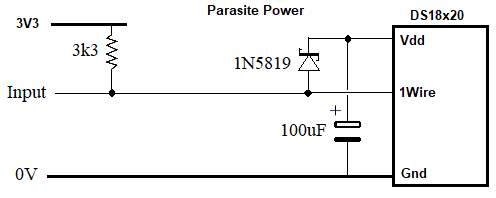
Attempts to get the DS18B20s to work in Parasite Power mode have failed so here is a hardware solution that does work. The component values are not critical, try whatever you have. I have also tested 1.2kΩ and 10µF powering two DS18B20s.
phil99 Guru Joined: 11/02/2018 Location: AustraliaPosts: 3412
Posted: 01:09pm 05 Jun 2026
Copy link to clipboard
Print this post
Yet another tweak. As before many DS18x20s can be on the OneWire bus if the unique ROM code of each is provided. If no ROM code is provided it assumes there is only one device on the bus and reads the temperature and its unique ROM code. The ROM code is then available in a integer variable with an initial value of 0 in place of the second parameter, The Family Code can be obtained from that by down shifting 56.
Eg, reading 2 individual devices on pins 9 and 10.
> code%=0 : ? "Temp.";ds18x20(10,code%);"`C",,"ROM Code ="; code%, "Family =";code%>>56 Temp. 19.6875`C ROM Code = 2909716863767585976 Family = 40 > > code%=0 : ? "Temp.";ds18x20(9,code%);"`C","ROM Code ="; code%, "Family =";code%>>56 Temp. 20.0625`C ROM Code = 2900111825584602189 Family = 40 >
Family ROM codes - 16 = DS1820/DS18S20, 34 = DS18S22, 40 = DS18B20
Function DS18x20(PinNbr As INTEGER, ROM As INTEGER) As FLOAT ' Adapted from DS18x20 test code by TassyJim ' This version for MMbasic v6.03.00RC15 with array and string support for OneWire Local INTEGER done, T(7), Fam, ROM1 Local ROMcode$ = Bin2str$(Uint64,ROM,big) 'convert ROM code to string DS18x20 = 1000' standard error code
OneWire READ PinNbr, 4, 1, done' is conversion finished? If Not done Then Exit Function ' if not return to program
If ROM Then Fam = ROM >> 56 ' extract "family" from ROM code OneWire WRITE PinNbr, 1, 1, &h55 ' reset then match ROM Code command OneWire WRITE PinNbr, 0, 8, ROMcode$ ' send ROM Code to the DS18x20 OneWire WRITE PinNbr,0,1,&hBE ' read scratchpad command Else OneWire WRITE PinNbr, 1, 1, &h33 'If no ROM code given assume only one DS18x20 connected OneWire READ PinNbr, 0, 8, ROMcode$ ' read the ROM code OneWire WRITE PinNbr, 1, 2, &hCC, &hBE ' read scratchpad command ROM1 = Str2bin(Uint64,ROMcode$,big) ' Output the ROM code to a variable% if it's value was 0 Fam = ROM1 >> 56 ' extract "family" from ROM code EndIf OneWire READ PinNbr, 2, 8, T() ' : Math V_Print T()' get the temperature data
' process the data, Family ROM codes - 16=DS1820/DS18S20, 34=DS18S22, 40=DS18B20 If Fam = 16 Then Value = Str2bin(int16,Chr$(T(0))+Chr$(T(1)))\2 -0.25+(T(7)-T(6))/T(7) If Fam = 40 Or Fam = 34 Then Value = Str2bin(int16,Chr$(T(0))+Chr$(T(1)))/16 If Fam = 0 Then Value = 1001 DS18x20 = Value
' Start conversion, ready for next read If ROM Then OneWire WRITE PinNbr, 1, 1, &h55 'reset then match ROM Code command OneWire WRITE PinNbr, 0, 8, ROMcode$ 'send ROM Code OneWire WRITE PinNbr, 8, 1, &h44 'Master issues Convert Temp. command Else OneWire RESET PinNbr' ' reset before command OneWire WRITE PinNbr, 8, 2, &hCC, &h44' ' start conversion EndIf ROM = ROM1 ' : Print "conversion started" End Function
The code above has been edited to improve a couple of minor items.
Checking for a genuine DS18B20 vs. non-genuine.
Genuine units retain the Last Temperature (bytes 0 & 1), High Alarm (byte 2), Low Alarm (byte 3) and Resolution (byte 4) of Scratchpad memory in EEPROM. On power-up they are restored. Non-genuine ones don't appear to have EEPROM so are in a Factory Fresh state when powered up.
This command-line program shows the difference.
> clear : Dim integer S(8) : Pin% = MM.Info(pinno gp6) > 'Genuine DS18B20 > OneWire WRITE Pin%, 1, 2, &hCC, &hBE : OneWire READ Pin%, 2, 9, S() : Math V_Print S() 144, 1, 85, 5, 127, 165, 165, 102, 180 > 'Last_Temp = Byte0 / 16 + Byte1 * 16, High_Alarm = Byte2, Low_Alarm = Byte3, Resolution = Byte4 >> 5, CRC value - Byte8 > 'the alarm temperatures have a fixed resolution of 1.0`C > > 'Non_genuine DS18B20 > OneWire WRITE Pin%, 1, 2, &hCC, &hBE : OneWire READ Pin%, 2, 9, S() : Math V_Print S() 80, 5, 255, 255, 127, 255, 255, 255, 31 > 'Default_Temp = 85`C = Byte0 / 16 + Byte1 * 16, High_Alarm = Byte2, Low_Alarm = Byte3, Resolution = Byte4 >> 5 These only have resolution 3 so this byte must be 127. > 'the alarm temperatures have fixed a resolution of 1.0`C >
Setting temperature alarm levels and reading the alarm status.
While the temperature of all units on the bus is within their set limits the status is 1 If the temperature any of the units on the bus goes high or low the status is 0. They do not read the temp. unless instructed and there is no provision for triggering an interrupt. So your main loop needs to trigger a bus-wide read and poll the status periodically to see if a 0 is returned.
If that returns 0 you can read each unit to find which one is out of its limits.
If your program is regularly reading all temperatures none of this is necessary as you can compare the temperatures with ones set in the program. Either hard coded or from VAR SAVE / RESTORE. MMBAsic makes life easier.
This Function sets the alarm limits and resolution and returns the ROM code. It will work with just one on the bus, in which case you don't need to supply a ROM code. If more than one you must supply the ROM code of the one you are setting the limits and resolution on. The temperature resolution format is the same as the TEMPR START command. 0 = 0.5°C, 1 = 0.25°C, 2 = 0.125°C and 3 = 0.0625°C The alarm setting resolution is fixed at 1°C
Function AlarmSet(Pin%, TH, TL, Res%, ROM%) As Integer 'Set the high temp alarm (TH), low temp alarm (TL) and resolution (Res%) of DS18S20 and DS18B20. Local integer TD(7), done Local ROMcode$, t TH = Cint(TH) And 255 : TL = Cint(TL) And 255 : Res% = ((Res% And 3) << 5) + 31 'prepare the data
t=Timer 'Start conversion on all units on the bus and wait for the slowest to finish. OneWire WRITE Pin%, 1, 2, &hCC,&h44 Do OneWire READ Pin%, 4, 1, done Loop Until done Or Timer - t > 1100 ' : Print Timer-t;"uS conversion time"
If ROM% Then ' 1 or more devices on 1Wire bus, ROM Code supplied ROMcode$ = Bin2str$(Uint64,ROM%,big) ' convert ROM code to string OneWire WRITE Pin%, 1, 1, &h55 ' reset then match ROM Code command OneWire WRITE Pin%, 0, 8, ROMcode$ ' send ROM Code OneWire WRITE Pin%, 0, 1, &hBE ' Read data command (to to check for non-genuine DS18B20) OneWire READ Pin%, 0, 8, TD() ': Print "TD() = "; :Math V_Print TD()' read back the scratchpad data If TD(7) = 255 Then Res% = 127 ' Non-Genuine DS18B20 use resolution 3 only OneWire WRITE Pin%, 1, 1, &h55 ' reset then match ROM Code command OneWire WRITE Pin%, 0, 8, ROMcode$ ' send ROM Code OneWire WRITE Pin%, 0, 1, &h4E ' Write data command OneWire WRITE Pin%, 0, 3, TH, TL, Res% ' send 3 bytes OneWire WRITE Pin%, 0, 1, &h48 'transfer the TH, TL and Res data from the scratchpad to EEPROM Else ' Only 1 device on the bus and ROM Code not supplied OneWire WRITE Pin%, 1, 1, &h33 ' reset then read the ROM code command OneWire READ Pin%, 0, 8, ROMcode$ ' Get the 8 byte ROM code ROM% = Str2bin(Uint64,ROMcode$,big) ' Output the ROM code to variable ROM% (if ROM% was 0) OneWire WRITE Pin%, 1, 2, &hCC, &hBE ' Read data command (to to check for non-genuine DS18B20) OneWire READ Pin%, 2, 8, TD() ': Print "TD() = "; :Math V_Print TD()' read back the scratchpad data then reset If TD(7) = 255 Then Res% = 127 ' Non-Genuine DS18B20 use resolution 3 only OneWire WRITE Pin%, 1, 2, &hCC, &h4E ' reset then write data to scratchpad command OneWire WRITE Pin%, 0, 3, TH, TL, Res% ' send 3 bytes OneWire WRITE Pin%, 1, 2, &hCC, &h48 ' reset then transfer the TH, TL and Res from scratchpad to EEPROM EndIf
AlarmSet = ROM% End Function
Reading the alarm status.
t = Timer + 2001 'An example of reading the temperature alarm status of all units on the bus. Do 'Your main loop
If Timer - t > 2000 Then 'Start conversion on all units at 2 Sec intervals OneWire WRITE Pin%, 1, 2, &hCC,&h44 t = Timer EndIf
OneWire READ Pin%, 4, 1, done ' and wait for the slowest to finish. If done then OneWire WRITE Pin, 1, 11, &hEC : OneWire READ Pin, 4, 1, alarm ': ? a 'Alarm Search then read all alarm flags If alarm = 0 then Print "A temperature is out of limits" 'now read each unit individually to find the culprit EndIf EndIf Loop
Edited 2026-07-18 16:35 by phil99
phil99 Guru Joined: 11/02/2018 Location: AustraliaPosts: 3412
Posted: 03:58am 28 Jul 2026
Copy link to clipboard
Print this post
DS18B20, DS1820, DS18S20 and DS18S22 Function for MicroMite Mk.II v5.05.05 with provision for multiple devices on one pin. Should also work on most other MMBasic devices, but most useful on the 28 pin MM2 when you have multiple sensors due to its limited number of pins. Derived from DS18x20 test code by TassyJim, with simplified sub-zero temp. processing
Following the Pin number an optional multifunction input / output integer variable can be addad as explained below. High Alarm, Low Alarm and Resolution bytes can all be set by packing them into this variable. As MMBasic V5.05.05 doesn't have a MEMORY PACK function you could use POKE, Bit Shifting or the RGB(r,g,b) function used below.
Usage with only one device on the bus.
Temperature = DS18x20(Pin%) : Print Temperature 'starts a new conversion then reads the temp.
ROMcode% = 0 : Temperature = DS18x20(Pin%, ROMcode%) : Print Temperature;" C", "ROM Code = &h";hex$(ROMcode%), "Decimal ";ROMcode% 'As above but if the supplied integer variable = 0 the unique 64 bit device number will be returned in that variable. 'Record this number as when there is more than one device on the 1-Wire bus the ROM Code of each device will be needed. 'The device "Family Code" then can be found with:- Family% = ROMcode% >> 56 'DS18B20 = 40, DS1820 and DS18S20 = 16 and DS18S22 = 34 'An initial value of 0 ensures all existing settings remain unchanged.
Res_ROM% = resolution + 1 : Temperature = DS18x20(Pin%, Res_ROM%) Print Temperature;" C", "&h";hex$(Res_ROM%), "decimal "; Res_ROM% 'As above but if supplied with an integer variable from 1 to 4 the resolution will be set (0 to 3 as per TEMPR START command +1), ' for DS1820, DS18S20 and some non-genuine DS18B20 resolution must be 3 as their resolution can't be changed. ' then the unique device number will be returned in that variable.
Alarm_ROM% = RGB(HighLimit And 255, LowLimit And 255, resolution + 1) Temperature = DS18x20(Pin%, Alarm_ROM%) Print Temperature;" C", "&h";hex$(Alarm_ROM%), "decimal ";Alarm_ROM% 'As above but if supplied with a 24 bit integer variable the high and low alarms and resolution will be set (0 to 3 as per TEMPR START command +1) 'The RGB(r,g,b) function ia a convienient way to combine 3 bytes in one variable. The high and low alarms are 8 bit signed integers, 1`C resolution. 'Then the unique device number will be returned in that variable.
Usage with more than one device on the bus.
Temperature = DS18x20(Pin%, &h286164123DD4A4B8) : Print Temperature Specify the unique 64 bit device number of the device you wish to read and only that device will respond. Repeat for each device.
ROMcode% = &h286164123DD4A4B8 InOutVar% = ROMcode% : Temperature = DS18x20(Pin%, InOutVar%) : Print "Temperature "; Temperature TH =(InOutVar% >>16)-((InOutVar% >>23) And 1)*256 : TL =(InOutVar% >>8 And 255)-((InOutVar% >>15) And 1)*256 Print "T high ";TH,"T low ";TL,"Resolution";InOutVar% >>5 And 3, "Alarm Status";InOutVar% And 3
'As above but using an Input / Output variable allows retrevial of the High Temp Alarm, Low Temp Alarm, and resolution settings 'plus the current alarm status by unpacking the returned value. 'Alarm Status - 0 = Low Temp Alarm, 1 = Normal Range and 2 = High Temp Alarm
Two test programs are included at the end. One for multiple devices on the 1-Wire bus and the other for a single device.
Function DS18x20(PinNbr As INTEGER, InOut As INTEGER) As FLOAT ' For MicroMite v5.05.05 derived from DS18x20 test code by TassyJim, with simplified sub-zero temp. processing Local INTEGER a,b,c,d,e,f,g,h,t,done,Rcode,Fam,Res,Th,Tl, alarm=1 DS18x20 = 1000 ' standard error code If InOut > 1<<24 Then a=InOut>>56 : b=InOut>>48 And 255 : c=InOut>>40 And 255 : d=InOut>>32 And 255 e=InOut>>24 And 255 : f=InOut>>16 And 255 : g=InOut>>8 And 255 : h=InOut And 255 Fam = a
OneWire WRITE PinNbr, 1, 2, &hCC, &h44 ' start convesion t = Timer ' conversion done? Do : OneWire READ PinNbr, 4 , 1 , done : Loop Until done Or (Timer - t) > 1200 'conversion done?
OneWire WRITE PinNbr,1,1,&h55 ' reset then match ROM Code command OneWire WRITE PinNbr,0,8,a,b,c,d,e,f,g,h ' send ROM Code OneWire WRITE PinNbr,0,1,&hBE ' read scratchpad command InOut = -1 Else OneWire WRITE PinNbr, 1, 1, &h33 ' read ROM code OneWire READ PinNbr, 2, 8, a, b, c, d, e, f, g, h Rcode = (a<<56)+(b<<48)+(c<<40)+(d<<32)+(e<<24)+(f<<16)+(g<<8)+h Fam = a If InOut Then 'If resolution parameter is given (1 to 4) set it and alarm limits (instead of ROM Code) < (1<<24) And InOut > 0 Res = ((InOut-1 And 3) << 5)+31 :Th = (InOut >> 16) And 255 : Tl = (InOut >> 8) And 255 If a=16 Or (g=255 And h=255) Then Res = 127 'Resolution can't be changed for DS18S20 or some non-genuine DS18B20 OneWire WRITE PinNbr, 1, 2, &hCC, &h4E ' write scratchpad command - alarms Th & Tl and resolution OneWire WRITE PinNbr, 0, 3, Th, Tl, Res OneWire WRITE PinNbr, 1, 2, &hCC, &h48 ' reset then transfer the TH, TL and Res from scratchpad to EEPROM EndIf InOut = Rcode t = Timer : OneWire WRITE PinNbr, 1, 2, &hCC, &h44 ' start conversion, Do : OneWire READ PinNbr, 4 , 1 , done : Loop Until done Or (Timer - t) > 1500 'conversion done? OneWire WRITE PinNbr, 1, 2, &hCC, &hBE ' read scratchpad command - data EndIf
OneWire READ PinNbr, 0, 8, a,b,c,d,e,f,g,h 'get the data (using recycled variables) If a=255 And b=255 And e=255 Then Exit Function 'not valid data or device not present ' process the data If Fam = 16 Then DS18x20 = (a-(b And 1)*256)\2 -0.25 + (h-g)/h 'conv. 9 bit signed int. to 64 bit float If Fam = 40 Or Fam = 34 Then DS18x20 = (a/16 +(b<<4))-(b>>7)*4096 'conv. 12 bit signed int. to 64 bit float
If InOut = -1 Then If DS18x20 > c-(c>>7 And 1)*256 Then alarm = 2 If DS18x20 < d-(d>>7 And 1)*256 Then alarm = 0 If DS18x20 > 125 or DS18x20 < -55 then : DS18x20 = 1000 : c=127 :d=128 :alarm=3 :endif 'invalid data InOut = RGB(c,d, (e And 96) + alarm) 'Pack Thigh, Tlow, Res. and Alarm status into InOut EndIf End Function
GoTo SINGLE 'REM this line when all ROM codes have been read and all resolution & high / low alarm levels set. 'Replace the values in the "Dim integer ROM(3)=(...) line below with your ROM codes. Change the array dimension to suit.
'Multiple devices on 1Wire bus, ROM Code must be given for each. Dim integer ROM(3)=(2900111825584602189, 2909716863767585976 ,2900111825584602189, 2909716863767585976) Dim Al$(3)=("Low Alarm","Normal","High Alarm","Error"),n%, x%=4, Pin% = 14 ' x%=number of devices, Pin%=MicroMite pin
For n%=0 To x%-1 IOvar% = ROM(n%) Temp = DS18x20(Pin%,IOvar%) 'first read needed to initialize some DS18B20 units If Temp < 125.1 And Temp >-55.1 Then Print "Temperature";Temp, "ROM code";ROM(n%), "Family";ROM(n%)>>56; " 16=DS1820/DS18S20, 34=DS1822, 40=DS18B20" TH =(IOvar% >>16)-((IOvar% >>23) And 1)*256 : TL =(IOvar% >>8 And 255)-((IOvar% >>15) And 1)*256 Print "Device";n%, "T high";TH, "T low";TL," Res";IOvar% >>5 And 3, Al$(IOvar% And 3) Else Print "Device";n%, "ROM code";ROM(n%), "Error, not found or bad data" EndIf Print Next
n%=0 Do IOvar% = ROM(n%) Temp = DS18x20(Pin%,IOvar%) TH =(IOvar% >>16)-((IOvar% >>23) And 1)*256 : TL =(IOvar% >>8 And 255)-((IOvar% >>15) And 1)*256 Print "Device";n%," Temp.";Temp,"T high";TH,"T low";TL,"Res";IOvar% >>5 And 3, Al$(IOvar% And 3) Do While Timer Mod 3000 : Loop 'read at 10 Sec. intervals n% = n%+1 : n% = n% Mod x% Loop
End
SINGLE: 'Single device on 1Wire bus Dim integer IOvar%=0, Family%, tmp, T1, T2, TH, TL, Res, Alarm=1, Pin = 14 Dim Al$(3)=("Low Alarm","Normal","High Alarm","Error") Dim Float Temp Print "Temperature"; DS18x20(Pin,IOvar%), 'first read needed to initialize some DS18B20 units
If TH=255 And TL=255 Then 'If alarm limits not set load defaults TH=30 : TL=15 : Res=3 Print "Alarm limits not set loading defaults - TH=";TH;" : TL=";15;" : Res=";Res, IOvar% = RGB(TH And 255, TL And 255, res + 1) Print "Temperature"; DS18x20(Pin%, IOvar%) EndIf
Print "Temperature ";(T1/16 +(T2<<4))-(T2>>7)*4096,"High temp alarm ";TH-(TH>>7)*256, Print "Low temp alarm ";TL-(TL>>7)*256,"Resolution ";Res>>5;" =";0.5/2^(Res>>5);"`C" Print Do Temp = DS18x20(Pin) If Temp >= TH-(TH>>7 And 1)*256 Then Alarm = 2 Else Alarm = 1 If Temp =< TL-(TL>>7 And 1)*256 Then alarm = 0 Print "Temp";Temp;" ", Al$(Alarm) Do While Timer Mod 10000 : Loop 'read at 10 Sec. intervals Loop
End
Edit. Some error handling ha been added to the code above. Edited 2026-07-29 18:10 by phil99

 Notice. New forum software under development. It's going to miss a few functions and look a bit ugly for a while, but I'm working on it full time now as the old forum was too unstable. Couple days, all good. If you notice any issues, please contact me.


 Print this post