Notice. New forum software under development. It's going to miss a few functions and look a bit ugly for a while, but I'm working on it full time now as the old forum was too unstable. Couple days, all good. If you notice any issues, please contact me.
Canada_Cold Regular Member Joined: 11/01/2020 Location: CanadaPosts: 57
Posted: 11:17am 26 Nov 2025
Copy link to clipboard
Print this post
Hi Albert
I just ran your latest update to your code, and it runs excellent!!!
You are one awesome programmer. Thank you for posting this.
All the Best to you, Don
AlbertR Senior Member Joined: 29/05/2025 Location: GermanyPosts: 111
Posted: 11:49am 26 Nov 2025
Copy link to clipboard
Print this post
Hi Don,
thank you very much for your feedback and praise. It's always nice to hear that someone finds it useful.The program should mainly serve as inspiration for what is possible with PIO and the displays.
Best regards, Albert
Bleep Guru Joined: 09/01/2022 Location: United KingdomPosts: 854
Posted: 07:41pm 27 Nov 2025
Copy link to clipboard
Print this post
Hi Albert, I've used your latest driver to load a BMP image and then scroll it sideways, all working great thanks. I have optimised the Rgb2222 function as below.
'Function Rgb2222(col) 'Local rR,rG,rB 'If col=1 Then rgb2222=0:Exit Function ' rR = (col% And &hff0000)>>22 ' rG = (col% And &hff00)>>14 ' rB = (col% And &hff)>>6 ' rgb2222 = rgb222(rR,rG,rB) 'End Function
'Function RGB222(rrB,rrG,rrR) As integer 'possible lsb for transparency(XOR-mask)?,msb not in use at the moment 'Local res ' res=1 Or((rrR And 1)<<1)Or((rrR And 2)<<3) ' res=res Or((rrG And 1)<<2)Or((rrG And 2)<<4) ' res=res Or((rrB And 1)<<3)Or((rrB And 2)<<5) ' RGB222 = res 'End Function
'Input data &h00R0G0B0 (4bits each of RGB respectivly) 'Output data in 8 bits RGB222 xgrbgrb1 , xgrbgrb1 etc... 'Mask and shift the RGB data from 'col' to place the second MSB in position 'mask and Or it in place in Rgb2222, then shift the MSB into position 'mask and Or it in place, repeat for all 6 bits of the RGB222 data. Function Rgb2222(col) Local integer Rd,Gr,Bl If col=1 Then rgb2222=0:Exit Function Rd=(col And &hf00000)>>20 Gr=(col And &hf000)>>11 Bl=(col And &hf0)>>5 Rgb2222=1 Or(Bl And 2)Or(Bl And 4)<<2 Or(Rd And 4)Or(Rd And 8)<<2 Or(Gr And 8)Or(Gr And 16)<<2 End Function
Not sure if it helps with speed much, this is for my panel, so you may need to swap the RGB for yours, if you want to use it. I've also removed DupD() and replaced all calls to it with Pack4Hub(HubPixs) which removes a level of call indirection. I used Peter's new find & replace, in the internal editor, which works well. I maybe about to get a second panel, Ali have them on special at the moment, especially if you create a new account, so I will be able join them to give 64x256, is there a way of getting 128x128? Regards Kevin. Edited 2025-11-28 07:34 by Bleep
AlbertR Senior Member Joined: 29/05/2025 Location: GermanyPosts: 111
Posted: 10:07pm 27 Nov 2025
Copy link to clipboard
Print this post
Hi Kevin,
thanks for sharing your optimizations. I guess I still had a few leftovers from the 12-bit version. Combining the two functions is also a great idea. Sometimes you need to take a step back to see something. After testing it, I have to say that this version is not as flexible as I first thought. If the color channels are swapped, it is not as generic. An interim solution would be
Function Rgb2222(col) Local Rd,Gr,Bl If col=1 Then rgb2222=0:Exit Function bl = (col And &hf00000)>>22 Gr = (col And &hf000)>>14 rd = (col And &hf0)>>6 Rgb2222=1 Or(Bl And 1)<<1 Or(Bl And 2)<<3 Or(Rd And 1)<<2 Or(Rd And 2)<<4 Or(Gr And 1)<<3 Or(Gr And 2)<<5 End Function
Now that we've decided on only 6-bit colors, we could also go back to my very first version. Both bits are treated equally, which saves time too. But then the wiring has to be changed back to RrGgBb instead of RGBrgb.
I have another one too. I just noticed it now.
Sub DupD() 'DisplayUpDate Pack4Hub(HubPixs>>1) 'interchange and save in ringbuffer End Sub
Sub Pack4Hub(size) 'twist and separate by bit-level Work()-data to PIO DMA TX-array(Pack()) Memory copy WAdr,UAdr,size '01234560 for example bitnames at start Memory copy VAdr,DAdr,size '0ABCDEF0 Memory set pAdM,&b01110000,size'bit1:(MSB)01230000>>0+0ABC0000>>3->0123ABC0 Math c_AND Uppr(),AddM(),Tmp1()'mask first bits from up Math c_AND Down(),AddM(),Tmp2()'mask first bits from down Math shift Tmp2(),-3,Tmp2(),u 'unsigned shift down right!!!!!! Math c_OR Tmp2(),Tmp1(),Tmp1() 'add up and down-temporary results Math c_OR Tmp1(),Ad1M(),Tmp1() 'add EOLs and EOEs Memory copy pTmp,pAA0,size 'copy bit1 part to ringbuffer Memory set pAdM,&b00001110,size'bit0:(LSB)00004560<<3+0000DEF0>>3->0456DEF0 Math c_AND Uppr(),AddM(),Tmp1()'mask second bits from up Math c_AND Down(),AddM(),Tmp2()'mask second bits from down Math shift Tmp1(),3,Tmp1() 'shift them left Math c_OR Tmp1(),Tmp2(),Tmp1() 'add up and down-temporary results Math c_OR Tmp1(),Ad0M(),Tmp1() 'add EOLs and EOEs Memory copy pTmp,pAA1,size 'copy bit0 part to ringbuffer End Sub 'Pack4Hub()
there were 6 shifts, new there is only one.
You wrote that you loaded a BMP file. If you use your own routine for loading indexed BMPs (256 colors), the speed can be 6 times faster.
The normal way to control 128 lines is probably to expand the PIO by 6 color channels. However, this would require changing the PIO and the pack function. That's not my favorite option. The length of the lines doesn't seem to be a problem at 256, so I would do that in software.
At the begin of mm.user_rectangle and mm.user_bitmap something like this
if y > 63 then y= y-64 x= x+128
then MM.HRES must be changed to MM.HRES*2 in this functions. I did not check this, it is my first thought.
Greetings Albert Edited 2025-11-28 20:39 by AlbertR
Bleep Guru Joined: 09/01/2022 Location: United KingdomPosts: 854
Posted: 12:36pm 29 Nov 2025
Copy link to clipboard
Print this post
Hi Albert, Thanks for the mod, because I've done away with DupD(), I've simply put the single shift inside the
Sub Pack4Hub(size) size=size>>1
Yes, I have made a 128x64 BMP (16,24 and 32bit) file, but it does seem to take a huge amount of time to load, 3seconds, I've even tried loading it into a Blit buffer, and then writing that to the screen, but that takes 4 seconds, I am able to move the Blit buffer image around on the screen, but the more of the Buffer that is displayed, the slower it gets, so if only say 64x4 pixels, reasonably quick but the whole Buffer 3 seconds? I have no idea why this is soo slow? Unless you do? using your SripeMoveLeft or Right for the whole screen, by comparison, is almost instantanious.
Thanks for the information on a possible way of splitting the screen buffer in half and sending it out as two halves, I'll give that a go, unfortunately it probably won't be till after Christmas as the second paned is destined to be a present. Regards, Kevin.
Ok I've found out why, when displaying a BMP or Blitting it to screen usr_rectangle seem to be called for every pixel, so is called 8192 times? Edited 2025-11-30 01:51 by Bleep
AlbertR Senior Member Joined: 29/05/2025 Location: GermanyPosts: 111
Posted: 05:08pm 29 Nov 2025
Copy link to clipboard
Print this post
Hi Kevin,
I'm sorry that I seem to be sabotaging your efforts to avoid DupD(). But I have also expanded the function in the new version. Changing the Rec and Bitmap procedures that were working properly was a bit of a brain teaser. Especially because the coordinates have to be converted from top left to bottom left. This would also mean that the calculations would have to be performed every time the functions were called. I have now taken a simpler approach, copying before the update. In DupD(), of course, sorry! But the loop also takes time . I have now tested the program with 2 displays (HxW) 32x64 (to 64x64) and 64x64 (to 128x64) pixels, and it has worked so far.
Loading an image takes so long because each pixel calls the mm.user_rectangle function.
Regards Albert
Bleep Guru Joined: 09/01/2022 Location: United KingdomPosts: 854
Posted: 05:28pm 29 Nov 2025
Copy link to clipboard
Print this post
Yep, so I have modified usr_rectangle to provide a short cut if the call is for only a single pixel as below.
Sub mm.user_rectangle(x1,y1,x2,y2,col) 'Short cut for single pixle If x1=x2 And y1=y2 Then Memory set WAdr+(MM.VRES-y2-1)*MM.HRES+x1,rgb2222(col),1 Exit Sub EndIf 'I hope you know what you do, coords outside screen will be skipped 'more tests will decrease speed If x1<0 Or y1<0 Or x2>MM.HRES-1 Or y2>MM.VRES-1 Then Exit Sub
Local rC,rW,rH,rI,rBas
If x1>x2 Then rI=x2:x2=x1:x1=rI '18.Oct.25 note from Peter If y1>y2 Then rI=y2:y2=y1:y1=rI 'the calling function did not sort!!! rC=rgb2222(col) rW=x2-x1+1 rH=y2-y1 rBas=WAdr+(MM.VRES-y2-1)*MM.HRES+x1 For rI=0 To rH ' base-address + row*MM.HRES + x-pos,color,count(wide) Memory Set rBas+rI*MM.HRES,rC,rW Next ' rI 'Print "Rec",x1,y1,x2,y2 End Sub
This speeds up bitmaps and Blit by about a third, so 2seconds rather than 3seconds, a small improvement, but hopefully useful. I'll give your new driver a spin. Regards Kevin.
Bleep Guru Joined: 09/01/2022 Location: United KingdomPosts: 854
Posted: 06:12pm 30 Nov 2025
Copy link to clipboard
Print this post
Hi Albert, Further speed ups for BMP Blit etc. On my setup, loading a BMP has gone from about 3 seconds to just over 1 second, doesn't seem to slow anything else down noticably.
'These two variables need to be global now. Dim Integer Rc,lcol=-1
Sub mm.user_rectangle(x1,y1,x2,y2,col) 'We only want the top 2 bits of first 3 bytes col=col And &hC0C0C1 'Check if colour has changed If lcol<>col Then rC=rgb2222(col):lcol=col EndIf 'Short cut for single pixle If x1=x2 And y1=y2 Then Memory set WAdr+(MM.VRES-y2-1)*MM.HRES+x1,rC,1:Exit Sub EndIf 'I hope you know what you do, coords outside screen will be skipped 'more tests will decrease speed If x1<0 Or y1<0 Or x2>MM.HRES-1 Or y2>MM.VRES-1 Then Exit Sub 'multi pixels here Local rW,rH,rI,rBas If x1>x2 Then rI=x2:x2=x1:x1=rI '18.Oct.25 note from Peter If y1>y2 Then rI=y2:y2=y1:y1=rI 'the calling function did not sort!!! rW=x2-x1+1 rH=y2-y1 rBas=WAdr+(MM.VRES-y2-1)*MM.HRES+x1 For rI=0 To rH ' base-address + row*MM.HRES + x-pos,color,count(wide) Memory Set rBas+rI*MM.HRES,rC,rW Next rI End Sub
Edited 2025-12-01 04:41 by Bleep
AlbertR Senior Member Joined: 29/05/2025 Location: GermanyPosts: 111
Posted: 09:28pm 30 Nov 2025
Copy link to clipboard
Print this post
Hi Kevin,
a very good idea to check the relevant color components for equality with the last pixel. Color conversion really seems to be the time-critical function here. I think if “rC” and “lCol” were static in the sub, it should also work. It's great that others are also working on the driver to optimize it.
I only managed to achieve a minimal effect. However, rearranging it may make it easier to understand.
Sub DupD() 'DisplayUpDate Local src0,src1,des0,stop If HubStack >1 Then 'stacked->rearrange by copying to an other array src0=WAdr src1=Wadr+MM.VRES/2*MM.HRES des0=pSt0 stop=src1 Do loop Memory copy src1,des0,MM.HRES Inc src1,MM.HRES:Inc des0,MM.HRES Memory copy src0,des0,MM.HRES Inc src0,MM.HRES:Inc des0,MM.HRES until src0=stop 'src1 at start Pack4Hub(pSt0,pSt1,HubPixs>>1) Else Pack4Hub(WAdr,VAdr,HubPixs>>1) 'interchange and save in ringbuffer EndIf End Sub
greetings Albert
Bleep Guru Joined: 09/01/2022 Location: United KingdomPosts: 854
Posted: 09:42am 01 Dec 2025
Copy link to clipboard
Print this post
Interestingly if you are trying to squeeze the last bit of speed, changing the way you do end of line comments makes a noticable difference, so instead of:-
bYba=MM.VRES-y0-1 'calc outside loop bMas=0 'init val to read byte first bI=bW*bH 'all-count bK=0:bM=0 'init
Do This
bYba=MM.VRES-y0-1' calc outside loop bMas=0' init val to read byte first bI=bW*bH' all-count bK=0:bM=0' init
I assume this is because the parser continues looking for code until it find a comment or line end? Also Next loops are faster without the return lable so:-
Next i Next j
Do this
Next 'i Next 'j
No idea why this might be, try it in your StripeMove routines, in some places as in after a Next, if you put the comment immediately, when you save the code the editor inserts a single space, again not sure why? Regards Kevin. Edited 2025-12-01 19:48 by Bleep
AlbertR Senior Member Joined: 29/05/2025 Location: GermanyPosts: 111
Posted: 10:18am 01 Dec 2025
Copy link to clipboard
Print this post
also if "IF then" are only in one line
If lcol<>col Then rC=rgb2222(col):lcol=col If (x1=x2)And(y1=y2)Then Memory set WAdr+(MM.VRES-y1-1)*MM.HRES+x1,rC,1:Exit Sub
We should create a separate thread for optimization strategies. I think the gurus still have some insights to share.
Regards Albert Edited 2025-12-01 20:19 by AlbertR
Bleep Guru Joined: 09/01/2022 Location: United KingdomPosts: 854
Posted: 10:22am 01 Dec 2025
Copy link to clipboard
Print this post
With If statements I find it varies??? sometimes it's quicker in line, sometimes as multi lines, and I can't see a pattern?? :-(
Bleep Guru Joined: 09/01/2022 Location: United KingdomPosts: 854
Posted: 06:52pm 01 Dec 2025
Copy link to clipboard
Print this post
Hi Albert, Continuing with the theme of clocks, here is a ClockClock24 on the 128x64 panel. :-) Video
Regards Kevin.
AlbertR Senior Member Joined: 29/05/2025 Location: GermanyPosts: 111
Posted: 08:32pm 01 Dec 2025
Copy link to clipboard
Print this post
Hi Kevin,
a digital clock consisting of many analog clocks, a nice idea. Is it yours? Do you only use system commands, or have you written your own line- and rotate-function?
When I have some time, I'll try these. TetrisClock
Regards Albert
Bleep Guru Joined: 09/01/2022 Location: United KingdomPosts: 854
Posted: 08:45pm 01 Dec 2025
Copy link to clipboard
Print this post
Hi Albert, Not my idea, if you search for clockclock24 you'll find lots, it uses standard drawing commands I calculate the coordinates for drawing with them. I like the Tetris clock that will look nice when finished. Regards Kevin.
AlbertR Senior Member Joined: 29/05/2025 Location: GermanyPosts: 111
Posted: 06:49pm 02 Dec 2025
Copy link to clipboard
Print this post
Hi,
thanks to Kevin's(Bleep) suggestions, I found a few more areas for optimization and have also incorporated his improvements into this version. Kevin suggested making the “last color” global, and he was right. The ‘static’ variables worked, but they were slower than the “global” variant. Since color conversion seems to be time-critical, I have now used a pre-calculated color table. I have no more ideas how I could further optimize the “USER driver.” I think this is the final version.
Bleep Guru Joined: 09/01/2022 Location: United KingdomPosts: 854
Posted: 10:48am 03 Dec 2025
Copy link to clipboard
Print this post
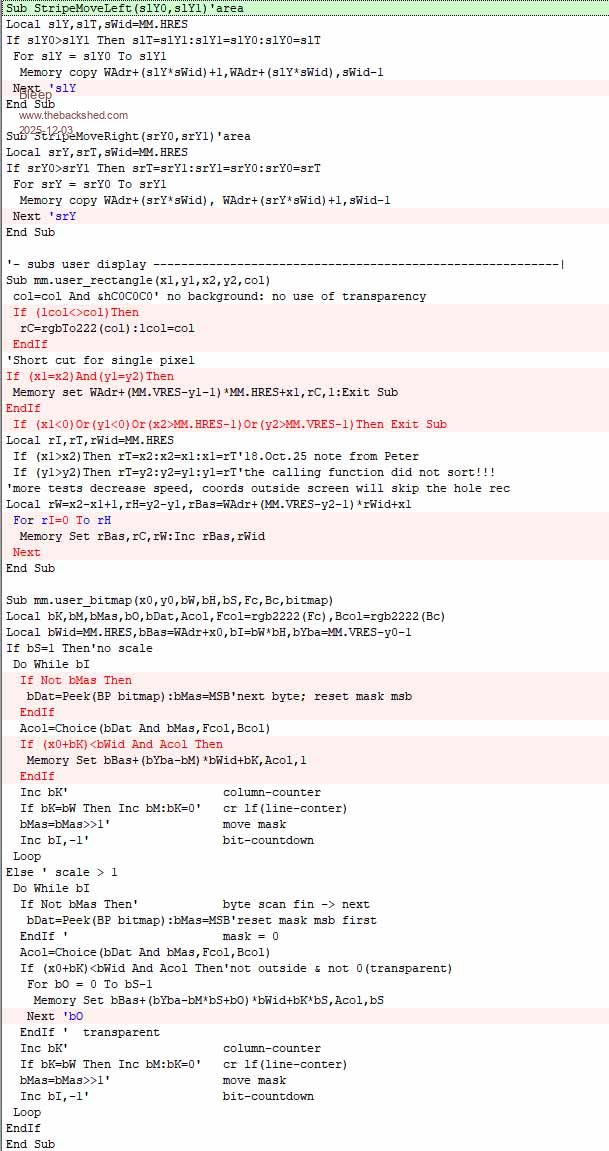
Hi Albert, I've tested you latest driver all looking good, thank you, I have been able to speed it up a little, my speed test is to run all of your checks from the driver, removing all the Pauses, I also add a load BMP of 128x64 then StripeMoveleft the whole screen 128 then Blit load the same BMP and Blit Write it across the screen in steps of 16. With the driver as above it all takes 30.3Sec, if you make the changes below it drops to 28.13sec. I have unrolled some 'If' statements, for whatever reason it makes them faster, maybe it is to do with whether the 'If' succeeds or fails most of the time? also removing the loop identifier on Next for the StripeMove subs improves them. :-) Hope this is of help. Regards, Kevin.
Volhout Guru Joined: 05/03/2018 Location: NetherlandsPosts: 6118
Posted: 01:05pm 03 Dec 2025
Copy link to clipboard
Print this post
Kevin,
In stead of using arrays to store all the data, could you store it a graphical pixels on a VGA screen (maybe VGA222). And blit from there to FIFO to PIO ? No idea if this requires a lot of bit manipulation.
Even webmite has a "framebuffer" to build grapical elements to be send in HTML. And getting data/pictures on the screen/framebuffer is well supported in MMBasic.
AlbertR Senior Member Joined: 29/05/2025 Location: GermanyPosts: 111
Posted: 01:41pm 03 Dec 2025
Copy link to clipboard
Print this post
Hi Kevin, Thank you very much for your support, ideas, and testing for this project. I have incorporated your changes. I wasn't aware that the move function was used so much. I've made a few more changes here.
Sub StripeMoveLeft(slY0,slY1)'area Local slT,sWid=MM.HRES,sDec=sWid-1 If slY0>slY1 Then slT=slY1:slY1=slY0:slY0=slT Local sSrc=WAdr+slY0*sWid,sEnd=WAdr+slY1*sWid For slT=sSrc To sEnd Step sWid:Memory copy slT+1,slT,sDec Next ' slY End Sub
Sub StripeMoveRight(srY0,srY1)'area Local srT,sWid=MM.HRES,sDec=sWid-1 If srY0>srY1 Then srT=srY1:srY1=srY0:srY0=srT Local sSrc=WAdr+srY0*sWid,sEnd=WAdr+srY1*sWid For srT=sSrc To sEnd Step sWid:Memory copy srT,srT+1,sDec Next ' srY End Sub
I can't explain why it's faster when the loop-start is on the same line as the statement and the “next” is on a new line. Maybe Peter can say something about that.
@Volhout The Hub75 protocol expects the pixel data to be mixed from the upper and lower halves of the screen. I don't know if the blitter can do that. Apparently, only WebMite supports this buffer. When we query the address(MM.INFO(WRITEBUFF)), we always get “0”.
Albert Edited 2025-12-04 01:09 by AlbertR
Bleep Guru Joined: 09/01/2022 Location: United KingdomPosts: 854
Posted: 06:15pm 03 Dec 2025
Copy link to clipboard
Print this post
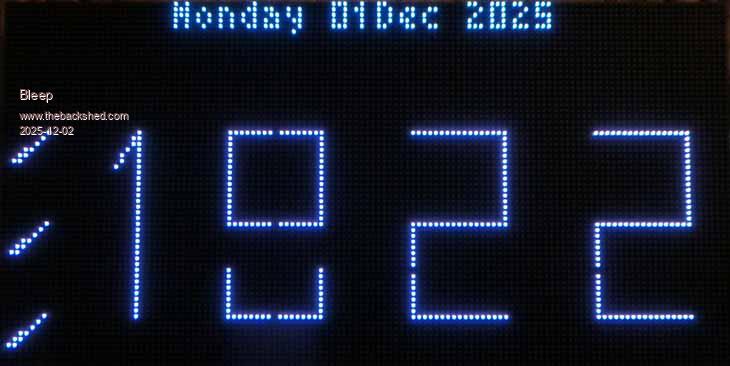
Here is the panel in action with latest driver. As usual the live panel looks much better than the video. Hub75 Panel 128x64 2mm spacing Regards, Kevin.
Page 6 of 8
Print this page
The Back Shed's forum code is written, and hosted, in Australia.

 Notice. New forum software under development. It's going to miss a few functions and look a bit ugly for a while, but I'm working on it full time now as the old forum was too unstable. Couple days, all good. If you notice any issues, please contact me.


 Print this post


 .
.