Notice. New forum software under development. It's going to miss a few functions and look a bit ugly for a while, but I'm working on it full time now as the old forum was too unstable. Couple days, all good. If you notice any issues, please contact me.
JanVolk Guru Joined: 28/01/2023 Location: NetherlandsPosts: 420
Posted: 04:11pm 09 Jan 2026
Copy link to clipboard
Print this post
I can get the problem with Flappy to occur. If I load "flappy.bas" and quit the program with Ctrl+C, and then play an .mp3 file with "file.mp3," the record spins at 33 rpm instead of 45 rpm. I want to try it with the original file because I might have made some changes in the past. I've now transferred all the files to filename A: and am starting from filename A: I think the original Flappy file came from Volhout? Flappy works with an sll3sfx2.mod file from 119908.
Kind regards,
Jan.
matherp Guru Joined: 11/12/2012 Location: United KingdomPosts: 11996
Posted: 04:16pm 09 Jan 2026
Copy link to clipboard
Print this post
What is the music file in flappy? If you just play it direct and then ctrl-c and play an mp3 do you get the same?.
JanVolk Guru Joined: 28/01/2023 Location: NetherlandsPosts: 420
Posted: 04:39pm 09 Jan 2026
Copy link to clipboard
Print this post
I found a flappyVGA folder from 2024-10-02, which may be the original, and it has the same sound problem. This folder contains 34 files.
First, I perform a hard reset on the Raspberry Pi. I play the file sll3sfx2.mod from A: with minifm_RC2, quit the program with Esc, and then start the MP3 file with F5, which then plays slowly. The same thing happens with Ctrl+C.
Kind regards,
Jan.
matherp Guru Joined: 11/12/2012 Location: United KingdomPosts: 11996
lizby Guru Joined: 17/05/2016 Location: United StatesPosts: 3885
Posted: 04:40pm 09 Jan 2026
Copy link to clipboard
Print this post
Is there a reason why REDIM PRESERVE of an array of structures doesn't work? I know that ",4" after STRUCT SORT fixes some of the problems of an array which has more elements than data, but REDIM PRESERVE might also provide a clean path (I don't, of course, know the effort required).
This works
Type test ii As integer aa As string length 15 End Type
Dim aray(20) As test Dim integer i,j,k,l,m,n Dim string a,b,c,d,e Dim string animal(5)=("Dog","Cat","Squirrel","Ape","Giraffe","Hippo") For i=0 To 9 aray(i).ii=i aray(i).aa=animal(Int(Rnd*6)) Next i
'ReDim Preserve aray(i) As test 'Struct sort aray().aa ' could use ,4
Struct sort aray().aa,4
For i=0 To 9 Print aray(i).ii;" "+aray(i).aa Next i
> run 0 Ape 7 Ape 1 Cat 5 Dog 4 Dog 6 Dog 9 Giraffe 3 Squirrel 8 Squirrel 2 Squirrel
This, with REDIM PRESERVE doesn't:
Type test ii As integer aa As string length 15 End Type
Dim aray(20) As test Dim integer i,j,k,l,m,n Dim string a,b,c,d,e Dim string animal(5)=("Dog","Cat","Squirrel","Ape","Giraffe","Hippo") For i=0 To 9 aray(i).ii=i aray(i).aa=animal(Int(Rnd*6)) Next i
ReDim PRESERVE aray(i) As test Struct sort aray().aa
'Struct sort aray().aa,4
For i=0 To 9 Print aray(i).ii;" "+aray(i).aa Next i
> run [15] ReDim PRESERVE aray(i) As test Error : Only the last array index can be changed
matherp Guru Joined: 11/12/2012 Location: United KingdomPosts: 11996
Posted: 05:01pm 09 Jan 2026
Copy link to clipboard
Print this post
Is this what you would expect as output? 0 6 Ape 2 Ape 8 Ape 4 Cat 5 Cat 7 Cat 9 Dog 3 Giraffe 1 Hippo
JanVolk Guru Joined: 28/01/2023 Location: NetherlandsPosts: 420
Posted: 05:22pm 09 Jan 2026
Copy link to clipboard
Print this post
Did a quick test. The sound problem seems to be resolved. I've done various tests and haven't seen any issues yet. Edit: Tested the problem. It's now resolved for MODE 2 through 5. So, only MODE 1 isn't working correctly with OPTION DEFAULT MODE 2. Thanks in advance.
Even if I don't use TeraTerm, the buffer still overflows, which I've noticed in the last few versions. Has anything changed with com1, GP0, or GP1, or should I look for the problem in TeraTerm or my cables?
Kind regards,
Jan.
matherp Guru Joined: 11/12/2012 Location: United KingdomPosts: 11996
Posted: 05:35pm 09 Jan 2026
Copy link to clipboard
Print this post
What buffer? When?
JanVolk Guru Joined: 28/01/2023 Location: NetherlandsPosts: 420
Posted: 05:59pm 09 Jan 2026
Copy link to clipboard
Print this post
Peter,
I understand that the information is sent to two consoles: the HDMI port and the COM1 port, which then sends it back to Tera Term. That information has to stay somewhere, and when I open Tera Term with my port, my screen sometimes fills with data from the PicoMite. Should I configure something in Tera Term to prevent this from happening?
> nnected on channel 2 > nnected on channel 2 > nnected on channel 2 > nnected on channel 2 > nnected on channel 2 > nnected on channel 2 > nnected on channel 2 > nnected on channel 2 > nnected on channel 2 > nnected on channel 2 > nnected on channel 2 > nnected on channel 2
This is the kind of data I mean.
Kind regards,
Jan.
matherp Guru Joined: 11/12/2012 Location: United KingdomPosts: 11996
Fixes bug in playing mp3 after mod file Fixes bug in editor showing the bottom magenta line in white Enables REDIM to work with arrays of a structure Adds regular expression support to STRUCT(FIND function - see manual attached Reduces memory requirement for filled polygons For VGA and HDMI versions mm.info(LCDPANEL) will now return the current mode
lizby Guru Joined: 17/05/2016 Location: United StatesPosts: 3885
Posted: 07:24pm 09 Jan 2026
Copy link to clipboard
Print this post
Yes, except I should have REDIMed to i-1 rather than i (so the first "0" isn't there).
JanVolk Guru Joined: 28/01/2023 Location: NetherlandsPosts: 420
Posted: 08:18pm 09 Jan 2026
Copy link to clipboard
Print this post
MODE 1 with EDIT has now also been resolved with V6.02.00RC4.
Thanks for quickly resolving all the issues.
Have a nice weekend.
homa Guru Joined: 05/11/2021 Location: GermanyPosts: 702
Posted: 08:11pm 10 Jan 2026
Copy link to clipboard
Print this post
Again a question about PIO and interrupts. Here is the code:
'PIO TEST piopin BSP4 Option explicit Dim pio_0_FSTAT% = &h50200000 + &h4 'PIO0 Register Offset + Register FSTAT Dim integer fifoR(3), fifoW(3) Dim integer ffR, ffW, tmp Dim string i$ Array Set 0,fifoR() Array Set 0,fifoW() ffW=0 ' PIO clear 0 PIO ASSEMBLE 0,".program bsp1" PIO ASSEMBLE 0,".wrap target" PIO ASSEMBLE 0, "pull block" PIO ASSEMBLE 0, "mov isr, osr" PIO ASSEMBLE 0, "push block" PIO ASSEMBLE 0,".wrap" PIO ASSEMBLE 0,".end program list" ' PIO CONFIGURE 0,0,20000,,,,,,,,,,,,,Pio(.wrap target),Pio(.wrap),,,,,,,1,1 PIO interrupt 0,0,pRX,pTX PIO START 0,0 ' Do i$="" Do While i$="" i$=Inkey$ Loop Print "PIN OUT ..." PIO write 0,0,4,&h1,&h2,&h3,&h4 Loop
Sub pRX 'Print "LEVEL TX:";Pio(FLEVEL 0 ,0, TX) 'Print "LEVEL RX:";Pio(FLEVEL 0 ,0, RX) 'Print "FSTAT: ";Bin$(Peek(word pio_0_FSTAT%),32) 'Print "FSTAT: ";Bin$(Pio(fstat 0),32) 'Print "Flevel:";Pio(FLEVEL 0) Local integer r Print "Pio FiFo RX " Array Set 0,fifoR() r=Pio(FLEVEL 0 ,0, RX) Print "LEVEL RX:";r PIO READ 0,0,r,fifoR() Math V_PRINT fifoR(), hex Print "Pio Fifo RX - END" End Sub
Sub pTX Print "Pio FiFo TX / TX - End - E E E M M M P P P T T T Y Y Y :-)" End Sub
Here is the output (several key presses by me):
> run 0: 80A0 1: A0C7 2: 8020 PIN OUT ... Pio FiFo TX / TX - End - E E E M M M P P P T T T Y Y Y :-) Pio FiFo RX LEVEL RX: 4 1, 2, 3, 4 Pio Fifo RX - END PIN OUT ... Pio FiFo TX / TX - End - E E E M M M P P P T T T Y Y Y :-) Pio FiFo RX LEVEL RX: 4 1, 2, 3, 4 Pio Fifo RX - END PIN OUT ... Pio FiFo TX / TX - End - E E E M M M P P P T T T Y Y Y :-) Pio FiFo RX LEVEL RX: 4 1, 2, 3, 4 Pio Fifo RX - END PIN OUT ... Pio FiFo TX / TX - End - E E E M M M P P P T T T Y Y Y :-) Pio FiFo RX LEVEL RX: 4 1, 2, 3, 4 Pio Fifo RX - END PIN OUT ... Pio FiFo TX / TX - End - E E E M M M P P P T T T Y Y Y :-) Pio FiFo RX LEVEL RX: 4 1, 2, 3, 4 Pio Fifo RX - END PIN OUT ... Pio FiFo RX LEVEL RX: 3 1, 2, 3, 0 Pio Fifo RX - END Pio FiFo RX LEVEL RX: 1 4, 0, 0, 0 Pio Fifo RX - END PIN OUT ... Pio FiFo RX LEVEL RX: 3 1, 2, 3, 0 Pio Fifo RX - END Pio FiFo RX LEVEL RX: 1 4, 0, 0, 0 Pio Fifo RX - END PIN OUT ... Pio FiFo TX / TX - End - E E E M M M P P P T T T Y Y Y :-) Pio FiFo RX LEVEL RX: 4 1, 2, 3, 4 Pio Fifo RX - END > option list PicoMite MMBasic RP2040 V6.02.00RC4 OPTION COLOURCODE ON OPTION CONTINUATION LINES ON OPTION CPUSPEED (KHz) 200000 OPTION DISPLAY 40, 80
Why does the interrupt for TX empty not occur from time to time? Shouldn't it always occur? Even when I change the PIO frequency, this problem gets worse. What have I overlooked?
homa Guru Joined: 05/11/2021 Location: GermanyPosts: 702
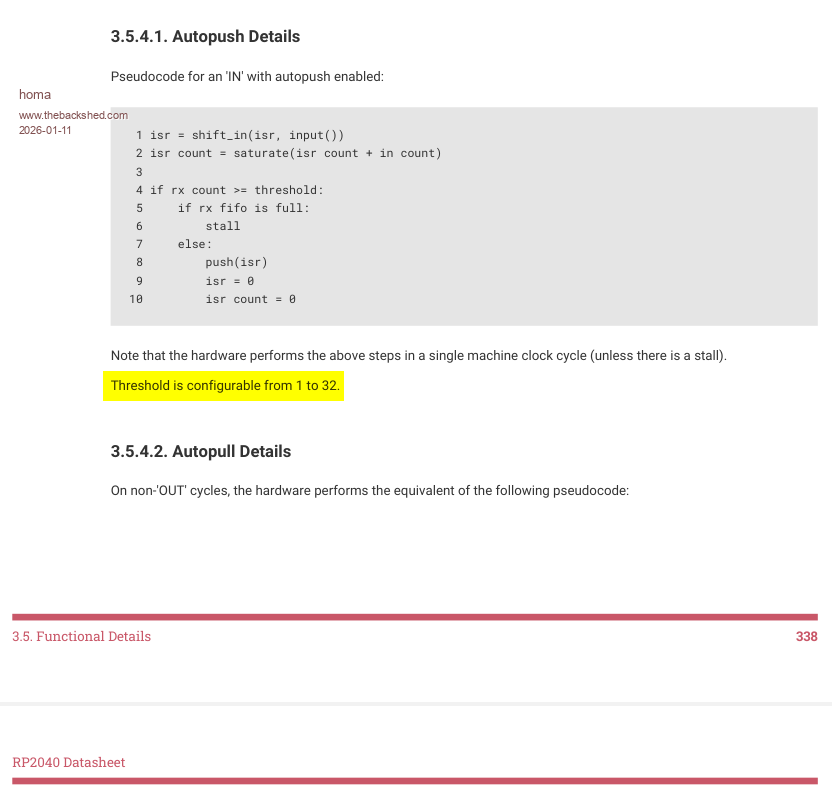
At [,pushthreshold] [,pullthreshold] the interpreter says "Error : 32 is invalid (valid is 0 to 31)"
But how do I specify that the entire OSR (32-bit) should always be filled from the FiFo and not just 31 bits?
homa Guru Joined: 05/11/2021 Location: GermanyPosts: 702
Posted: 10:33pm 10 Jan 2026
Copy link to clipboard
Print this post
phil99 Guru Joined: 11/02/2018 Location: AustraliaPosts: 3411
Posted: 02:15am 11 Jan 2026
Copy link to clipboard
Print this post
Looking at the PIO examples in the manual it all appears to be Base 0, so 1 to 32 = 0 to 31. So I assume you will get 32 bits (base 1) if you specify 31 (base 0).
Similar to Dim A%(31) giving you room for 32 integers. Edited 2026-01-11 17:20 by phil99
AlbertR Senior Member Joined: 29/05/2025 Location: GermanyPosts: 111
Posted: 07:38am 11 Jan 2026
Copy link to clipboard
Print this post
That's a bit of MMBasic-logic. If a parameter of a function is not specified, i.e., is “0,” the default value is used, which is 32-bit for thresholds. However, I have only used this with “PULL” so far. I have not observed any offset due to Base.
Albert
phil99 Guru Joined: 11/02/2018 Location: AustraliaPosts: 3411
Posted: 07:46am 11 Jan 2026
Copy link to clipboard
Print this post
As far as I can see PIO are always Base 0 regardless of what OPTION BASE has been set for arrays.
matherp Guru Joined: 11/12/2012 Location: United KingdomPosts: 11996
Posted: 08:18am 11 Jan 2026
Copy link to clipboard
Print this post
These are coded values as per the RP datasheet 0=32, 1-1 etc.
I can't help with the program as it is completely uncommented as to what it is trying to do, what the configuration is trying to set up, and how it is being run.
The Raspberry Pi datasheet and/or sdk are essential reading to understand PIO usage. It isn't possible to give more than an overview in the MMbasic documentation Edited 2026-01-11 18:23 by matherp
homa Guru Joined: 05/11/2021 Location: GermanyPosts: 702
Posted: 08:45am 11 Jan 2026
Copy link to clipboard
Print this post
So an 8 must be entered for 8 bits. Thank you for the explanation.
Actually, the PIO Prog does nothing other than push the TX FIFO directly into the RX FIFO via the ISR/OSR.
Each time the button is pressed, the values are written from mmbasic to the PIO. I had simply expected the interrupt for TX-Fifo to be empty on a regular basis. But it is not deterministic?!
I realise that too, and I am trying to do so.
Page 6 of 14
Print this page
The Back Shed's forum code is written, and hosted, in Australia.

 Notice. New forum software under development. It's going to miss a few functions and look a bit ugly for a while, but I'm working on it full time now as the old forum was too unstable. Couple days, all good. If you notice any issues, please contact me.


 Print this post