Notice. New forum software under development. It's going to miss a few functions and look a bit ugly for a while, but I'm working on it full time now as the old forum was too unstable. Couple days, all good. If you notice any issues, please contact me.
Martin H. Guru Joined: 04/06/2022 Location: GermanyPosts: 1552
Posted: 10:20pm 05 Mar 2026
Copy link to clipboard
Print this post
Hi Kevin Quite possible. I haven't looked at Peters new routines yet, except for the video. Consider it ‘sporting ambition’ on my part. I read up on it and started implementing it in Basic on the Pico at a usable speed (see the first post). Once the function was in place, I optimised the routines for speed as far as possible. Regardless of the fact that there is now an ‘out of the box’ version for it. The last posted Version was a a first attempt. I have already added the adjustment for CMM2/MMB4W; the version will be available tomorrow.
Hope that made some sense. Cheers Martin'no comment
Bleep Guru Joined: 09/01/2022 Location: United KingdomPosts: 854
Posted: 08:17am 06 Mar 2026
Copy link to clipboard
Print this post
Hi Martin, No I absolutely understand, it's the challenge of trying to wring the best performance our of what you have. I do it myself all the time, obsessively ;-) I'll give your latest version a spin when you publish it. Regards Kevin.
Martin H. Guru Joined: 04/06/2022 Location: GermanyPosts: 1552
Posted: 09:37am 06 Mar 2026
Copy link to clipboard
Print this post
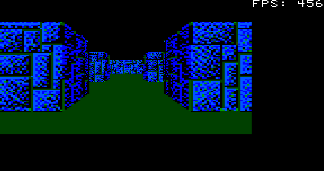
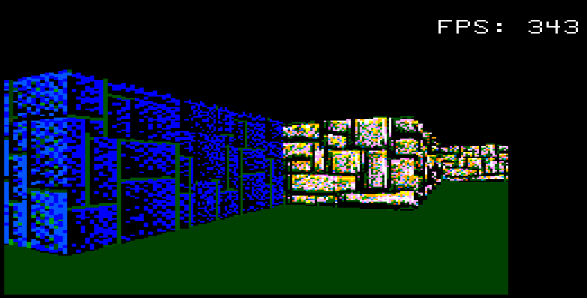
added different textures added the Image RESIZE_FAST command for Win/CMM2 re-added View-Bobbing,
Have Fun Martin Edited 2026-03-06 19:42 by Martin H.'no comment
Bleep Guru Joined: 09/01/2022 Location: United KingdomPosts: 854
Posted: 01:10pm 06 Mar 2026
Copy link to clipboard
Print this post
Hi Martin, yes that's working fine, it's slightly slower than the previous version, About 15 to 16fps at 320x240 and about 8fps at 480x320. On a HDMI 640x480 @378Mhz about 14fps Or a HDMI 640x320 @252Mhz about 9 to 10fps Or a HDMI 1024 (actually 512) @375Mhz 20 to 21fps Regards Kevin.
Volhout Guru Joined: 05/03/2018 Location: NetherlandsPosts: 6118
Martin H. Guru Joined: 04/06/2022 Location: GermanyPosts: 1552
Posted: 01:50pm 06 Mar 2026
Copy link to clipboard
Print this post
Hi Kevin, To speed up image rendering, you can set the variable resStep from 2 to 4. This will make the changes more angular, but only half as many scans will be performed per frame.
' --- Grafik Setup --- Dim integer resStep = 4' Wich...
'no comment
Volhout Guru Joined: 05/03/2018 Location: NetherlandsPosts: 6118
Posted: 01:54pm 06 Mar 2026
Copy link to clipboard
Print this post
@Martin,
With reStep=4 and 6 I get a Blit-RESIZE error "number out of bounds". Line 114 Same when I run with line 115 after commenting out line 114.
led-bloon Senior Member Joined: 21/12/2014 Location: AustraliaPosts: 210
Posted: 11:57pm 06 Mar 2026
Copy link to clipboard
Print this post
Thanks gentlemen for some very interesting code! I have added some trivial changes to the code for aesthetics. Some of it may be of interest. Tested on PicoMite HDMI only.
1. I have added a text line for angleIndex (simple) although a small "North-Up display" would be better (beyond my pay-grade) 2. I have added a small replica of the map (plus user current position) under the text info. 3. I have moved the displayed Frame buffer, both X & Y, by a fixed offset (ScrnOff). 4. Removed UCASE$ on keyboard input, checking for "asdw" now and also added arrow keys for movement (Chr$(x) -> 128,129,130,131) Added CASE ELSE at bottom: screenRedraw = 0 (for any non-movement keys) 5. Played a little with the wall texture BMPs. 6. Some other minor changes ... can't remember all of them, but minimal. led
ccast1b2.zip Edited 2026-03-07 09:58 by led-bloonMiss you George
Martin H. Guru Joined: 04/06/2022 Location: GermanyPosts: 1552
Posted: 09:08am 07 Mar 2026
Copy link to clipboard
Print this post
Hi led-bloon So did I in the last release the use of UCASE$ avoids me having to query letters in both states, e.g. ‘a’ or ‘A’, thus saving another operation. Checking the cursor keys makes sense, I just hadn't implemented it yet, thank you. I'll take a look at that. I'm also considering whether I should create 32x32 and 16x16 versions to prevent pixelation caused by excessive reduction (just a thought, as you have more control over this in the drawing programme).
Thank you, I'll test your version on the Pico later. Cheers Martin Edited 2026-03-07 22:51 by Martin H.'no comment
thwill Guru Joined: 16/09/2019 Location: United KingdomPosts: 4398
Posted: 12:06pm 15 Mar 2026
Copy link to clipboard
Print this post
Thanks Martin, I've updated my development version of MMB4L to support BLIT RESIZE and it all looks very impressive.

 Notice. New forum software under development. It's going to miss a few functions and look a bit ugly for a while, but I'm working on it full time now as the old forum was too unstable. Couple days, all good. If you notice any issues, please contact me.


 Print this post