Notice. New forum software under development. It's going to miss a few functions and look a bit ugly for a while, but I'm working on it full time now as the old forum was too unstable. Couple days, all good. If you notice any issues, please contact me.
phil99 Guru Joined: 11/02/2018 Location: AustraliaPosts: 3412
Posted: 09:58pm 16 Apr 2026
Copy link to clipboard
Print this post
When the 50kHz backlight was introduced it also gave problems with older backlight circuits that used 2 MOSFETs. The second MOSFETs is a high side (5V) PFET driven through a resistor from the first. Its gate needs time to discharge through the pullup resistor.
If this display has a similar setup the simplest option is to use a normal PWM at a lower frequency. Otherwise the drive circuit will need lower value resistors, as previously suggested. Assuming the resistors are SMD new resistors can be soldered on top of the originals.
dddns Guru Joined: 20/09/2024 Location: GermanyPosts: 924
Posted: 12:28am 17 Apr 2026
Copy link to clipboard
Print this post
Thanks @Phil for this explanation. The higher the frequency the lower is the brightness with same duty cycle. I've tested with PWM command and 20KHz is very maximum. That might be the reason the build in PWM runs at 120Hz IIRC.
Volhout Guru Joined: 05/03/2018 Location: NetherlandsPosts: 6184
Posted: 06:36am 17 Apr 2026
Copy link to clipboard
Print this post
Hi Peter,
In checking performance, I stumbled upon an issue. I found it in PicoFrog (attached a debug version). Picofrog plays a melody, where each note is (settick based) played in a ADSR envelope. The music note time is 230ms (7 ADSR slots or 33ms). This time is also the loop time of the game (all actions happen in this 230ms, or 4FPS).
In an LCD version (i.e. GameMite) the LCD refresh is aligned with the game time by doing a FRAMEBUFFER MERGE 0,B. The second CPU gets a kick to refresh the LCD at 4FPS. This is below the maximum 7FPS that are listed in the manual, so the merge should always finish in 4FPS.
According the user manual the FRAMEBUFFER MERGE 0,B returns immediately, and I confirm this time is measured around 0.08ms initially. But after few seconds of gameplay, the FRAMEBUFFER MERGE 0,B starts consuming more time. Much more time. So much time that it exceeds the 33ms, whereby the ADSR enveloppe of the notes is corrupted, and the music sounds crackling. This is observed on default Game*Mite setting (CPUSPEED 252MHz).
Below a part of the timing listing the debug version sends out to console.
My guess: It is possible the second CPU cannot end the framebuffer merge in 230ms, and asks the first CPU to wait for confirmation. There is a workaround in clocking (both) CPU's at higher frequency (300MHz), but maybe it is possible to adapt the code so the first CPU does not wait for the second.
But you wil definitely have thoughts what is happening under water.
P.S. This is not new in MINI, V6.02.01 release also shows this, V6.00.01 does not show the artefact (I developed picofrog on V6.00.01) but maybe that version finished the merge withing 230ms always.
P.P.S. in the debug version there are "tags" called "@harm_debug" that show the location of the important FRAMEBUFFER MERGE 0,B (there are multiple in the game, but just one in the game loop). Edited 2026-04-17 17:11 by VolhoutPicomiteVGA PETSCII ROBOTS
matherp Guru Joined: 11/12/2012 Location: United KingdomPosts: 12034
Posted: 07:27am 17 Apr 2026
Copy link to clipboard
Print this post
Framebuffer merge takes just less than 40mSec in 6.02.02B4 PicoMiteMin at 252MHz. There is something else going on. Try
You can see the immediate return until the merge gets behind and blocks then the actual merge time. Put a pause 50 after the print timer and the merge time is always c0 You can also prove this by doing the merge in the foreground and you will get the same time.
Whatever is happening in Frogger, it isn't the merge causing the issue. The thing that changed in recent releases is the audio where the waveform is precalculated in order to reduce time in the H/W interrupt. Frogger's use of audio is massively cpu intensive changing the sound every 25 mSec or even faster. Edited 2026-04-17 17:47 by matherp
Volhout Guru Joined: 05/03/2018 Location: NetherlandsPosts: 6184
Posted: 07:47am 17 Apr 2026
Copy link to clipboard
Print this post
@Peter,
I tried your code at 252MHz
using FRAMEBUFFER MERGE 0,B starts at 0.08ms then after 6 loops changes to 49ms steady FRAMEBUFFER MERGE 0 starts at 49ms, and continues at 49ms.
I would have expected FRAMEBUFFER MERGE 0,B to start at 0.08ms and remain at 0.08ms. The change to 49ms implies that the first CPU is waiting for the second, correct ?.
But the strange thing is that there are 5 fast returns (0.08, and even 0.024), and then 49-ers. I would have expected the first loop to be 0.08, and the second (the first merge is not finished) to be 49ms. ?
Volhout
P.S. or.. is the second CPU dominant holding memory access during the merge, so the first has to wait (can't be..??)
P.P.S. this is gamemite config, so there is also background PWM audio enabled (not active in your code, but in PicoFrog), and a shared SPI bus with SD card (not active in your code, not in PicoFrog). Edited 2026-04-17 17:53 by VolhoutPicomiteVGA PETSCII ROBOTS
matherp Guru Joined: 11/12/2012 Location: United KingdomPosts: 12034
Posted: 08:14am 17 Apr 2026
Copy link to clipboard
Print this post
Yes. There is a finite pipe (fifo) between the cores. Once the pipe is full core 0 will block waiting for space in the fifo. As in my post, put pause 50 after print timer and you will see the times are then all zero. In other words, as long as any processing is > 50mSec between calls to the background merge then the call will always return immediately. I don't understand why your Pico is so slow. I'm getting 38mSec not 48 with the display, sd, and audio configured Edited 2026-04-17 18:15 by matherp
Volhout Guru Joined: 05/03/2018 Location: NetherlandsPosts: 6184
Posted: 09:08am 17 Apr 2026
Copy link to clipboard
Print this post
PicoMiteMin MMBasic RP2040 V6.02.02B4 OPTION SYSTEM SPI GP18,GP19,GP16 OPTION COLOURCODE ON OPTION CPUSPEED (KHz) 252000 OPTION LCDPANEL ILI9341, LANDSCAPE,GP20,GP21,GP22 OPTION SDCARD GP17 OPTION AUDIO GP6,GP7', ON PWM CHANNEL 3 OPTION F5 flash run 2 OPTION PLATFORM Game*Mite
This platform is not a Game*Mite, but a breadboard pretending to be a Game*Mite. Genuine RP Pico. 2.4" ILI9341, SD card.
Volhout
EDIT: I have removed the bottleneck between CPU1 and CPU2 by letting CPU2 run autonomously. FRAMEBUFFER MERGE 0,R Since LCD update is not synchronous anymore with game loop, there is incidental irregularity in movement of the objects on screen, but music sounds good. This may be a good solution. . Edited 2026-04-17 20:01 by VolhoutPicomiteVGA PETSCII ROBOTS
Volhout Guru Joined: 05/03/2018 Location: NetherlandsPosts: 6184
Posted: 10:33am 17 Apr 2026
Copy link to clipboard
Print this post
@Peter,
I have misinformed you (I was confused). The main game loop runs at 50ms. And every 50ms sets a flag, that in the sound interrupt routine triggers the FRAMEBUFFER MERGE. Since sound and game loop run independent, there is a delay from the merge flag to starting the merge (up to 33ms, the ADSR tick).
Worst case the next merge flag is set after 50-33 = 17ms, and immediately processed to a FRAMEBUFFER MERGE. The FIFO between the 2 CPU's will absorb this, but depending on the gameplay, 5 slots in the FIFO may not be able to absorb this. Hence the incidental delays.
When I change the main game loop to 55ms the problem disappears.
So now it is completely clear why things are happening, and I can adapt PicoFrog to the current MMBasic. Still confused why your 2040 needs 38ms, and mine 49ms. The 38 would statistically also help solving this problem.
BarryH Regular Member Joined: 05/01/2025 Location: AustraliaPosts: 53
Posted: 11:38am 17 Apr 2026
Copy link to clipboard
Print this post
a minor bug in V6.02.02B4, that probably existed in previous versions.
(most likely) Due to the now inbuilt file manager (which is superb), it is now more common for the file system not to be at the root of drive a:
When that is the case, print mm.info(boot count) results in "Error: Could not find the file"
A simple work around for the moment is set the DRIVE to a: and set the directory to root /, before accessing the mm.info(boot count) predefined variable.BarryH
matherp Guru Joined: 11/12/2012 Location: United KingdomPosts: 12034
Fixes a memory leak in FM when opening multiple image files Adds support for listing a file in FM (F9 or L) Fixes bug in mm.info(boot count) when not in the root directory Fixes various bugs in SSD1963 buffered drivers Reduces memory footprint of BLIT WRITE when the image would exceed the screen
Improvement and speed up in FM rendering. Note: if using a USB version of the firmware, setting the serial baudrate to 921600 will hugely speed up FM scrolling (OPTION BAUDRATE 921600)
ville56 Guru Joined: 08/06/2022 Location: AustriaPosts: 641
Posted: 04:02pm 17 Apr 2026
Copy link to clipboard
Print this post
Peter,
WebMiteRP2350V6.02.02B5.uf2 cannot be flashed. It immediately returns after copying the image to the Pico as the drive in Windows file manager again. 73 de OE1HGA, Gerald
matherp Guru Joined: 11/12/2012 Location: United KingdomPosts: 12034
Posted: 04:32pm 17 Apr 2026
Copy link to clipboard
Print this post
Updated version of PicoMiteMin - Harm please test frogger at the original speed
Peter63 Senior Member Joined: 28/07/2017 Location: SwedenPosts: 217
Posted: 04:55pm 17 Apr 2026
Copy link to clipboard
Print this post
> option list PicoMiteHDMI MMBasic USB RP2350A Edition V6.02.02B5 OPTION SERIAL CONSOLE COM2,GP8,GP9 OPTION SYSTEM I2C GP10,GP11 OPTION FLASH SIZE 4194304 OPTION COLOURCODE ON OPTION MOUSE SENSITIVITY 1.0000 OPTION KEYBOARD US OPTION RESOLUTION 640x480 @ 252000KHz OPTION SDCARD GP5, GP6, GP4, GP3 OPTION RTC AUTO ENABLE
Tested and OK now
/Peter63 Edited 2026-04-18 02:56 by Peter63
ville56 Guru Joined: 08/06/2022 Location: AustriaPosts: 641
Posted: 05:50pm 17 Apr 2026
Copy link to clipboard
Print this post
thanks Peter, works now. Also the BLIT issue is now solved. 73 de OE1HGA, Gerald
dddns Guru Joined: 20/09/2024 Location: GermanyPosts: 924
Posted: 08:46pm 17 Apr 2026
Copy link to clipboard
Print this post
I would like to use the buffered driver as default but only if I could setup Mode 800 as default as well. I'm using the display as console and sometimes test with Mode 400.
So I normally use the standard 7_16 driver and switching to Option lcd320 works very nice now(for the first time). E.g. PESCII runs error free and looks great.
Using the buffered driver has errors for me when:
Run a program which uses framebuffer in Mode 400 works, switching to Mode 800 and let it run again will scramble the colours in Mode 800. Only restart helps then. Switching first to Mode 800, let the program run and then back to Mode 400 will scramble the colours in Mode 400.
Switching to Option lcd320 on while being in Mode 400 won't let you go back. Option lcd320 disable/off won't work correctly.
PicoMite MMBasic USB RP2350B Edition V6.02.02B5 OPTION SERIAL CONSOLE COM1,GP32,GP33 OPTION SYSTEM SPI GP22,GP23,GP20 OPTION SYSTEM I2C GP24,GP25 OPTION FLASH SIZE 16777216 OPTION COLOURCODE ON OPTION KEYBOARD US OPTION PICO OFF OPTION CPUSPEED (KHz) 384000 OPTION LCDPANEL CONSOLE OPTION DISPLAY 20, 50 OPTION LCDPANEL SSD1963_7_16BUFF, LANDSCAPE,GP46,GP16 OPTION TOUCH GP21,GP34 OPTION SDCARD GP29, GP30, GP31, GP28 OPTION AUDIO GP26,GP27', ON PWM CHANNEL 5 OPTION RTC AUTO ENABLE OPTION PSRAM PIN GP47
Edited 2026-04-18 06:48 by dddns
Volhout Guru Joined: 05/03/2018 Location: NetherlandsPosts: 6184
Posted: 09:15pm 17 Apr 2026
Copy link to clipboard
Print this post
Peter,
Much improvement. I can run the original code at 252MHz, can even bring the game loop back from 50 to 40ms, and use the 23ms ADSR enveloppe (original for 2350, the 2040 has 33ms since it was too slow). This is great. Please include these changes in the MIN release.
Despite that the original game runs fine, I will continue development with the FRAMEBUFFER MERGE 0,R continuous LCD screen update, that with this new software 2040MIN release no longer suffers from irregular movements, and frees me completely from the all interaction between audio and video. I can even bring the game loop back to 30ms, which would be needed in level 3 (to speed up the game).
Thank you,
Volhout
P.S. Level 3 does not yet exist, and even level 2 is experimental. But from here on it is simply adding levels. The core works. Edited 2026-04-18 07:15 by VolhoutPicomiteVGA PETSCII ROBOTS
Peter63 Senior Member Joined: 28/07/2017 Location: SwedenPosts: 217
Posted: 03:30am 18 Apr 2026
Copy link to clipboard
Print this post
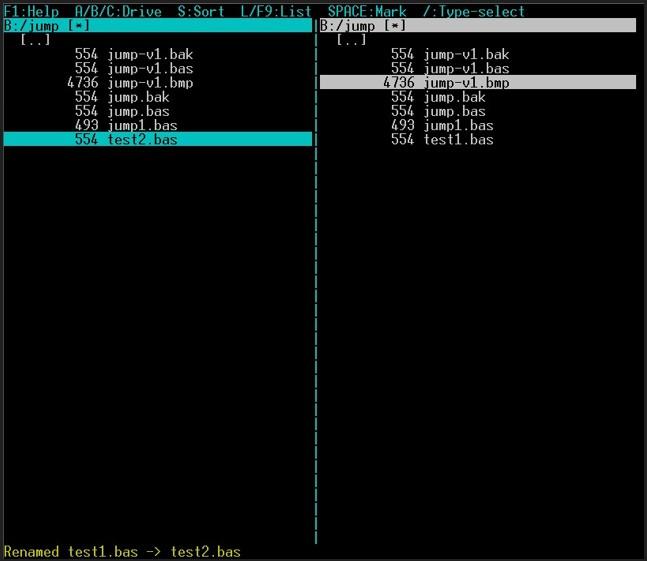
I am using FM more and more now that it's there. Discovered a little update thing. When I have the same library open in both windows, and rename a file, the filename does not update in the other window.
/Peter63
Bleep Guru Joined: 09/01/2022 Location: United KingdomPosts: 863
Posted: 02:13pm 18 Apr 2026
Copy link to clipboard
Print this post
Hi Peter, Working great, thanks, the speed up you have achieved is very impressive, more so if, as you suggest set 'Option Baudrate 921600' have you tested with auto repeat turned on, I would think it's close? could you limit the auto repeat buffer to say 10, so if someone leans on a arrow key you can't get stacked repeats causeing havoc, or just limit it to within the current window, as soon as you get to top or bottom, auto repeat is disabled? Otherwise the overall speed, of other programs is almost the same as before FM was added, it had dropped, but it's now back to as it was. :-) have not found any regressions. Regards Kevin.
JanVolk Guru Joined: 28/01/2023 Location: NetherlandsPosts: 420
Posted: 02:45pm 19 Apr 2026
Copy link to clipboard
Print this post
I checked FM. It works well.
I noticed a few things.
- If you start a .bas program from FM, it cannot be stopped with Ctrl-C; it only works after pressing Ctrl-C 3 times, after which it returns to FM.
- From FM, you can start it using Select and F2 EDIT. This works, but I tested it with an RP2040/16MB and it takes 3 seconds to start, and with an RP2350/16MB, it takes even 6 seconds.
The question is, what causes this delay?
> help fm
' FM 'File Manager ' Speed up FM via USB version: OPTION BAUDRATE 921600. ' Arrow keys/Home/End/PgUp/PgDn: Move selection. ' ^E/^X/^U/^K/^P/^L: Move selection. ' TAB/LEFT/RIGHT or ^S/^D: Toggle Active Panel. ' ENTER: Open Directory Folder. ' ENTER: .BAS RUN/Execute. END:3 x Ctrl-C to FM. ' ENTER: .BMP/.JPG/.PNG/.MP3 Play audio. ' F1: HELP Explanation of FM commands. ' F2/^W: EDIT Edit selected file. ' ESC/F1/F2: Close ESC Editor. F1/F2: Save and to FM ' F3/^R: Set Filter. ' F4/^T: Clear Filter. ' F5/^Y: COPY Copy files marked with *. ' F6/^O: PLAY PLAY STOP output. ' F7/F8: +/- PLAY Adjust volume. ' F9/ L: LIST Retrieve file after selecting LIST. ' F10/^B: MKDIR Create folder. ' A/B/C: Change Active Drive. A: FLASH B: SD C: USB. ' SPACE: Highlight Highlight(*)/Unhighlight. ' *: Highlight All. ' \: Clear Highlighting. ' DEL/^]: DEL Delete X record delete. ' G: GO To path or folder. ' L: LIST Retrieve file after selection LIST. ' N: NEW New. ' ^N: Rename Rename. ' D: Dup Duplicate. ' M: MOVE Move. ' /: Type Select (name sort, ENTER open, ESC cancel) ' ESC: ESC: Cancel or close FM. ' CTRL-C Ignores in FM except at end LIST.
Jan.
Page 6 of 8
Print this page
The Back Shed's forum code is written, and hosted, in Australia.

 Notice. New forum software under development. It's going to miss a few functions and look a bit ugly for a while, but I'm working on it full time now as the old forum was too unstable. Couple days, all good. If you notice any issues, please contact me.


 Print this post