Notice. New forum software under development. It's going to miss a few functions and look a bit ugly for a while, but I'm working on it full time now as the old forum was too unstable. Couple days, all good. If you notice any issues, please contact me.
lizby Guru Joined: 17/05/2016 Location: United StatesPosts: 3881
Posted: 11:51am 03 Aug 2026
Copy link to clipboard
Print this post
The German group order people had gotten some indication that the parts would become available sometime in August. Might be worthwhile to check again later.
JohnS Guru Joined: 18/11/2011 Location: United KingdomPosts: 4380
Posted: 12:50pm 03 Aug 2026
Copy link to clipboard
Print this post
Thanks.
(I can't find them, either.)
Let me know if things change and you're able to order some built ones, please.
John
matherp Guru Joined: 11/12/2012 Location: United KingdomPosts: 11881
Posted: 03:22pm 03 Aug 2026
Copy link to clipboard
Print this post
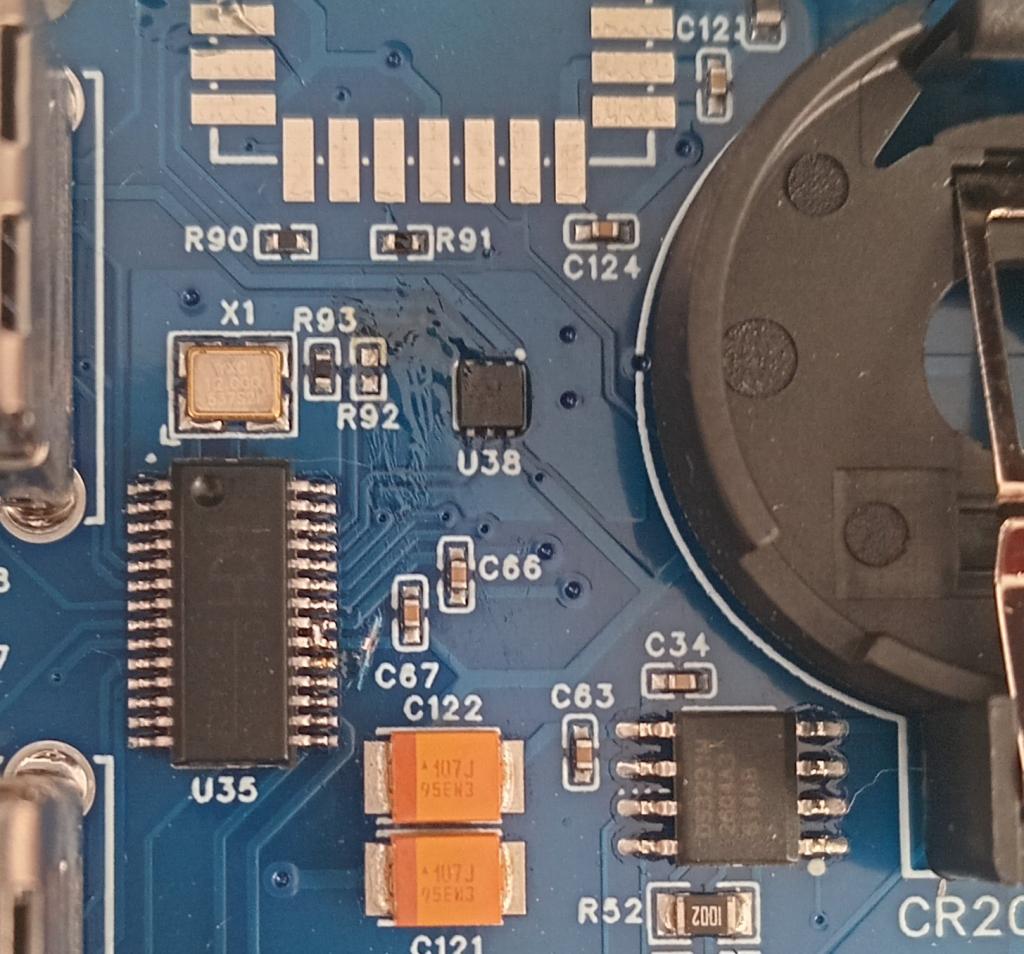
I've found a fault on the current PC3 design files (all boards so far made). This causes the ch334 hub chip to get hot, particularly if the programming cable and usb-c are both left plugged in and even when the switch is set to hub. Some time ago I swapped versions of the CH334 chip to use the CH334U as the previous variant had a bad batch at JLC. What I hadn't understood is that this variant has an internal 3.3V regulator. It has two pins 20 and 21 marked 3.3V and 5V on the datasheet so that is how I connected them. What this means is that if the regulator in the CH334U is producing a higher voltage than the LM117 then the hub chip is trying to power the whole board and hence getting hot. The correct wiring is either 3.3V on both the 3.3 and 5V pins, or 3.3V pin bypassed to gnd with 0.1 and 10uF caps. In addition R92 currently pulls up to 5V (only 10K so not serious) whereas it should pull up to 3.3V although there is an internal pullup so it is not really needed at all. If the board isn't giving any issues then you can leave it as-is. If the ch334U is getting hot then you can mod the board as follows: Cut the 5V trace to pin 20 between C67 and the pin. Short pins 20 and 21. Remove R92. I will post revised gerbers shortly.
matherp Guru Joined: 11/12/2012 Location: United KingdomPosts: 11881
Bryan1 Guru Joined: 22/02/2006 Location: AustraliaPosts: 2267
Posted: 10:18pm 03 Aug 2026
Copy link to clipboard
Print this post
The steps I use turn off the switch for the hub insert the programming USB cable holding down the reset button then program the board, once the prompt on the computer goes away take out the programming USB cable insert the C-USB then power it up.
So at NO time are both USB cables are on the board.
By the way Peter I'm running V0.12 of the micro-python is this the latest version?
matherp Guru Joined: 11/12/2012 Location: United KingdomPosts: 11881
Bryan1 Guru Joined: 22/02/2006 Location: AustraliaPosts: 2267
Posted: 11:19pm 05 Aug 2026
Copy link to clipboard
Print this post
Thanks for that Peter Mid way thru yesterday I upgraded board 2 to V.14 and it ran the club.py straight off the boot with no problems. So did Board 1 and by the end of day had both boards transferring csv files and grainy jpg files between each other over wifi.
Regards Bryan
palcal Guru Joined: 12/10/2011 Location: AustraliaPosts: 2052
Posted: 03:05am 07 Aug 2026
Copy link to clipboard
Print this post
Received my Pico3 from Grogster, and was doing a bit of setting up. I have set OPTION I2C GP20,GP21. I can set the current date and time using RTC SETTIME, the 3v. battery is fitted. When power is removed and reinstated the time has not been kept, and I have to use RTC SETTIME again."It is better to be ignorant and ask a stupid question than to be plain Stupid and not ask at all"
phil99 Guru Joined: 11/02/2018 Location: AustraliaPosts: 3381
Posted: 05:06am 07 Aug 2026
Copy link to clipboard
Print this post
Perhaps check that 3V from the cell is making it to the RTC chip. On the underside of the board the cell holder terminals are accessible or on the top side C63 is across the RTC backup supply. Edited 2026-08-07 15:07 by phil99
palcal Guru Joined: 12/10/2011 Location: AustraliaPosts: 2052
Posted: 05:33am 07 Aug 2026
Copy link to clipboard
Print this post
Thanks Phil, I've already done that, checked OK."It is better to be ignorant and ask a stupid question than to be plain Stupid and not ask at all"
Rodgerg Newbie Joined: 13/10/2019 Location: New ZealandPosts: 13
Posted: 07:52am 07 Aug 2026
Copy link to clipboard
Print this post
Hi Palcal - I received my PC3 board from Grogster recently and went through the same process. Have you included
OPTION RTC AUTO ENABLE
palcal Guru Joined: 12/10/2011 Location: AustraliaPosts: 2052
Posted: 08:15am 07 Aug 2026
Copy link to clipboard
Print this post
Hi Rodger, no I didn't set that option, I'll have a look."It is better to be ignorant and ask a stupid question than to be plain Stupid and not ask at all"
palcal Guru Joined: 12/10/2011 Location: AustraliaPosts: 2052
Posted: 08:32am 07 Aug 2026
Copy link to clipboard
Print this post
Thanks Rodger, That did the trick. I also forgot I had to use RTC GETTIME to reinstate the time. Edited 2026-08-08 07:18 by palcal"It is better to be ignorant and ask a stupid question than to be plain Stupid and not ask at all"
matherp Guru Joined: 11/12/2012 Location: United KingdomPosts: 11881
Posted: 02:53pm 09 Aug 2026
Copy link to clipboard
Print this post
Alternate gerbers posted at https://github.com/UKTailwind/Pico-Computer-3 . Either 3.1 or 3.2 is fine. 3.2 replaces an out-of-stock part in 3.1 with an equivalent Edited 2026-08-10 01:18 by matherp
javavi Guru Joined: 01/10/2023 Location: UkrainePosts: 609
Posted: 06:31pm 09 Aug 2026
Copy link to clipboard
Print this post
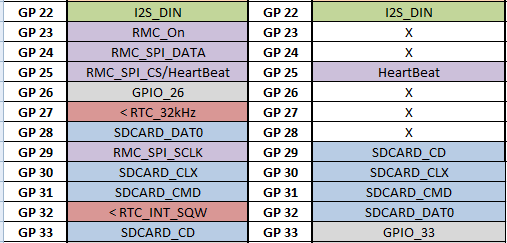
Hi Peter, I'm looking at and comparing the schematics of the Pico Computer 3 and the PicoMite HDMIUSB motherboard V3.0. I'm not entirely clear on the allocation of the RP2350B ports below the GP23 for connecting devices (SD card, Wi-Fi module, RTC timer signals). If possible, could you explain the reasoning behind choosing these ports over the PicoMite HDMIUSB motherboard V3.0 ? Why was the order of the SD card lines changed, why were these ports chosen for the RTC timer signals, and how does the SPI bus work for the Wi-Fi radio module? Edited 2026-08-10 04:40 by javavi
terekgabor Senior Member Joined: 02/01/2026 Location: HungaryPosts: 129
Posted: 12:17pm 10 Aug 2026
Copy link to clipboard
Print this post
Hello Everybody!
If somebody has 1 pc (or 2 pcs also good) Picocomputer 3 for sale or planning to order it and want to share costs please write me a message. I’d like to test Mpython on it, and of course fantastic Picomite.
Thanks! G@bor
Grogster Admin Group Joined: 31/12/2012 Location: New ZealandPosts: 10043
Posted: 11:36pm 13 Aug 2026
Copy link to clipboard
Print this post
I can confirm that matherp's fix for the hot USB chip problem worked on my one PM3 board that had that issue. Future orders will make use of the updated gerber set.
I have five assembled, programmed PM3 boards here, if anyone from Kiwi Land(New Zealand) wants one. If interested, send me a PM.Smoke makes things work. When the smoke gets out, it stops!
dddns Guru Joined: 20/09/2024 Location: GermanyPosts: 910
Posted: 01:49pm 14 Aug 2026
Copy link to clipboard
Print this post
I'd like to buy an SD card and have a quick question to be sure: What is the maximum supported size of an SD card for MMbasic, MicroPython, and Fuzix (on the Pico Computer 3)?
Regards Edited 2026-08-14 23:49 by dddns
palcal Guru Joined: 12/10/2011 Location: AustraliaPosts: 2052
Posted: 12:01am 15 Aug 2026
Copy link to clipboard
Print this post
@ dddns from the manual
palcal Guru Joined: 12/10/2011 Location: AustraliaPosts: 2052
Posted: 02:43am 15 Aug 2026
Copy link to clipboard
Print this post
I now have the WiFi and PSRAM soldered in. Everything seems to work as it shoul except for the mouse. Moving the mouse left and right causes the cursor to move up and down, left clicking does nothing, right clicking moves the cursor one position to the right and clicking the scroll wheel acts like TAB and moves the cursor a few positions to the right. The mouse cursor is a white square and the normal cursor is still there and does not move at all unless I press the arrow keys. Also when I boot it tells me that the mouse is connected on chanel 2 and the keyboard is connected to chanel 1 and also the keyboard is connected to chanel 4. Edited 2026-08-15 12:47 by palcal"It is better to be ignorant and ask a stupid question than to be plain Stupid and not ask at all"
Page 6 of 9
Print this page
The Back Shed's forum code is written, and hosted, in Australia.

 Notice. New forum software under development. It's going to miss a few functions and look a bit ugly for a while, but I'm working on it full time now as the old forum was too unstable. Couple days, all good. If you notice any issues, please contact me.


 Print this post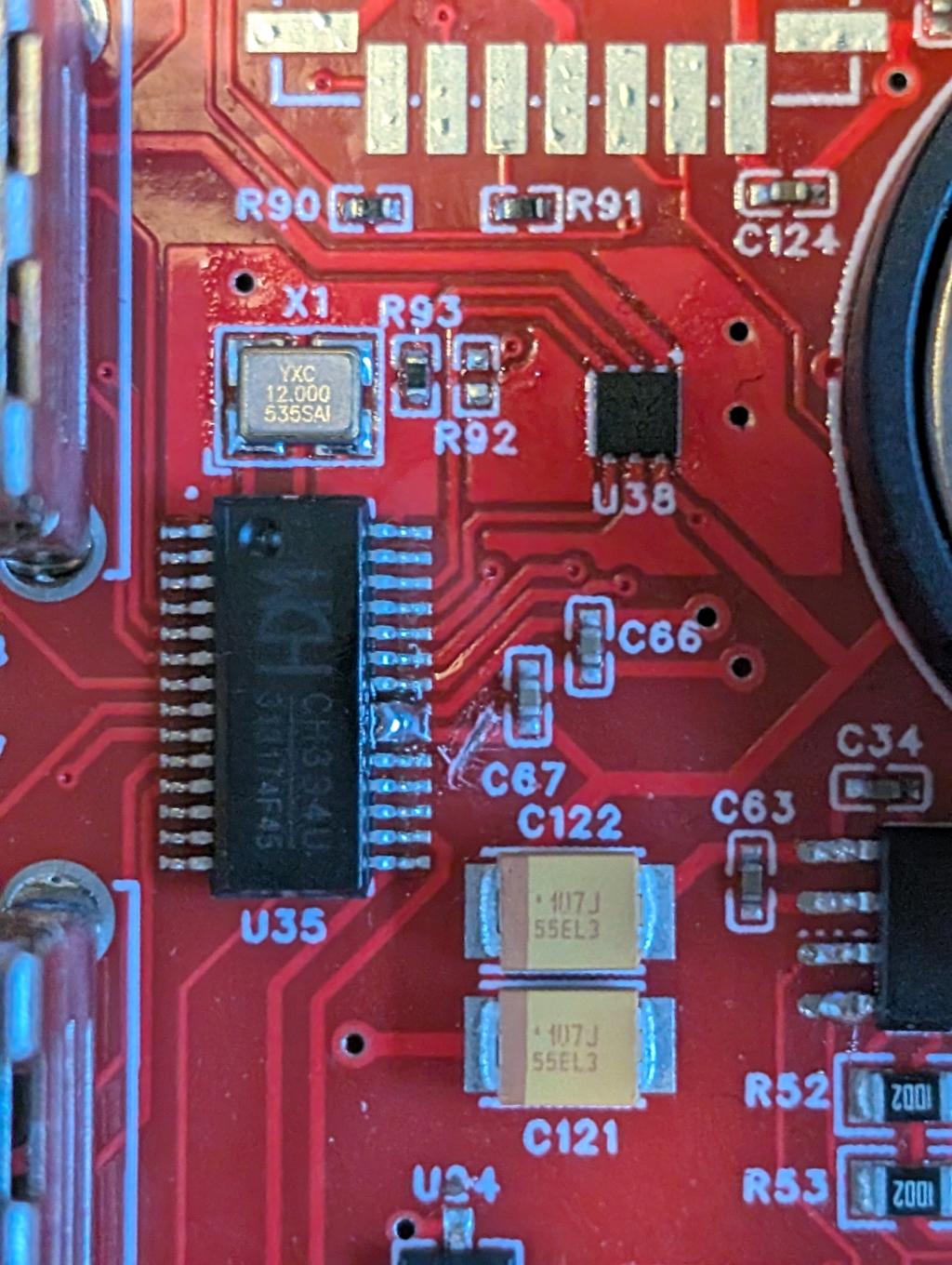

 Mid way thru yesterday I upgraded board 2 to V.14 and it ran the club.py straight off the boot with no problems. So did Board 1 and by the end of day had both boards transferring csv files and grainy jpg files between each other over wifi.