Notice. New forum software under development. It's going to miss a few functions and look a bit ugly for a while, but I'm working on it full time now as the old forum was too unstable. Couple days, all good. If you notice any issues, please contact me.
ville56 Guru Joined: 08/06/2022 Location: AustriaPosts: 612
Posted: 02:05pm 17 Sep 2026
Copy link to clipboard
Print this post
Vollhout,
sure, but there are differences between say V6.03.02 and the Fuzix implementation. Porting it takes more or less effort and there is emphasis on VGA/HDMI as display, as far as I understand it. If I want all the beloved features of MMBasic I think I have to stay with the "original" .... E.g. running something just on a stamp size PCB, no display, no SD, no nothing just a serial interface or CDC on USB and some control lines but faster then the interpreter. IMHO can't be done with Fuzix atm. There is now an OS in between that is preemptive.
I'd like to see something that can be developed in the good ole MMBasic environment and, if wanted, kind of compiled much like the CSUB compiler in B9 now. I've to play around a bit with the CSUB compiler now to better understand what can be done with it. But as always, Peter gives me surprise after surprise.
Gerald 73 de OE1HGA, Gerald
JohnS Guru Joined: 18/11/2011 Location: United KingdomPosts: 4380
Lots of internal changes. See the release notes for more details. The most important for the RP2350 is that programs can now create their own temporary library in PSRAM without changing the library in flash.
The three help files are extended to cover commands and functions only included in separate manuals (3d, gui etc.)
mozzie Guru Joined: 15/06/2020 Location: AustraliaPosts: 435
Posted: 06:44pm 18 Sep 2026
Copy link to clipboard
Print this post
G'day Peter, Many thanks once again for the work going into the firmware, its a wonderful problem trying to keep up with the pace of updates.
A niggly edge use case but I thought it was already possible to plug a USB GPS into a USB CDC and set it as GPS.
COM1 or COM2 are ok as Serial GPS and COM3 works fine as a COM port but not GPS port.
I can see the GPS data with COM3 as a COM port but not find a way to get the internal GPS parser to work from a CDC USB port, probably missed something as usual, has this ever been possible?
> USB CDC Device Connected on channel 5 (COM3) > open "Com3:9600" as GPS > print GPS(valid) Error : GPS not activated >
> option list PicoMiteHDMI MMBasic USB RP2350A Edition V6.03.02b4 OPTION SERIAL CONSOLE COM2,GP8,GP9 OPTION SYSTEM I2C GP20,GP21 OPTION FLASH SIZE 4194304 OPTION COLOURCODE ON OPTION MOUSE SENSITIVITY 1.0000 OPTION KEYBOARD US OPTION RESOLUTION 1024x600 @ 252000KHz OPTION DISPLAY 50, 128 OPTION SDCARD GP22, GP26, GP27, GP28 OPTION AUDIO GP10,GP11', ON PWM CHANNEL 5 OPTION RTC AUTO ENABLE OPTION PLATFORM HDMIUSB >
And yes a couple of versions behind....
Also tested the Stepper system recently and all appears to be working well
Regards, Lyle.
karlelch Guru Joined: 30/10/2014 Location: GermanyPosts: 356
Posted: 06:53am 19 Sep 2026
Copy link to clipboard
Print this post
Hi Peter,
thanks for all the new features und MMBasic! I almost cannot keep up and you seem to be able to read my thoughts - I just had written a CSUB equivalent to Math Clamp and now it's already built-in.
Also the "Load Library" is very useful. However, I was too quick to adapt my code and shot myself in th foot by expecting that several libraries can be loaded from within a program - which is apparently not the case. I usually partition my libraries into smaller files (basically drivers for different hardware devices).
Would it be possible that multiple (directly consecutive) Library Load commands are accepted? Or that the file name could be a comma-separated list of file names?
Thanks and best Thomas
matherp Guru Joined: 11/12/2012 Location: United KingdomPosts: 11882
As requested, multiple files on library load and gps over cdc + some bugs fixed
The big change is being able to use FRAMEBUFFER MERGE on VGA and HDMI RP2350 build. This does the same as a layer but puts the refresh under your control
mozzie Guru Joined: 15/06/2020 Location: AustraliaPosts: 435
Posted: 03:11am 20 Sep 2026
Copy link to clipboard
Print this post
G'day Peter, USB CDC GPS working like a champ many thanks.
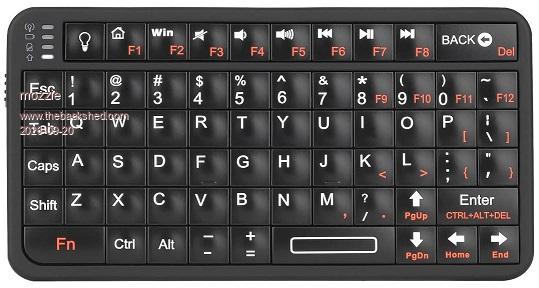
One more observation / minor niggly issue: Would it be possible to get info on the Bluetooth keyboard / mouse connection in the PicoMiteBTH build? Could this then be used to force a re-connect to the same device?
I have a few Bluetooth keyboards that can connect to the PicoMiteBTH, as sods law would have it, the cheap crap ones re-connect every time either the PicoMite or keyboard is power cycled, however the better quality Rii unit I want to use needs to be re-paired on every power cycle. Not a big problem in the larger scheme of things but the position of the switch requires the keyboard to be removed from a prospective device to re-pair.
This is the unit that does not re-pair: (Rii518bt)
Thanks again.
Regards, Lyle.
Footnote added 2026-09-20 17:24 by mozzie Just tested on PicoMiteBTH060302b12 and its only power cycling the Picomite that causes the problem, power cycling the keyboard it re-connects OK.
Bryan1 Guru Joined: 22/02/2006 Location: AustraliaPosts: 2267
Posted: 03:27am 20 Sep 2026
Copy link to clipboard
Print this post
Mozzie I have been trying to get a K250 BT keyboard going but claude for some reason refuses to setup the 6n so the K250 can pair. Now with BT mouse sometimes it does connect on boot and it has a 40 second delay before working, just did a reboot and 40 second later the BT mouse worked.
I am not going down that rabbit hole today as I'm told my weekly limit with claude is about to expire. So a full wekk of getting nothing done has used up this socalled AI that just argues with everything and does nothing.
karlelch Guru Joined: 30/10/2014 Location: GermanyPosts: 356
Posted: 06:17am 20 Sep 2026
Copy link to clipboard
Print this post
Thank you Peter!
mozzie Guru Joined: 15/06/2020 Location: AustraliaPosts: 435
Posted: 07:37am 20 Sep 2026
Copy link to clipboard
Print this post
G'day Bryan, This keyboard and most others tested seem to connect to PicoMiteBTH in around 6 seconds for initial pairing and a couple of seconds after that. As far as I can see if they don't connect within 10 seconds it doesn't matter how long you wait. YMMV.
Considering you are on the Python build it may be more the host end rather than the device, perhaps it does a full scan or something, well beyond my knowledge of Python I'm afraid , struggling enough keeping up with MMBasic, only AI used here is Aussie Intelligence (this version is quite slow at times)
Regards, Lyle.
Bryan1 Guru Joined: 22/02/2006 Location: AustraliaPosts: 2267
Posted: 08:04am 20 Sep 2026
Copy link to clipboard
Print this post
Yes Mozzie it is on claudes end I'm moving over to a dashboard board design and 'it' is really showing its way down a rabbit hole every time to the point more than likely tomorrow morning my weekly session limit has been reached and 3/4's of club.py is in a mess.
One would think asking to convert each page into the new format would be enough information but sadly pasting V1 into V2 isn't what I asked for. Now everyday I tell 'it' to use the template but everyday I'm told there isn't one although it did make one when we started.
This 40 second delay on the bt mouse has been a bug from the start yet 'it' states it connects so job done now with the BT keyboard it plainly refuses to do what is right and says it's in the too hard basket.
There was a message in the app saying 2.30pm tomorrow so may just have to put the grader blade on my tractor and have some real life fun instead of been totally pissed off with this poor excuse of a AI.

 Notice. New forum software under development. It's going to miss a few functions and look a bit ugly for a while, but I'm working on it full time now as the old forum was too unstable. Couple days, all good. If you notice any issues, please contact me.


 Print this post
 when can we expect a MMBasic "compiler" for the Pico??



 , struggling enough keeping up with MMBasic, only AI used here is Aussie Intelligence (this version is quite slow at times)
