Notice. New forum software under development. It's going to miss a few functions and look a bit ugly for a while, but I'm working on it full time now as the old forum was too unstable. Couple days, all good. If you notice any issues, please contact me.
but all I can use is touch(down), touch(x), touch(y) and touch(xn 0) which gives 1 no matter how many points I do touch. No gestures as well. Works fine under Windows though with multi-touch (e.g. zoom in/out).
Is it just incompatible or do I something wrong?
environment: PicoMitePC3 MMBasic USB RP2350B Edition V7.00.00RC6 73 de OE1HGA, Gerald
matherp Guru Joined: 11/12/2012 Location: United KingdomPosts: 12172
Posted: 06:58pm 27 Oct 2026
Copy link to clipboard
Print this post
Try this version and let me know. If it doesn't work I will compile a debug version to try and get more info
ville56 Guru Joined: 08/06/2022 Location: AustriaPosts: 665
Posted: 07:24pm 27 Oct 2026
Copy link to clipboard
Print this post
Peter,
the following parts work with the build supplied: pinch rotate ttap (two finger tap) contacts 1 to 5 are also ok.
not working: tap dtap hold swipe Edited 2026-10-28 05:27 by ville56 73 de OE1HGA, Gerald
matherp Guru Joined: 11/12/2012 Location: United KingdomPosts: 12172
Posted: 07:35pm 27 Oct 2026
Copy link to clipboard
Print this post
That's a good result. Multi-touch is turned on now which is what the test firmware tries to do. Don't worry about bits not working. I won't be able to look at it any further until next week though so stick with the release version until then
ville56 Guru Joined: 08/06/2022 Location: AustriaPosts: 665
Posted: 07:40pm 27 Oct 2026
Copy link to clipboard
Print this post
no problem, thanks for your support so far !! 73 de OE1HGA, Gerald
TassyJim Guru Joined: 07/08/2011 Location: AustraliaPosts: 6638
Posted: 08:26pm 27 Oct 2026
Copy link to clipboard
Print this post
PC3 with Webmite firmware. A reply from OpenWeather often gets the packets in the wrong sequence. The first packet is at the end. This can happen as often as 1 in 2 calls to OpenWeather but occasionally I can get a successful run or 6 or 7 calls.
The bug has been present on versions back as far as 6.4.0 RC2 I may not have tested versions 6.4.0 RC1 long enough but it appears OK.
> OPTION LIST WebMite MMBasic RP2350B Edition V7.00.00RC6 OPTION SYSTEM I2C GP20,GP21 OPTION FLASH SIZE 16777216 OPTION COLOURCODE ON OPTION PICO OFF OPTION CPUSPEED (KHz) 200000 OPTION WIFI hoth_e, **********, tpico OPTION TCP SERVER PORT 80, 1000 OPTION TELNET CONSOLE ON OPTION SDCARD GP33, GP30, GP31, GP28 OPTION AUDIO I2S GP10,GP22', ON PWM CHANNEL 11 OPTION RTC AUTO ENABLE OPTION COUNT GP34,GP35,GP36,GP37 OPTION PLATFORM PICO COMPUTER 3 OPTION PSRAM PIN GP47
twofingers Guru Joined: 02/06/2014 Location: GermanyPosts: 1785
Posted: 07:49pm 29 Oct 2026
Copy link to clipboard
Print this post
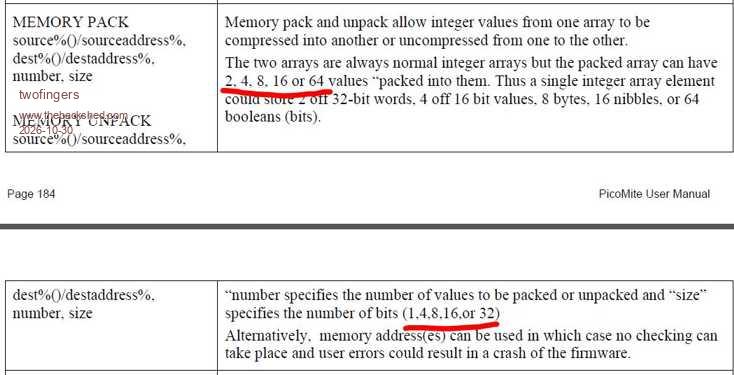
Hi Peter, I think this should perhaps be corrected in the manual:
Regards Michael
romba6 Newbie Joined: 04/07/2020 Location: United KingdomPosts: 39
Posted: 09:32am 30 Oct 2026
Copy link to clipboard
Print this post
karlelch Guru Joined: 30/10/2014 Location: GermanyPosts: 368
Posted: 10:57am 31 Oct 2026
Copy link to clipboard
Print this post
Hi Peter I have two brief questions:
1) multiline comments are now illegal in functions and subroutines, consistent with the manual. I illegally used /* */ in routines a lot to comment out code for testing. Of course, I can change that, but I am interested why this restriction?
2) the baud rate for the UART is limited to 921600, if I am correct. Is this a hardware limitation? I am working with serial servos, which by default use 1000000 baud. Currently, I set them to 500000, which works but I wonder if it was possible that MMBasic accepted also 1000000.
Thanks for all your fantastic work! Cheers Thomas
PhenixRising Guru Joined: 07/11/2023 Location: United KingdomPosts: 2149
'NOTE: This is SmallBASIC (an interpreter) running on Windows 'print "step 1" open "COM5:4000000" as # 1 ' Open COM5 @4M BAUD open "COM6:4000000" as # 2 ' Open COM6 @4M BAUD open "COM11:4000000" as # 3 ' Open COM11 @4M BAUD 'print "step 2" showpage c=1 a=0 d=1 print #1,str(d); print #2,str(d); print #3,str(d); repeat d++ delay 10
l = lof(1) ' Query how much data is in the queue if l then s$ = INPUT(l,1) ' get all data at 50,50 print "Pico_1"+s$ print #1,str(d); showpage fi l = lof(2) ' Query how much data is in the queue if l then s$ = INPUT(l,2) ' get all data at 50,100 print "Pico_2"+s$ print #2,str(d); showpage fi l = lof(3) ' Query how much data is in the queue if l then s$ = INPUT(l,3) ' get all data at 50,150 print "Pico_3"+s$ print #3,str(d); showpage fi
until inkey="s"
close #1 close #2
karlelch Guru Joined: 30/10/2014 Location: GermanyPosts: 368
Posted: 12:27pm 31 Oct 2026
Copy link to clipboard
Print this post
Hi PhenixRising,
This is not MMBasic code, right? I don't want to switch to a different BASIC.
In my hands, MMBasic (WebMite MMBasic RP2350A Edition V7.00.00RC6) does not allow baud rates above 921600:
> open "COM1:1000000" as #5 Error : 1000000 is invalid (valid is 190 to 921600)
Cheers Thomas Edited 2026-10-31 22:29 by karlelch
PhenixRising Guru Joined: 07/11/2023 Location: United KingdomPosts: 2149
Posted: 12:34pm 31 Oct 2026
Copy link to clipboard
Print this post
@Karlelch
Might be bad info altogether.
No. I used SmallBasic from the PC because it was my only option to get Windows to use that BAUD.
BUT....My mistake is that this was talking to the Picos via USB.
I was pretty sure that I made a post that I'd discovered that the PicoMite's UARTs could go higher than the stated limit.
Might be another senior moment.
Mixtel90 Guru Joined: 05/10/2019 Location: United KingdomPosts: 9328
Posted: 01:04pm 31 Oct 2026
Copy link to clipboard
Print this post
The RP2350 can run the UART very fast (several Megabaud) but that doesn't mean that MMBasic can read and clear the buffer that fast. You need time for other things to happen too.Mick
karlelch Guru Joined: 30/10/2014 Location: GermanyPosts: 368
Posted: 01:30pm 31 Oct 2026
Copy link to clipboard
Print this post
Sure but 900000+ vs 1000000 is a small difference. And 921600 works very reliably. Edited 2026-10-31 23:32 by karlelch
karlelch Guru Joined: 30/10/2014 Location: GermanyPosts: 368
Posted: 02:31pm 31 Oct 2026
Copy link to clipboard
Print this post
Well, sounds familiar to me ...
Cheers Thomas
Mixtel90 Guru Joined: 05/10/2019 Location: United KingdomPosts: 9328
Posted: 02:39pm 31 Oct 2026
Copy link to clipboard
Print this post
There'll be a reason. Peter isn't one to set a limit unless there's a good reason, like not enough time to service interrupts. Also, 921600 is a standard baud rate, which fits the division ratios available. It could be that 1,843,200 (the next n/2 division ratio up) isn't available for some reason.Mick
karlelch Guru Joined: 30/10/2014 Location: GermanyPosts: 368
Posted: 02:49pm 31 Oct 2026
Copy link to clipboard
Print this post
There is always a reason but I would like to know it. I use 500,000 with the serial servos (after reconfiguring them) and that is also not a standard baud rate. So two options: Either exept only standard baudrates (e.g., from an internal table) or give a range. In the latter case, 1 MBaud vs 0.921 MBaud does not seem to be a big jump - but maybe you are right and there is a limit at 921600.
Cheers Thomas
mozzie Guru Joined: 15/06/2020 Location: AustraliaPosts: 505
Posted: 03:11pm 31 Oct 2026
Copy link to clipboard
Print this post
G'day Karlelch, Whilst trying to get keyboard emulation working with USB-Remapper I faced a similar issue, they use something like 1.5Mbaud
As you mention, the UART in the RP2350 can go far higher than 921600, however I believe this is the fastest "standard" rate that is stable at the lowest clock freq of 48Mhz, not considering any limits in MMBasic.
With some study of the RP2350 datasheet it is possible to set the baud rate higher, for COM1 (UART0) 1000000 baud at a clock speed of 252Mhz:
POKE WORD &h40070024,&h0F Sets baud rate integer divisor to 15 POKE WORD &h40070028,&h30 Sets baud rate fractional divisor to 48
Will set the baud rate to exactly 1000000 if you want to try it out, it will only work at 252Mhz and COM1/UART0. Tested here and it works.
The UART is fed from CLK-PERI @1:1, this is fed from SYS_PLL at 252Mhz, this may change for other options.
It would of course be far better to see if Peter is willing to make this work in the firmware as I have no idea what else this could upset in the system, although as you stated, 921600 is awful close to 1000000.
Regards, Lyle. Edited 2026-11-01 01:13 by mozzie
Page 8 of 11
Print this page
The Back Shed's forum code is written, and hosted, in Australia.

 Notice. New forum software under development. It's going to miss a few functions and look a bit ugly for a while, but I'm working on it full time now as the old forum was too unstable. Couple days, all good. If you notice any issues, please contact me.


 Print this post