Notice. New forum software under development. It's going to miss a few functions and look a bit ugly for a while, but I'm working on it full time now as the old forum was too unstable. Couple days, all good. If you notice any issues, please contact me.
PhenixRising Guru Joined: 07/11/2023 Location: United KingdomPosts: 2149
Posted: 03:37pm 31 Oct 2026
Copy link to clipboard
Print this post
In my case, I request the state of a slave's I/O...a short binary transfer and I'd like a response ASAP. Nothing is ever lost, thanks to the rx buffer. Not talking about huge chunks of data.
karlelch Guru Joined: 30/10/2014 Location: GermanyPosts: 368
Posted: 07:59am 01 Nov 2026
Copy link to clipboard
Print this post
Thanks @Lyle - I will try this for the new batch of servos.
Cheers Thomas
matherp Guru Joined: 11/12/2012 Location: United KingdomPosts: 12172
RC7 is RC6 with the reports since then answered, plus one addition: listings can now go to a printer, a serial port or a file. MM.VER reads 7.000057. The full release notes are on GitHub: https://github.com/UKTailwind/PicoMite/releases/tag/PicoMite-V7.00.00RC7
Upgrading from RC6: every build keeps everything: its options, its programs, its flash slots and its A: drive. Coming from RC5, the PicoMiteHDMI and the PicoMiteRP2350VGA still reset their options at the first boot, as described in the RC6 notes, so save them first with OPTION DISK SAVE.
New • LIST ALL, LIST PINS, FILES, OPTION LIST, LIBRARY LIST ALL and FLASH LIST take #n as their first argument, as PRINT does, and send their output to the serial port or file opened as #n. For example, to print a program on a serial printer:
SETPIN GP1, GP0, COM1 OPEN "COM1:9600" AS #1 LIST ALL #1, "test.bas" CLOSE #1
◦ LIST ALL #n, file$ sends the file exactly as it is: every line, blank lines and tabs included, unwrapped, each line ending with CR LF. LIST ALL #n sends the program in memory without wrapping its long lines. ◦ Nothing appears on the screen: no clearing, no font change and no page pauses. ◦ FILES #n lists the entries in the order they are stored in the directory, so it can't sort them. Unlike FILES on its own at the command prompt, it clears neither the variables nor the open files. ◦ A program in a flash slot is listed with ALL: FLASH LIST #n, 2, ALL. ◦ Not available on the PicoMiteMIN.
Changed • LIST PINS is now part of the firmware rather than a small BASIC program run behind the scenes. On the console it prints exactly as before.
Fixed • USB touch screens (issue 144): on a panel that reports a newly landed finger first, such as the WCH controller (27C0:0859), TOUCH(X) and TOUCH(Y) jumped to a second finger while the first was still held, and an on-screen keyboard chord (Sh or Ctl held, then a key) did nothing. Each finger now keeps its place while it stays down. • USB touch screens: without OPTION GUI CONTROLS, TOUCH(TAP), TOUCH(DTAP), TOUCH(HOLD) and the swipes never fired; only pinch and rotate did. They all work now, with or without GUI controls. • USB touch screens whose Input Mode report carries a report ID, such as a SiS panel (0457:0819), could give only one contact. The firmware now switches them to touch screen mode the way Windows does. • KEYBOARD ON with no strip reserved said "Set OPTION SCREEN OFFSET first", an option that doesn't exist (issue 143). It now says "Set OPTION SCREEN KEYBOARD first". • WiFi builds (since 6.04.00 RC2): a reply to WEB TCP CLIENT REQUEST could arrive with its first packet moved to the end, so an OpenWeather reply began in the middle of its JSON and JSON$ reported "Invalid JSON data", on as many as one call in two. Replies now always arrive in order. • Ctrl-C while output was waiting for a slow serial port, for example a long PRINT #n at a low baud rate, went straight back to the prompt without tidying up: files stayed open and the last command came back at the prompt. It now ends the way any Ctrl-C does.
Please keep the reports coming, especially from existing programs.
Supertech Regular Member Joined: 13/11/2016 Location: AustraliaPosts: 68
Posted: 05:17pm 01 Nov 2026
Copy link to clipboard
Print this post
Hi Peter matherp,
Exceptional V7 been following as I can.
One for my Webmite running now on W2 some time (2+ years), I fell victim I notice in your notes. I had emence difficulty in explaining, but seems identified and actually fixed! I paste here your wording,
"A DO loop in a recursive SUB or FUNCTION, ON ERROR SKIP around a FUNCTION call, and the ON ERROR setting a program leaves behind at the prompt all behave."
But I found a work-around thus I'd have to run an older version of my program to see indeed if fixed, anyway, thanks to those who finnaly noticed. All my V6.03.01's have this issue. Ok...
Now I have a aquard question while you in depth of V7, Is it possible some how with your skill, to be able to TFTP from B: or SD card? Why? I log.txt files to A:, when of size, xfer it to B:, clear from A: etc etc, but of course no way to get them. I know this is near impossible but no harm to ask as you tinker the bits n bytes so well. Thank you in advance.
ville56 Guru Joined: 08/06/2022 Location: AustriaPosts: 665
Posted: 05:50pm 01 Nov 2026
Copy link to clipboard
Print this post
Peter,
thank you for the new build. The touchscreen now works with all gestures. It needed a reboot after flashing the new build to take effect though.
Gerald 73 de OE1HGA, Gerald
ville56 Guru Joined: 08/06/2022 Location: AustriaPosts: 665
Posted: 06:05pm 01 Nov 2026
Copy link to clipboard
Print this post
Maybe someone already stumbled over trying to trap an error in a TYPE definition e.g. because the TYPE is already defined. The ON ERROR does not catch it, the program just throws an error and exits. Could not find any hints in the forum or the relevant manuals.
e.g.: if xy is already defined, no error trapping/skipping ' OPTION EXPLICIT OPTION DEFAULT NONE
on error skip type xy ab as integer de as integer end type
on error skip type xy ab as integer de as integer end type
> RUN [11] Type xy Error: TYPE already defined > where line 11 is the second "on error skip" statement, not the "Type xy" statement, so also the error line is somehow incorrect.
Of course the above sample makes no sense, but I use this sometimes to check whether a variable has already been defined in a SUB/FUNCTION and this sub is called again now but variable definition is not allowed this time. Works ok with DIM statements.
Is this an inherent restriction with TYPEs?
Tnx, Gerald
Edit: the cursor is placed correctly to the TYPE statement when editing after the error occured. So maybe a leftover from the wrong errorline reporting some times ago. But this does not address the core of the issue though. Edited 2026-11-02 04:24 by ville56 73 de OE1HGA, Gerald
matherp Guru Joined: 11/12/2012 Location: United KingdomPosts: 12172
Posted: 07:14pm 01 Nov 2026
Copy link to clipboard
Print this post
TYPE definitions are parsed and checked during tokenising and cannot be trapped by on error as nothing is running
TFTP works with any drive the build has, not only A:. The client picks the drive with a prefix in the file name
Build Drives WebMite RP2040, WebMite RP2350 A:, B: PicoMiteHDMIWEB, PicoMitePC3 A:, B:, C: (USB stick) With a prefix: B:/data/log.csv or C:/pic.bmp goes to that drive, whatever the BASIC program is doing at the time. Subdirectories work. Without a prefix: the file goes to the current drive. Refused: another drive letter, B: with no SD card configured, or no free file number. The client gets an error, and the console shows TFTP error: … unless OPTION suppresses status messages. For example, from a PC:
tftp -i 192.168.1.251 PUT game.bas B:/games/game.bas tftp -i 192.168.1.251 GET B:/logs/today.csv A:/B: handling was fixed on 2026-10-10 (before that, a B: request could land on the current drive) and passed 12 of 12 drive tests on COM16 then. I have no record of C: being tested over TFTP; the code handles it the same way as B:.
Andrew_G Guru Joined: 18/10/2016 Location: AustraliaPosts: 917
Posted: 10:04pm 01 Nov 2026
Copy link to clipboard
Print this post
Hi Peter, Thanks for fixing the OpenWeather packet shuffle.
Regards,
Andrew
Volhout Guru Joined: 05/03/2018 Location: NetherlandsPosts: 6252
Posted: 02:40pm 02 Nov 2026
Copy link to clipboard
Print this post
Peter,
OPTION SCREENSHOT ON On V7 with RP2040 VGA in mode 1, press <ctrl>+"\" saves a screenshot on B:/ drive. When in FM viewing the screenshot, the FM reverts to mode 2, so you can only see top left part of the screenshot.
matherp Guru Joined: 11/12/2012 Location: United KingdomPosts: 12172
Posted: 03:27pm 02 Nov 2026
Copy link to clipboard
Print this post
It sets the largest display with colour (mode 2 on the rp2040). If you press a key when the picture is showing what happens?
Volhout Guru Joined: 05/03/2018 Location: NetherlandsPosts: 6252
Posted: 09:40am 03 Nov 2026
Copy link to clipboard
Print this post
Sorry,
Option printscreen shows the BMP in 320x240 from FM (rc7). After hitting a key you are back in FM. The image properties of the printscreen file SCREENxxxxxxx.BMP say it is 640x480. So it could be viewed in it's original size.
matherp Guru Joined: 11/12/2012 Location: United KingdomPosts: 12172
Posted: 10:23am 03 Nov 2026
Copy link to clipboard
Print this post
The behaviour is as intended. FM can't know the original image was from a mode 1 snapshot that only used black and white (no tiles colours set). As I said above "It (FM) sets the largest display with colour (mode 2 on the rp2040)." All images are stored with colour. The save interprets the tile colours in mode 1 and uses this.
Volhout Guru Joined: 05/03/2018 Location: NetherlandsPosts: 6252
Posted: 10:32am 03 Nov 2026
Copy link to clipboard
Print this post
Peter,
Is there any reason why I can't make a screenprint in a running program ? I tried chucky egg, tried logic analyzer, tried ROCKS, but none of them make a screenprint when hitting the magic keys. Only in FM, I can make a screenprint (and observe the tile colors. That works OK).
terekgabor Senior Member Joined: 02/01/2026 Location: HungaryPosts: 161
Posted: 10:36am 03 Nov 2026
Copy link to clipboard
Print this post
Have you started your program with OPTION PRINTSCREEN ON?
matherp Guru Joined: 11/12/2012 Location: United KingdomPosts: 12172
Posted: 10:36am 03 Nov 2026
Copy link to clipboard
Print this post
Manual page 133
Looking for the printscreen keys has a significant performance overhead so it is only enabled by user command
Volhout Guru Joined: 05/03/2018 Location: NetherlandsPosts: 6252
Posted: 01:21pm 03 Nov 2026
Copy link to clipboard
Print this post
Peter,
Thanks for reminding me to read the manual.
I simply misunderstood. I was under the impressions it was handled similar to <ctrl>-C, and was integral part of the fixed functionality. That the only reason it needed to be enabled was to prevent accidental data written to SD card.
homa Guru Joined: 05/11/2021 Location: GermanyPosts: 753
Posted: 11:00pm 03 Nov 2026
Copy link to clipboard
Print this post
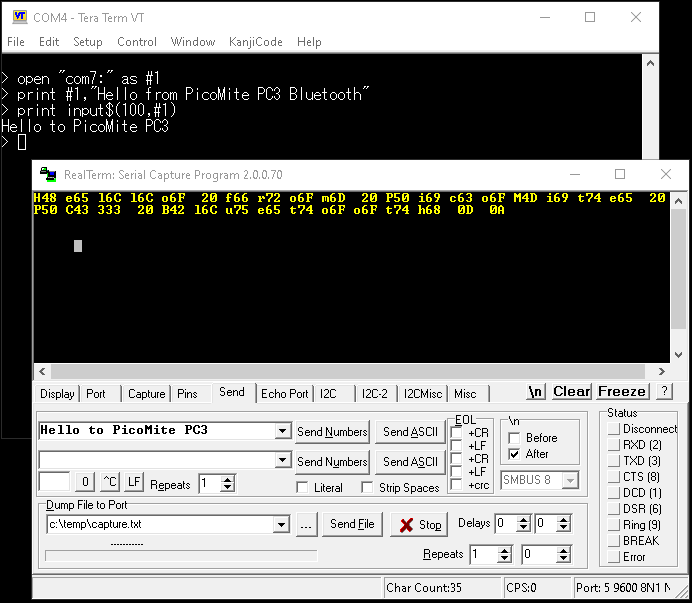
PicoMitePC3: sending more than one byte to a BLE serial device on COM7
Hi Peter,
thank you for Bluetooth serial on COM7. Reading a GoDice (Nordic UART, shown as "BLE serial" by BLUETOOTH SCAN) works fine - rolls, battery and charging all arrive on COM7.
Single-byte commands also work. But a command of several bytes in one PRINT #1 does not do what the die expects: the LED pulse command below should make it blink blue. Instead the die answers with its battery level, which is its answer to command &H03 (the 2nd byte). Commands that set the LEDs (&H08 + 6 bytes) switch them on, even when all six bytes are 0.
Could you please have a look at how a multi-byte PRINT # is passed to a BLE serial device? The byte values are taken from a working ESPHome client for this die.
' GoDice (BLE serial, Nordic UART) on COM7 ' before: BLUETOOTH CONNECT "GoDice_06F5A3_Y_v04" OPEN "COM7:" AS #1 DO WHILE MM.INFO$(BLUETOOTH SERIAL) = "" : PAUSE 100 : LOOP PAUSE 500 Test CHR$(3) ' battery request, 1 byte Test CHR$(16) + CHR$(3) + CHR$(40) + CHR$(50) + CHR$(0) + CHR$(0) + CHR$(255) + CHR$(1) + CHR$(0) CLOSE #1 BLUETOOTH DISCONNECT SERIAL
SUB Test(c$) LOCAL a$, i PRINT #1, c$; PAUSE 1000 IF LOC(#1) > 0 THEN a$ = INPUT$(LOC(#1), #1) PRINT "sent:"; FOR i = 1 TO LEN(c$) : PRINT " "; HEX$(ASC(MID$(c$, i, 1)), 2); : NEXT PRINT " got:"; FOR i = 1 TO LEN(a$) : PRINT " "; HEX$(ASC(MID$(a$, i, 1)), 2); : NEXT PRINT END SUB
The die did not blink blue. "Bat" + &H64 is the battery answer (100 %), the second line gets the same kind of answer (97 %).
> option list PicoMitePC3 MMBasic USB RP2350B Edition V7.00.00RC6 OPTION SERIAL CONSOLE COM2,GP8,GP9 OPTION SYSTEM I2C GP20,GP21 OPTION BAUDRATE 460800 OPTION FLASH SIZE 16777216 OPTION COLOURCODE ON OPTION KEYBOARD GR, 0, 1, 200, 75 OPTION HEARTBEAT OFF OPTION PICO OFF OPTION RESOLUTION 640x480 @ 315000KHz OPTION HDMI PINS 1, 3, 5, 7 OPTION WIFI behofam, *****************, Pico3, DE OPTION TELNET CONSOLE ON OPTION SDCARD GP33, GP30, GP31, GP28 OPTION KEYBOARD REPEAT 200,75 OPTION AUDIO I2S GP10,GP22', ON PWM CHANNEL 11 OPTION RTC AUTO ENABLE OPTION COUNT GP34,GP35,GP36,GP37 OPTION COMPILE ON OPTION PRINTSCREEN FORMAT PNG OPTION PLATFORM PICO COMPUTER 3 OPTION PSRAM PIN GP47
And a question for later: would more than one BLE serial device at a time be possible (e.g. two dice)?
Matthias Edited 2026-11-04 09:07 by homa
mozzie Guru Joined: 15/06/2020 Location: AustraliaPosts: 505
Posted: 02:50pm 05 Nov 2026
Copy link to clipboard
Print this post
G'day Homa, This may be something peculiar to the Nordic BT connection rather than the PC3 Bluetooth in general.
So far using HM-10 (CC2540), BT401 (KT1026) and RN52 Bluetooth serial connections from both the console and within a program has sent and received strings flawlessly, unless the baudrate at the receiver is too slow (overruns the buffer).
Hopefully someone has a Nordic module to test to confirm the serial data is sent correctly or not.
Regards, Lyle.
mozzie Guru Joined: 15/06/2020 Location: AustraliaPosts: 505
Posted: 03:18pm 05 Nov 2026
Copy link to clipboard
Print this post
G'day Peter, Many thanks for the ability to send output from LIST etc to a file or com port, this will come in very handy while testing
Is there any possibility of adding STEPPER STATUS and BLUETOOTH STATUS to that list? these would also prove useful when testing.
Regards, Lyle.
ville56 Guru Joined: 08/06/2022 Location: AustriaPosts: 665
Posted: 12:15pm 06 Nov 2026
Copy link to clipboard
Print this post
Peter,
if I have configured a virtual keyboard with OPTION SCREEN KEYBOARD 25,M and RUN a program, the keyboard disappears. Even OPTION SCREEN within the program does not change the behaviour. How do I receive input via ON KEY in this case (other than from the serial console)? Same with INPUT LINE, etc. No virtual keyboard on screen.
Note: under rare circumstances the keyboard does not disappear, but I cannot reliably reproduce that.
PicoMitePC3 MMBasic USB RP2350B Edition V7.00.00RC7 OPTION SERIAL CONSOLE COM2,GP8,GP9 OPTION SYSTEM I2C GP20,GP21 OPTION FLASH SIZE 16777216 OPTION COLOURCODE ON OPTION CASE LOWER OPTION KEYBOARD GR OPTION PICO OFF OPTION RESOLUTION 1024x768 @ 375000KHz OPTION DISPLAY 24, 64 OPTION Screen Keyboard 25, M OPTION HDMI PINS 1, 3, 5, 7 OPTION SDCARD GP33, GP30, GP31, GP28 OPTION AUDIO I2S GP10,GP22', ON PWM CHANNEL 11 OPTION RTC AUTO ENABLE OPTION COUNT GP34,GP35,GP36,GP37 OPTION COMPILE ON OPTION PLATFORM PICO COMPUTER 3 OPTION DEFAULT FONT 3, 1 OPTION PSRAM PIN GP47 > Is there anything I can do within the program to make the keyboard accessible? 73 de OE1HGA, Gerald
Page 9 of 11
Print this page
The Back Shed's forum code is written, and hosted, in Australia.

 Notice. New forum software under development. It's going to miss a few functions and look a bit ugly for a while, but I'm working on it full time now as the old forum was too unstable. Couple days, all good. If you notice any issues, please contact me.


 Print this post