Notice. New forum software under development. It's going to miss a few functions and look a bit ugly for a while, but I'm working on it full time now as the old forum was too unstable. Couple days, all good. If you notice any issues, please contact me.
LeoNicolas Guru Joined: 07/10/2020 Location: CanadaPosts: 582
Posted: 06:18am 17 Nov 2025
Copy link to clipboard
Print this post
Hello everyone
I'm trying to port to the CMM2 the great arcade game Outrun. It will be a challenge to make it run with good performance, this means, I will have a lot of fun
I can't promise that the port will be similar to the arcade version. I will try my best to keep it closest as possible to the original.
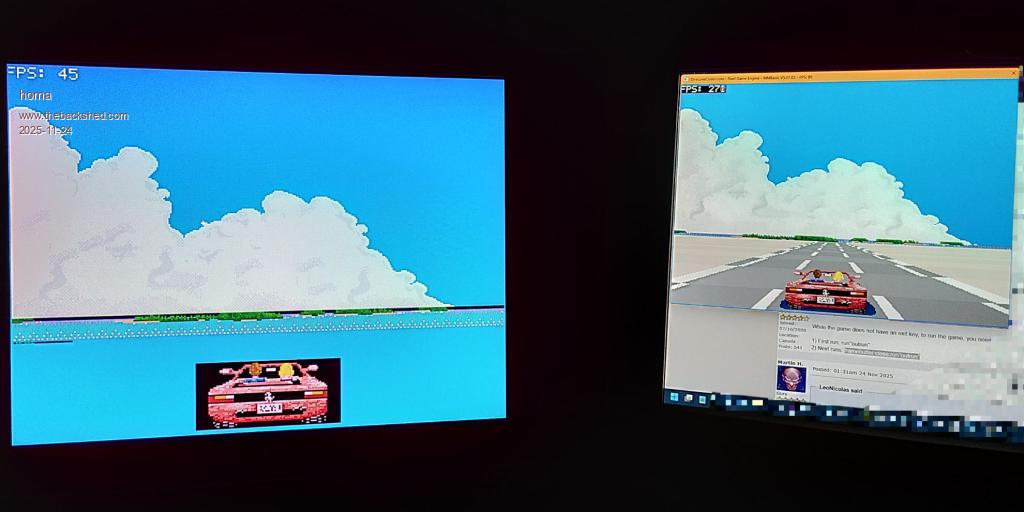
The following screenshot is the result of 300 lines of basic code from this weekend. The source code is not available in my git hub yet. I need to progress a little more before pushing it to its git repo.
Edited 2025-11-17 16:19 by LeoNicolas
Volhout Guru Joined: 05/03/2018 Location: NetherlandsPosts: 5927
Posted: 07:21am 17 Nov 2025
Copy link to clipboard
Print this post
Nice,
I played it last weekend on one of the earlier arcades. Is KM on pico stopped ? Or is it waiting for Peter to push the use of libraries to blit from ?
matherp Guru Joined: 11/12/2012 Location: United KingdomPosts: 11499
Posted: 08:10am 17 Nov 2025
Copy link to clipboard
Print this post
That is all there in RC14. I was hoping you would give it a good testing
Volhout Guru Joined: 05/03/2018 Location: NetherlandsPosts: 5927
Posted: 09:31am 17 Nov 2025
Copy link to clipboard
Print this post
@Peter,
Is there is preferred method to get the X and Y dimensions in the library (2 words) before the image data ?
I know the method Petscii uses (the CSUB) but lets assume we have a BMP in RGB121 format on disk. And we know the dimensions.
How would you do it ? Use the Petscii method ? And that with the 1 file, in stead of the individual sprites. There is a limit in what you can do, because the MMbasic program needs to hold the sprite data in readable form, as well as the CSUB conversion in RAM. That is why we had to split the Petscii sprites in 70kbyte blocks.
And since we do not store individual indexes (the whole BMP) we cannot compress. I have no clear view how this could work with a 80k+ sized BMP.
The way I see is that I open the BMP file in a HEX editor, move the data down by 2 words of 64 bits, and type the X and Y values in as integers. Then save the file.
matherp Guru Joined: 11/12/2012 Location: United KingdomPosts: 11499
Posted: 10:02am 17 Nov 2025
Copy link to clipboard
Print this post
It does it for you. The blit then knows the dimensions of the image in the flash slot. All you have to know is the locations of your sprites in your image. The dimensions of the image in the flash slot can be completely different from the display. Just load the bmp and blit your known image locations Edited 2025-11-17 20:03 by matherp
Volhout Guru Joined: 05/03/2018 Location: NetherlandsPosts: 5927
Peter63 Senior Member Joined: 28/07/2017 Location: SwedenPosts: 196
Posted: 02:29pm 17 Nov 2025
Copy link to clipboard
Print this post
Nice
/Peter63
homa Guru Joined: 05/11/2021 Location: GermanyPosts: 627
Posted: 11:00pm 17 Nov 2025
Copy link to clipboard
Print this post
I tried my hand at these pseudo 3D car racing games, a far cry from Outrun. That's when I came across this on the subject of Outrun... https://www.youtube.com/@reassembler68k He also programmed a track editor for it... just incredible background knowledge. I gave up in frustration. Good luck!
Matthias
LeoNicolas Guru Joined: 07/10/2020 Location: CanadaPosts: 582
Posted: 07:37am 19 Nov 2025
Copy link to clipboard
Print this post
I pushed the Outrun's code to my github. It is far for be playable. For now, the code is only rendering the images to the screen and projecting the road to a pseudo 3D plane.
In my last commit I replaced the sprite write command by pure blit. It looks way faster then before. My goal is making the game to run at 30 FPS. I really don't know if it is possible. Let's see.
PeteCotton Guru Joined: 13/08/2020 Location: CanadaPosts: 630
Posted: 07:07pm 22 Nov 2025
Copy link to clipboard
Print this post
I'm following along with great excitement. Good luck!
Martin H. Guru Joined: 04/06/2022 Location: GermanyPosts: 1459
Posted: 09:01am 23 Nov 2025
Copy link to clipboard
Print this post
Hi Leo I use the same version of MMB4W as you 5.07.03b25, but strangely enough, the road is only displayed occasionally. Do you have any idea why that might be?'no comment
LeoNicolas Guru Joined: 07/10/2020 Location: CanadaPosts: 582
While the game does not have an exit key, to run the game, you need to:
1) First run: run"outrun" 2) Next runs: framebuffer close:run"outrun"
Martin H. Guru Joined: 04/06/2022 Location: GermanyPosts: 1459
Posted: 03:31pm 23 Nov 2025
Copy link to clipboard
Print this post
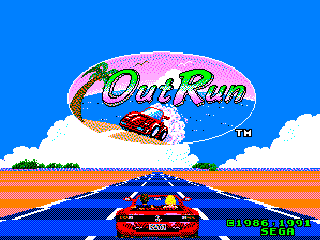
Thanks, that worked. It looks very close to the original. Do you really want to scale the sprites in the game in real time? I imagine that would be computationally intensive. Cheers Martin'no comment
LeoNicolas Guru Joined: 07/10/2020 Location: CanadaPosts: 582
Posted: 06:41pm 23 Nov 2025
Copy link to clipboard
Print this post
No, I will not. I will pre-render them in different sizes. There are a lot of challenges to overcome, while I'm trying to keep the frame rate in a descent range.
This weekend I am implementing the code to move the camera. I will post a video as soon as it is working
homa Guru Joined: 05/11/2021 Location: GermanyPosts: 627
Posted: 09:26pm 23 Nov 2025
Copy link to clipboard
Print this post
This is going to be challenging! In addition to low fps, there are also display issues on the cmm2.
LeoNicolas Guru Joined: 07/10/2020 Location: CanadaPosts: 582
Posted: 10:40pm 23 Nov 2025
Copy link to clipboard
Print this post
Yep, it will. But for now, I'm not so concerned about running it on the CMM2. I can use a lot of tricks to improve performance, including reducing the resolution and maybe using CSUBs.
It will be fun
Martin H. Guru Joined: 04/06/2022 Location: GermanyPosts: 1459
Posted: 04:20pm 25 Nov 2025
Copy link to clipboard
Print this post
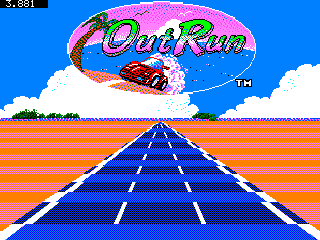
I was looking for a possible color scheme for the Pico. This was the best result. 'no comment
Martin H. Guru Joined: 04/06/2022 Location: GermanyPosts: 1459
Posted: 01:04pm 27 Nov 2025
Copy link to clipboard
Print this post
Hello Leo, Here is an example of how the animation of the lines on the road can be done. I used my Pico graphics, but the program is for mmb4w (Only a few lines need to be changed for the Pico.). On the Pico, an animation frame takes about 4 ms to paint, so it is considerably faster under mmb4w. Take a look at it when you have a chance. Cheers Martin Outrun-Pico.zip Edited 2025-11-27 23:13 by Martin H.'no comment
LeoNicolas Guru Joined: 07/10/2020 Location: CanadaPosts: 582
Posted: 08:20pm 27 Nov 2025
Copy link to clipboard
Print this post
Thank you Martin
They look great. We can improve a lot the render time reducing the screen resolution and also the size of the sprites we are bliting to the screen. Edited 2025-11-28 06:28 by LeoNicolas
Martin H. Guru Joined: 04/06/2022 Location: GermanyPosts: 1459
Posted: 07:34am 28 Nov 2025
Copy link to clipboard
Print this post
Of course, reducing the resolution affects speed and memory requirements. In the example, I initially used the full 320 x 240 resolution. The original only has 320 × 224. Reducing the playing area to, for example, 256 x 192 would save some 25% memory and computing time, but it would also change the appearance. To do this, it would be necessary to reduce all sprites/tiles to 0.8 times their original size in a way that looks believable. Edited 2025-11-28 19:50 by Martin H.'no comment
Page 1 of 2
Print this page
The Back Shed's forum code is written, and hosted, in Australia.

 Notice. New forum software under development. It's going to miss a few functions and look a bit ugly for a while, but I'm working on it full time now as the old forum was too unstable. Couple days, all good. If you notice any issues, please contact me.


 Print this post